
Skip to content
DevMeme
1301 of 7435
Fixing Bugs in Production with a Little Help from `git revert`
VersionControl Post #1455, on Apr 30, 2020 in TG

Fixing Bugs in Production with a Little Help from `git revert`

Why is this VersionControl meme funny?

Level 1: Undo Saves the Day

Imagine you’re building a tall tower out of blocks. You excitedly add one more block on top, but uh-oh – the tower starts to wobble and is about to fall over. You quickly take that last block off, and the tower becomes sturdy again. Phew! Now, your teacher comes by, sees the tower standing tall, and says, “Great job fixing the tower!” You smile and shake the teacher’s hand, feeling a bit funny inside because you know all you did was remove the wobbly block you just added. The tower is safe like nothing bad happened.

This is exactly what’s happening in the meme. The boss is like the teacher, happy that the “tower” (the software) is stable again. The developer is like you, the kid who simply took away the trouble-making block. The funny part is getting praised for essentially undoing the oopsie you made. Sometimes, just like taking a block off to save a tower, a quick undo can save the day – and you might even get a high-five for it!

Level 2: Magic Undo Button

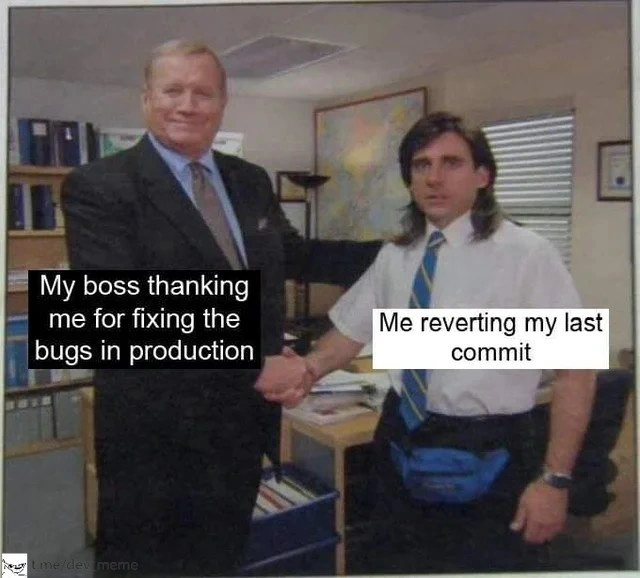
For a newer developer or someone just learning about deployments, let’s clarify what’s happening in this meme. We have a production bug (an error on the live site) caused by the latest code change, and the developer fixes it by using Git’s magical undo button: the git revert command. The meme labels make it plain and funny:

  • Boss thanking me for fixing bugs in production – The manager is ecstatic because the application is working again for real users. In a company, a broken production system can mean lost revenue or unhappy customers, so fixing it fast is a big deal. The boss likely imagines the developer performed some genius debugging or coding wizardry to eliminate the bug.
  • Me reverting my last commit – The developer (the one wearing the bright blue fanny pack and tie) knows that the “fix” was not writing new code at all. It was literally undoing the last change they made. In Git terms, a commit is a saved set of changes in the code. “My last commit” is the code update that introduced the bug. Reverting that commit means Git will create a new commit that reverses those changes, effectively removing them from the codebase. It’s like pressing an undo shortcut (Ctrl+Z) for the codebase, but in a controlled, documented way. After the revert, the code in production is back to how it was before the problematic changes were introduced.

Think of production as the kitchen of a busy restaurant during dinner rush – it’s where the real action happens and where mistakes have immediate consequences. A bug in production is like a spill in that kitchen – it could cause chaos if not addressed quickly. A hotfix is an urgent fix applied to production (like quickly mopping up the spill so nobody slips). In our scenario, the hotfix didn’t involve inventing a new recipe (no new code); it was more like taking the spoiled ingredient out of the dish. The developer ran git revert to instantly roll back to the last good state. This is a common hotfix_strategy: if a new deployment causes a serious issue, the fastest solution is often to roll back to the previous stable version.

Let’s explain some key terms and why this approach is common:

  • Git: A popular version control system that developers use to track changes in code. It lets multiple people work on code together and keeps a history of every change (each change is a commit).
  • Commit: Think of a commit as a snapshot of the code at a certain time, with a message describing the change (e.g., “Add login feature” or “Fix typo on homepage”). Commits let you travel back in time in your code history if needed.
  • Git Revert: This is a Git command (git revert <commit_id>) that creates a new commit which is the exact opposite (inverse) of a specified commit. For example, if commit A added a line of bad code, reverting A will create a new commit that removes that line. This is safer in shared repositories than something like git reset, because revert doesn’t erase history – it adds a record that you undid something. It’s the official way to undo a commit when you’ve already shared/pushed it.
  • Bug: A flaw or error in the software that makes it behave in unintended ways. In this meme, the bug was severe enough to require immediate action (users or monitoring probably noticed something broke after the latest release).
  • Production: The live environment where the application or website is running for end-users. Changes here affect real customers. It’s as opposed to development or staging environments where devs test things. A bug in production is urgent because it’s already out “in the wild.”

So what exactly happened? The developer likely deployed a new feature or change (their last commit) to production, and it backfired – maybe it caused a crash or a major glitch (ProductionBugs often surface quickly if something is wrong). Realizing their commit is the culprit (often developers can trace the problem to the latest deployment), they performed a rollback_fix by running git revert on that commit. This produced a new commit that effectively canceled out the bad code. They then probably deployed this revert commit to production, restoring the app to the previous bug-free state.

From the junior dev’s point of view, it might feel a bit anticlimactic: you “fixed” the bug by removing your code rather than by understanding and solving the underlying issue right then and there. But it’s actually a very practical skill in ProductionDebugging and BugFixing: sometimes the safest fix is to undo the change and regroup. You can always go back, reproduce the bug in a dev environment, and figure out what went wrong without the pressure of an ongoing outage. Companies even build automated rollback into their deployment process because it minimizes downtime.

And why the managerial_praise? In non-technical terms, the boss cares that the system is stable and users aren’t complaining. The how isn’t as important in that tense moment. So when the developer announces, “It’s fixed!” the boss is relieved and grateful. The meme’s comedy is that the boss is treating the dev like a hero (“Thank you so much for saving the day!”) while the dev knows their “heroic act” was as simple as hitting the undo button. The contrast between the formal handshake thank-you and the casual reality of the fix is what makes it DeveloperHumor. It’s a lighthearted reminder that in software engineering, quick fixes sometimes trump elegant solutions, at least in the eyes of management. The handshake meme format (often used to highlight unlikely agreements or partnerships) works here to show the amusing alliance between the boss’s perception and the dev’s action: they’re literally shaking hands over a non-event.

Level 3: Rollback to Glory

At a senior engineering level, this meme hits on the classic arsonist-firefighter scenario in tech: we caused the fire and then got praised for putting it out. The image of a boss in a suit enthusiastically shaking hands with a disheveled developer (short-sleeve shirt, tie, and even a goofy fanny pack) perfectly captures the absurdity. The boss (with the label "My boss thanking me for fixing the bugs in production") is all smiles, while the developer (labeled "Me reverting my last commit") wears a hesitant I-can’t-believe-this-is-happening expression. It’s a scene straight out of corporate comedy, reminiscent of a tongue-in-cheek handshake moment from The Office. The humor lands because any seasoned developer knows that “fixing a production bug” often really means rolling back the code that caused the bug in the first place. In other words, the big heroic fix that’s getting a round of applause was literally just hitting the undo button on our last change.

From an experienced perspective, this scenario is painfully relatable. Production is on fire due to a recent deployment, alarms are blaring, and users (or SREs) are panicking. What’s the fastest hotfix_strategy to get things stable? Usually, it’s a rollback_fix: deploying the previous known-good version or using git revert on the offending commit. Instantly, the bug vanishes because we’ve essentially time-traveled the code back to its stable state. The managerial_praise that follows is both gratifying and ironic. The boss is thrilled — uptime is restored, customers are happy again — but the seasoned dev inside you is thinking, “Well, that was no fancy bug fix, I just removed the code that introduced the bug.” It’s like being hailed as a hero for disarming a bomb that you accidentally set ticking an hour before.

Let’s break down why this meme resonates in dev culture:

  • The Speedy Rollback: In real-world ProductionIncidents, the priority is to stop the bleeding. A git revert is blazingly fast — a one-command quick_win that generates a new commit undoing the bad change. In crisis mode, reverting is often safer and quicker than crafting a complicated patch under pressure. Seasoned teams even plan for this by having a rollback playbook or automated pipelines to redeploy the previous version.
  • Hero Culture: There’s an unwritten workplace trope where the developer who stays up late to debug and fix an outage (often one they inadvertently caused) gets treated like a hero. Management sees a problem solved and heaps praise, sometimes not realizing (or not caring) that the root cause was the hero’s own earlier commit. This meme zeroes in on that ironic dynamic. The developer essentially gets a pat on the back for hitting CTRL-Z on their code. It’s all in good humor, but it highlights a real industry pattern: sometimes you get more positive attention by fixing bugs dramatically than by quietly avoiding them in the first place.
  • Tech Versus Business Perspective: The boss in the meme represents the business view — results matter more than methods. Production was broken, now it’s fixed, so the boss is happy, end of story. The developer represents the tech reality — knowing that the “fix” was a blunt instrument, not some elegant refactor. This disconnect is funny because it’s true: non-technical stakeholders often don’t know how an issue was resolved, only that the BugsInSoftware are gone. As long as the site is back up, a rollback that undoes a week’s worth of work can appear just as triumphant as a brilliant algorithmic solution. Cue the handshake and applause.
  • Lessons Learned (or Not): A grizzled engineer might chuckle darkly at this situation. Why? Because it hints at a cycle we’ve all seen: deploy something → break production → scramble to revert → get praised → repeat. It pokes fun at how organizations sometimes favor firefighting over prevention. Ideally, that “thanks for fixing it” should be followed by a blameless post-mortem examining how the bug slipped through and how to improve tests or CI/CD next time. But in the heat of the moment, everyone’s just relieved that Production is stable and the bug is gone. The meme snapshot freezes that moment of relief and ironic glory.

In short, Level 3 exposes the inside joke: veteran devs laugh (or groan) at how a simple git revert — the ultimate “no-code” fix — can turn a ProductionBugs nightmare into a win, complete with managerial kudos. VersionControlHumor at its finest: sometimes the most effective debugging tool is a healthy dose of version control undo. And as any battle-scarred on-call developer will tell you, Git giveth (new features) and Git taketh away (reverts) — both can get you a handshake from the boss. ✨

Description

This meme uses the 'Ed Truck Handshake' format from the TV show 'The Office.' In an office setting, a smiling, suit-clad man labeled 'My boss thanking me for fixing the bugs in production' shakes hands with a younger man with a mullet and a guilty expression, labeled 'Me reverting my last commit.' The humor lies in the disconnect between the boss's perception and the developer's reality. The boss believes a complex bug was heroically fixed, while the developer knows they simply undid their own recent change that likely caused the problem. It's a deeply relatable scenario for senior engineers who know that sometimes the fastest 'fix' is a strategic retreat (a rollback), even if it feels less like a triumph and more like cleaning up your own mess while someone pats you on the back for it


Comments

7
Anonymous ★ Top Pick My boss called me a hero for resolving the production outage in 5 minutes. I just reverted the merge commit. My resume now says 'Expert in high-stakes, rapid-response incident mitigation.'
  1. Anonymous ★ Top Pick

    My boss called me a hero for resolving the production outage in 5 minutes. I just reverted the merge commit. My resume now says 'Expert in high-stakes, rapid-response incident mitigation.'

  2. Anonymous

    Rollback-driven development: ship Friday, wake up to PagerDuty, trigger the “git revert” step in our CICD, and watch leadership call it proof our “self-healing architecture” works

  3. Anonymous

    The best debugging tool is still git revert, but we call it "root cause analysis" in the post-mortem to make it sound like we learned something

  4. Anonymous

    The most elegant production fix is often `git revert HEAD` followed by a carefully worded incident report that transforms 'I broke it and had to undo my changes' into 'Implemented rapid rollback strategy to restore service stability while conducting root cause analysis.' Bonus points if you can stretch the post-mortem meeting long enough that everyone forgets you caused the outage in the first place

  5. Anonymous

    Our DORA board loved today’s incident: 100% change‑failure rate, near‑zero MTTR - turns out the responder and the root cause were the same commit

  6. Anonymous

    Got praised for “fixing prod”; I just invoked the enterprise best practice: Last Known Good via git revert - the cheapest MTTR money can buy

  7. Anonymous

    Senior dev hotfix mantra: revert first, ask questions from the blameless post-mortem

Use J and K for navigation
