Python devs roast node_modules yet suggest 400-MB Anaconda virtualenvs instead
Why is this PackageManagement meme funny?
Level 1: Look Who’s Bloated
Imagine you have two friends who are packing for a trip. One friend looks at the other’s backpack and sees it stuffed with hundreds of tiny items, making the backpack bulge and weigh a ton. This friend laughs and says, “Wow, that’s such a silly way to pack – your bag is way too full of little things!” Now, here’s the twist: that same friend then says, “Instead of doing that, I think you should pack using my method: for each trip, take a huge suitcase filled with everything you might need.” In both cases, they end up carrying a lot of stuff, just in different ways. It’s funny because the friend who was laughing doesn’t realize they’re suggesting something just as over-the-top! They’re basically criticizing someone for carrying a heavy load, and then happily carrying an equally heavy load themselves but thinking it’s fine. This meme is making us laugh at that kind of situation in programming: one group made fun of another group’s giant folder of tools, while not noticing that their own way of doing things is also really bulky. It’s the hypocrisy (saying one thing but doing the same type of thing) that makes it humorous and easy to relate to.
Level 2: The Weight of Dependencies
If you’re newer to these concepts, let’s break down what’s going on. In Node.js (JavaScript’s runtime for building things like web servers and tools), there is a very important folder called node_modules inside each project. This is where Node stores all the code libraries (packages) that your project depends on. For example, if you run the command npm install express to add a popular web framework, Node’s package manager NPM will download Express and everything Express itself needs (like other small packages). All those files and folders get dumped into the project’s node_modules directory. With a few dependencies, this folder can grow really large. It’s not unusual to see hundreds or even thousands of files in there, even if your own code is just a few files! Why so many? Each package might have its own packages (dependencies of dependencies), and Node keeps them all. If two libraries need different versions of the same helper library, Node will just include both versions in separate sub-folders under node_modules. This way, each part of your project gets the exact code version it expects, and nothing conflicts. The downside is obvious: the project directory fills up with duplicate files and many copies of things. It’s a bit like having a separate copy of a tool for every task that needs it, rather than sharing one — very safe to avoid mix-ups, but it can waste a lot of space. Developers often jokingly complain that node_modules is “heavier than the project itself”. And they’re right: you might write 100 lines of code, but end up pulling in tens of megabytes of other people’s code through NPM packages. This is a form of dependency bloat on the JavaScript side.
Now, over in the Python world, developers handle dependencies differently. In Python, you normally install libraries using a tool like pip (Python’s package installer) or conda (the package manager that comes with Anaconda). By default, these tools might install packages globally or user-wide, which can cause conflicts between projects. For instance, if Project A needs version 1.0 of a library and Project B needs version 2.0 of the same library, having just one global Python environment means you’re stuck – one of the projects will be using the “wrong” version. To avoid this mess, Python devs use virtual environments. A virtual environment is essentially a self-contained folder that includes its own copy of the Python interpreter and whatever libraries you install into it. When you “activate” a virtual environment, your Python commands (like running a script or installing a package) are confined to that environment’s files. This way, each project can have its own set of libraries and versions without colliding with others. Tools like python3 -m venv env or virtualenv env will create a folder (often named env or venv) that contains a fresh mini-version of Python just for your project. Similarly, Conda, which comes with the Anaconda distribution, can create environments by doing conda create -n my_project_env. Anaconda is basically a big bundle of Python plus a lot of popular scientific and data libraries. It’s very handy because it brings along everything from basic Python up to heavy packages like NumPy (for math), Pandas (for data frames), and others in one go. However, because it includes so much, it’s huge in size. A minimal Anaconda-based environment can easily be a few hundred megabytes. If you’re doing data science, you might even have environments that are 1–2 GB after adding deep learning libraries! Even a pretty barebones Anaconda environment often clocks around 300–400 MB. In contrast, a basic Python virtualenv that only includes needed packages could be lighter (for example, a simple web app with Flask might only use tens of MB of packages if you avoid the big scientific ones). But the meme chooses Anaconda to make the example extreme (and funnier): it’s the largest common way to set up Python environments.
Let’s compare these two approaches side by side in terms of how they manage dependencies and how much content they store:
| Approach | How Dependencies Are Managed | Typical Size Footprint |
|---|---|---|
| Node.js projects | All packages for a project go into a local node_modules folder within that project. Each project keeps its own copies, allowing multiple versions of the same package across projects or even within one project (nested). |
Very large folder with many small files. Can be tens to hundreds of MB, sometimes more, per project (lots of duplication if projects share libraries). |
| Python with virtualenv/conda | Each project uses a separate Python environment (virtualenv or Conda env). The environment includes a Python interpreter and installed libraries isolated from other projects. No two projects share the same environment folder. | Large environment directory. Ranges from tens of MB for a minimal pipenv to hundreds of MB (400 MB or more) for a Conda environment. If using Anaconda, includes big packages by default, so quite heavy. |
As you can see, both strategies keep projects isolated to avoid conflicts: Node keeps isolation at the package level inside one project (every project has its own packages directory), while Python keeps isolation at the environment level (every project has its own sandboxed Python installation). Both end up storing duplicate stuff when you have multiple projects. For example, if both a Node Project A and Project B use lodash (a common JS utility library), each will have its own copy of lodash in its node_modules. If both a Python Project X and Project Y use requests (a popular HTTP library), each will have its own copy of requests in their virtualenv folders. So disk usage multiplies in both cases.
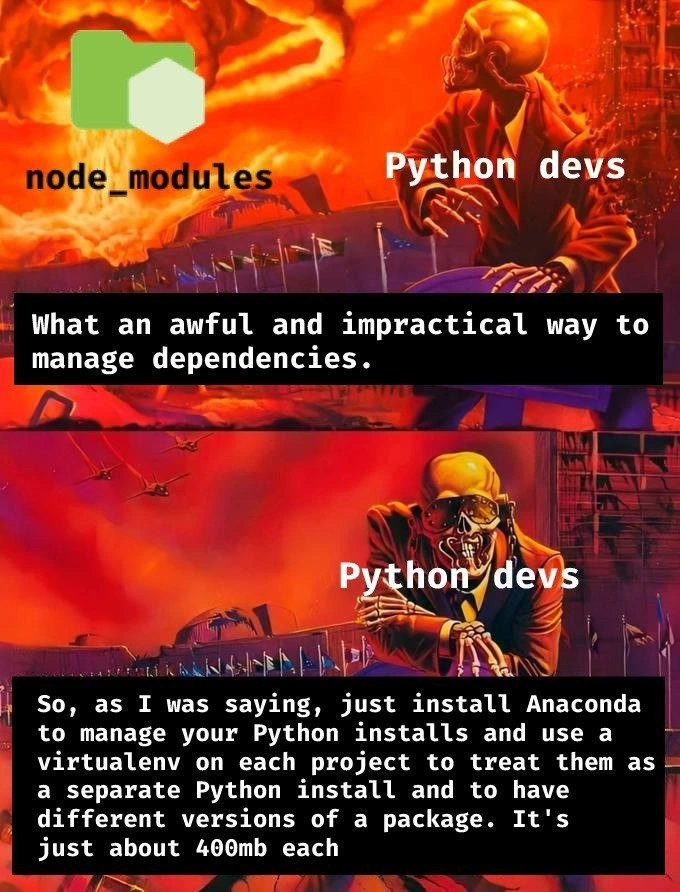
Now, what’s the joke? The meme highlights that Python devs sometimes make fun of Node’s node_modules for being ridiculously large and complex, calling it “an awful and impractical way to manage dependencies.” That’s the top panel: the Python dev is grossed out by the huge Node folder. But in the bottom panel, the same Python dev basically describes a process that also uses a ton of space: “Just install Anaconda... and use a virtualenv on each project... It’s just about 400 MB each.” They’re essentially saying: “Don’t do that crazy thing, do this other crazy thing instead!” The humor comes from the irony: the Python developer doesn’t realize (or is ignoring) that their recommended solution is also quite bulky. In simpler terms, the Python dev is laughing at how the JavaScript world carries a huge bag of packages, while suggesting that in Python, you should carry a different huge bag for each project. To an observer, both bags are heavy! It’s a classic case of tech folks thinking “my way is cleaner” and poking fun at another technology, even though under the hood the same kind of trade-off is being made. If you’re new to programming, it’s useful to understand that no language ecosystem is perfect – each has its own quirks. Here the quirk is dependency size bloat, and both Node and Python have it, just in different flavors. So the meme is poking fun at that double standard in a lighthearted way.
Level 3: Dependency Déjà Vu
Python devs: "What an awful and impractical way to manage dependencies."
Also Python devs: "Just install Anaconda and use a virtualenv for each project... It's just about 400 MB each."
In this fiery meme scene, we witness a classic case of cross-language package management hypocrisy. The top panel has a disgusted Python developer scoffing at Node.js’s node_modules folder, calling it “awful and impractical.” In the bottom panel, the same Python dev turns around and cheerfully advocates for an Anaconda setup with per-project virtual environments that weigh in at a hefty 400 MB each. The humor hits home for seasoned engineers because we’ve seen this pattern before: every ecosystem has its own form of dependency hell, and it’s always easier to mock the other side’s mess than to admit your own. This meme perfectly captures that pot-calling-the-kettle-black moment in tech, where one stack’s bloat is ridiculed even as another stack’s bloat is rationalized away.
Let’s unpack why this scenario is too real. Node.js developers (JavaScript in backend) often get flak for the infamous node_modules directory, which can grow into a colossal maze of subfolders. Install one modest library, and suddenly you’ve pulled in a cascade of dozens of NPM packages – each with its own dependencies, and so on. The result is a node_modules folder so large and convoluted that devs joke it contains the entire internet (or at least half of Stack Overflow). This is partly by design: Node’s package management favors local dependencies for each project to avoid version conflicts. Instead of a single global copy of a library, each project keeps its own version tucked away in node_modules. It’s a clever solution to the “But it works on my machine!” problem – ensuring one project’s updates don’t break another – but it comes at the cost of disk space. Long-time devs remember the left-pad fiasco and other NPM incidents that taught us how fragile and bloated this ecosystem can get. So, when Python folks see thousands of files and folders for even a simple Node project, their reaction is often a mix of horror and smug relief that their world is “simpler.”
Ah, but enter the Python world – a land of multiple interpreter versions and conflicting libraries – which has its own cumbersome rituals. Python developers learned (often the hard way) that installing all packages globally is a recipe for conflict chaos (the classic “version X required but version Y installed” nightmare). The answer was virtual environments: sandboxed spaces for each project with its own Python interpreter and libraries. Tools like virtualenv (and its newer built-in counterpart venv) or environment managers like Conda (from the Anaconda distribution) became standard. And yes, they solve the “it works on my machine” in a Pythonic way by keeping projects isolated. However, that solution can be chunky. The meme specifically name-drops Anaconda, which is a fully-loaded Python distribution packed with data science goodies (NumPy, pandas, SciPy, etc.). Anaconda is super convenient – it’s like getting a big toolbox with every tool you might need – but it’s also massive. A fresh Anaconda environment can easily be a few hundred megabytes before you even add any project-specific packages. Throw in some heavy libraries or different versions, and each env swells further. In practice, having ten separate Conda envs could mean tens of gigabytes of disk space eaten up by duplicate binaries and libraries. Python devs shrug this off as the cost of avoiding dependency conflicts. After all, storage is cheap, right? This mindset leads to the punchline: calling out Node’s bloat while nonchalantly saying “it’s just 400 MB each” about your own solution is hilariously conda-scending. The Python dev in the meme is basically being condescending about Node’s approach while Conda-sending everyone to a different kind of bloat.
The irony isn’t lost on experienced engineers. We’ve been through the dependency management irony wringer with various tech stacks. JavaScript’s node_modules is a frequent meme target because of how absurdly large and nested it can get – but Python’s approach can be equally absurd in aggregate. It’s a “choose your poison” situation: Node.js piles up many small modules within a project; Python duplicates a whole runtime for each project. Both strategies stem from legitimate needs (preventing version clashes, ensuring reproducible environments), and both lead to bloat in different forms. A senior developer will note that fundamentally, this is about trade-offs in design. Node’s flat dependency model (with nested sub-dependencies to allow multiple versions) trades disk space for simplicity in dependency resolution (no complex version negotiation at runtime – each module finds the version it expects in its local folder). Python’s virtualenv model trades disk space to achieve environment isolation – each project lives in its own bubble, so incompatible packages never meet. These are two sides of the same coin: avoid meddling between projects, even if it means duplication. In fact, this pattern is so common that other ecosystems have their own flavor of it: think of Java with fat JARs (bundling all dependencies into one huge JAR file per app), or Docker images (each container carries its own stack). Seasoned devs have a wry smile because they know every solution in package management tends to shift the burden around rather than eliminate it. Dependency Hell finds you eventually, whether it’s at compile time, runtime, or disk time.
Historically, the pendulum swings between shared dependencies (efficient on disk but prone to conflicts, like “DLL Hell” on Windows or shared library nightmares on Linux) and bundled dependencies (self-contained projects that avoid others’ mess but waste space). Node.js leaned hard into bundling everything per project (hence the monstrous node_modules), while Python opted for isolated environments to sidestep the global shared library hell. Both communities have poked fun at each other for years: JavaScript devs tease Python for “DLL hell with pip,” and Python devs tease JS for having a node_modules bigger than a black hole. The truth is, both have converged on similar pragmatic solutions: duplicate stuff to keep the peace. This meme is funny to us because it lays that truth bare with a dose of sarcasm – it’s basically saying, “Look, you’re both managing dependencies by copying a bunch of data everywhere. You just call it different names and sizes.” When the Python dev in the meme so confidently says to use Anaconda and per-project envs, senior devs can’t help but chuckle: it’s a deja vu of the same storage-hungry strategy that Node uses, just wrapped in a different packaging (and perhaps wearing a snake-themed tie). In short, the meme lights up our shared pain and humor from Python vs JS dependency battles: no one gets to claim the moral high ground when it comes to dependency size bloat. We’re all hauling around our 400 MB (or multi-GB) sacks of packages and pretending our way is pristine while the other’s is ridiculous. The skeleton in the suit, against an apocalyptic backdrop, is a perfect avatar for the senior dev outlook: a bit jaded, a bit amused, and fully aware that in the end, all those dependencies are coming for us, no matter the ecosystem. It’s a fiery laugh at our own expense, acknowledging that every language has its own “mega folder” approach – and disk space burns all the same.
Description
Two-panel meme with a fiery orange apocalypse backdrop. In the top panel, a large green folder icon titled “node_modules” sits left while a skeletal business-suit figure labelled “Python devs” looks disgusted; a black monospace caption reads, “What an awful and impractical way to manage dependencies.” In the bottom panel, the same “Python devs” figure now gestures confidently; the caption says, “So, as I was saying, just install Anaconda to manage your Python installs and use a virtualenv on each project to treat them as a separate Python install and to have different versions of a package. It's just about 400mb each.” The humor highlights the irony that Python engineers criticize JavaScript’s bulky node_modules directory while recommending an equally storage-heavy Anaconda + per-project virtual-env workflow, poking fun at cross-language dependency management pain

Comments
25Comment deleted
Every time a Python dev sneers at node_modules, Conda fires up a 400 MB env complete with a spare Python interpreter, BLAS, and a bonus Fortran compiler - because nothing says “lean dependency management” like shipping a micro-distro for hello_world.py
The real horror isn't the skeleton's appearance - it's explaining to your DevOps team why your Python microservice needs a 2GB Docker image because of conda dependencies, while simultaneously maintaining three different requirements.txt files for pip, conda, and poetry, each slightly incompatible with the others
Python developers roasting node_modules for being bloated while casually recommending a 400MB Anaconda environment per project is peak 'do as I say, not as I do' energy. At least node_modules has the decency to be honest about its disk space addiction - it doesn't pretend to be a 'lightweight solution' while shipping an entire scientific computing stack just to run Flask
In JS you vendor the world, in Python you vendor a world - either way du -sh is the only observability metric you truly trust
Node_modules gets the villain edit, but Python counters with conda's 'isolated' 400MB-per-project tax - truly, progress in dependency purgatory
Conservation of dependency pain: JavaScript nests 100k tiny packages in node_modules; Python answers with a fresh CPython + BLAS per repo via conda/venv - Docker just sends you the storage bill
Ml fans be like Comment deleted
https://drewdevault.com/2021/11/16/Python-stop-screwing-distros-over.html Comment deleted
I'm a python dev and I fucking hate pip, anaconda, venv, etc. It's so incredibly shit in every fucking way. THEY DEPRECATED SEARCHING FOR PACKAGES I cannot even Comment deleted
they what. Comment deleted
try pip search commoncodes Comment deleted
.sh pip search commoncodes TGPy> ERROR: XMLRPC request failed [code: -32500] RuntimeError: PyPI no longer supports 'pip search' (or XML-RPC search). Please use https://pypi.org/search (via a browser) instead. See https://warehouse.pypa.io/api-reference/xml-rpc.html#deprecated-methods for more information. Return code: 1 Comment deleted
Oh fkn yes. This is really very convenient to search through the browser when you are sitting in the terminal. I really want to launch my browser every time I need to find some package. Comment deleted
python packaging index? more like penis penis iiii Comment deleted
conda? more like con't do basic shit Comment deleted
venv will it stop? Comment deleted
It's really fkin terrible. I was having some dependency resolution issues and suddenly everything stopped working. I removed all the packages using pip freeze pist and then it broke system packages which I then manually had to install. Why don't they provide dependency resolution like the others do? I mean they can name the current release of numpy as is but a previous release as numpy-3.27 so that older packages can use it. Comment deleted
I upgraded from py3.10 to py3.11 recently and somehow it successfully installed itself but forgot to carry over some packages. I then had to reinstall every single fucking python package that wasn't in the main arch repos. That meant rebuilding and reinstalling everything from the AUR and pip itself. Comment deleted
the only reason packages from the main repos weren't affected is because they're synchronized with the main python package, meaning every time python itself updates, ALL python packages do too, simply to move where the files are located Comment deleted
yay -S $(pacman -Qoq /usr/lib/python3.10) --answerclean All I too had to copy vkbasalt from 3.10 to 3.11. It worked. Comment deleted
yes, that's what I ended up doing (the paru equivalent of it, technically) Comment deleted
(also I filtered for ^python-.* instead of files in the python lib directory, technically) Comment deleted
more like big pp just backwards Comment deleted
Why just not delete python?👍🏻 Comment deleted
pnpm > npm Comment deleted