Skip to content
DevMeme
848 of 7435
Python Development: A Precise Science
Languages Post #958, on Jan 5, 2020 in TG

Python Development: A Precise Science

Why is this Languages meme funny?

Level 1: Lining Things Up

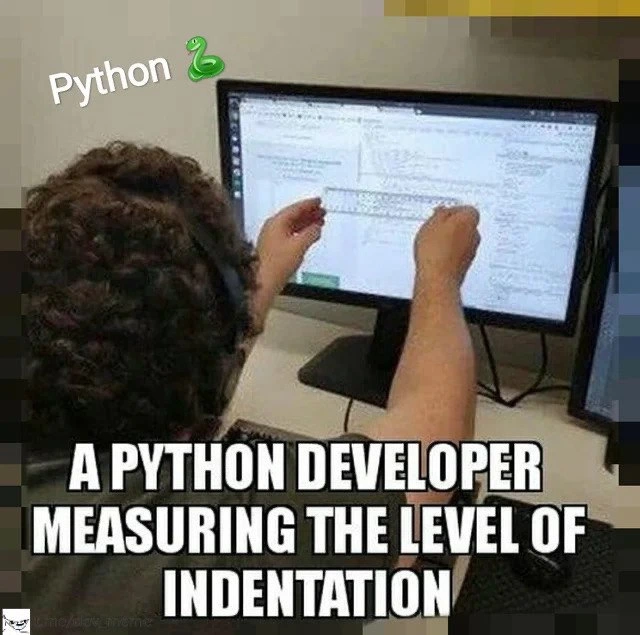
Imagine you’re drawing a picture and you want all the lines to be super straight. You might even hold a ruler on the paper to guide your pen so you don’t mess up. That’s exactly what’s happening here, but with computer code! Python code needs each new line to be indented (pushed a bit to the right) just the right amount, kind of like how you might start a new paragraph in writing by scooting over a bit. If those lines aren’t lined up correctly, the computer gets confused – a lot like how a teacher might get upset if you don’t start your sentences under the right margin. In the photo, the programmer is so worried about keeping the code perfectly lined up that he’s using a real ruler on the screen to check. It looks pretty funny and over-the-top, right? But it shows how much he cares about keeping things neat and avoiding any little mistakes. Just like coloring inside the lines or stacking blocks in a straight tower, keeping code lined up makes it all work properly – and this person is making extra sure of it, which is why it’s so humorous to see!

Level 2: Whitespace as Syntax

In Python, indentation (the spaces or tabs at the beginning of a line) is a core part of the language’s grammar. This is very different from many other programming languages (like C, Java, or JavaScript) where whitespace is mostly ignored or just for readability. Python follows the “off-side rule,” meaning the amount of whitespace at the start of a line defines how code blocks are structured. For example, an if statement or a loop in Python doesn’t use {} braces – instead, the code that should run inside the if must be indented to the right. All lines in that block must line up with the same indentation. If one line has a few extra or fewer spaces, Python gets confused and will raise an error. The meme’s caption spells it out: “A PYTHON DEVELOPER MEASURING THE LEVEL OF INDENTATION.” The joke is that this developer is so concerned about getting the indent exactly right that he’s using a physical ruler against the screen to check the spacing!

A linter is a tool that automatically checks code for potential errors or style violations. Python linters (like pylint or flake8) will warn you if your code doesn’t follow recommended style guidelines. One famous style guide is PEP 8 (Python Enhancement Proposal #8), which suggests best practices for writing clean, readable Python code. PEP 8 says, among other things, “use 4 spaces per indent level” (and no tabs!). Linters can enforce these rules – for instance, they’ll complain if you mix tabs and spaces, or if your indent isn’t a multiple of 4 spaces. When the meme says “when the linter isn’t strict enough,” it implies the automated checker might not be catching something that this extremely detail-oriented developer cares about. Maybe the linter was configured leniently, or perhaps it isn’t running at all – so our poor programmer resorts to manual_linting: literally checking the code by hand. There’s even a tongue-in-cheek context tag ruler_quality_gate, imagining that the code won’t pass review unless it passes the ruler test!

For a newcomer, it’s worth understanding why all this fuss about spaces exists. If you’ve ever seen an error like IndentationError: unindent does not match any outer indentation level, that’s Python telling you “the spacing on this line doesn’t line up with the rest of the block.” It can happen if, say, one line has 3 spaces in front and the next has 4, or if a mix of a tab character and spaces are used inconsistently. Here’s a tiny example of how a subtle indent mistake breaks code:

# Example of bad indentation in Python
if success:
    print("Task was successful")
   print("This line is mis-indented!")  # <- Oops, 3 spaces instead of 4

In the snippet above, the second print line is indented 3 spaces instead of 4, so Python would raise an IndentationError as soon as you try to run it. The code’s structure becomes ambiguous to the interpreter because the lines in the same block don’t align. This is why Python developers care so much about consistent whitespace.

Now, most of the time, you wouldn’t actually measure your screen with a ruler 😄. Developers use editor features like “show whitespace” or draw vertical indent guide lines to visually check alignment. Modern DeveloperExperience (DX) tools also auto-format code. For example, a formatter like black can re-indent your code to follow PEP 8 standards automatically, so you never have to count spaces yourself. The meme humorously exaggerates a situation where either those tools aren’t available or the coder just really, really trusts their own eyes more than any software. It also hints at the classic tabs vs spaces debate – a long-running discussion in programming about which one is better for indentation. Python’s answer (per PEP 8) is clear: spaces win. But the debate was so famous it even became a joke in TV shows (ever see that Silicon Valley episode? 😜). The takeaway for a junior developer is: consistent indentation is critical in Python. It’s both about making the code easy to read (CodeReadability) and about making it run without errors. So we use tools (linters, formatters) to help, and we chuckle at the idea of needing a plastic ruler as an extra safeguard.

Level 3: Analog Linter

At the highest level, this meme hilariously exaggerates a real Python quirk: in Python, indentation isn’t just style, it’s syntax. The curly-haired developer holding a ruler to the screen is performing a kind of manual linting – a physical code quality check – because Python 🐍 will throw a fit (i.e., an IndentationError) if your whitespace is off. Seasoned developers immediately recognize the obsession here. We’ve all had that “why won’t this Python code run?” moment, only to discover a single space was misplaced. In production code, one misaligned indent can completely alter program flow or crash the run, so seeing someone literally measure indentation levels pokes fun at how paranoid Pythonistas can become about their spacing. It’s a shared trauma: anyone who’s been burned by invisible characters or mixed tabs vs. spaces feels a jolt of recognition (and a chuckle) here.

In practice, experienced Python devs rely on tools like linters (flake8, pylint) and auto-formatters (hello PEP 8 and the almighty black!) to enforce consistent whitespace. But the meme riffs on the idea that when the linter isn’t strict enough, you escalate to a physical ruler. It’s the ultimate analog quality gate – a ruler quality gate, if you will – ensuring pep8_compliance down to the millimeter. We’re basically seeing the indentation_error_anxiety that many devs get (that fear of the dreaded IndentationError: unexpected indent) taken to comedic extremes. The developer is acting as the human embodiment of the PEP 8 police, making sure there are four_spaces_exactly for each indent level. It’s hyperbole, of course – real code review doesn’t involve office supplies – but it highlights a truth: Python’s use of whitespace_as_syntax makes engineers meticulous about lining up their code.

There’s an industry in-joke here about the great Tabs vs Spaces war. In many languages, the debate over using a tab character or multiple spaces for indentation is mostly about style and team agreements. But in Python, the stakes are higher: mix a tab and a space in the wrong way, and boom – your program won’t run. Many of us have wasted time chasing an invisible tab hiding in a sea of spaces. Senior developers have learned (sometimes the hard way) to turn on “show invisibles” or enable editor guides that draw little dotted lines for indent levels. The guy with the ruler is a funny throwback to what feels like medieval troubleshooting: “Can’t find that stray indent? Bring out the ruler and physically align the code!” It’s absurd, yet relatable. The meme is essentially nodding to those painstaking code review sessions where you’re literally squinting at whitespace. It’s a commentary on DeveloperExperience_DX too – ideally, our tools should catch these things, but when they don’t, devs become extremely creative (or desperate). The physical_code_review depicted reminds us of old-school teachers checking homework margins with a ruler. For veteran Python devs, it invokes a mix of laughter and sympathy: we’ve been there, ensuring our code blocks are perfectly aligned so the interpreter doesn’t throw a tantrum.

Description

A popular meme showing a person from behind, wearing headphones and sitting in front of a computer monitor. The person is holding a physical ruler up to the screen, seemingly measuring the indentation of the code displayed. The top-left corner of the image has the text 'Python' with a green snake emoji. A large, white, impact-font caption at the bottom reads, 'A PYTHON DEVELOPER MEASURING THE LEVEL OF INDENTATION'. This meme humorously exaggerates the critical importance of whitespace and indentation in Python's syntax. Unlike many other languages that use brackets or keywords to define code blocks, Python relies solely on indentation, making it a common source of syntax errors, especially for beginners or when code is copied from different sources. The image perfectly captures the feigned precision required to handle Python's strict formatting rules

Comments

7
Anonymous ★ Top Pick In most languages, a bug is a logical flaw. In Python, it can be a single misplaced space. That's why senior Python devs don't use linters; they use laser levels
  1. Anonymous ★ Top Pick

    In most languages, a bug is a logical flaw. In Python, it can be a single misplaced space. That's why senior Python devs don't use linters; they use laser levels

  2. Anonymous

    Because nothing says ‘shift-left’ quite like verifying four-space blocks with metrology-grade instrumentation

  3. Anonymous

    When you've been debugging a legacy codebase for three hours only to discover the previous developer used 2 spaces, 3 spaces, 4 spaces, and a tab - all in the same function - because "it looked right in their IDE."

  4. Anonymous

    This perfectly captures the Python developer's eternal struggle: where a single misplaced space can turn your elegant function into an IndentationError. While other languages use curly braces like civilized beings, Python developers have evolved to possess supernatural abilities to detect 3-space indentation mixed with 4-space tabs from across the room. The ruler is actually less absurd than it seems - at least it's more reliable than that one colleague who insists on using tabs set to 3 spaces because 'it feels right.' Senior engineers know the real horror isn't the indentation itself, but inheriting a 10-year-old Django codebase where the previous team used a mix of tabs, 2-space, and 4-space indentation across different modules, and somehow it still runs in production

  5. Anonymous

    In Python, indentation isn't style - it's load-bearing architecture; one space off and your nested monolith collapses

  6. Anonymous

    Architects debate eventual consistency all week, but Python enforces strong consistency with a four‑space quorum - break it and your pipeline elects a TabError

  7. Anonymous

    When CI keeps failing on W191/E101 and you still can’t spot the rogue tab, you fall back to the only deterministic linter left: a 30 cm physical diff

Use J and K for navigation