Skip to content
DevMeme
4364 of 7435
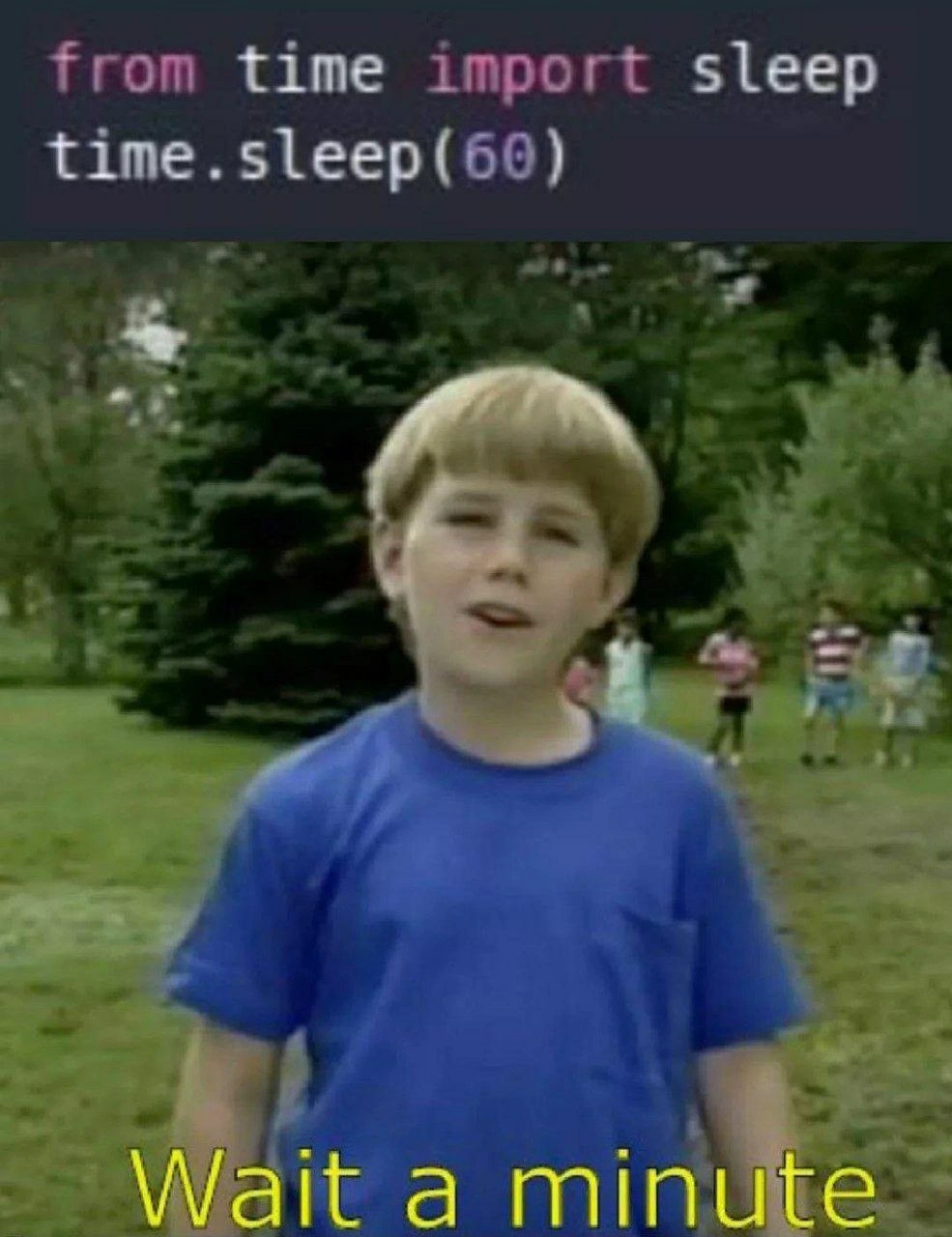
Importing sleep but calling time.sleep - that copy-paste bug realization moment
Bugs Post #4776, on Aug 12, 2022 in TG

Importing sleep but calling time.sleep - that copy-paste bug realization moment

Why is this Bugs meme funny?

Level 1: Wait a Minute

Imagine you ask your friend Time to lend you a toy named Sleep. Time hands you the Sleep toy directly (so you now have it in your hand). Instead of playing with the toy in your hand, you walk back to Time’s house and knock on the door asking, “Hey Time, can I have the Sleep toy for a minute?” But Time isn’t there – they already gave you the toy! You stand there confused for a moment and then go, “Wait a minute… I already have it!” 😅 It’s funny because you realize you were asking the wrong person for something that was with you all along. That “Oh, duh!” moment of confusion and realization – that’s exactly what’s happening in this meme. The programmer had the sleep tool ready to use, but accidentally tried asking the time module for it again, leading to a silly mix-up. The humor comes from that sudden realization, just like realizing you were looking in the wrong place for something you already held in your hand.

Level 2: Lost Track of Time

Let’s step back and explain the joke in simpler terms. In Python, the time module is a built-in library that contains a bunch of time-related functions, one of which is sleep(). The sleep function just pauses the program for a given number of seconds. You have two main ways to use sleep in your code:

  • Option A: import time – This brings in the whole time module. You’d then call the function with time.sleep(60) (meaning “use the sleep function from the time module”).
  • Option B: from time import sleep – This brings in only the sleep function directly. That means you can just call sleep(60) without the time. prefix, because you’ve put sleep into your program’s namespace as if it were a function you defined.

The meme shows a mix-up: the code did from time import sleep (Option B) but then tried to call time.sleep(60) as if Option A was in effect. Python gets confused here because when you use from time import sleep, you never introduced the name time into your code at all. So Python encounters time.sleep(60) and goes, “What is time? I don’t have that name anywhere!” This raises a NameError, which is Python’s way of saying it can’t find a variable or name you referenced. In other words, NameError: name 'time' is not defined is the exact error you’d see. The program will crash at that line because it can’t resolve what time refers to.

Why would someone write code like this? It’s often due to copy-paste confusion or a simple oversight. Maybe the developer grabbed some example code from Stack Overflow or documentation. Perhaps the original example had:

import time
time.sleep(60)

and the dev thought, “I’ll just import the function directly to make my code cleaner,” changing the first line to from time import sleep but forgetting to change the second line. This kind of bug is a rite-of-passage for newcomers and a facepalm for pros – it’s easy to do when you’re moving fast or debugging in circles late at night.

The bottom half of the meme shows a kid saying “Wait a minute” with a puzzled look. This is exactly the reaction you’d have during debugging/troubleshooting when you finally notice the mistake. There’s a fun double meaning here: “wait a minute” is something you say when you spot a mistake (“Wait a minute… that line is wrong!”), and literally the code was attempting to wait one minute (sleep(60) is 60 seconds). The meme connects that feeling of sudden realization with the literal action the code was supposed to do. It’s a small Python language quirk — a namespace issue — that trips up your program. But once you see it, it’s straightforward to fix: either call sleep(60) directly (since we imported sleep), or change the import to import time.

This meme falls under Bugs and CodeQuality because it highlights a tiny mistake that makes the code buggy. For a junior developer, the lesson here is to be careful with imports and names. When you import something “as something else” or specifically, remember to use it that way. Tools can help catch this: many code editors will underline time in time.sleep(60) to warn you that “Hey, I have no idea what time refers to.” That’s a hint that you’ve lost track of a name. In summary, the image is poking fun at a common Python goof: using the wrong name due to a mix-up between module import styles. It’s funny to developers because we’ve all been there, and it’s satisfying when you spot it and think “Ah, got it – silly bug, easy fix!”

Level 3: No Time to Sleep

In this snippet, an experienced Python developer immediately spots a namespace mismatch. The code starts with from time import sleep, which pulls the sleep function directly into the current namespace. However, the very next line calls time.sleep(60). Cue the facepalm. Because we imported sleep directly, the name time isn’t defined in this scope at all. The result? A Python interpreter yelling a NameError – essentially Python’s way of saying "I have no idea what time is right now." This is a classic copy-paste bug or refactoring oversight that senior devs have seen countless times. Maybe the code originally used import time (making time.sleep(60) correct), and someone changed the import to save keystrokes but forgot to update the call. The irony is rich: the code literally says to sleep for 60 seconds, and the meme’s caption “Wait a minute” nails that double meaning. It’s both a literal one-minute pause and the coder’s sudden realization of “hang on, something’s off here.” Seasoned programmers appreciate this because it pokes fun at how even a one-word change in a Python statement can introduce a bug that stops everything in its tracks. We’ve all had that bug that makes us stop and mutter “wait a minute…” as the truth dawns. In Python, using modules and functions correctly is a basic skill, yet under crunch time (or 3 AM on-call brain fog), even a trivial mistake like this can slip through. The humor here also lies in how obvious the fix is once you see it – it’s almost involuntary to yell at the code “just call sleep(60) already!”

Let’s break down why it fails, and how to fix it, senior-engineer style. In Python, there are two common ways to use the sleep function from the time module:

# Correct Usage Option 1:
import time
time.sleep(60)  # Call sleep via the module (time is defined).

# Correct Usage Option 2:
from time import sleep
sleep(60)       # Call sleep directly (imported into namespace).

The meme’s code mixed these approaches, leading to a bug:

# Buggy example (mixed approach):
from time import sleep  
time.sleep(60)  # NameError: name 'time' is not defined

An experienced developer knows that this error surfaces immediately at runtime. It’s not a subtle bug; it’s Python bluntly refusing to run that line. In a compiled language like Java or C#, a mismatch like calling an undefined name would be caught at compile time. But in Python’s dynamic world, you don’t find out until you actually execute the code. That’s why good testing and linters (like flake8 or pylint) are a lifesaver – a linter would’ve underlined time.sleep(60) in red squiggly lines faster than you can say “oops.” 😅

From a code quality standpoint, this snippet is a gentle reminder: consistency matters. Either import the module or the function, but not one and use it like the other. The meme resonates with the dev community because it encapsulates that “D’oh!” moment we all recognize. It’s the split-second when your brain, after staring at an error, finally reconciles what’s wrong – in this case, realizing you told Python “bring me the sleep tool directly” but then tried to use the whole time toolbox that you never actually grabbed. The Debugging_Troubleshooting aspect is encapsulated in that yellow subtitle “Wait a minute”, which is exactly what a dev thinks right before identifying the bug. In essence, the meme is lighthearted Python humor about a simple mistake that can happen to anyone, even if you’ve been coding for years. And the veteran engineers chuckle because, deep down, there’s relief: hey, at least it’s a quick fix this time!

Description

The meme is split into two parts. Top half shows a dark-themed code editor with Python code in colored syntax: 'from time import sleep' on the first line and 'time.sleep(60)' on the second, the numeral '60' highlighted in purple. Bottom half is a blurry still from an old playground video: a child in a blue T-shirt stands in front of trees and other kids (face blurred for privacy) with large yellow subtitle text reading 'Wait a minute'. The visual joke captures the instant a developer notices the logical error - importing a function directly but then calling it through the module namespace - resulting in a NameError and an unnecessary one-minute pause. It humorously illustrates common copy-paste mistakes, namespace confusion, and the debugging head-scratch that follows in everyday Python coding
Comments

6
Anonymous ★ Top Pick Imported sleep directly, then muscle-memory typed time.sleep(60) - turns out the hardest thing to decouple is my decade-old keystrokes
  1. Anonymous ★ Top Pick

    Imported sleep directly, then muscle-memory typed time.sleep(60) - turns out the hardest thing to decouple is my decade-old keystrokes

  2. Anonymous

    The same developer who puts sleep(60) in production code is now architecting our distributed tracing system and insisting we don't need millisecond precision because "humans can't perceive anything under a second anyway."

  3. Anonymous

    Ah yes, the classic moment when you realize time.sleep(60) isn't just a suggestion - it's a hard commitment to doing absolutely nothing for a full minute. Senior engineers know this is why async/await exists: because sometimes 'wait a minute' is exactly 59 seconds too long for production systems, and your monitoring alerts don't appreciate the dramatic pause

  4. Anonymous

    time.sleep(60): Exponential backoff for juniors; enterprise SLA saver for when VCs demand 'ship it now'

  5. Anonymous

    from time import sleep; time.sleep(60) - an implementation of 'wait a minute' that triggers flake8 F821 before the minute can elapse; also, why are we blocking the main thread?

  6. Anonymous

    from time import sleep; time.sleep(60) - SLO-friendly failure mode: planned to starve the thread for a minute, actually NameError in zero. Deterministic latency, questionable imports

Use J and K for navigation