Skip to content
DevMeme
4459 of 7435
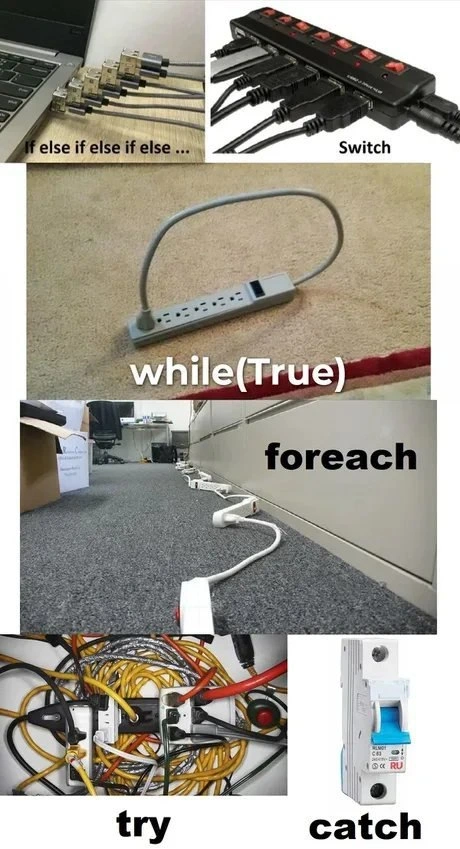
Extension cords depict switch, loops, and try-catch in physical form
CS Fundamentals Post #4885, on Oct 2, 2022 in TG

Extension cords depict switch, loops, and try-catch in physical form

Why is this CS Fundamentals meme funny?

Level 1: Don’t Try This at Home

Imagine you walked into a room and saw power cords and extension plugs all tangled up and plugged into each other in the craziest ways. There’s one plug going into another, a cord plugged back into itself like a dog chasing its tail, and a huge knotted pile of wires under the desk that looks like a spaghetti monster! It’s such a silly and messy setup that you just know something will go wrong – and sure enough, the safety switch has flipped off because of the chaos. This picture is funny because it’s comparing that wild tangle of plugs to the way we sometimes write complicated instructions in computer code. It’s saying, “Look how ridiculous it is to plug things in like this – doing certain things in code can be just as ridiculous!” Even if you don’t know coding, you can laugh at the idea: it’s like someone trying every single key on a keyring one by one (if/else if/else), or using one of those big outlet strips to power a bunch of gadgets at once (switch), or looping an electric cable in a circle so the electricity just goes around forever (while(true) – basically a never-ending task). Then there’s a super long chain of extension cords (foreach) – that’s like doing a big task step by step by step with no shortcut – and a big jumbly experiment of plugs that ends up blowing the fuse (try and catch – meaning they tried something crazy and the breaker caught the problem). The core joke is: messy cords = messy code. Just as a tangle of wires can cut the power, a tangle of bad code can make a program break. It’s a playful way to show that doing things the wrong or overly complicated way — whether with electricity or coding — might technically work for a moment, but it’s bound to trip you up! So, it makes us laugh and remember to keep things simple (and safe) next time, both in our homes and in our programs.

Level 2: Wiring Up Loops & Branches

If you’re newer to programming, don’t worry—this meme is essentially teaching a mini-lesson in coding basics using an electrical twist. It takes everyday power_strip_metaphor scenarios and labels them with programming keywords, turning abstract code ideas into something you can literally see. Let’s break down each part so the humor becomes clear:

  • if / else if / else – In coding, an if-else chain is a way to check conditions one after the other. The top-left image shows a row of identical USB plugs all plugged into a laptop, captioned “If else if else if else…”. Think of each plug as a question you ask in sequence: “Is condition A true? No? Then check condition B. No? Then C…” and so on. In a program it might look like:

    if (weather == "rainy") {
        wear(coat);
    } else if (weather == "cold") {
        wear(jacket);
    } else if (weather == "sunny") {
        wear(tshirt);
    } else {
        wear(defaultOutfit);
    }
    

    Each else if is another plug in that chain. The visual joke is that all the plugs are the same type, just as each condition is similar (checking the same variable weather here). Conditional_logic like this is very common: you use it to make decisions in code. But having too many in a row can become hard to manage—just like stuffing a laptop with too many USB devices might be overkill. The meme humorously equates a long chain of logic to a clutter of plugs. It’s saying, “Look, checking one thing after another and another… feels like plugging in a bunch of connectors until something fits.”

  • switch statement – The top-right image is a surge protector power strip loaded with plugs, labeled “Switch”. A switch in programming is another way to do multi-way branching (especially in languages like Java, C, or C++). Instead of writing many if/else if statements, you can switch on a value and specify different blocks of code for each case. Imagine one main power source (the switch) distributing power to several devices (the cases). In code it’s like:

    switch (dayOfWeek) {
        case "Monday":
            mood = "Focused";
            break;
        case "Friday":
            mood = "Excited";
            break;
        case "Saturday":
        case "Sunday":
            mood = "Relaxed";
            break;
        default:
            mood = "Meh";
    }
    

    Here, dayOfWeek is the single input being switched on, and depending on its value, a different case executes (much like each plug on the strip powers a different gadget). We even see red toggle switches on that power bar, reminiscent of switching cases on or off. The humor is that a power strip neatly organizes multiple plugs into one outlet, just as a switch statement neatly organizes multiple paths into one construct. It’s a bit more organized than the if/else chain—notice how all the plugs share one strip (one condition check) instead of separate holes. The meme’s switch_statement_visual helps newcomers recall: when you have lots of else-ifs on the same variable, a switch can make it cleaner (and it’s literally safer, as using one surge protector is tidier than a bunch of loose plugs).

  • while(True) loop – The middle image shows a short extension cord whose plug is inserted back into its own socket, forming a loop. It’s labeled “while(True)” which is a common way in code to write an infinite_loop. In many languages (like Python or C-style syntax), while(true) or while(True) means “do something repeatedly forever (or until broken out) because the condition is literally always true.” The picture is a perfect physical analogy: the electricity goes out from the strip and comes right back in, creating a never-ending cycle. In a real program, an infinite loop without a break will run endlessly and likely freeze or hog resources. In real life, plugging a power strip into itself doesn’t create infinite energy (sorry, no free energy machine here!), it just does nothing or blows a fuse. The meme exaggerates this idea to make us laugh—everyone knows not to do that with cables! Similarly, every coder learns that if you write a loop that never ends, you’d better have a good reason (and another mechanism to stop it), or else you’ll crash your app. So “while(True)” being depicted as a cord eating its own tail is a funny warning: an infinite loop is as logically circular (and unproductive) as this loopy cable. It’s a memorable image for the concept of a loop that doesn’t exit.

  • foreach loop – The next image (below the loop) is a line of several extension cords linked one after another stretching across a carpeted floor, captioned “foreach”. In programming, a foreach loop means “for each item in a collection, do this action.” It’s like saying “for each extension cord segment in this chain, pass the power along to the next.” The photo literally has multiple extension cables piggy-backed, one plugged into the next in series, making a long daisy chain. This is visually teaching the idea of iteration: you handle one element, then move to the next element, and so on—just like power flows through one cord, then the next in line. Now, chaining extension cords in real life is something you do only if you really have to (like if one cord isn’t long enough, you add another, then another... but it can become a messy_cabling situation or even a fire hazard if overdone!). The meme uses that to hint at the idea that going through many steps one-by-one (for each item) can sometimes be inefficient or risky if done to an extreme. But fundamentally, a foreach loop is a helpful, everyday construct: for example, “for each student in the class, print their name.” In code it might look like:

    students = ["Alice", "Bob", "Charlie"]
    for student in students:  # Python's version of foreach
        print(student + " is present.")
    

    This would output each name in turn. The extension cords down the hall give a mental picture of that process: you start with the first cord (first student), then the next, and eventually you’ve processed (or in the image, reached) all of them. It’s a bit absurd seeing so many cords, which is why it’s funny, but it solidifies the concept of sequential processing. Also, note the word “foreach” is commonly used in languages like C# or PHP, while others like Java have a similar concept with different syntax (like for(Type item : collection)). No matter the syntax, the idea is the same and the meme’s electricity_as_code approach nails the idea that you go through a collection by connecting to each element one after another.

  • try { ... } catch { ... } (Exception handling) – The bottom images capture the concept of error handling in code. In many languages, you use a try block to wrap code that might throw an error, and a catch block to deal with what happens if an error occurs (like cleaning up or logging a message instead of crashing). The meme shows "try" on a picture of a crazily tangled bunch of cables, and "catch" on a picture of a circuit breaker (specifically, a breaker switch that has flipped to the off position). Here’s the breakdown: the jumble of cables labeled try represents someone attempting a very complex, haphazard setup—imagine plugging in a ton of devices and adapters all over the place under a desk. It’s an accident waiting to happen (just looking at it, you sense something’s going to short out or unplug). In coding, writing a huge, messy block of code inside a try is similarly risky: any part of it could throw an exception (error). The catch block is like the safety net – in code, if an exception happens in try, you “catch” it and handle it gracefully. The meme brilliantly uses the circuit breaker as the catch. In real life, when there’s an electrical overload or short (too many things plugged in or a bad connection), the circuit breaker catches the problem by tripping and cutting power, preventing a fire. It’s exactly what a catch block does: it stops the program from crashing by catching the exception and (hopefully) handling it. For example, in Java you might see:

    try {
        // attempt a bunch of operations
        connectToDatabase();
        readFile("data.txt");
        parseData();
        // ... lots could go wrong here ...
    } catch (Exception e) {
        // handle any exception that occurred above
        System.err.println("Something went wrong: " + e.getMessage());
    }
    

    The try has a lot going on (like that web of cords), and the catch is ready to react when any one of those things fails, much as the breaker flips the moment there’s an unsafe surge. This part of the meme is highlighting a common scenario new devs learn: you can’t always prevent errors, so you have mechanisms to cope when things go wrong. But it also carries a gentle lesson: if your try looks as messy as that cable heap, you might want to refactor! We even have a term “spaghetti_code” for code that’s tangled and hard to follow, just like spaghetti noodles—or those yellow cables in the picture. The meme labels that mess as try because apparently someone tried to make it work, and then the catch (breaker) had to save the day when it failed. It’s a funny way to visualize the idea that “I tried to do something crazy, and when it blew up, I caught the problem.”

All these comparisons make the meme a mini gallery of programming basics (from conditionals to loops to exception handling) shown in a physical, humorous way. Even if you’re just starting out, you can relate the code concepts to real objects:

  • Control flow is like directing electricity through different paths.
  • Branches (if/switch) are like choosing which plug/outlet to use based on a condition.
  • Loops (while/foreach) are like running power through a loop or chain again and again.
  • Error handling (try/catch) is like having a fuse or breaker for when too much goes wrong.

It’s also relatable_humor because anyone who has dealt with electronics or cables knows the struggle of limited outlets and the temptation to daisy-chain cords or create ad-hoc solutions. Similarly, new programmers quickly learn the trade-offs of different ways to write logic and the messes we sometimes make while learning. The meme simply juxtaposes the two worlds. By labeling a power strip plugged into itself as while(True), it gives a silly mental image you won’t forget—and now you’ll definitely remember what an infinite loop is! Each label is basically a piece of syntax_humor: it takes actual code syntax (if else, while(true), etc.) and slaps it on a funny real-world scene. This helps demystify the code terms: you see foreach and think “chain of things one after another,” or try/catch and think “risk something and have a safety backup.” In fact, you’ve just painlessly reviewed key CS_fundamentals (conditionals, loops, and exceptions) in a fun, visual way. And as a bonus, you’ve also seen how not to handle power cables 😅 (seriously, don’t loop a power strip into itself, and don’t plug 10 of them in a row—both programmers and electricians would cringe).

Level 3: Circuitous Logic

This meme cleverly uses electricity as code to poke fun at our everyday programming control_flow constructs—and the code_smells that arise when they’re misused. Each panel is a visual metaphor mapping a coding structure to an over-the-top cabling setup. Seasoned developers will smirk at how accurately these chaotic wires capture the feel of messy code logic:

  • If/else ladder (top-left) – The row of identical USB plugs labeled "if else if else if else …" represents a long conditional chain. In code, this is a series of cascading if/else if statements, each checked in turn. Visually, each plug is a separate condition trying to connect. It hints at the tedium and fragility of having to evaluate one condition after another sequentially. Experienced devs know that an endless train of else if clauses can be a red flag. It’s essentially a manual search through options—much like testing each USB plug one by one to find a live port. There’s even a performance insight here: a long if/else ladder may compile into a series of branch checks (potentially O(n) in the number of conditions), whereas a well-structured switch can sometimes use a jump table for O(1) direct branching. The meme humorously contrasts these: a bunch of individual plugs (repeated checks) versus a single power strip handling multiple connections. It’s a lighthearted jab at those extra-long conditional blocks that would make any code reviewer groan, "there must be a cleaner way".

  • Switch statement (top-right) – The power strip bristling with many plugs is labeled "Switch", alluding to the switch or case construct found in languages like C, Java, or C#. A switch allows one input to branch out to multiple outcomes (cases) in a clear, organized manner—just like a single outlet distributing power to many devices via a strip. The meme’s switch panel is literally one source feeding 6 different plugs. Seasoned devs appreciate this visual pun: a switch statement is often used instead of a long if/else-if chain to improve clarity and sometimes efficiency. It’s as if the meme says, “Why plug devices in one-by-one (if/else) when you can use one power hub (switch)?” Of course, even a switch can be overpacked (notice that strip is fully loaded) – hinting that while switch statements organize branches, too many cases might still overload our brains or become unwieldy. The switch_statement_visual here is both a play on words (power strip switches) and a nod to cleaner code structure. It lampoons how we sometimes cram every possibility into one block, toggling all those red switches on like a fully loaded switch/case block with dozens of cases.

  • Infinite loop with while(true) (middle) – Perhaps the most physically absurd image is the small power bar plugged back into itself, labeled "while(True)". This is a brilliant literal take on an infinite_loop: power feeding back in circles forever. In coding, while(true) creates a loop with no end condition – it will run indefinitely until something else breaks out of it (or the program is killed). Here, the power strip looping into itself shows a circuit with no exit. It’s a messy_cabling stunt equivalent to a program stuck spinning its wheels. Every senior dev has encountered a runaway process or a thread locked in an endless loop chewing CPU cycles. This panel wittily demonstrates why that’s bad: just as plugging a strip into itself doesn’t accomplish anything useful and risks tripping a breaker, a program stuck in an infinite loop doesn’t produce useful work and could eventually crash or hang. There’s also an echo of that classic geek joke, "To infinity... and oh no!" because an unbroken while(true) often leads to uncontrolled behavior—like an outlet feeding itself electricity until something overheats. In practice, we write while(true) loops only with a plan (like a server listening loop, with an internal break or sleep). Without a break condition, it’s like a dog chasing its tail endlessly. The meme hyperbolically visualizes this control_flow folly: it’s funny because we know no sane electrician (or developer) would intentionally do this… right? (Hint: both have happened in real life, to disastrous effect).

  • Foreach loop (below, middle) – The corridor-length daisy chain of extension cords labeled "foreach" is a sight both comical and cringe-worthy. A foreach loop means “for each item in a collection, do X.” The meme imagines each extension cord as one item in a sequence, plugged into the next. In code, a foreach takes an input collection and handles one element after another, in order. In the photo, power flows through one cord, then the next, and so on down the line—much like how data or execution flows through each element of an array or list. For seasoned observers, this has dual humor: first, it literally shows iteration by connecting many identical units in series (very literal interpretation of “for each cord, plug into next”). Second, it highlights an implicit warning: chaining too many extensions is a notorious code_smell in the electrical world (it can overload circuits or cause voltage drop). Likewise in software, iterating deeply or chaining too many operations can be inefficient or risky. It brings to mind doing a long-handled process step by step where a more direct approach might exist. Also, every enterprise veteran has seen “daisy-chained” systems—like one microservice calling another, then another, ten layers deep, until you have a fragile Rube Goldberg machine. This foreach visual exaggerates that feeling: you iterate through so many connections that the end is literally rooms away from the start. It’s funny and relatable because we’ve all either seen someone physically do this (hello, office holiday lights plugged into 5 extension cords) or we’ve seen codebases where simple tasks pass through an unnecessarily long chain of function calls. The daisy_chain_extension_cords metaphor playfully dramatizes the concept of “going through a lot of steps one by one.”

  • Exception handling – try/catch (bottom) – The last row brings it home for anyone who’s slogged through debugging messy code. On the left, we have a chaotic tangle of cables and adapters labeled "try". On the right, a solitary circuit breaker switch labeled "catch". This maps to a try { ... } catch { ... } block in languages like Java, C++, or C#. In a try, you run code that might throw an exception (an error event), and catch is where you handle those exceptions. Now the joke here is twofold: first, the messy_cabling spaghetti nest under try looks like the inside of a server rack from hell – it screams complexity and things going wrong. It’s a perfect analogue to spaghetti_code inside a try block that’s doing too much at once. The truth is, developers sometimes shove a bunch of risky operations into a big try hoping to handle any errors after the fact. The meme exaggerates this: the cords are so entangled and jury-rigged that something will go wrong (loose connection, overload, who knows!). And that’s where the catch comes in – represented by the tripped breaker. The circuit breaker being OFF (catch) implies that the chaotic attempt in try indeed failed and the safety mechanism triggered. This is extra funny to a coder because a circuit_breaker is also a software design pattern for handling failures gracefully in distributed systems. Here it’s literally shown as the hardware circuit breaker catching the failure of that wired monstrosity. A senior dev might chuckle thinking: “Yup, that try block sure blew a fuse!” It’s a humorous reminder that while exception handling is good, it’s better not to make a mess in the first place. Over-reliance on catching exceptions instead of preventing errors can lead to catch blocks that just band-aid over deeper problems—like constantly having to flip the breaker because you wired your system dangerously. The try_catch_meme pairing here nails the dynamic: try something crazy, catch the disaster when it inevitably happens. It’s a scenario we dread in production: a wild block of code throwing an error and our only solace being that we wrapped it in a generic catch(Exception e) that logs "Something went wrong." The meme gets a laugh by mapping that software scenario to an equally dramatic hardware fail-safe.

Across all these panels, the underlying humor is about programming_control_structures taken to the extreme and the similarity between tangled logic and tangled cords. Seasoned developers recognize these situations intimately: the interminable if-else ladder that should have been refactored, the monstrous switch-case covering every scenario since the dawn of time, the infinite loop that brings down the server, the overly long pipeline of processes, and the giant try-catch swallowing errors rather than preventing them. It’s both a celebration of how far we’ve come in writing cleaner code and a gentle ribbing that even with high-level constructs, we can still create a mess (be it logical or literal). The meme’s TechHumor lands because it’s so true—we laugh, perhaps a bit nervously, recalling times we witnessed (or wrote) similarly convoluted code. Remember, structured programming was supposed to save us from spaghetti goto code, yet here we are, still finding creative ways to tie ourselves in knots. In short, this collage is a master class in visual metaphor: by equating power strips and cords to code structures, it highlights the pitfalls of each in a way only a developer (or an electrician with a sense of humor) can fully appreciate.

Description

Vertical collage of six photos equates power cabling to programming constructs. 1) Top left: a row of identical USB plugs in a laptop with the caption "If else if else if else ..."; top right: a surge-protected power strip packed with plugs under the caption "Switch". 2) Middle: a short power bar whose own plug is looped back into one of its sockets, resting on carpet, captioned "while(True)" to imply an infinite loop. 3) Below: a floor-length daisy chain of multiple extension leads stretching down an office corridor, captioned "foreach" to show iteration over a collection. 4) Bottom left: a chaotic, spaghetti-like tangle of cords and adapters labelled "try"; bottom right: a lone circuit-breaker switch labelled "catch". The meme humorously maps common control-flow keywords - if/else, switch, while, foreach, try/catch - to increasingly questionable electrical setups, satirizing messy code and real-world tech shortcuts

Comments

6
Anonymous ★ Top Pick Our ops runbook in one photo: endless if-elses into a switch, a self-plugging while(true) retry loop, a daisy-chain foreach pipeline, spaghetti-wire try blocks - and one lonely breaker we optimistically label “circuit-breaker pattern.”
  1. Anonymous ★ Top Pick

    Our ops runbook in one photo: endless if-elses into a switch, a self-plugging while(true) retry loop, a daisy-chain foreach pipeline, spaghetti-wire try blocks - and one lonely breaker we optimistically label “circuit-breaker pattern.”

  2. Anonymous

    The try block looks exactly like our microservices architecture after three years of 'temporary' fixes, but at least the catch block is as elegant as the single point of failure it represents

  3. Anonymous

    The real genius here is that 'while(True)' power strip - it's the perfect metaphor for production code that's been running since 2003 because nobody dares touch it, and the 'try' block accurately represents what your network closet looks like after three different contractors and zero documentation. At least the circuit breaker 'catch' will trip before the building burns down, which is more than we can say for most exception handlers in legacy codebases

  4. Anonymous

    A complete control-flow diagram: if/else ladder → switchboard → while(true) retries → foreach daisy-chain, and the only reliable error handling is a literal circuit breaker implementing the circuit breaker pattern

  5. Anonymous

    Catch block goals: trip the breaker before your while(true) melts the prod rack

  6. Anonymous

    Our control-flow diagram in prod: foreach is a daisy chain, while(true) loops the strip, and try/catch delegates to the building’s breaker - the only circuit breaker pattern we ever shipped with SLAs measured in amps

Use J and K for navigation