All those sprint features, yet the user just wants a cardboard box
Why is this Stakeholders Clients meme funny?
Level 1: Just the Box, Please
Think about a time when you got a really fancy present, but ended up playing more with the simple box it came in rather than the actual gift. Sounds silly, right? 😸 Well, that's exactly the joke here. Someone built a super deluxe playground for their cat – with multiple levels, ramps, and toys – but the cat is happiest sitting in an ordinary cardboard box. It’s funny because it reminds us that sometimes the simplest thing is all someone really wants or needs. We can spend a lot of time and effort making something very complicated, imagining it'll be great, but in the end it might not matter to the person (or pet) we made it for. Just like how you'd scratch your head if you spent days making an elaborate cake and your friend only ate the plain cookies beside it. The cat and box show us that bigger and fancier isn't always better – often, a basic, simple solution can bring the most joy.
Level 2: When "More" Is Less
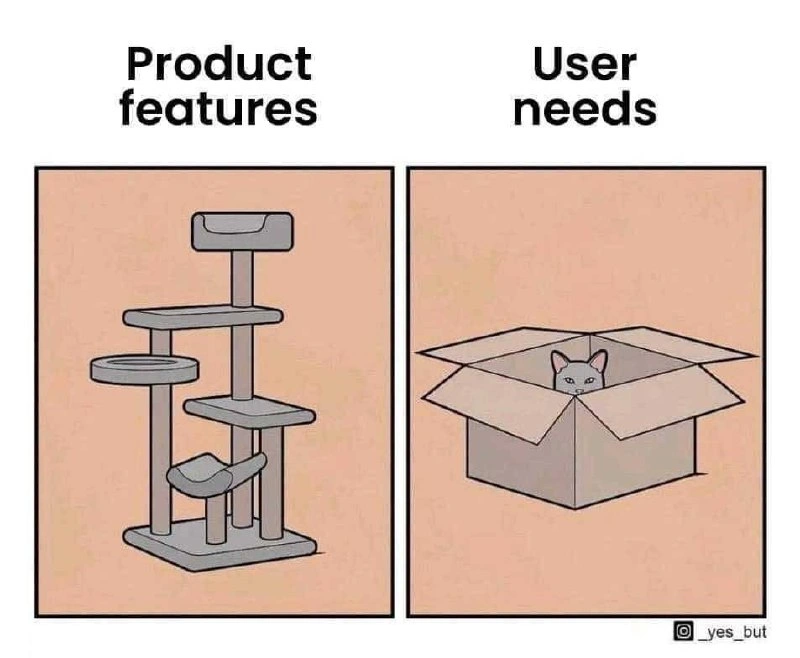
At its core, this meme jokes about a mismatch between what a product offers and what the user actually needs. On the left side, we have a super fancy cat playground (with multiple levels, platforms, and accessories) labeled "Product features." On the right side, we see a plain cardboard box labeled "User needs," and there's a cat comfortably peeking out of it. The cat represents the user of a product, and the cat tree represents the product loaded with features. The punchline is that after all that effort to build something elaborate, the user prefers the simplest thing.
In real software terms, "all those sprint features" refers to the features a development team might add during their sprints. A sprint is a short, fixed-length period (often 1 or 2 weeks in Agile methodology) during which a team works on building and delivering a set of features or improvements. Imagine that in each sprint, the team kept adding another shelf, ramp, or toy to that "cat tree" of a product. They might think they're increasing value, but if they don't check with the actual user, they could just be stacking up extras that no one asked for.
Let's clarify some terms and ideas that relate to this scenario:
- Feature Creep / Scope Creep: This means continuously adding new features to a project beyond its original plan. It's like starting with a plan to build a simple to-do list app, but then saying, "oh, let's also add reminders... and a calendar... and a chat feature..." until the app becomes overcomplicated. By the end, something that was supposed to be simple feels bloated with options. In our meme, feature creep turned a basic pet accessory into a multi-story cat mansion. "Scope creep" is a similar term often used when project requirements keep expanding in an uncontrolled way. Both are cautionary terms because they can lead to projects that are late, over budget, or confusing for users.
- Stakeholder Expectations: Stakeholders are people who have an interest in the project, like clients, managers, or company executives. Their expectations can heavily influence a project. For example, a stakeholder might insist, "We need to add a share-to-social-media feature, because our competitor has one," even if the app's users wouldn't really use it. In the cat tree analogy, a well-meaning cat owner (the stakeholder) kept imagining new attachments and enhancements for the cat tree ("What if it had a dangling toy? And a feeding bowl? And a tower?") thinking it would make the cat happier. However, those expectations might be based on personal assumptions or fear of missing out, rather than actual user (or cat) feedback.
- UX/UI Design (User Experience/User Interface Design): UX design is all about making a product useful, easy, and enjoyable for the user. It starts with understanding what the user really needs and values. UI design focuses on the look and layout, while UX is more about the overall feel and whether the product makes sense to the user. In our context, paying attention to UX would mean someone should have asked, "What does our cat actually enjoy?" Maybe some user research (or observing actual cats) would show that many cats love simple boxes more than complex toys. If the product team had put UX first, they might have built something simpler and more aligned with the cat’s true interests from the start.
- Over-Engineering: This term refers to designing a solution that's far more complicated or fancy than necessary for the problem at hand. It's like using a giant hammer to crack a small nut. In software, over-engineering might happen if developers use an overly complex architecture or add lots of configurable options for a task that could be done with a straightforward script or a few settings. In the meme, the cat tree is an over-engineered answer to a simple question: "Where can the cat be comfortable?" The team could have given the cat a basic cushion or box, but instead they over-thought it and built something worthy of a feline palace. Over-engineering often comes from a good place (wanting to be prepared for anything or use cool technology) but it can end up making the system harder to use and maintain.
For a newer developer or student, the takeaway is: keep the user’s actual needs front and center. It's exciting to brainstorm features or imagine using the latest tech in your project, but always ask, "Does this actually help the user? Or am I piling on extras because they sound cool?" Every feature you add has a cost. It makes the codebase larger and more complex, which can introduce new bugs and make testing harder. It can also make the user interface more complicated, which might confuse people.
Consider a simple example: You set out to make a straightforward note-taking app for your friends. Initially, it just lets you write and save notes – quick and easy. Then you think, "What if it could also include photos in notes? And maybe allow voice recordings? Ooh, how about adding task list functionality, and calendar integration, and a mood tracker too?" Soon, this little note app is trying to do five or six different things. When your friends try it, they might feel overwhelmed by all the menus and buttons. One friend might say, "I liked it best when it was just a clean, simple place to jot down notes." In this story, the original simple note app was the "cardboard box" – it did the job well. The expanded all-in-one app became the "cat tree" – impressive but perhaps more than they needed.
The cat meme is a fun reminder not to lose sight of the basics. As a developer, you will work closely with product managers and designers to decide what to build next. Don't be afraid to ask questions like, "Do users really want this feature? How do we know?" or "Can we test a smaller version of this idea first?" Those are the kind of questions that lead to building a MVP (Minimum Viable Product) – a version of the product with just enough features to satisfy the main user needs and nothing extra. Once the MVP is out, real users can give feedback. Maybe they'll say, "Actually, we'd love more features!" – in which case you add on carefully. Or they might say, "It's kind of complicated; we only use this one part." Hearing that early is gold, because it means you can adjust course before investing too much in the wrong direction.
So, remember the cat in the box whenever you're planning features. It captures a simple but important idea: sometimes less is more. Users ultimately care about solving their problems or having an enjoyable experience – they don't count how many features your product has. If a simple approach meets their needs, piling on extras can actually make the product worse for them. In short, make sure each feature has a purpose that a user truly cares about. That way, you'll spend your time building things that matter (and your "cat" will be purring happily).
Level 3: Scope Creep Cat Tree
In the left panel of the meme, there's an elaborate multi-tier cat tree labeled "Product features," and on the right, a simple cardboard box labeled "User needs" with a cat happily sitting inside. This stark contrast humorously illustrates how feature bloat and scope creep can lead to an over-engineered product that overshoots what users actually want. It's a scenario all too familiar in software development: teams pack sprint after sprint with new features (like adding every imaginable shelf, ramp, and perch to the cat tree), often due to stakeholder expectations or a misguided "more is better" mentality. The result? A complex product (the cat tower) that impresses on paper but leaves the real user experience unfulfilled – the "user" (here represented by the cat) ignores the bells and whistles and finds comfort in a basic solution (the cardboard box).
Let's break down why this happens from a senior developer's perspective:
- Stakeholders vs. Users: Stakeholders (e.g. project managers, executives, or clients) often equate adding more features with adding more value. They push for additional functionality each sprint to chase market trends or one-up competitors. In the meme's terms, it's like an owner insisting on building the tallest, fanciest cat tree to please their pet. Meanwhile, the actual users (the cats of the world, or customers) may only care about a small subset of those features – one cozy spot that meets their core needs.
- The Feature Creep Phenomenon: Small additions pile up. A product that started as a lean solution can quietly turn into a bloated beast after many iterations. Every sprint planning, someone says, "Wouldn't it be nice if it also did X?" So you add a dangling toy mouse, a feeding station, a slide – metaphorically, these are extra app features or settings. This creeping growth is how scope creep sneaks in. Before you know it, you're maintaining a over-engineered product with complexities that far exceed the problem it was meant to solve. It's like building a five-story software 'cat condo' when the user only needed a one-room 'apartment'.
- Lack of Early Validation: A key Agile principle is to validate requirements early. That means checking with real users that you're on the right track, often by demoing a prototype or MVP. If the team here had tested a simple solution first (maybe gave the cat an MVP cardboard box to see its reaction), they might have discovered that the box satisfied the need. Skipping or ignoring user needs analysis and UX research leads to huge gaps between what we build and what users actually do with it. The cat tree was built under assumptions of what the cat might like (multiple levels, special features) without asking the cat – a mirror to projects where we code features without real user feedback.
- Over-Engineering Costs: Seasoned developers know that every extra feature has an exponential cost. More code means more potential bugs, more maintenance, and more things to confuse or frustrate users. We have principles like YAGNI (You Aren't Gonna Need It) and KISS (Keep It Simple, Stupid) for this very reason. An over-engineered solution is harder to test and prone to failure in unexpected ways. (Think of the cat tree: more parts to wobble or break vs. the durable simplicity of a box.) Yet teams sometimes can't resist adding "power-user" settings or clever technical flourishes. The meme gets a laugh because any experienced dev can recall working on a "cat tree" project – pouring time into fancy features that users ended up disregarding, much like a cat walking away from a pricey toy to play with the packaging instead.
The humor here has an edge of truth that senior folks appreciate. It underscores the importance of aligning with user expectations instead of being dazzled by sheer feature count. After all, success isn't measured by how many gadgets or lines of code your product has, but whether it solves the user's problem effectively. A veteran developer or product designer will nod and say, "Yes, we've learned this the hard way." Building less but better-targeted functionality often leads to a product that users love. This meme is essentially a lighthearted reminder: before you build that next big "cat tower" of features, double-check that your user isn't perfectly happy with a "cardboard box" solution.
Description
Two side-by-side panels share a flat peach background. The left panel is titled "Product features" and depicts a tall, multi-level grey cat tree with shelves, ramps, and a bed - clearly an elaborate construction. The right panel is titled "User needs" and shows a lone cardboard box with a cat peeking out, content inside the simplest possible enclosure. The contrast humorously exposes the gap between over-engineered product backlogs and genuine customer value. For developers it’s a reminder to fight scope creep, validate requirements early, and keep UX at the center of feature planning
Comments
6Comment deleted
We spent two quarters decomposing the cat tree into event-driven micro-perches; the customer still curls up happily in the legacy cardboard monolith
We spent six sprints building a distributed event-sourcing architecture with CQRS, GraphQL federation, and real-time WebSocket subscriptions when all they wanted was a CSV export button
This is the architectural equivalent of building a microservices mesh with service discovery, circuit breakers, and distributed tracing when the user just needed a REST endpoint that returns 'Hello World' - but hey, at least we're cloud-native and the cat's happy in production
Architects built a microservices cat tree for ultimate scalability; the cat ignores it for the monolith box MVP
We shipped a five-service CatTree with feature flags and analytics; the user’s entire spec was POST /box - classic feature-factory vs outcome mismatch
Built a five-tier, feature-flagged cat tree; the box achieved 100% DAU. YAGNI remains undefeated