The Ultimate Security Anti-Pattern: A Website for 'Checking' Private Keys
Why is this Security meme funny?
Level 1: Never Hand Over Your Keys
Imagine you have a house key that unlocks your home. Now a stranger comes up to you and says, “Hi there! I can check if any bad guys have a copy of your house key. Just give me your key for a minute, and I’ll tell you if it’s been copied.” 😧 You wouldn’t hand your house key to a stranger, right? The moment you do, that stranger could make a copy or use it – and then it doesn’t matter if anyone else had it before, because now they do. This meme is joking about the exact same idea, but with a computer’s secret key. It’s funny (and scary) because the website is acting like a friendly helper, but it’s actually asking you to do the one thing you should never do: give away your secret. It’s like someone saying, “I promise I’ll keep your secret safe, just tell it to me and I’ll check if anyone else knows it.” The joke highlights how silly that is. In real life and in tech, the lesson is simple: if you want something to stay safe and private, don’t hand it over to strangers – no matter how nicely they ask or how official they look. Keep your special keys to yourself!
Level 2: Keep It Secret
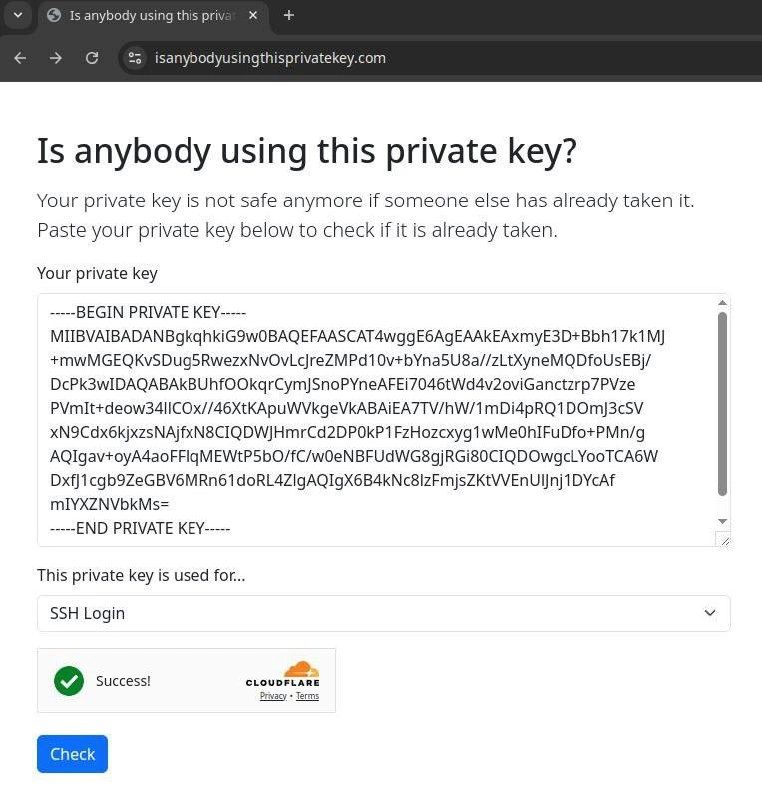
Let’s break down what’s happening here in simpler terms. The image shows a pretend website asking you to paste your SSH private key to check if someone else is using it. Some definitions first: SSH (Secure Shell) is a protocol used to securely log in to servers and computers. It uses a pair of keys – a public key (which you can share) and a private key (which you must keep secret). Think of the public key as a padlock you give to a server, and the private key as the key that opens that padlock. When you try to log in, you prove you have the private key without ever sending it over the network (the cryptography does the magic). Because of this setup, anyone who has your private key can pretend to be you. It’s like a master key to all the servers and systems where your public key is trusted. That’s why private key management is such a critical part of CredentialManagement in DevOps and IT – losing control of it is a big security breach.
Now, along comes this fake website (don’t worry, it’s a joke) that says: “Your private key might not be safe if someone else has it. Paste it here to check if it’s already taken.” This is basically an invitation to leak your credentials. A legitimate site or service would never ask for your raw private key like this. It’s the equivalent of a stranger saying, “Hey, I can check if your house key has been copied by burglars. Let me borrow your key for a minute.” 🚩 Red flag! A phishing site does exactly this – it poses as a helpful or harmless page to trick you into giving away something valuable, like a password or key. Here it’s posing as a “private key checker,” which is not a real thing in any safe form. The moment you paste your private key into that box and hit "Check," you’ve essentially handed the bad guys the keys to your accounts. The green “Success!” message is part of the trick: it’s there to reassure you, possibly implying “Yay, no one else had your key… (except us now).” Phishing attacks often use positive reinforcement or urgent warnings to manipulate people, and here the honeyed SecurityVsUsability trap is the promise of a quick safety check.
For a new developer or someone not familiar with SecurityAwareness, it might not be instantly obvious why this is so dangerous. After all, the site looks professional – it’s nicely designed, uses a friendly tone, even has a Cloudflare badge and a CAPTCHA (those “I’m not a robot” checks). But these elements are just window dressing; they don’t mean the site is trustworthy. Cloudflare, for instance, is just a service that protects websites from attacks and can display that little badge. It doesn’t vet what the site is asking you to do. The site’s suggestion itself – to paste your private key – is the huge warning sign. In security, there’s a simple rule: private keys must remain private. If you suspect your SSH key might be compromised or “taken by someone,” the proper action is to generate a new key pair and replace the old one, not to reveal the old private key to a random service. Also, how would anyone know if your key is already taken? There’s no central registry of private keys (precisely because they’re supposed to be secret!). The only thing a site could do is compare your key’s fingerprint (a short unique hash) against a database of known leaked keys – and even that can be done without the actual private key. The fact this site asks for the whole key is proof that it’s not a legitimate tool but an obvious scam or joke.
So, in practical takeaway: Never copy-paste your secrets or private keys into any website unless you are absolutely sure what it will do (and almost no legitimate use-case requires your full private key text). If you need to check if a key is compromised, you’d typically do it via safe methods (like using command-line tools to get a fingerprint, or checking a known list of breaches). Sharing the entire secret is like handing over the keys to your digital kingdom. Private means private! If someone else gets it, it’s game over for the security of whatever that key protected. In short, this meme is a humorous reminder for junior devs and everyone: keep your keys secret and safe, no matter how convincing or “helpful” a website or form may seem. It’s highlighting an extreme example to make the lesson stick – and hopefully give you a chuckle at how ridiculously brazen the request is.
Level 3: Phishing in Plain Sight
This meme hits home for every seasoned engineer who’s yelled at their screen, “No, don’t do that!” The humor comes from just how blatant and absurd this security anti-pattern is. It parodies a phishing scam so obvious that it’s almost funny: a website literally asking, “Paste your super-secret key here to see if it’s been stolen.” It’s like the Nigerian prince of DevOps scams. The site’s title, “Is anybody using this private key?”, and its friendly prompt mimic a helpful tool, but any experienced DevOps or SRE professional can see the trap a mile away. It’s phishing in plain sight – no fancy tricks, just a direct appeal for your credentials with a syringe of social engineering sugar-coating.
Why is this funny to those in the know? Because it beautifully satirizes the eternal conflict of Security vs. Usability. We’ve all encountered that one person who values convenience so much they’ll do something incredibly dangerous to save five minutes. This fake service offers the ultimate convenience: one quick test to ease your mind about key compromise. And in doing so, it performs the ultimate security sin: asking for your SSH private key. It’s the kind of absurdity that makes security engineers facepalm. We spend years preaching security awareness and credential management hygiene – “treat private keys like passwords, never share them, never even show them” – and here comes a site cheerfully saying “Just this once, pop your secret in here.” The meme’s punchline is essentially: What could possibly go wrong? – a rhetorical question every engineer knows precedes disaster. The answer, of course, is everything.
Real-world analogies abound. It’s reminiscent of those spoofed emails pretending to be IT support asking for your password – except here it’s targeting developers/admins with an “SSH key checker.” The presence of the Cloudflare logo and CAPTCHA is a brilliant satirical detail: it gives the site a veneer of legitimacy and security. “Look, we even have bot protection and a privacy policy, we must be legit!” It’s a false sense of security. A junior dev might think, “They use Cloudflare, so it’s safe, right?” Meanwhile, an old-timer knows that a padlock icon or CAPTCHA on a site doesn’t mean “you can trust it with secrets.” It only means your data is securely delivered — to whoever is on the other end. In this case, that’s presumably a malicious actor or a prankster. The green “Success!” message is particularly dark humor: Success! as in, congratulations, you’ve successfully compromised yourself. The site will happily tell you your key wasn’t safe... now that they have it.
This scenario is painfully relatable. Seasoned devs have seen colleagues or new hires blunder by leaking secrets in far less obvious ways: accidentally committing id_rsa keys to public GitHub repos, sharing credentials over Slack/email, or pasting sensitive keys into forums while asking for help. There are even bots scanning public GitHub for lines like “-----BEGIN PRIVATE KEY-----” to instantly grab leaked keys and exploit them. In ops war stories, a leaked SSH key can lead to 3 AM emergency rotations when an attacker uses it to log into servers. So the meme’s over-the-top example (“hey, voluntarily give up your key!”) sarcastically echoes those real incidents. It’s funny because it’s true – not that people go to a site like this (one hopes not!), but that human error and phishing gullibility are constant threats, even among tech folks who should know better.
To appreciate the nuance: this fake site is an obvious_phishing_site joke, yet it shines a light on genuine issues. There’s always pressure to make security tools user-friendly, but taken too far, that can backfire spectacularly. The tension between convenience and security is encapsulated here: the “convenient” solution (copy-paste your key) is actually catastrophic. No seasoned engineer would fall for this, because we have an instinctive rule: never share your private keys. Instead, if you suspect a key is compromised, you rotate it (generate a new one) and maybe compare its fingerprint against known compromised keys lists – all done without ever exposing the full private material. This meme basically says with a smirk, “there’s an app for that – the wrongest app imaginable.”
Just to drive the point home, here’s a bit of pseudo-code that captures the dark humor of what this site is doing under the hood:
// Pseudo-code representation of the "private key checker" logic
function checkIfKeyStolen(userPrivateKey) {
// Step 1: Store the provided private key in the attacker's database
compromisedKeysDB.add(userPrivateKey);
// Step 2: Always indicate success (the user won't know any better)
return "Success! Your key is now (definitely) taken.";
}
// Usage:
let result = checkIfKeyStolen("-----BEGIN PRIVATE KEY----- ... -----END PRIVATE KEY-----");
console.log(result); // "Success! Your key is now (definitely) taken."
😏 Success! indeed – for the phisher. The code above is essentially what any engineer imagines when seeing this site: the moment you hit “Check”, your key gets leaked_credentials straight into someone else’s hands. The meme mocks this scenario so we can all laugh nervously and say, “Thank goodness nobody would actually be that naive… right?” (And then we double-check that no junior team member is pasting secrets where they shouldn’t.) In summary, it’s a perfect storm of SecurityFlaws played for laughs, and an inside joke for devs: Of course it’s a terrible idea – that’s the joke.
Level 4: The Public-Private Key Paradox
At the heart of this meme is a fundamental cryptography no-no: exposing a private key. In public-key cryptography (like the RSA or ED25519 keys used for SSH), the entire security model assumes the private key remains secret. Private means for your eyes only – it’s the secret large number that lets you prove your identity or decrypt data. If someone else obtains it, all cryptographic guarantees collapse instantly. This fake “tool” site creates a paradox: it asks you to publicize your private key in order to check if it’s… public. Essentially, it’s encouraging a breach of the very security principle of confidentiality it pretends to help enforce.
From a theoretical standpoint, this scenario highlights why checking “if someone else is using your secret” is inherently tricky. In security, we have concepts like zero-knowledge proofs and one-way cryptographic hashes to verify things without revealing the secret itself. Real breach-checking services (for example, databases of leaked passwords or keys) never ask for the actual secret; they use fingerprints or partial information. A known approach is using hashed values and k-anonymity – e.g. Have I Been Pwned? lets you check if your password is compromised by sharing only a small hash fragment, never the password itself. By contrast, this joke site throws all that out the window. It’s effectively saying, “Don’t bother with fancy cryptographic protocols, just hand over the raw key!” The presence of the -----BEGIN PRIVATE KEY----- block in the textbox is a glaring red flag: that’s a PEM-formatted private key, base64-encoded, potentially an RSA key. If you literally feed that into a website, you’re granting full cryptographic power over your identity to a stranger. No advanced math attack is needed – you’ve volunteered the keys to the kingdom.
It’s worth noting that modern security relies not just on strong algorithms but on keeping secrets secret. Even the most unbreakable encryption (AES-256, RSA-4096, etc.) is useless if an attacker simply tricks you into handing over the keys. This “tool” is a textbook example of social engineering wrapped in a user-friendly interface. The irony is palpable: the site uses a Cloudflare security badge and a CAPTCHA – employing real web security measures to earn your trust – only to request something that nullifies any security on your side. Sure, the connection to the site might be HTTPS (secure in transit), but that just means you’re securely delivering your secret straight into the attacker’s hands. In cryptographic terms, you’ve performed a complete knowledge proof (the opposite of a zero-knowledge proof): proving you possess the private key by directly surrendering it. The result? The one scenario you wanted to check for (someone else having your key) is guaranteed to become true, because you just gave it to them. This underscores a core truth in security engineering: no algorithm can save you from a user willingly violating key management best practices. It’s the ultimate private key paradox — attempting to verify a secret’s safety by destroying that safety.
Description
A screenshot of a website with the URL 'isanybodyusingthisprivatekey.com'. The site's header boldly asks, 'Is anybody using this private key?'. Below, instructive text reads, 'Your private key is not safe anymore if someone else has already taken it. Paste your private key below to check if it is already taken.' A large text area displays a full RSA private key, including the '-----BEGIN PRIVATE KEY-----' and '-----END PRIVATE KEY-----' markers. Beneath this, a dropdown menu is set to 'SSH Login'. The most humorous part is the result section, which shows a green checkmark and the word 'Success!' next to a Cloudflare logo, all above a blue 'Check' button. This image is a piece of expert-level satire aimed at anyone familiar with cybersecurity fundamentals. The entire premise is a parody of a phishing attack or honeypot, as the absolute first rule of cryptography is to never, ever share your private key. The joke is in the audacity of the request, and the ironic 'Success!' message creates a brilliant piece of dark humor, implying that the 'success' is the theft of the key. It's a perfect in-joke for senior developers and security professionals who would instantly recognize the catastrophic security flaw being presented as a 'service'
Comments
18Comment deleted
I'm not saying I pasted my key, but my entire home directory just pushed itself to a public GitHub repo titled 'free-server-access-keys-for-educational-purposes'
Finally, a SaaS that turns RCE into Remote Credential Extraction - just paste your key and *boom*, problem transferred to someone else’s server
This is the cybersecurity equivalent of a 'Free Candy' van asking kids to hop in and check if their candy is poisoned - except the van has a Cloudflare sticker, so at least your private key will be compromised with enterprise-grade DDoS protection
This is the cryptographic equivalent of 'haveibeenpwned.com' but for people who fundamentally misunderstand asymmetric encryption. It's like asking 'Is anyone else using my house key?' by mailing your only copy to a stranger. The real genius is that anyone who actually uses this service has already failed the security awareness test so catastrophically that the 'Success!' message is technically accurate - they've successfully compromised their own infrastructure. At least when junior devs commit AWS keys to GitHub, it's usually an accident; this requires deliberate, step-by-step incompetence
If your PEM ever touches a web form, the answer is already yes - execute the incident runbook, rotate every authorized_keys, and accept that “Check” was the attacker
Finally, a self‑serve exfiltration endpoint: paste your SSH private key, clear Cloudflare’s Turnstile, and get a green “Success!” - for the attacker’s secrets-management pipeline
When your infra key's 'private' status is verified by a public pastebin - rotate yesterday, or it's already prod-owned
I need to try this Comment deleted
This makes the furry count 5 Comment deleted
Uhmm.. Comment deleted
Or maybe six Comment deleted
nothing i guess Comment deleted
🔒 Verified Secure ✅ Comment deleted
Thank Goodness! All my keys are safe, now I know it for sure! Comment deleted
Charge a payment Comment deleted
true Comment deleted
The deep state blocked the website claiming it's "for fraudulent purposes". So much for freedom of speech Comment deleted
Pffft it actually works lol Comment deleted