Skip to content
DevMeme
517 of 7435
The Password Strength Paradox
Security Post #595, on Aug 19, 2019 in TG

The Password Strength Paradox

Why is this Security meme funny?

Level 1: When Strong is Wrong

Imagine you come up with the world’s best secret for your clubhouse – a long, complicated secret handshake that only your friends would know. The longer and more detailed it is, the harder it is for an outsider to copy, right? Now picture the club’s gatekeeper saying, “Whoa there, your secret handshake is too good! You need to make it shorter and easier, or I won’t let you use it.” That sounds pretty silly, doesn’t it? Why would anyone ask you to make your secret less secret?

That’s exactly the joke here. On a website, your password is like your secret handshake or a key to your treasure chest. You tried to make that key super long and complex so no bad guy could ever guess it. But then the website basically says, “Sorry, your key is too strong. Please break your key and make it weaker so it fits our tiny lock.” It’s absurd! It’s like a bank telling you to use a flimsier lock on your safe because the big strong lock won’t fit their policy. The humor comes from how backwards this is – everyone knows a stronger lock (or a longer password) is better for safety. Being told to do the opposite is both funny and frustrating, kind of like a teacher telling the class, “You all studied too much for the test, next time don’t study so hard.” It just doesn’t make sense, and that’s why we shake our heads and laugh at it.

Level 2: Password Policy 101

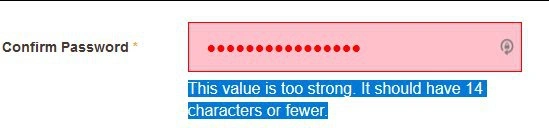
Let’s break down what’s happening in this image in simpler terms. We have a typical website authentication form asking the user to create a password and confirm it. Usually, sites have a password policy – a set of rules about what passwords you can use. Common rules include things like a minimum length (e.g. at least 8 characters), requiring a mix of letters, numbers, symbols (to ensure complexity), and sometimes forbidding easily guessed words. In the screenshot, however, the site has an unusual rule: a maximum password length of 14 characters. That means if you try to make your password 15 characters or longer, the site will reject it. The form is showing a form_validation_error because the user’s input violated that rule. The error message displayed is “This value is too strong. It should have 14 characters or fewer.”

Let’s unpack that message. Normally, if you exceed a maximum length, an error would say something like “too long” — because, literally, the input is longer than allowed. Here the word "strong" is used, hinting at the idea that a longer password is generally a stronger password (which is true in terms of security). It seems the website is equating length with strength (not a bad assumption generally), but then doing something very strange: calling the password “too strong” as a reason to not accept it. This is like a teacher saying, “Your essay is too excellent; please make it shorter and less detailed.” The UX/UI design here highlights the input box in red/pink to indicate an error, and the message in blue is likely a styled validation hint telling the user how to fix the error (“14 characters or fewer”). The user had presumably typed a long passphrase (maybe a whole sentence or a set of random words) which is a great idea for security, but the system is effectively scolding them for it.

A password_strength_validation is usually meant to help users make better passwords – for example, a strength meter that goes from “Weak” to “Strong” as you add more characters or mix in different character types. But here that concept was twisted. The site literally has a ceiling on strength: beyond a certain point, they consider it “too much.” This is absolutely against modern SecurityBestPractices. Best practice would encourage long passwords (even up to 64 characters or more) so people can use passphrases – common words or a sentence that’s easy for them to remember but very hard for others to guess. There’s almost no downside to allowing longer passwords on the user side (aside from maybe a rare case where extremely long inputs could affect performance – but again, typical limits would be much higher than 14).

The fact that the error references "14 characters or fewer" directly points to an arbitrary_character_limit set by the developers or security team. "Arbitrary" because there’s no obvious reason it had to be 14 – it could have been 20, 50, etc., but someone chose 14. Often such specific numbers come from either technical limitations (like maybe the database was set up to only store 14 characters for some historical reason) or from outdated policy documents. In any case, as a user or a junior dev looking at this, you should recognize: this is a bad security policy. It’s an example of what not to do. It not only frustrates users (because it’s a UX failure – the user here did the right thing but got treated like they made a mistake), but also weakens security overall.

To put it simply: longer passwords are generally more secure. There’s no such thing as a password that’s "too secure." If you see something like this in the wild, it’s a red flag that something is wrong under the hood. Maybe the team was forced to integrate with an old system (so they had to enforce a password_length_limit of 14), or someone in charge didn’t understand how password security works. As a junior developer, take this meme as a cautionary tale: always question weird requirements like “max 14 characters”. Ask why. If the answer is “that’s how it’s always been” or “some old compliance rule,” it might be time to advocate for a change. Users shouldn’t be asked to make their passwords weaker. Security and usability aren’t always at odds – in fact, here the usable thing (letting people choose passphrases they can remember) and the secure thing (more characters) align perfectly. It’s only a misguided rule that created a conflict. So, in summary: this meme shows a confirmation password field error where the only “mistake” the user made was having a password that was too good. It’s funny in a head-shaking way because we expect security features to push us towards safety, not away from it.

Level 3: Security Theater at Work

For seasoned developers and security engineers, this screenshot elicits a facepalm and a chuckle in equal measure. It perfectly encapsulates security theater in action – when an organization acts like it’s enforcing security, but the measures are superficial or outright counterproductive. The meme’s text “When your password policy caps strength at fourteen characters max” describes a situation that is all too familiar: arbitrary security constraints that make no practical sense. The image shows a web form’s "Confirm Password" field highlighted in angry red/pink, with an error message stating:

“This value is too strong. It should have 14 characters or fewer.”

The humor (and horror) here comes from the blatant contradiction: "too strong" – as if having a more secure password is somehow a bad thing! It immediately strikes experienced folks as a tragic UX failure and a security flaw. We’ve got a WebDev form validation mechanism that literally instructs the user to weaken their password. This is the opposite of what any sane Security policy should do. It’s like a bouncer at a club saying, “Sorry, your armor is too thick to enter – please remove some plates for your own safety.”

Why does this happen in real life? Often, it’s due to some mix of legacy systems, misguided policies, and poor communication between security and UX teams. Here are a few likely scenarios that senior devs might immediately think of:

  • Legacy Backend Constraint: The system might be anchored to an old user database or authentication service that cannot handle passwords longer than 14 characters (as mentioned, possibly due to legacy hashing like LM, or a fixed database column). Instead of fixing the root cause (which can be costly or risky in an enterprise environment), they slap a client-side validator to prevent users from breaking the archaic limit. It’s a classic case of technical debt dictating user experience.
  • Misinterpreted Compliance Rules: Perhaps some outdated corporate or regulatory policy specified a password length range (like “passwords must be between 8 and 14 characters”). Such rules were more common in early 2000s security checklists, often due to legacy reasons or an attempt to balance security with memorability. An overzealous compliance officer or developer took that rule as gospel and implemented it to the letter, not realizing modern best practice is to allow much longer passphrases. This is a security_compliance_misinterpretation: they think they’re following “the rules” for security, but they’ve lost the plot of what actually makes passwords secure.
  • Poorly Implemented Strength Meter: Many sites include password strength meters that label your password as "Weak", "Strong", etc. It’s possible the developer repurposed a strength meter’s feedback incorrectly. Maybe the code had thresholds and the highest threshold was phrased as “Too Strong” as a joke or error, and they accidentally treated it as a validation failure. For instance, consider a pseudo-code logic:
function validatePassword(pwd) {
    if (pwd.length < 6) {
        return "Too weak";
    } else if (pwd.length > 14) {
        return "Too strong";
    }
    // ... other checks for numbers, special chars, etc.
    return "Just right";
}

In a sane world, that else if should never exist – but if someone misunderstood the assignment, you end up with a Goldilocks-style validator where a password can be “too short,” “too long,” or “just right.” The meme’s error text reads like the output of such a borked function. It wouldn’t surprise any senior dev if somewhere in that codebase there’s a PasswordPolicy.MAX_LENGTH = 14; constant defined because “that’s how we’ve always done it.”

  • UX Copy Fail: Let’s not overlook the wording. Typically, a form validator would say "too long" rather than "too strong." The wording “value is too strong” almost sounds tongue-in-cheek. It could be a copy/paste or find/replace error by a developer trying to customize messages. Perhaps they changed all instances of "long" to "strong" to sound more user-friendly (thinking length == strength), but ended up with this comedic phrasing. It’s a small hint that the people behind this form didn’t fully think it through – a hallmark of UXFailures in enterprise apps.

The senior perspective on this is that it’s an example of a well-intentioned policy gone wrong. Everyone “cares about security” in theory – hence the meme’s caption “We really care about your security, but” – implying that after the “but” comes ...we’re not actually going to let you be secure. It’s poking fun at the corporate doublespeak: they’ll claim passwords must be complex and secure, SecurityBestPractices and all that, but then they undermine it with a ridiculous limitation. Many veterans have encountered this hypocrisy: for instance, a company that requires you to include uppercase, lowercase, number, special char, hieroglyph, blood sample in your password – but also forces you to change it every 30 days, leading users to choose predictable patterns or write them on sticky notes. Or a bank that limits you to a 12-character password and disallows symbols because their 1980s mainframe can’t handle them. These are classic SecurityVsUsability dilemmas, except here it’s not even usability being helped – it’s pure inconvenience married to insecurity.

In real-world terms, enforcing a max length of 14 is not just an innocuous quirk; it actively lowers the ceiling of security. Any attacker brute-forcing or guessing passwords now knows they only ever have to consider up to 14 characters, which is a huge advantage for them. Meanwhile, the legitimate user trying to be safe is left scratching their head, maybe thinking, "Huh, I always heard longer passwords are stronger... Why is this site scolding me?" It erodes trust in the system and might even encourage poor behavior (like “Oh well, if they don’t allow long passwords, maybe I’ll just use the same 8-character password I use everywhere else.” SecurityFlaws, meet bad_security_policy creating a nice breeding ground for breaches).

For seasoned devs, the humor also comes with a bit of PTSD: we’ve all had to debug or refactor some legacy code that imposes nonsensical limits because “someone upstairs said so.” The meme is essentially a neon sign pointing at the disconnect between developers who know what’s right and bureaucratic or technical constraints that enforce what’s easy. It’s funny because it’s true – and sad because it still happens. This single screenshot encapsulates a meeting’s worth of argument between a security engineer yelling “We need to allow longer passphrases!” and a product manager replying “But the older system will break and we don’t have budget to fix it.” The compromise? Slap a client-side validation and pretend that it’s the user’s fault for being "too secure." Security theater at work, indeed.

Level 4: Legacy Hash Hangover

At the deepest technical level, this meme highlights a collision between modern security entropy and legacy system limitations. In an ideal world, every extra character in a password adds exponential strength, because the password search space grows multiplicatively with length. For example, if a character can be one of ~94 printable symbols, then a 15-character password is about 94 times stronger than a 14-character one. In terms of information theory, each additional truly random character adds around $\log_2(94) \approx 6.5$ more bits of entropy to the password. That’s a massive increase in cryptographic strength – roughly doubling the effort required for brute-force attacks for each bit added. By capping passwords at 14 characters, the system is effectively throwing away potential entropy (and doing so with a straight face, as if too much security were a problem!). This goes against fundamental cryptographic principles: more randomness (length, complexity) should never decrease security. The notion of a password being "too strong" is laughable from a theoretical standpoint – it's like saying a cipher is too unbreakable or an encryption key is too long. There is no such thing in legitimate cryptography; you can’t have too many bits of security.

So why on earth would a system balk at the 15th character? The answer likely lies in the bowels of legacy password storage implementations or misguided constraints. Historically, some older authentication systems had hard limits on password length due to the algorithms or data models they used. For instance, Windows LAN Manager (LM) hashing – a notoriously weak password hashing method from the 1980s – truncated passwords to 14 characters, splitting them into two 7-character chunks to hash separately. If a system still relies on (or maintains compatibility with) such antiquated methods, anything beyond 14 characters would be ignored or mishandled. In such a case, letting users enter a 15-character password would create confusion (since effectively only the first 14 would count) or even break verification. Instead of upgrading the security scheme, some systems simply throw an error on length: “too strong”, meaning “our old hash can’t handle more characters”. It’s a legacy hangover – the system is stuck enforcing a bygone password_length_limit from decades past. Another historical case: early Unix DES-based crypt (1970s) only used the first 8 characters of a password for hashing, silently ignoring the rest. In those days of limited memory and fixed-size fields, such limits were common. But carrying those limits into 2019’s web apps is pure security heresy. Modern hash functions like bcrypt and Argon2 can handle long passphrases just fine (bcrypt does have a 72-byte input limit, but that’s far beyond 14 characters). Enforcing a 14-char max suggests the application might be shackled to an outdated identity store or a bad_security_policy frozen in amber.

Let’s put this in context with a brief history of password length limits:

System / Algorithm Max Effective Password Length Notes
Unix DES crypt (1970s) 8 characters (effective) Only first 8 chars used due to 56-bit DES key limitation.
Windows LAN Manager (LM) 14 characters Password uppercased & split into two 7-char DES hashes – a legacy weak scheme.
bcrypt (1999) 72 bytes (≈72 chars) Input beyond 72 bytes is ignored in most implementations.
Modern NIST Guidelines (2017) 64+ characters recommended Encourage allowing very long passphrases (e.g., up to 64 or more).

As shown above, a 14-character cap is a relic. Unless the backend is using LM hashes from the Jurassic period, there’s no legitimate technical reason to reject longer passwords. It’s more likely a case of security_compliance_misinterpretation or a database design flaw. Perhaps a developer defined the password field in the database as VARCHAR(14) (fixed max length) back in the day, and no one updated it – now the application’s input validation dutifully rejects anything that doesn’t fit in that 14-char box. Or maybe an overzealous password strength validator was coded with a mistaken assumption that passwords shouldn’t exceed some arbitrary length, conflating length with strength in a very wrong way. Either way, from a cryptographic and security architecture perspective, the meme is pointing out something absurd: the system actively prevents users from utilizing the full strength that modern security allows. It’s as if the code is throwing a PasswordTooStrongException – an oxymoron in any well-designed authentication logic.

Description

A screenshot of a web form's 'Confirm Password' field. The input box, highlighted in a light red to indicate an error, is filled with dot characters representing a masked password. Below the input, a blue-highlighted text displays an absurd error message: 'This value is too strong. It should have 14 characters or fewer.' This meme humorously captures the frustrating and nonsensical validation rules that developers often encounter in legacy systems or poorly designed applications. For an experienced engineer, it's a relatable example of security theater, where arbitrary rules are enforced at the expense of actual security, creating a terrible user experience and undermining best practices

Comments

7
Anonymous ★ Top Pick It's not a bug, it's a feature to prevent users from creating passwords so secure that even the NSA can't crack them, thus protecting us from government overreach. It's just patriotic UX
  1. Anonymous ★ Top Pick

    It's not a bug, it's a feature to prevent users from creating passwords so secure that even the NSA can't crack them, thus protecting us from government overreach. It's just patriotic UX

  2. Anonymous

    Nothing like a React front-end insisting 15 characters is “too strong” because five microservices later a COBOL job is still cramming LM hashes into CHAR(14)

  3. Anonymous

    Somewhere there's a database column still defined as VARCHAR(14) from 1987, and the entire security team is too afraid to ask who has the migration scripts

  4. Anonymous

    Ah yes, the classic 'your password is too secure' error - because nothing says enterprise-grade security like a VARCHAR(14) constraint from a 1990s schema migration that nobody dared to touch. Somewhere, a DBA is defending this with 'but we'd have to update the stored procedures' while a security team weeps quietly. This is what happens when legacy database constraints meet modern security requirements: you get validation logic that actively punishes users for following NIST guidelines. Bonus points if this is hashing passwords and still enforcing length limits, suggesting they're storing plaintext or using a broken implementation. The real vulnerability isn't the 15-character password - it's the architecture that thinks 14 is the magic number

  5. Anonymous

    Nothing says 'enterprise security' like client-side copy calling my password 'too strong' because the backend still caters to LM and a VARCHAR(14) column

  6. Anonymous

    Security theater where the validator's the real weak link - capping entropy to appease a 90s-era schema constraint

  7. Anonymous

    “Too strong - 14 chars max.” Translation: InfoSec lost to a legacy CHAR(14) column and LM-era auth; defense in depth replaced by defense by schema width

Use J and K for navigation