A Masterclass in Insecure Authentication Design
Why is this Security meme funny?
Level 1: The Secret Is Out
Imagine you and your friends have a secret treehouse club with special passwords to get in. You think of a new secret password for yourself, but the club leader says, “Oops, you can’t use that password because Hank already uses it. In fact, Hank’s secret password is exactly that! Here are some other ideas you could use instead.” Suddenly, you know Hank’s secret password. That completely ruins the whole point of it being a secret, right? This meme is joking about a website that did exactly that: it told one person the password of another person while trying to be “helpful.” It’s like a teacher accidentally blurting out one student’s secret to another student – everyone instantly realizes that’s a really bad idea.
The meme makes fun of this by showing a cool action hero with the caption “Superior programming.” Of course, they don’t actually mean it’s good – it’s said with a laugh. That’s sarcasm. It’s as if they’re saying, “Wow, great job telling secrets!” when obviously it’s a terrible mistake. The reason it’s funny is because it’s so clearly wrong: passwords are meant to be private, and here the website just gave one away. It’s a silly situation that makes us laugh because we all know you should never share someone’s secret password, and seeing it happen is absurd.
Level 2: Unique Password? Unique Mistake
For someone newer to web development, let's break down what's happening and why it's so wrong. Normally, when you create an account on a website, you choose a username (which typically has to be unique so no one else has the same login name) and a password (which is a secret known only to you). This is part of the authentication process: your username identifies you publicly, and your password is your private key that verifies it's really you. Websites usually check if your desired username is available (not taken by someone else) and might check if your password is strong enough (meeting length or character requirements). But they never need to check if your password is "already taken" by someone else – that's not a thing in real systems. Passwords are not public identifiers; they're private secrets.
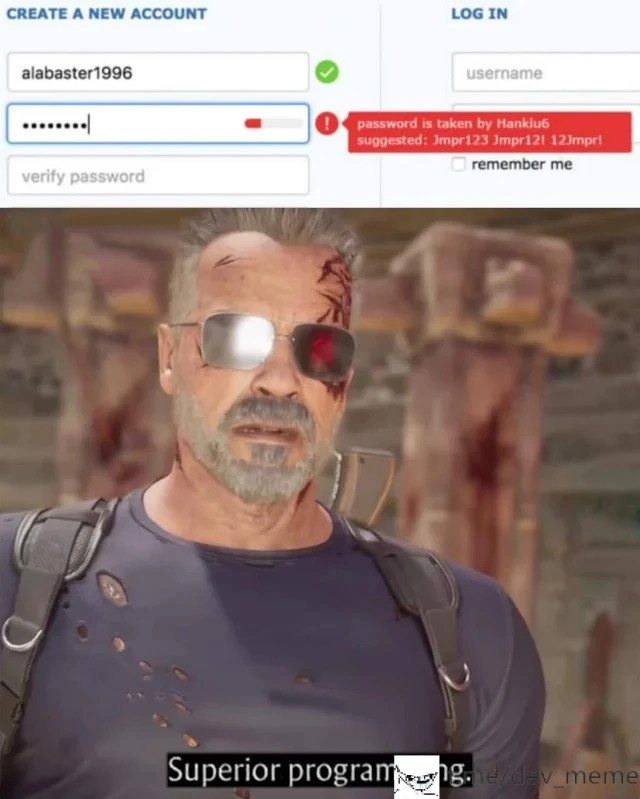
In the top half of the meme image, the form on the left is a registration form (for creating a new account). You can see a field for "alabaster1996" with a green checkmark – that likely means the username alabaster1996 is free to use. Below that, the user has typed a password (hidden by those typical bullet dots ••••••••). Instead of a green check or a simple strength meter, there's a red error icon. The message in the red box says "password is taken by Hanklu6" and even shows suggestions like it's trying to be helpful: “suggested: Jmpr123, Jmpr121, 12Impr1”. Essentially, the site is telling the user: "Sorry, you can’t use that password because someone named Hanklu6 already uses it. Maybe try a slightly different password." This is absolutely not how password selection is supposed to work! It’s a massive mistake. The site is revealing that Hanklu6’s password is (or starts with) "Jmpr123," which is information that should be highly confidential.
Why is this so bad? Because passwords are sensitive data. Only the user should know their own password. When you type a password into a website, that site should handle it super carefully – ideally, it converts it into a scrambled form (a one-way hash) and never keeps the original text. Plaintext password storage means they're keeping the actual passwords exactly as users type them, not protected at all. That’s one of the biggest no-nos in security. If I, as a new developer, ever find myself storing a password in a variable or database exactly as the user typed it, I should hear alarm bells. Standard practice is to store a one-way scrambled version. Think of a hash like a fingerprint of the password: you can use it later to check if a login attempt is correct, but you can't easily go from that fingerprint back to the actual password. This way, even the website owners or admins can't just look up what your password is.
Now, the fact that this site can check if a password already exists in its database means they did not follow those practices. It suggests they're either storing the actual passwords or something equivalently insecure. Otherwise, how could they compare one user’s password to another’s? This is a glaring security bug because the system is basically announcing someone else’s secret. It's also a UX/UI failure. In terms of user experience, imagine being a normal user and seeing "password is taken by Hanklu6" – you'd be baffled and probably worried. It's not a message anyone expects to see, and it immediately makes you question the site’s security. The interface might be trying to mimic a friendly feature (like when a username is taken, some sites say "that name is taken, try this other one"), but doing it for a password is an obvious blunder.
Let’s also talk about that disabled "verify password" field below the password input. Usually, when you sign up, sites have you re-type your password in a "verify" field to make sure you didn't accidentally mistype it the first time. In the meme image, the "verify password" box is greyed out (disabled), probably because the form won't let you proceed until the first password is acceptable. Normally "acceptable" means the password meets certain strength rules; but here "acceptable" bizarrely means "not already used by someone else." They literally won't even let you confirm your password until you pick one that no other user has ever picked! It's a twisted bit of form logic, and it shows how confused the feature’s priorities are.
To put it simply: this website is doing something very wrong under the guise of being helpful. A password isn’t like a username – it doesn’t need to be unique, it needs to be secret. By trying to enforce uniqueness, the site accidentally leaked a secret. It showed the new user a piece of someone else's login info, which is a huge breach of trust. If I saw this while signing up for a service, I'd immediately learn two things: (1) Hanklu6’s password (so I or anyone could now potentially log in as Hanklu6, especially since the login form is shown on the right side of that image), and (2) that this site doesn’t protect passwords properly. I’d probably leave and never come back, because who knows what other security issues it has.
Early in a developer's learning journey, you find out how important it is to protect user passwords. It's one of the first security principles: never store passwords in plain text and never share someone’s password with anyone else. Even without deep security knowledge, it’s common sense that you shouldn’t tell User A what User B’s password is. This meme highlights an extreme, almost cartoonish case of what happens when a site does everything wrong with passwords. The “Superior programming” caption is pure sarcasm – it's the community’s tongue-in-cheek way of saying this is a spectacular failure. In reality, if a site ever did this, developers would treat it as a critical incident and fix it immediately, because it’s so dangerous.
So, in summary: the site in the meme tried to be extra helpful in the worst way possible. It’s like a bank saying, “Your new safe combination can’t be 1234, because another customer named Hank is using 1234 for their safe. How about 1235 or 1244?” Clearly, that would be ridiculous and unsafe. We all recognize that sharing someone else’s secret defeats the purpose of it being a secret. This meme is poking fun at a mistake so bad that it’s comical, and it teaches a clear lesson: protect passwords and don’t get creative by breaking fundamental security rules. Sometimes, what seems like a helpful idea is actually a huge security blunder.
Level 3: Security 101 Dropout
This meme combines a cringe-worthy security flaw with a heavy dose of irony that seasoned developers immediately recognize. On the left side, we have a typical sign-up form: a username field (alabaster1996) gets a friendly green checkmark indicating it's available, and right below, a password field is flagged in red. But instead of a normal password strength warning, the form screams: “password is taken by Hanklu6” in a bright red alert box. They even go so far as to suggest alternate passwords, listing: Jmpr123, Jmpr121, 12Impr1 — a parody of how sites suggest variations when your username is taken. This absurd password_already_taken_prompt is the punchline. It's as if the developer treated the password like a username that has to be unique site-wide. The result? The interface is literally leaking credentials. It’s telling me that user Hanklu6 uses the password "Jmpr123" (or very close to it), something that should never be revealed.
The post title calls this “top-tier security brilliance” with searing sarcasm. Every experienced dev reading that error message has the same reaction: a facepalm followed by a nervous chuckle. We laugh because it's better than crying about such developer_incompetence. This particular combination of elements – a helpful-looking UI and a catastrophic security oversight – creates a darkly funny scenario. It's like a perfect storm of bad practice:
- Storing passwords in a readable form (strike one).
- Enforcing a nonsensical password_uniqueness_check (strike two).
- Blabbing someone else’s secret to the user (strike three).
The humor lands because it's so far from what real security should be, yet presented with the earnestness of a helpful feature. It's the ultimate "UX fails meets security fails" situation. The developer probably thought they were being clever, maybe misinterpreting advice about preventing password reuse. (“Hey, if password reuse is bad, let's just prevent any two users from using the same password!” 🙄) In doing so, they created a colossal SecurityVsUsability blunder. The user experience here is actually terrible: imagine the confusion of being told your password is "taken" as if it’s a Twitter handle. And security-wise, it’s an atrocity – Hanklu6’s account is basically one step away from being compromised by anyone who sees this message.
Seasoned engineers have seen variants of this in real life, which is why it's both funny and painful. Maybe not this exact UI, but we've encountered sites that email you your password in plain text (a dead giveaway of improper storage), or legacy systems where all the devs know the admin passwords because they're not hashed. Those are immediate red flags. In corporate hallways, discovering a users table with a password column holding plain text can give a battle-scarred developer PTSD. 😅 This meme just takes it up a notch by making the site itself spout the insecurity out loud.
Now, let's talk about the action hero at the bottom: that's our visual metaphor for sarcasm. The scene shows a battle-worn badass (Arnold Schwarzenegger in full action mode) striding confidently, with the subtitle “Superior programming.” This is a classic meme format where you show something utterly foolish in the first panel, and in the second panel you ironically glorify it as genius. It's dripping with sarcasm. The community often uses this format to mock bad code or practices by pretending to applaud them in an over-the-top way. Here, the implication is: “Wow, only a superior programmer would come up with a feature so creative that it kompromats their own security!” It's equivalent to giving a Darwin Award to a piece of software.
From an industry perspective, this image captures a shared pain. Web security 101 says never expose passwords, and any hint that you can check if a password exists means you’re storing it wrong. Every senior developer can recount horror stories of password breaches. For instance, when Adobe was breached in 2013, they had stored passwords in reversible encryption and even included password hints – that leak revealed many users’ actual passwords. Or the RockYou breach in 2009, which exposed 32 million passwords stored in plain text. Those real events had huge fallout, requiring millions of people to change passwords everywhere. Seeing a login form voluntarily cough up someone else’s password evokes that same "Oh no, this is catastrophic" feeling, condensed into a single UI pop-up. It's funny as a meme precisely because if it happened in reality, it would be an epic disaster.
The meme also hints at a complete failure of checks and balances in development. In a well-run team, at least one person would yell, “What are you doing?!” upon seeing a line of code comparing plaintext passwords across users. The snippet behind this might look like:
# Hypothetical bad code: checking if a password is already in use
if new_user.password in all_passwords:
existing_user = find_user_by_password(new_user.password)
raise Error(f"password is taken by {existing_user.username}")
# ...and perhaps suggest similar passwords by tweaking the input
It's the kind of code you'd expect only in a joke or as an example of what not to do. Yet, that’s why we find it hilarious in meme form – it’s a caricature of a rookie mistake taken to absurd heights. It shows the security flaw equivalent of a clown car: a bunch of errors packed into one spectacle, so outrageous that you can't believe it made it on stage.
Ultimately, the humor comes from the stark contrast between how the feature is presented versus what it actually is. The UI presents as helpful and "smart"; the text praises it as "superior programming"; but every dev with a pulse knows it's an F- in Security 101. It satirizes a situation that hits close to home: we've all seen bungled systems and UXFailures, though hopefully not this egregious. It’s a tongue-in-cheek reminder that not everything labeled as a cool new feature is a good idea – especially when it violates fundamental security and common sense. The meme resonates with developers because it spotlights, in an exaggerated way, the kind of mistake you pray you’ll never see in production, all while winking at the audience: we know this is insane, and that’s why it’s funny.
Level 4: Plaintext Purgatory
In the realm of web security, storing user passwords in plaintext is practically sacrilege. Modern authentication architecture demands that passwords be irreversibly transformed via cryptographic hash functions (like SHA-256, bcrypt, or Argon2) and salted with unique random data. This ensures that even if two users coincidentally choose the same password, their stored hashes will differ thanks to distinct salts. In other words, a proper system wouldn't even know if a password is reused across accounts – and that's by design. A password uniqueness check like the one satirized here should be impossible (and utterly unnecessary) when following best practices.
Yet our meme scenario is doing the opposite: it must be storing passwords in a reversible or plain form (or at best, using unsalted hashes) such that it can query “does this exact password exist already?” and unbelievably even identify which account uses it. This is a textbook case of plaintext password storage combined with flawed validation logic. If a password database uses no unique salt (or worse, no hashing at all), identical passwords produce identical stored values, making it trivial to detect reuse — a severe vulnerability. Properly implemented, even developers or admins cannot retrieve a user's original password; they can only verify guesses by hashing and comparing. Here, though, the code is effectively performing an inverted login: taking the new user’s chosen secret and looking up who else has that exact secret on file.
This reveals fundamental failures at the cryptographic level. By foregoing proper one-way hashing, the developers have essentially left the house keys under the doormat. Attackers dream of such setups: if they ever breach the database, they can exploit those identical password entries. Even with unsalted hashes, precomputed rainbow tables could crack common passwords in seconds. But in this case, the system itself is one step ahead in the worst way – it’s willing to leak another user’s password on the signup page! In cryptography 101, we learn that passwords must remain confidential at all times. The fact that this system can retrieve and display someone else’s password means the confidentiality part of the security triad was utterly disregarded. It's a severe sensitive data exposure engineered as a feature. No compliance auditor or OWASP guideline would ever allow this. (This design would send shivers down the spine of anyone familiar with the OWASP Top 10, flagging it as a glaring cryptographic failure and broken authentication issue.)
For clarity, let's contrast proper password handling with what's happening in this meme:
| Proper Security Practice | Meme’s Implementation |
|---|---|
| Hash and salt passwords in storage. (Even if two users choose "Jmpr123", their stored hashes differ thanks to per-user salt.) | Store the plaintext password (or unsalted hash) in the database. Identical passwords result in identical stored values, allowing direct lookup of duplicates. |
| Treat passwords as secrets known only by the user. The server should never retrieve or display the original password once stored. | Treat passwords like a public identifier: the system can find and reveal which user has a given password (e.g. "Hanklu6"). |
| Enforce uniqueness only on usernames or emails (public identifiers). Password policies focus on strength, not being unique across users. | Enforce uniqueness on passwords as if each password must be one-of-a-kind, like a username, which is unnecessary and bizarre. |
| If a password is too common or found in breach lists, warn the user it’s unsafe without exposing any specific account info. | If a password is already used by another account, inform the new user which user has it and even propose variations of that same password, blatantly leaking credentials. |
From a theoretical standpoint, this is jaw-dropping. It violates the fundamental concept of one-way functions in authentication design. It's like writing a brilliant encryption algorithm and then printing the secret key on the login page for "convenience." In short, the site in this meme burned the security rulebook: a misguided UX idea (making sure every password is unique) completely undermined the core safeguards of authentication.
Description
A two-panel meme format used to express sarcasm about poor programming. The top panel displays a web UI for account creation. The form has fields for username, password, and password verification. The username 'alabaster1996' is shown with a green checkmark, indicating it's available. However, the password field is marked with a red error message that reads: 'password is taken by Hanklu6 suggested: Jmpr123 Jmpr121 12Jmpr1'. The bottom panel features a still image of a battle-damaged, weary-looking Terminator (Arnold Schwarzenegger) from what appears to be a video game. Below him is the caption, 'Superior programming.' The humor is derived from the absurd and fundamentally insecure logic of a system where a password can be 'taken' by another user, implying passwords are not hashed and are unique across the entire user base. The sarcastic caption highlights the frustration developers feel when encountering such poorly designed systems
Comments
7Comment deleted
This isn't a bug; it's a revolutionary new global singleton password constraint. It's part of their strategy to achieve stateless authentication by having every user log in with the same password
Nothing says “defense in depth” like comparing your new password against the global plaintext table - credential stuffing as a service
When you implement bcrypt with a cost factor of 12, enforce 2FA, and rate-limit login attempts, but your entire security model collapses because someone's password is literally "Jmpr123" and they're genuinely surprised it's already taken
When your authentication system integrates HaveIBeenPwned's API so thoroughly that it literally tells users 'Sorry, HankIu6 from the 2019 breach already claimed that password' - that's not just defense in depth, that's having a T-800 guarding your credential database. Sure, it creates UX friction, but at least your users won't be the low-hanging fruit in the next credential stuffing attack. Though explaining to stakeholders why registration completion rates dropped 15% because we're 'too secure' is its own special kind of product management hell
If your form reports 'password is taken by Hanklu6,' you didn’t build auth - you put a UNIQUE index on plaintext and turned OWASP A02 into a feature
Signup says “password already taken” - aka a UNIQUE INDEX on passwords; congrats, your auth UX doubles as a dictionary attack and OWASP is already writing the incident report
Scaled monoliths to Kubernetes, but Levenshtein distance in auth.js claims his first victim