The Infamously Inefficient Python Calculator
Why is this CodeQuality meme funny?
Level 1: The Big Book of Math Answers
Imagine you have a friend who wants to be a "human calculator" but doesn't actually know how to add numbers. Instead of learning the method of addition, your friend takes a giant notebook and starts writing down every single addition problem and its answer by hand:
- On one page, they write "0 + 0 = 0."
- Next line: "0 + 1 = 1."
- Then "0 + 2 = 2," "0 + 3 = 3," and so on.
- They fill pages up through "0 + 1000 = 1000."
- Then on a new page: "1 + 0 = 1," "1 + 1 = 2," "1 + 2 = 3," ... continuing this way.
They spend days (maybe weeks!) filling up this huge book of answers. Now, if you ask your friend, "Hey, what's 37 + 55?" they quickly flip to the correct page in their big book and proudly read out, "37 + 55 = 92." The answer is correct, because they had written it down beforehand. But if you then ask, "What about 1001 + 5?" suddenly your friend looks very confused and panicked – that combination wasn't written in the book. They never actually learned how to calculate it themselves; they were just parroting the answers they had recorded.
This is exactly what the code in the meme is doing. The program hasn't learned to add or do math at all – it's just a massive list of every answer someone typed in advance. It will cheerfully give you an answer if you ask something it has in its list, but anything outside that list and it's lost. It's funny because it's such an over-the-top, silly way to make a calculator. Instead of doing the simple thing (actually adding the two numbers when asked), the program's author did the ridiculously hard work of listing every possible question and answer. It's as if to avoid doing a tiny bit of math each time, they did a ton of math in advance and hard-coded the results!
When we see that, we can't help but laugh because it's like using a bulldozer to crack a peanut. Sure, it gets the job done, but it's complete overkill for the task at hand. And the little friendly touch at the end – the program printing "Thanks for using this calculator, goodbye :)" – is like your friend closing their big answer book with a smile, thanking you for using their "service." It's both adorable and absurd, which is exactly why developers find this meme so amusing.
Level 2: When Loops Are Too Mainstream
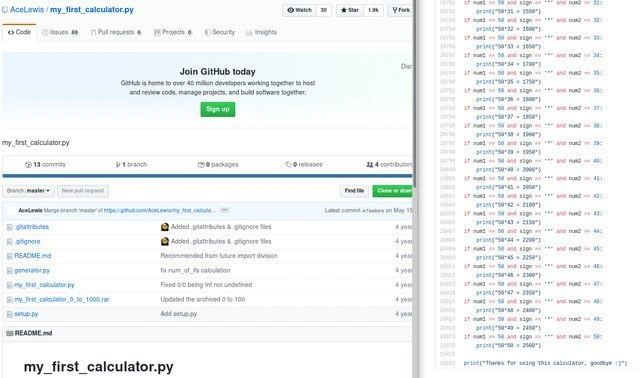
For a junior developer or someone new to coding, let's break down what's happening in this meme. The left side shows a GitHub repository page for a project named my_first_calculator.py. GitHub is an online platform where developers store and share their code. So this person uploaded their first calculator program to the internet. So far, so good.
Now, the funny (and educational) part is how that calculator is implemented. Normally, if you want to program a calculator in Python, you'd do something straightforward like:
result = num1 + num2
print(result)
That single line num1 + num2 makes the computer actually calculate the sum of num1 and num2. But in this repository, the author didn't do that. Instead, they wrote hundreds of if statements for every possible combination of numbers! An if statement is a basic programming construct that runs some code only if a condition is true. For example, if num1 == 2 and sign == '+' and num2 == 2: means "if the first number is 2 and the sign is '+' and the second number is 2, then...". In a sane calculator, you'd handle any numbers with a general formula, but here they've specifically handled 2 + 2, 2 + 3, 2 + 4, and so on, each with its own if.
Hard-coding means directly embedding answers or data in code rather than calculating or generating them. This calculator is entirely hard-coded. It probably has lines like:
if num1 == 2 and sign == '+' and num2 == 2:
print("2+2 = 4")
if num1 == 2 and sign == '+' and num2 == 3:
print("2+3 = 5")
# ... and on and on ...
This approach works technically for the specific cases it's coded for, but it's a terrible idea in practice:
- It's extremely repetitive. The code is doing almost the same thing over and over with only slight differences (different numbers each time). In programming, repetition like this is considered bad practice. We have a motto: Don't Repeat Yourself (DRY). If you see yourself copy-pasting code or writing the same pattern 1000 times, that's a hint you should use a loop or a formula instead.
- It's error-prone and hard to maintain. Imagine you found a bug or wanted to change how the calculator works. You would have to find and update every single
ifline (there might be hundreds or thousands of them!). The more places you have a piece of logic duplicated, the more chances for mistakes and the harder it is to update everything correctly. - It’s limited. Because the author explicitly wrote out only results up to a certain number (0 to 1000 as the file name suggests), this "calculator" cannot handle anything beyond that range. If you try
1001 + 5, it probably won't know what to do, because there's noifcase for that. A proper calculator usingnum1 + num2would handle any size of number that Python can handle (which is virtually any integer until you run out of memory). - There are no loops or general logic. A loop in programming lets you repeat an action for many values without writing each case by hand. For example, a simple loop could handle all numbers from 0 to 1000 in just a few lines, rather than writing each one as a separate
if. But perhaps loops or proper arithmetic were too mainstream for this author (or more likely, they didn't know how to use them yet), so they went for the brute-force, manual route.
The term spaghetti code is often used to describe code that is tangled and messy, much like a bowl of spaghetti. It usually happens when a program's structure is chaotic or overly complicated. In this case, it's not so much tangled logic as it is just a giant, unwieldy blob of repetitive code. It's like taking a simple idea and stretching it into a very long, twisty rope of if statements. Any programmer reading this will have a tough time understanding or modifying it, because they'd have to scroll through pages of nearly identical lines.
Another term, code smell, refers to a hint that something is off with the code's design. This many hard-coded conditions is a big code smell. It "smells" like the programmer didn't approach the problem the right way. Usually, when experienced developers see something like this, alarm bells ring, because it suggests the author was either extremely new to programming or was intentionally writing a joke program.
On GitHub, seeing "19 commits" for this project means the author saved their progress 19 times while building this. A commit is basically a snapshot of changes (like a save point) in the code repository. One commit might have added the cases for all sums involving 50, another commit for sums involving 51, and so on. It’s humorous to imagine those commit messages: "Added all results for 51+...", "Now covering 52+...". Usually, each commit should add a meaningful feature or fix; here, each commit was probably just adding another big chunk of repetitive lines.
In summary, for a junior programmer, the lesson is: don’t hard-code everything. If you find yourself writing dozens of similar lines, step back and think, "Can I use a variable, a loop, or a formula to handle this in a smarter way?" In Python, making a calculator is as simple as using the +, -, *, or / operators on your input numbers and printing the result. There's no need to pre-write every possible answer. This meme exaggerates what happens when someone doesn't know that yet (or is doing it as a parody) – you get a ridiculously overcomplicated program that makes other developers facepalm and laugh at the same time.
Level 3: Brute-Force Arithmetic Overkill
This meme spotlights a GitHub repository where the developer has literally hard-coded every single addition result between 0 and 1000 in Python. The right panel reveals an absurd wall of if statements in the file my_first_calculator_0_to_1000.py. Each condition checks specific values of num1, sign, and num2, and then prints a precomputed result. For example:
if num1 == 36 and sign == '+' and num2 == 55:
print("36+55 = 91")
if num1 == 37 and sign == '+' and num2 == 55:
print("37+55 = 92")
# ... and so on, covering every combination up to 1000.
Notice that the code isn't actually performing 36 + 55 on the fly – the answer 91 is literally written out. The + sign is only being used in a string and an if condition, not as an arithmetic operator. In other words, the program isn't "doing math"; it's just printing out pre-recorded answers that a human put in.
This is a brute-force approach to implement a calculator: rather than using arithmetic operations or algorithms, it pre-enumerates the answer for every possible input. For seasoned developers, this is a massive code smell. Instead of writing a general solution (like using print(num1 + num2) to handle any numbers), the codebase contains thousands of repetitive conditional checks. It's the opposite of the DRY principle ("Don't Repeat Yourself") – in fact, this is "Repeat Yourself 1000+ Times."
The humor comes from the sheer overkill and poor code quality:
- Maintainability Nightmare: If someone wanted to support numbers beyond 1000 or add new operations (like subtraction or multiplication), they'd have to manually add countless more
ifstatements. It's virtually unmaintainable and scales terribly. One small change means editing a mind-numbing number of lines. - Inefficient Execution: Checking potentially thousands of conditions to identify the right answer makes the program much slower than it needs to be. A normal calculator would directly compute
num1 + num2with one quick operation (CPUs are extremely fast at simple arithmetic). But this approach is like searching through a long list of known answers every time you want to add two numbers. It's computational overkill – the program is doing way more work than necessary for each calculation. - Git Commit Irony: The repository shows 19 commits. One imagines the commit history might be filled with messages like "Added more cases up to 500" and "Covered additions up to 1000". It's both funny and painful to think about. The presence of a
generator.pyfile suggests the author wrote a script to auto-generate this monstrosity, rather than typing it all by hand. So they knew how to write loops or code to create output, but the end result is still a huge hard-coded script. It's a bit like building a machine that prints out an entire math textbook of answers. - Spaghetti Code: This kind of code is often called spaghetti code – it’s tangled and overly long, making it hard to follow. Here it's not twisty logic, but the term applies because there's no clear structure or abstraction, just an endless stream of conditions. Reading or debugging this would be a nightmare. If something went wrong with, say, the result for
250 + 300, you'd have to sift through the sprawl of code to find where that case is handled. - No Actual Calculation: The code never actually uses Python's ability to add numbers on the fly. The logic for addition isn't implemented algorithmically at all. The program is basically a giant lookup table of inputs to outputs. It prints
"36+55 = 91"not by calculating 36 plus 55, but because somewhere in its sea ofifstatements, there's a line with that answer hardwired. This is deeply ironic for a calculator program.
In essence, the repository is a parody (or perhaps a genuine novice attempt) of how not to code. It highlights a fundamental misunderstanding of what programming is supposed to do: automate and generalize tasks, not manually enumerate every scenario. Seasoned developers see it and chuckle because it exaggerates newbie mistakes to an absurd extreme. It's like a cautionary tale in code form, showing how an innocent idea ("I'll just handle all cases!") can spiral into a ridiculous solution.
The meme's caption "AI-Powered Calculator" adds an extra layer of irony. Of course, there's no real Artificial Intelligence here – but calling it that pokes fun at how some "AI" solutions are basically just big tables of precomputed answers. This program is as "intelligent" as a thick book of math tables. For experienced engineers, the whole thing is equal parts cringe and comedy. They remember their own early coding blunders (though probably not this extreme) and also appreciate how far proper programming practices can take us away from such manual, brittle solutions. It's a meme that educates by showcasing an outrageous example, making the point with humor.
Description
A composite image showing a GitHub repository on the left and a snippet of its Python code on the right. The repository is named "my_first_calculator.py" by user AceLewis. The code snippet reveals a shockingly inefficient implementation: instead of performing mathematical operations, the calculator works by using a massive chain of `if` statements that explicitly check for every possible combination of two numbers (e.g., `if num1 == 50 and sign == '*' and num2 == 32: print("50*32 = 1600")`). The line numbers in the snippet are already in the tens of thousands, implying an enormous file size. This meme is a legendary example of hilariously bad coding practice, often ironically labeled "AI-Powered" or "machine learning" by the community. It resonates with experienced developers as the ultimate anti-pattern - a brute-force, unscalable, and computationally absurd solution to a trivial problem, representing the polar opposite of elegant, algorithmic thinking
Comments
7Comment deleted
I see you've implemented the O(n*m) calculator. It's a bold strategy, Cotton. Let's see if it pays off when they ask for floating-point support
Our “AI-powered” calculator ships with an if-statement for every possible sum up to 1 000 - finally, linear-time arithmetic with exponential code-review debt
This is what happens when you bill by commits instead of features - suddenly a calculator needs 33 commits to add two numbers, and each print statement becomes a critical hotfix worthy of its own deployment
When your calculator project has more commits than lines of actual logic, and each commit is essentially 'if input equals this exact number, print this exact answer' - congratulations, you've invented the world's most elaborate lookup table. This is what happens when someone takes 'test-driven development' too literally and forgets the 'development' part. At this rate, supporting floating-point arithmetic would require a commit history longer than the Bitcoin blockchain
When the ALU is just a 500k‑line lookup table, you’ve optimized latency to O(1) and technical debt to O(n²)
Tkinter on GitHub Pages: because nothing screams 'cloud-native' like a browser hunting for a nonexistent Python interp
my_first_calculator.py: addition via a 1,000‑case if ladder - branch‑driven development where the CPU fights branch prediction and Git fights the PR; division is “not recommended” because the diff won’t converge