Skip to content
DevMeme
384 of 7435
The Infinite Loop of Unresolved GitHub Issues
Debugging Troubleshooting Post #448, on Jun 14, 2019 in TG

The Infinite Loop of Unresolved GitHub Issues

Why is this Debugging Troubleshooting meme funny?

Level 1: Is It Fixed Yet?

Think of it like this: you have a favorite playground slide that got a crack in it back in 2017. You remember that the park officials roped it off and said they’d fix it soon. Now it’s 2019, and you excitedly run to the playground expecting the slide to be as good as new – after all, it’s been two years! But when you get there, not only is the slide still broken, you see a note someone taped on it just last week asking, “Any update on the repair?” In that moment, you’d probably stomp your foot and shout, “Oh, come on!” or maybe something not-so-polite. That’s exactly what this meme is about: the frustration when you assume something broken was surely fixed by now, but discover it’s still broken and people are still waiting. It’s a funny-sad feeling, like waiting forever for a problem to be solved and finding out you have to keep waiting even longer.

Level 2: Issue Limbo

Let’s break down what’s happening in this meme in simpler, newbie-friendly terms. Imagine you’re a developer encountering a strange error or bug in your project. You don’t know what’s wrong, so you do what most developers do: Google the issue. You type in the error message or symptoms, hoping to find a solution. Sure enough, Google returns a result on GitHub – specifically a GitHub issue that sounds exactly like your problem.

GitHub Issues are essentially an official place to report bugs or request enhancements for an open-source project. Think of it like a public to-do list or a helpdesk for the code. When someone discovers a bug in a library or tool, they (or someone else) open an issue on that project’s GitHub repository describing the problem. Maintainers and contributors can discuss it there, share workarounds, or attach fixes. Issues have timestamps and comments, so you can see when it was opened and what’s happened since.

Now, in the meme, our developer finds an issue that was opened way back in 2017. The inner monologue goes: “Ah, 2017! This must’ve been fixed by now!” This line captures an assumption many of us would make: if a bug was reported years ago, surely the developers have fixed it in the meantime, right? Software usually evolves quickly. Projects often follow semantic versioning – a fancy term for a version numbering system like MAJOR.MINOR.PATCH (for example, going from version 2.3.4 to 2.3.5 means a small patch, and 2.3 to 2.4 means a new minor update; jumping to 3.0 would be a major overhaul). The hopeful thought is that between 2017 and now, there have been updates and patches that resolved this issue. In other words, the developer expects that the issue is closed and the bug is gone in the latest version of the software.

So, they click on the issue and start reading. The meme specifically mentions scrolling through 4 pages of comments. That indicates this issue has a long discussion thread – lots of people chimed in over time. (On GitHub, if an issue has many comments, you might have to click through multiple pages to read them all, page 1, 2, 3, etc.) As our developer skims through, they’re likely looking for an official solution or a comment from a maintainer saying “Fixed in version X.Y.Z” or perhaps a workaround. The expectation is: somewhere near the end of this thread, someone will declare victory and close the issue.

Instead, the twist comes when they reach the most recent comment. It’s from a user named _h4t0n and it was posted just 7 days ago relative to the current date (which in the meme is 2019). And what does that comment say? Essentially, “any progress on this?” – meaning that person is asking if there’s been any update or fix. This is a big red flag that the issue is still open and unresolved. If someone is asking for progress now, it means there hasn’t been a resolution yet. The developer’s reaction, “GODDAMMIT,” is pure frustration. It’s the feeling of “Oh no… this bug is still not fixed and I’m affected by it.”

Let’s unpack why this scenario is so relatable to developers, even those early in their careers:

  • Dependencies and waiting: Usually this bug is in a dependency, which means it’s code your project uses but that you didn’t write yourself (often an open-source library). If a dependency has a bug, you often rely on the maintainers of that project to fix it. You can’t easily fix it from your side unless you modify that library’s code (which is possible, since it’s open source, but not always straightforward for a newcomer). So you’re stuck waiting for the official fix. This can feel powerless – like you’re dependent on someone else’s work and schedule.
  • Open source maintenance is hard: Many open-source projects are maintained by a small team or even a single person, often doing it in their spare time. So issues, especially tricky ones, can stay open for a long time if they’re not top priority. It’s not like a big company’s paid product where there’s a dedicated support team fixing bugs on a deadline. Maintenance_backlog is a term for the pile of issues and tasks that maintainers haven’t gotten to yet.
  • Stale issues: On GitHub, an issue that’s been open a long time without activity is sometimes labeled “stale” (there are even bots that auto-mark issues as stale after X days of inactivity). A stale_github_issue just means it’s been sitting there without resolution for a while. However, the moment someone comments (like _h4t0n did), it’s no longer stale – the conversation becomes active again. This can ping the maintainers’ radar once more.
  • “Any progress on this?” comments: Newer developers might not know, but just commenting “Any update?” doesn’t by itself help solve the bug. It’s more a cry of frustration or a way to show “hey, I care about this issue too.” Maintainers often prefer if you add new information, or a thumbs-up on the original issue (many projects say “👍 upvote the first post if you have this problem” to gauge interest). But when you have nothing else, you might still ask. This is called issue_comment_bump in the tags – bumping the issue in the queue by commenting. It’s a bit like nudging the person responsible, except in open source there’s often no formal obligation for them to respond promptly.
  • Scrolling through threads: The meme emphasizes scrolling through four pages, which is something any dev can picture at 2 AM: bleary-eyed, reading an endless thread of comments – some people posting code snippets of possible fixes, others saying “still broken for me,” maybe a maintainer popping in occasionally with “we’ll get to this when we can”. It’s tedious and it eats up time you’d rather spend actually fixing your project. That’s why the description calls it a “thread that stalls productivity.” The developer isn’t coding now; they’re digging for answers in a long conversation.

For a junior dev, encountering this can be confusing and disheartening. You might think, “Did I do something wrong? Why is this not fixed if it was reported so long ago?” It’s an early lesson in how software development, especially with external libraries, sometimes involves waiting or working around other people’s unfinished business. It’s not your fault – it’s a known bug that’s simply in limbo. The meme’s situation is very relatable: even if you haven’t hit such an old issue yet, you eventually will as you work with more tools and libraries. And when you do, you’ll remember this joke and probably let out your own “goddammit” (or choice expletive).

To sum up the sequence of events in a more step-by-step way:

  1. You encounter a bug in your project and search online for answers.
  2. You find a relevant GitHub issue that describes your exact problem.
  3. You notice the issue was opened in 2017 (a while ago), so you assume it’s probably been resolved by now.
  4. You start reading through the issue’s comments (there are a lot of them, spanning multiple pages).
  5. Instead of finding a solution, you see the latest comment was very recent (just a few days ago) and is someone else asking if there’s been any fix.
  6. You realize this bug is still open after all this time. There’s no fix readily available.
  7. You feel a wave of frustration – the humorous exaggeration is yelling “GODDAMMIT,” because you now have to deal with a problem you hoped would already be solved for you.

This meme is basically a rite-of-passage moment in the Developer Experience (DX): understanding that not all bugs have quick answers on StackOverflow or GitHub, and sometimes you’ll find out you’re treading on well-worn, yet unresolved territory. The tags like DeveloperFrustration, DependencyHell, and SharedPain are there because this really is a shared pain across the community. Everyone from junior devs to seniors has felt the sinking feeling of “Oh no… it’s an old open bug and I’m stuck with it.” The only lighthearted comfort is knowing you’re not alone — as evidenced by that poor soul _h4t0n who commented recently, and by the thousands of retweets/likes this meme probably got. It’s a little bonding moment over the absurdity of software bugs that just won’t die. So, as a junior developer, don’t be surprised when this happens to you. It doesn’t mean you’re bad at coding; it’s just an inevitable part of working with a vast ecosystem of software. And hey, on the bright side, sometimes these stories have happy endings: a frustrated user like you might become motivated enough to fix the bug themselves and contribute the patch. Open source means you can be the hero… just maybe not at 3 AM when you’re busy cursing at the screen!

Level 3: The Bug That Wouldn't Die

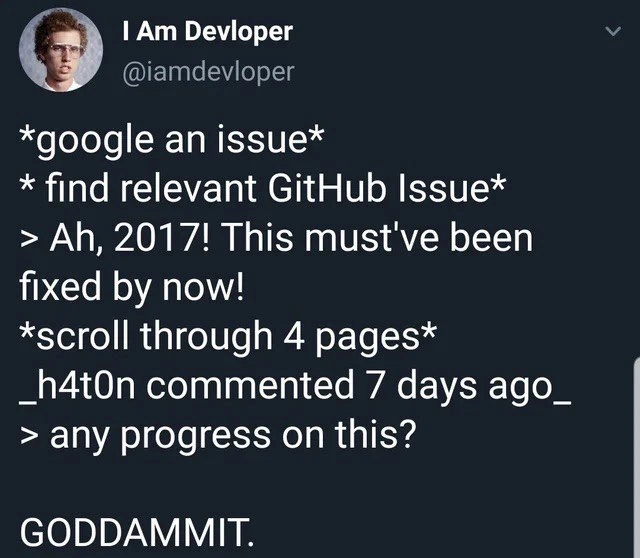
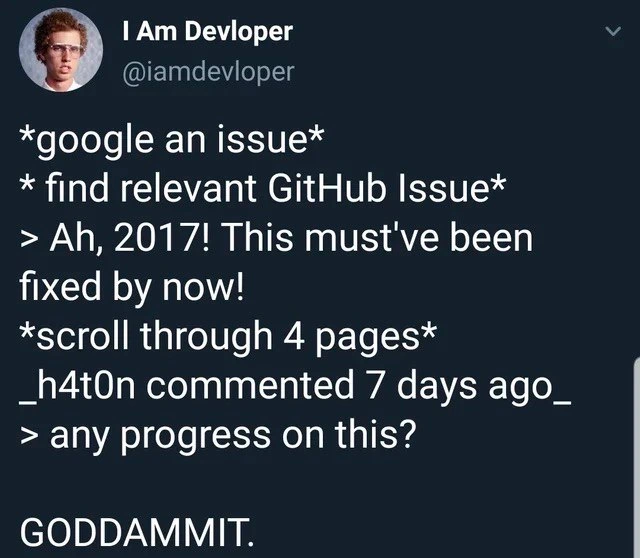
In the life of open source software, some bugs achieve a kind of legendary immortality. This meme nails that scenario: a developer finds a GitHub Issue from 2017 describing the exact bug they're experiencing. In theory, two years (2017 to 2019 in the tweet) is an eternity in software development – enough time for multiple release cycles, patches, maybe even a major version bump. Surely it’s been fixed by now, our intrepid developer thinks. But then comes the brutal revelation: after scrolling through four pages of discussion on that issue, the latest comment (from just a week ago!) is a user essentially begging, “any progress on this?” In other words, the bug is still unresolved. The punchline hits with a gut-punch of recognition: GODDAMMIT. Every experienced developer has been there, hence the dark humor and shared pain.

Why is this so funny (or painful) to seasoned devs? Because it satirizes a common industry pattern: long-standing bugs in dependencies that persist across releases. We’ve all had that semantic versioning optimism – you see a dependency updated from 1.x to 2.x and assume old issues were resolved in the process. Ha! Often reality says otherwise. The tag semantic_versioning_lies captures this perfectly: just because a library’s version number jumped doesn’t guarantee that pesky issue #123 from 2017 was addressed. It might have been postponed for the mythical “next major release,” which then postponed it again. In the meantime, people comment occasionally (“h4t0n commented 7 days ago”) effectively performing issue necromancy – reviving the dead thread with a desperate “any update?” that rings through the void. Maintainers usually cringe at such comment bumps (they’d prefer a 👍 reaction or, even better, a pull request), but it’s hard to resist when you’re the one stuck. This ritual of the “issue_comment_bump” is so common that it’s basically a meme within open source circles. Experienced devs chuckle (and grimace) because they likely wrote a similar “Any progress?” plea at 3 AM after exhausting all other options.

The humor also lies in shared trauma. The meme’s script-like format (*google an issue* → find GitHub issue → “Ah, 2017! fixed by now!” → *scroll* → recent comment “any progress?” → “GODDAMMIT.”) reads like a late-night coding horror story. It’s funny because it’s true – nearly every developer has gone bug-hunting online and discovered a thread older than some interns, still waiting on a resolution. It’s a subtle roast of our dependency on community-maintained projects: open source is amazing, but it often runs on volunteer time, so non-critical bugs can languish for years. There’s an unwritten veteran rule: the older the issue, the less likely it’s fixed – unless someone stepped up to fix it. Seasoned engineers often approach GitHub issues with caution: check the open/closed status, sort by recent comments, and manage your expectations. If you see dozens of comments and the issue is still open, you know you might be in for a wild ride (or a long night crafting a workaround). The meme exaggerates this emotional rollercoaster for comedic effect, but not by much!

We can also nod to the reality of dependency hell here. This bug isn’t in the developer’s own code – it’s in a library (a dependency) their project relies on. That ups the frustration: you’re at the mercy of someone else to fix it. Sure, you could fork the repo and patch it yourself (we’ve all considered the “fix it and open a PR” route), but maybe it’s a complex issue or you’re crunched for time. so you pinned your hopes on the maintainers’ having solved it already. Discovering that hope was dashed – the issue is still alive in the backlog – feels like being stranded. The tags like maintenance_backlog and open_source_triage hint at why such issues persist. Often, maintainers have hundreds of issues to triage, and unless an issue is causing major breakages for many users (or a paying sponsor demands it), it can slip through the cracks. This isn’t (usually) malice or incompetence; it’s the reality of software maintenance with limited resources. As a result, some bugs gain undead status: periodically reappearing when someone new stumbles upon them, but never fully laid to rest.

The meme resonates especially with those who have dealt with legacy systems or long-lived projects. It’s a reminder that old bugs don’t magically fix themselves. In fact, time often makes them harder to address – the codebase changes around them, or everyone’s built brittle workarounds on top of the buggy behavior. Fixing it “properly” might now introduce breaking changes, so the issue lingers in an uneasy limbo. This is the quiet horror behind the humor: the longer a bug lives, the more it ossifies into the system’s reality. Seasoned devs have a hint of cynicism because they’ve seen even simple-sounding bugs (like a minor UI glitch or an off-by-one error) remain unresolved for ages, due to hidden complexity or lack of incentives to fix. Dependency bugs are particularly infamous: you might update to the latest version hoping for relief, only to find the same bug biting you release after release – a feeling this meme captures with the “Ah, 2017!” false hope moment.

In an even larger context, this tweet pokes at the challenges of collaborative software development. It’s essentially an entire mini-drama about communication breakdown: A bug was reported on GitHub (which is great), but then… what? Perhaps a contributor tried to fix it and the PR got abandoned or stuck (see tag abandoned_pr). Maybe maintainers couldn’t agree on the solution, or they labeled it “help wanted” but no one volunteered. So the issue just sat there, gathering comments and +1s. When _h4t0n comments “any progress?”, it’s like the final act of this play – echoing the original poster’s frustration years later. To a seasoned developer, this is both hilarious in its familiarity and sobering: it highlights the long memory of the internet. That 2017 issue is a public artifact, easily rediscovered by anyone Googling that problem. It doesn’t matter that it’s 2019 (or 2023, or 2024…) – if it’s not closed, it’s effectively current. In open source, time is weird: a two-year-old unresolved bug can feel fresh when you encounter it, while a two-week-old closed issue can feel ancient history if a patch was released. This tweet exaggerates it for comedic timing, but truly, seeing “commented 7 days ago” on a 2+ year old issue is a textbook oh no moment in a dev’s journey.

In summary, at the senior engineer level, this meme is a wry commentary on software maintenance realities. It combines the familiar narrative beats (searching Google, scanning GitHub issues, clinging to optimistic assumptions, then crushing disappointment) with a real pain point: the endless waiting for a fix that may never come. It’s funny because it’s cathartic – we laugh to keep from crying about all those hours lost to reading stale threads and all the “GODDAMMIT” moments we’ve muttered under our breath. As cynical and battle-hardened as we may become, a part of us always hopes the next time will be different… and that’s why this scenario keeps happening. The meme lets us collectively facepalm at our optimism and the open-source ecosystem’s quirks, then get back to work (perhaps muttering, “If you want it fixed, you gotta fix it yourself...”).

Description

A screenshot of a tweet from the popular satirical account 'I Am Devloper' (@iamdevloper), which uses a picture of Napoleon Dynamite as its profile icon. The tweet is on a dark background and narrates a universally frustrating developer experience in a series of steps written with asterisks and greater-than signs. It reads: '*google an issue*', '*find relevant GitHub Issue*', '> Ah, 2017! This must've been fixed by now!', '*scroll through 4 pages*', '_h4t0n commented 7 days ago_', '> any progress on this?', ending with a climactic 'GODDAMMIT.'. This meme perfectly captures the sinking feeling a developer gets when they discover that a critical bug they're facing is not only known but has been languishing in an open-source repository for years without a fix. The humor lies in the shared pain and the cycle of hope turning to despair, a common occurrence when relying on community-maintained dependencies
Comments

7
Anonymous ★ Top Pick The five stages of debugging with GitHub: Denial ('It can't be this old'), Anger ('Why is this still open?!'), Bargaining ('Maybe I can work around it...'), Depression ('Four pages of comments and no solution'), and Acceptance ('Okay, time to fork the repo')
  1. Anonymous ★ Top Pick

    The five stages of debugging with GitHub: Denial ('It can't be this old'), Anger ('Why is this still open?!'), Bargaining ('Maybe I can work around it...'), Depression ('Four pages of comments and no solution'), and Acceptance ('Okay, time to fork the repo')

  2. Anonymous

    Nothing says "enterprise-grade" like a six-year-old GitHub issue quietly converted into your production feature flag

  3. Anonymous

    The GitHub issue from 2017 with recent activity is just a dependency waiting to become a CVE with a CVSS score of 9.8 that you'll have to explain to the board why your entire infrastructure relies on it

  4. Anonymous

    Ah yes, the classic developer archaeology expedition: you Google an error, find a GitHub issue from the Obama administration, think 'surely this ancient artifact has been resolved,' scroll through pages of '+1' comments and 'any updates?' inquiries, only to discover the most recent comment is from last week asking the same question. It's the software equivalent of finding a 'CLOSED: WONTFIX' tombstone in a graveyard you're still actively visiting. The real technical debt isn't in the codebase - it's in the collective trauma of discovering that your 'new' problem has been someone else's 'old' problem since before Docker was cool

  5. Anonymous

    GitHub issues: the only distributed system where 'eventual consistency' means 'eternally open'

  6. Anonymous

    Enterprise translation of '2017 GitHub issue': survived three re-orgs, two cloud migrations, and your microservices rewrite - still waiting on a volunteer maintainer’s weekend SLA

  7. Anonymous

    Enterprise roadmap meets OSS reality: the CAP theorem reinterpreted - pick two: consistency, availability, or a maintainer with time

Use J and K for navigation