Skip to content
DevMeme
385 of 7435
Compiler Warnings Are Merely Suggestions
Compilers Post #449, on Jun 14, 2019 in TG

Compiler Warnings Are Merely Suggestions

Why is this Compilers meme funny?

Level 1: Hiding the Mess

Imagine your mom or dad tells you to clean your messy room. You have toys all over the floor and clothes thrown everywhere – it’s a big mess. You don’t want to spend time putting everything away properly, so instead you hide the mess: you shove toys under the bed, cram clothes into the closet, and push some books behind the dresser. Now the floor is clear and the room looks clean. When your parent comes to check, they see a tidy floor and say, “Great job, your room is clean!” They don’t open the closet, so they never see the hidden piles of stuff. You feel proud and relieved – you got praised for cleaning up, even though you know you just hid everything out of sight. This meme is funny because the programmer is basically doing the same thing, but with computer code. The program “ran” and the computer said “All good!” (just like your parent seeing a clean floor). But there were lots of little problems in the code (warnings) that got swept under the rug. The developer is celebrating like a superhero because, at first glance, he met the goal: the code works and no one is yelling about errors. It’s like he got away with it. We laugh because he’s treating that sneaky success – hiding issues and still passing – as a big victory, and sometimes in real life, that’s exactly how it feels when you’re just happy something works.

Level 2: Compiling with Warnings

First, let’s break down what’s happening technically. Compiling code means converting the source code you wrote (in C++, Java, etc.) into an executable program or machine code. A compiler is the tool that does this. When you compile a program, the compiler can emit two kinds of messages: errors and warnings.

  • Errors are serious problems that violate the language rules or make it impossible to produce a valid program. For example, forgetting a semicolon in C++ or referencing a variable that doesn’t exist will cause a compile error. The compiler will stop and not create the program until you fix the error.
  • Warnings are softer alerts. They indicate something is unusual or potentially incorrect, but not so bad that the compiler has to stop. The compiler will still generate the program, but it’s basically saying, “Hmm, you might want to check this.” For example, if you declare a variable and never use it, that’s likely a mistake, so the compiler will warn you. But it doesn’t prevent the program from being built.

To illustrate, consider this simple C code:

#include <stdio.h>

int main() {
    int x = 42;  // This variable x is never used - the compiler might warn about this
    printf("Build succeeded!\n");
    return 0;    // Returning 0 means the program executed successfully (zero exit status)
}

When compiled with warnings enabled (e.g. using gcc -Wall), the compiler might output a warning like “warning: variable 'x' set but not used”. But it will still create the program (an executable file) because an unused variable isn’t a show-stopper. If you run the program, it will still print “Build succeeded!” as we coded. The compiler also exits with status 0, which is the way it signals “Everything compiled successfully (no errors)” to the operating system.

Now, what does “CI passes” mean in the title? CI stands for Continuous Integration, which is a development practice and set of tools that automatically build and test your code whenever you make changes. Think of it like a robot assistant that constantly checks your work. In a CI build pipeline, if any step fails (like the code doesn’t compile or a test fails), it will mark the build as failed (often shown as a red X or red light). If everything succeeds (exit status 0 from compile and tests), you get a green checkmark or green light. Developers love seeing that “green build” because it means they can merge their code or deploy the app without blockers.

However, by default most CI pipelines treat compiler warnings as just informational. They won’t fail the build as long as the final result is an executable. So in our meme scenario, despite 13,424 warnings scrolling by, the compiler ultimately said “Finished with success” (since there were 0 errors). The CI system sees a success code and marks the pipeline green ✅. To the CI tool, warnings don’t count as failure unless someone explicitly sets a rule for that.

So the senior developer in the picture is celebrating because “it compiles!” – meaning the code went through the compiler and an application was produced at the end. This is a common saying: “Hey, it compiles, ship it!” It’s a tongue-in-cheek way of implying that as long as the code runs, it’s good enough (even if it’s not truly good). In reality, having thousands of warnings is definitely not best practice, but the joke is that we sometimes ignore them just to keep things moving. Fixing 13,424 warnings would be a massive task, so many teams postpone that work.

Let’s talk about why those warnings pile up and why people don’t address them immediately:

  • Time and Productivity: Developers are often on tight schedules to add features or fix critical bugs. Cleaning up warnings (which might not be causing immediate failures) can feel like a lower priority. It improves CodeQuality, sure, but it doesn’t add new functionality that users see. So it gets pushed aside in favor of work that directly delivers value or meets a deadline.
  • Technical Debt: This term describes the accumulation of little problems in code that haven’t been fixed. It’s like borrowing time – you “save time” now by not fixing warnings, but you incur a debt that might cost you more time later when those unchecked issues cause bugs or make the code harder to modify. 13,424 warnings is a huge amount of technical debt! Each warning is a clue that something might be off. Ignoring them for too long is like ignoring a leaky faucet; eventually you get a flood.
  • Tools and Settings: There are ways to rein in warnings. For instance, many compilers have an option to treat warnings as errors (so that any warning would actually stop the build). Some projects adopt this to enforce a zero-warning policy. But if that flag isn’t turned on (or can’t be, because the codebase already has too many warnings), then the compiler will happily compile with warnings. Likewise, CI servers can be configured to fail a build if the number of warnings exceeds a threshold, but in this meme’s story, clearly no such rule is in effect.
  • Culture and Attitude: A junior developer might see a wall of warnings and worry they broke something. A senior developer might chuckle and say, “Those warnings have been there for ages, the code still runs.” Over time, teams can become desensitized to warnings if nothing bad immediately happens. The meme exaggerates this attitude—showing a dev acting like a superhero for getting a clean compile despite the mess. It highlights a kind of battle-worn pragmatism: sometimes you’re just happy the code runs, and you’ll deal with the fallout later.

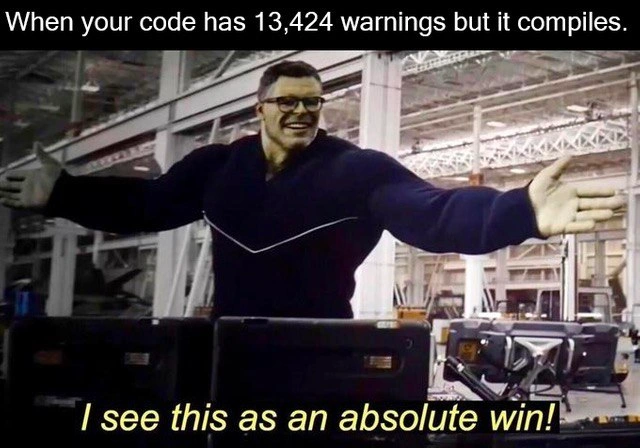
Finally, the image itself is a reference to a popular Marvel movie scene. That big smiling character is Bruce Banner as “Professor Hulk” from Avengers: Endgame. In that scene, he successfully performs a tricky experiment (with some wacky side effects) and happily declares, “I see this as an absolute win!” It’s funny because in the movie things weren’t perfect, but he was thrilled they worked out at all. Developers use this scene as a reaction meme to joke about situations where something works just enough to call it a success. Here, compiling code with 13k warnings is exactly that kind of situation – not ideal at all, but hey, we got a runnable program, so we’ll take the win. The lab/warehouse setting in the background reinforces the engineering vibe: it’s like the developer concocted a solution in their workshop that barely held together. He’s grinning and spreading his arms as if he saved the day, and in a sense, he did – the build didn’t fail.

So, this meme resonates with developers because it’s about celebrating a small victory (the code compiles) in the face of a big underlying problem (all those warnings). It’s tagged under Compilers, CodeQuality, BuildSystems_CICD, and TechnicalDebt for good reason: it literally involves a compiler, highlights code quality issues, touches on the CI build process, and showcases the technical debt of ignoring warnings. And of course, it’s classic DeveloperHumor – finding a lighthearted angle on the quirks of programming life.

Level 3: Continuous Integration, Continuous Ignorance

In this meme, a senior developer stands triumphant in a high-tech lab (just like Professor Hulk from the Avengers), beaming with pride. Why? Because even though the compiler spewed 13,424 warnings during the build, the code still compiled and the CI pipeline gave a green checkmark. The top caption sets the scene: “When your code has 13,424 warnings but it compiles.” And at the bottom, our hero-dev declares:

“I see this as an absolute win!”

This humor hits close to home for experienced engineers. It satirizes the real-world habit of treating a successful build (no fatal errors, process exits with 0) as victory, even if the compiler log looks like a yellow-pages directory of code issues. As long as there’s a zero exit status, Continuous Integration considers the build PASSED. All those warnings? They scroll by in yellow text (or get tucked away in an artifact), but they don’t flip the BuildPipeline red. So the team, under pressure to deliver, breathes a sigh of relief. It’s green – ship it! This is the DeveloperHumor of living with debt: the code’s screaming “something’s off!” thousands of times, but management only hears “Build succeeded.”

Seasoned devs know this scenario isn’t just comedy – it’s reality on many projects. Over years, software accumulates technical debt in the form of ignored compiler warnings and TODO comments nobody ever TODOs. Perhaps a legacy module throws hundreds of deprecation notices, or a new library update suddenly floods the console with type conversion warnings. Ideally, you’d fix them for better CodeQuality. But in practice? Deadlines loom, tests are (mostly) passing, and everyone’s incentivized to keep that CI/CD pipeline green. It’s easier to celebrate the one thing that went right (it compiles!) than confront the 13,424 things that are technically not right.

This meme nails the cognitive dissonance: pragmatism vs. purity. The bold superhero pose parodies how a senior dev might react after wrestling a gnarly codebase into compiling. They know the code is far from perfect – it might be throwing warnings like confetti – but hey, no CompilerErrors means no show-stoppers. It’s a cheeky acknowledgment that in the trade-off between shipping features and polishing code, shipping often wins. As the sarcastic saying goes, “Works on my machine and now it builds in CI – looks like we’re done here.” The superhero dev isn’t proud of the warnings, but after days of chasing a green build, they’ll take any win they can get.

There’s also a darkly funny undertone here about BuildSystems culture. Many build pipelines don’t treat warnings as fatal. You can configure flags like -Werror (in GCC or Clang) to treat warnings as errors – essentially fail the build if even one warning pops up. But turning that on in a codebase that’s spitting out 13k warnings? That’s a one-way ticket to build-failure city. It would halt development until someone fixes every last one (good luck convincing the product manager). So teams quietly agree to live with warnings. They might even add // TODO: fix warnings later comments or suppress certain warnings entirely. The unwritten pact is: as long as merges aren’t blocked and the app runs, those warnings can wait. Continuous Integration stays happy, even if it means a bit of Continuous Ignorance regarding code health.

Every senior engineer has war stories in this vein. Perhaps they inherited a huge codebase where compiling with all warnings on for the first time produced more output than War and Peace. Or they’ve seen trivial warnings (like an unused variable) snowball into real bugs because no one noticed the one truly dangerous warning in the noise. But in the everyday trenches, you learn to pick battles. If something compiles at 5 PM on a Friday with zero errors (and a few thousand warnings), you deploy and pray nothing blows up over the weekend. The relief is real, if short-lived.

Ultimately, this meme gets a laugh by showing a developer-hero claiming “absolute win” while standing in a metaphorical warehouse full of red flags (or at least yellow caution flags). It’s the perfect encapsulation of a senior dev’s survival mindset: better a build with warnings than no build at all. Sure, those warnings are festering problems, but that’s Monday’s problem. Today, we celebrate that our code actually compiled and passed CI. In the absurd world of software deadlines, sometimes that alone feels like saving the world.

Description

This is a meme using the 'I see this as an absolute win!' format, which features a still from the movie 'Avengers: Endgame'. The image shows Professor Hulk, a large, muscular green figure wearing glasses and a dark sweater, standing in a workshop or lab setting. He is smiling broadly with his arms outstretched in a gesture of triumph. The text overlay at the top of the image reads, 'When your code has 13,424 warnings but it compiles.' At the bottom, a subtitle in yellow text says, 'I see this as an absolute win!'. The humor stems from the developer's experience of prioritizing a successful compilation over code quality. Compiler warnings are designed to alert developers to potential problems, such as deprecated syntax or logical oversights that aren't critical enough to stop the build process. A vast number of warnings, like the 13,424 mentioned, signals a deeply flawed or poorly maintained codebase. For an experienced engineer, this meme is a relatable joke about the pragmatic, if risky, trade-offs made under pressure, where simply getting the code to run is celebrated as a major victory, despite the mountain of technical debt it represents
Comments

7
Anonymous ★ Top Pick A warning is just the compiler's opinion. A segmentation fault is when that opinion becomes a fact
  1. Anonymous ★ Top Pick

    A warning is just the compiler's opinion. A segmentation fault is when that opinion becomes a fact

  2. Anonymous

    Exit code 0: because governance only audits what Jenkins reports, not the 3-MB warning log

  3. Anonymous

    Those 13,424 warnings are just the compiler's way of documenting why the next person will need therapy - but hey, at least now it's their problem, not mine

  4. Anonymous

    Ah yes, the classic 'warnings are just the compiler's suggestions' philosophy - where 13,424 yellow flags are merely decorative elements in your build output. It's like having a smoke detector that's been beeping for three months; sure, you *could* address it, but the house hasn't burned down yet, so clearly everything's fine. This is the senior engineer's version of 'move fast and break things,' except we've evolved it into 'compile successfully and ignore things.' The real question is: are those warnings from deprecated APIs you'll definitely refactor next sprint, or are they archaeological artifacts from the Subversion era that have achieved protected heritage status in your codebase?

  5. Anonymous

    13k warnings but green build? That's enterprise job security, not tech debt

  6. Anonymous

    Green pipeline with five‑figure warnings? That's eventual consistency for quality: skip -Werror today, debug in prod tomorrow

  7. Anonymous

    We replaced -Werror with a ‘warning budget’ KPI; as long as 13,424 < ∞, the build is green - enable it right after this quarter’s OKRs

Use J and K for navigation