A Cautionary Tale in Perl and Regret
Why is this Security meme funny?
Level 1: Don’t Push That Button
Imagine you’re in a room and you see a big red button with a bunch of squiggly symbols on it that you can’t read. It might do something cool, right? You’re curious, so you press the button without asking anyone what it does. KABOOM! Confetti cannons pop out and spray glue and glitter everywhere, ruining your favorite book and all your homework pages. Uh-oh. Now you’re standing there all sticky, and your stuff is a mess. Your friend rushes in and yells, “Oh no, I should’ve told you – don’t push that! I did it earlier and look at the mess I made of my room!” Basically, they pressed the same mystery button before, and it trashed their room, and now it’s trashed yours too.
It’s funny in a “I told you so” way. You thought you’d get a fun surprise, but you ended up with a big mess to clean. Now you need a special tool (like a super vacuum or a magic rag) to save whatever you can – maybe peel the glitter off your homework – just like the person in the meme needs a special hex editor to rescue their files. The lesson? If you see a random button (or a piece of code) that you don’t understand, don’t press it or run it just because it’s there. Otherwise, you might spend the rest of the day cleaning up a disaster instead of enjoying a fun surprise. And admit it, from the outside it’s a little funny – one little press, and suddenly it’s glitter mayhem. But when it happens to you, you’re not laughing anymore, right? So next time, be careful and maybe ask an adult (or a senior engineer) before trying a mystery button.
Level 2: The Copy-Paste Trap
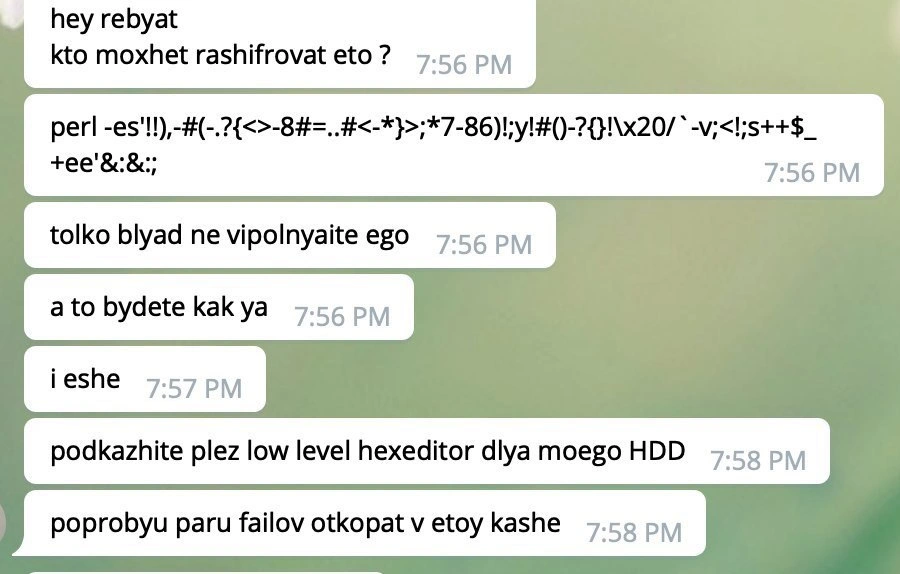
Let’s break down what’s happening here in simpler terms. The image is a chat where one developer posts a Perl one-liner – a complete small program written in one line of Perl code – and it looks like pure gibberish. Perl is a programming language infamous for letting you write ultra-compact, often unreadable code (there’s even a saying: “Only Perl can parse Perl,” meaning even other programs struggle to understand Perl’s syntax!). This particular one-liner is obfuscated, which means it’s been deliberately made hard to read. Think of obfuscated code as a cipher or puzzle: it might use weird symbols, double meanings, and tricks so that humans can’t easily tell what it’s doing. Here, the code is full of characters like !!),-#(.-?{<>... which is not at all obvious. It’s basically a command-line magic spell. And the first person in the chat asks, “hey rebyat kto mozhet rashifrovat eto?” – mixing Russian and English to say, “Hey guys, who can decipher this?” They found a mystery script and want to know what it does.
Now, another chat member immediately jumps in to warn: “tolko blyad ne vipolnyate ego”, which bluntly means “just don’t execute it, for @#$%’s sake.” In plain English: Do NOT run that code! Why such a strong warning? Because running random code from an untrusted source is extremely dangerous. In computing, your Command Line Interface (CLI) is powerful – it’s like the control panel to your computer’s inner workings. A one-liner can do anything your user account is allowed to do. That includes deleting files, modifying system settings, or in the worst case, erasing your entire hard drive. Here, the code is so garbled that it might hide a nasty surprise. It could be a prank or outright malicious. Security awareness 101: never run code if you don’t know what it does, especially if it’s obfuscated. It’s akin to swallowing a pill without knowing its effects.
So what happened? The second person hints, “a to budete kak ya” – “otherwise you’ll be like me.” Oops. That means they did run it, and now they’re suffering the consequences. The following messages confirm the fallout: they ask for a “low level hex editor for my HDD” and say they’ll try to dig up a couple of files from the “kashe” (slang for mess or mush). This paints a clear picture: the one-liner trashed something on their hard drive (HDD). A hex editor is a tool that lets you see and edit the raw data on disk – literally ones and zeros (represented in hexadecimal, or base-16, thus “hex”). Using a hex editor on your drive is serious business; it’s the kind of last-resort step you take when normal file recovery tools aren’t working. It means the file system (the system that organizes your files on disk) is likely corrupted or parts of your data have been turned to mush. They’re basically doing digital forensics, trying to manually recover pieces of files. That’s why the title jokes about “low-level hex-editor archaeology” – the person is digging through the lowest level of the disk, like an archaeologist digging through ruins, to recover artifacts (their files).
This scenario is a classic copy-paste programming disaster. As a newer developer, you might have copied code from Stack Overflow or a forum to save time – we’ve all done it. Sometimes it works great; other times, if you’re unlucky, it introduces weird bugs or, in cases like this, something far worse. The meme is essentially a cautionary tale: if you copy-paste a command without understanding it, you’re trusting that stranger’s code with your own system. In security terms, that’s a huge risk. It’s like installing an app from a sketchy website – you might get the functionality you want, or you might get malware. Here, our friend got the digital equivalent of a bomb.
To put it simply: the chat messages show someone learning a hard lesson. They thought, “Hey cool, a one-line fix!” – ran it – and boom, their weekend project turned into a fight to recover lost data. The humor comes with a side of pain: it’s funny to others because it’s a known rookie mistake. Many of us had that “Oh no, what have I done?” moment early in our careers – like accidentally deleting a database table or overwriting a file we didn’t back up. This meme just takes it to the extreme. In short, if you’re a junior dev, the takeaway is clear: Never run code you don’t understand, especially if it’s from some random chat. If you do, you might spend your weekend with a hex editor, piecing your project back together byte by byte. And trust us, that’s no fun at all.
Level 3: One-Liner to Oblivion
This meme hits that too-real nerve for seasoned developers. Here we have someone casually copy-pasting a mysterious Perl one-liner from a chat – essentially a string of gibberish like perl -e '!!),-#(.…' – straight into their Command Line Interface. To a senior engineer, this scenario screams “Here we go again.” Why? Because blindly running an obfuscated script from Telegram (or any chat) is the CLI equivalent of handing a stranger your root password. It’s a perfect cocktail of Security nightmares and Bugs waiting to happen.
Consider what likely unfolded: that Perl one-liner was arcane enough that even Perl gurus would squint at it. Obfuscation can hide all sorts of nastiness – from spawning a fork bomb to something as blunt as system("rm -rf /") (read: wipe the disk). The poor soul in the chat asks, "Who can decipher this?" – a cry for help that any skeptical dev reads as "I have no idea what this does, but I’m tempted to run it." Immediately, another user responds in transliterated Russian: “tolko blyad ne vipolnyate ego” – which roughly means “for the love of #%!$, do not execute it.” And here’s the punchline: “a to budete kak ya” – “or you’ll end up like me.” Cue the facepalms. This person already ran that snippet, and now their weekend project has morphed into a nightmare of data recovery. In a single keystroke, a supposed quick fix detonated like a logic bomb, and our hapless friend became an archaeologist sifting through the digital ruins of his hard drive.
The humor (tinged with horror) comes from experience: any senior dev has either survived a similar fiasco or narrowly avoided one. We all have that war story of “I ran a script I found on the internet and spent the next week piecing my system back together.” It’s funny now – in the way that scars are funny after they heal – because it’s a textbook lesson we wish we didn’t have to learn the hard way. The chat’s final messages, “podkazhite plez low level hexeditor dlya moego HDD” (please suggest a low-level hex editor for my hard drive), and “poprobyu paru failov otkopat v etoy kashe” (gonna try to dig out a couple files in this mush), are dripping with painful irony. Our intrepid friend is basically saying, “Hey guys, I need tools for digital forensics because I nuked my drive.” This is debugging frustration on steroids: not just stepping through code, but scavenging bytes on disk with a hex editor, hoping to salvage fragments of what was once a weekend’s work.
For a senior engineer, the situation is too real and darkly comedic. It lampoons the gap between best practices and what actually happens at 2 AM when you’re stuck and someone on a forum says “Here, try this one-liner, trust me.” Best practice is to never run untrusted code, or at minimum, inspect it in a sandbox. Reality? Deadlines and desperation make that slimy pastebin spell look like a lifeline. We’ve seen smart people do incredibly unsafe things under pressure – it’s a systemic issue. New devs aren’t always taught to be paranoid, and our tooling doesn’t scream “DANGER!” when you paste in line-noise code. In a culture of quick fixes and copy-paste programming, this meme is the aftermath: Copy-Paste Programming gone nuclear.
The deeper industry truth hiding in this humor is that security awareness often comes from painful lessons. Many of us have had to learn about command-line disasters the same way: by triggering one. The meme serves up that lesson with a laugh (and a groan): Remember that time you thought a random script would save time, but you ended up spending ten times longer fixing the damage? Everyone nods knowingly. It’s funny because it’s true – the “quick hack” turned into a low-level disaster. And as the cynical veteran voice in our heads says: Next time, you’ll think twice before trusting a magical one-liner from the internet. Until then, pass the hex editor – we’ve got some digging to do.
Description
A screenshot of a chat conversation on a light green background. The messages, written in transliterated Russian, tell a short, tragic story. The first message asks, 'hey guys, who can decrypt this?'. The second message contains a long, cryptic line of Perl code, full of symbols and line noise: 'perl -es'!!),-#(-.?(<>-8#=..#<*`>,'*7-86)!;y!#()-?{}!\x20/` -v;<|;s++$_+ee'&:&:;'. This is immediately followed by a series of panicked warnings: 'just f***ing don't execute it' and 'or you will be like me'. The user then asks for a recommendation for a 'low level hexeditor for my HDD' to 'try to dig out a couple of files from this mess'. The humor is dark and serves as a classic cautionary tale for developers. It plays on the infamous readability of Perl, where code can look like random characters but perform powerful and, in this case, destructive system operations. The punchline is the user's desperate attempt at manual data recovery, implying the script they ran has catastrophically damaged their file system. It's a relatable horror story for anyone who has ever been tempted to run a cool-looking but unverified script from the internet
Comments
7Comment deleted
That's not a Perl script, it's a rite of passage. It decrypts your filesystem into a write-only format and teaches you the true meaning of 'backups'
Obfuscated Perl one-liners: because nothing says “disaster recovery drill” like trusting the internet with `sudo perl -e`
The fastest way to turn a senior developer into a junior is watching them paste mysterious Perl one-liners from chat into their terminal because "it's probably just a clever regex."
When someone asks 'who can decipher this Perl one-liner?' the correct answer is always 'nobody should try.' This is the software engineering equivalent of 'hold my beer' - a Perl script so obfuscated it makes regex look readable, followed by the universal distress signal: asking for a low-level hex editor. The progression from curiosity to catastrophe is a masterclass in why production systems have code review, why we don't execute random scripts, and why 'works on my machine' sometimes means 'worked until it didn't.' At least they're learning about disaster recovery in the most hands-on way possible - one corrupted sector at a time
If your timeline jumps from “decode this Perl y/// + s///ee thing” to “recommend a low‑level hex editor for my HDD,” you didn’t debug - you pivoted from DevOps to digital forensics because your rollback strategy was backups-as-a-theory
Hex editor on HDD: developer brain surgery with a butter knife - precise enough to carve files, dumb enough to risk the whole platter
That moment when y/// and s///e turn your shell session into a red-team demo followed by, “any recommendations for a low-level hex editor?”