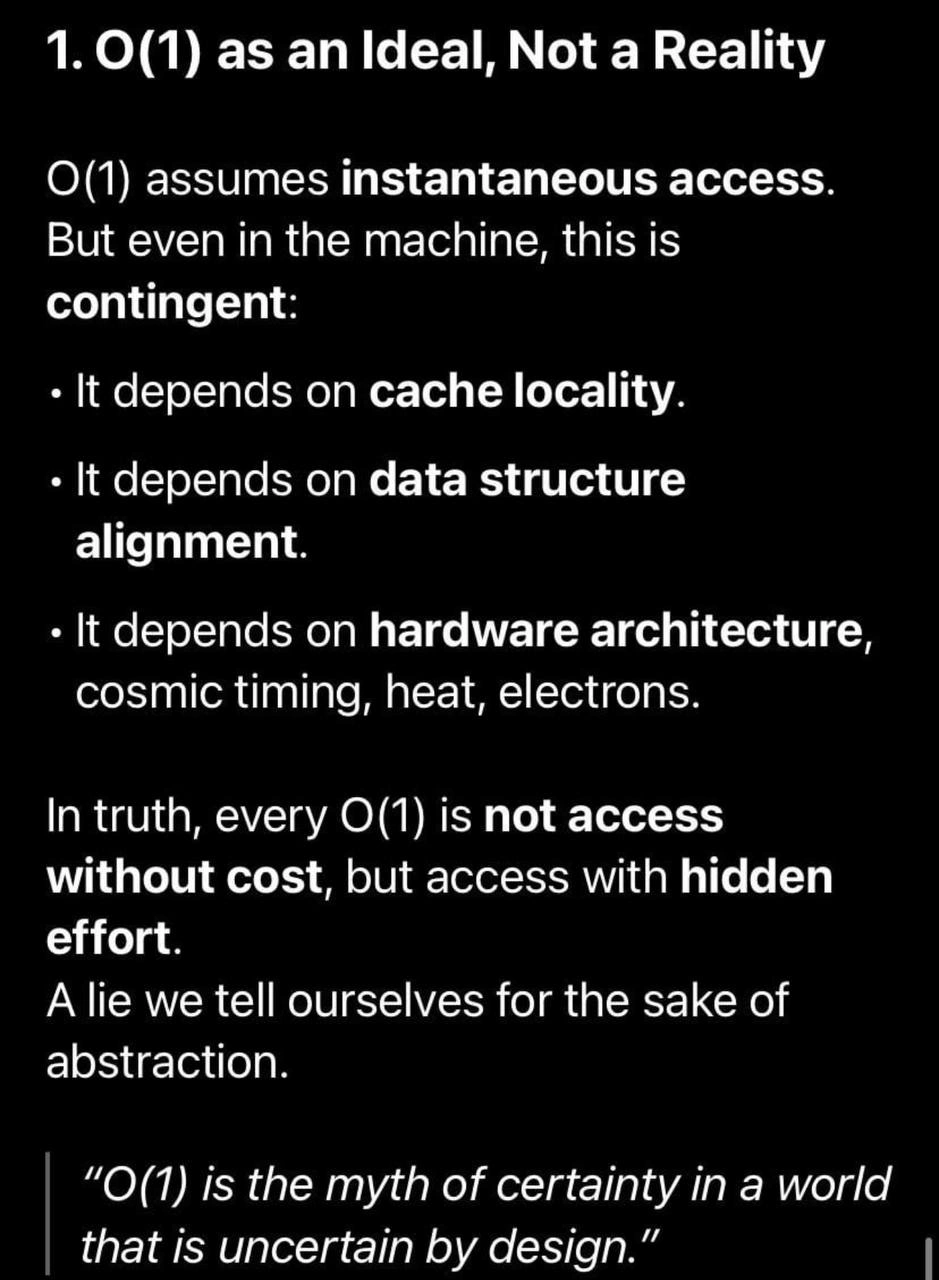
The comforting lie of constant time complexity
Why is this CS Fundamentals meme funny?
Level 1: Not Exactly Instant
Imagine you have a cookie jar in your kitchen. Getting a cookie is usually just one simple action: you reach into the jar and take a cookie. If the jar is right in front of you, that’s super quick. But what if the cookie jar is on a high shelf that you can’t reach? You still perform one action – you go for the cookie – but now you have to drag a chair over, climb up, and then grab it. Or worse, what if you ran out of cookies at home and the only way to get one is to go to the store? You decide “I want a cookie” (one decision), but then you might spend 10 minutes biking to the store.
In all cases, the task “get a cookie” sounds like one step in your plan, right? But clearly, how long that one step takes can be very different. If the cookie was in your pocket, you’d have it instantly. If it’s in the kitchen, you’ll have it in a minute. If you have to go buy it, that’s much longer. The meme is making a similar point with computers: we often say an operation is constant time (like just grabbing that cookie) as if it’s instantaneous. But really, there can be hidden delays. Maybe the data the computer needs is “right there” (like the cookie in your pocket) – then it’s super fast. Or maybe the data is far away in the computer’s memory (like the cookie at the store) – then that one operation takes longer.
So the funny takeaway is: even things we call “instant” in computing aren’t truly instant. There’s always some work happening behind the scenes. It’s a bit like how we call some meals “instant noodles” – you still have to boil water and wait a few minutes; it’s quick, but not magic. In the computer, saying something is O(1) is like saying “it’s just one quick step,” but the meme reminds us that one step might involve a lot of unseen effort. In a simple way: even when a computer operation is supposed to be the same speed every time, real life can make it slower or faster depending on where the information is and what the computer hardware is doing. Nothing is completely free or truly instantaneous, even if it looks that way in theory. And that’s why this is a bit funny – it’s calling out a little lie we tell to make our lives easier, kind of like calling those noodles instant. They’re faster than cooking from scratch, sure, but you still have to wait a bit!
Level 2: Beyond Big O
Let’s break down what all this means in simpler terms. In computer science classes, you learn about Big O notation as a way to measure how algorithms scale. For instance, O(1) (spoken as “Big O of 1”) means an operation takes constant time, no matter how big your input is. A classic example: accessing an element in an array by index. If you want the 5th item, you can jump directly to it in one step. Whether your array has 10 items or 10 million, that index access is still just one step – that’s why we call it constant time. AlgorithmComplexityAnalysis loves O(1) because it suggests something is very efficient and won’t slow down as your data grows.
However, what this meme points out is that “one step” in theory isn’t really the whole story when it comes to actual speed. The phrase “O(1) assumes instantaneous access” means that in our abstract thinking, we pretend that one step is instant. But on a real computer, that one step might involve some waiting under the hood. It depends on a bunch of low-level details that the simple Big O model ignores. Here are the main things mentioned:
Cache locality: Computers have different layers of memory. The CPU cache is a small, super-fast memory built into the processor. It stores copies of data from the main memory (RAM) that the program is likely to use soon. If the data you need (say, that array element) is in the cache (we call that a cache hit), the CPU gets it really quickly. If it’s not (a cache miss), the CPU has to reach out to the slower RAM to fetch it. Think of it like this: if you’re working on a project and your tools are right on your desk, grabbing them is quick. If you left a tool in the garage, you have to walk out to get it – slower! So, cache locality means data that’s “nearby” in memory (or recently used) tends to be faster to access. An operation can be technically O(1) but will be faster when data is cache-local versus when it’s far off in RAM. This is why the meme says constant time is contingent on cache locality – it’s a condition.
Data structure alignment: Computers like to fetch memory in chunks aligned on certain boundaries (like multiples of 8 bytes, etc.). Alignment refers to how data is laid out in memory. If your data is nicely aligned, the CPU can read it in one go. If it’s misaligned (imagine a piece of data that starts at an odd address, crossing a boundary), the computer might need two reads to get the whole thing or do some extra work to assemble it. It’s a bit like how you’d prefer to pick up a box that’s not half on one shelf and half on another. If it is, you have to grab it in two parts. So, the meme is reminding us that even a single read operation (O(1) in theory) can become effectively two operations if the data isn’t aligned well. Good DataStructures often ensure proper alignment for this reason, especially in systems programming.
Hardware architecture: Different computers might have different designs. “Hardware architecture” covers things like the CPU design, the memory system, etc. Some CPUs are faster, some have bigger caches, some handle misalignment gracefully, others penalize it. There’s also stuff like branch prediction and pipelines – modern CPUs try to guess what work you’ll need to do next and line it up. If they guess wrong, there’s a delay (kind of like having to undo some work). If an operation depends on something like that, its time can vary. The slide even jokingly mentions cosmic timing, heat, electrons. That’s partly humor, but with a kernel of truth: real-world timing can be affected by physical factors. Heat: if the CPU gets too hot, it might slow itself down (many processors do this to avoid overheating – it’s called throttling). Electrons and “cosmic timing”: signals on a circuit board only go so fast. If the memory chip is far away, it literally takes a tiny bit longer for the signal to travel. And yes, cosmic rays flipping a bit is an extreme example of an unpredictable hardware event (rare, but it has happened!). The main idea is that the hardware introduces variability – it’s not like in a textbook where each operation is perfectly timed every time.
All these factors mean that when we say something is O(1), we’re hiding the performance details under the rug for simplicity. Most of the time, that’s okay! Big O is about how things scale, not exact timing. But as a programmer, especially when you care about speed, you need to remember those details exist. PerformanceTradeoffs come into play when choosing how to implement something: maybe you use an array vs a linked list based on these considerations, or you organize data to be cache-friendly even if the algorithmic complexity is the same.
Let’s connect this to a practical example. Imagine you have two ways to search for a number in a collection:
- Look it up in an unordered_map or hash table (which is O(1) on average).
- Search through a simple array of numbers (which is O(n), linear time).
If you have a huge amount of data, the hash table (1) is supposed to scale better because no matter if you have 100 or 100,000 entries, the average lookup doesn’t get slower based on n. The array (2) will take longer as n grows because it potentially checks each element. Now, suppose in reality you have, say, 1000 elements (not enormous). The array is just 1000 items in a row in memory – the CPU can whip through that list leveraging cache (it will load chunks of it at a time, very efficiently). The hash table, on the other hand, might scatter those 1000 items all over memory (each time you look something up, it jumps to a calculated position). Those jumps could each be a cache miss. If each cache miss takes significantly longer, the hash lookup might actually end up slower than just scanning 1000 items in an array. So even though O(n) vs O(1) suggests the hash method is better, in practice the constants (like cache behavior) might flip the outcome for that size or environment. This doesn’t mean Big O lies – it means Big O isn’t the whole truth about performance. It abstracts away constants and conditions that matter in real machines.
The meme’s phrase “not access without cost, but access with hidden effort” is basically saying: every operation has a cost, even if it’s constant time, and those costs might be hidden from our simple models. Hidden effort could be waiting for memory, handling alignment, dealing with hardware quirks, etc., all of which the high-level description doesn’t mention.
As a newer developer or student, what should you take from this? Mainly, it’s a lesson in humility about performance. BigONotation gives you a first approximation. But when you need your code to run faster or you observe a performance issue, remember to “peek under the hood.” Check if your algorithm is cache-friendly. Are you making the CPU bounce around memory? Are you doing tiny operations that might individually be fast but add up if they all suffer delays? These are things that a LowLevelProgramming perspective introduces. You don’t need to worry about electrons and cosmic rays day-to-day (those are extremes), but knowing about the cache and memory alignment is super useful even at a relatively high level. For instance, if you’re using Python or Java, you’re not manually managing memory, but the principles still apply: contiguous data tends to be accessed faster than lots of scattered objects.
Also, the mention of “a lie we tell ourselves for the sake of abstraction” isn’t to say we should stop using abstractions. Abstractions like constant time make it feasible to reason about complex systems without drowning in details. But it’s a reminder that abstraction has limits. When you push systems to their limits (like high-performance applications, games, large-scale web servers), those tiny hidden costs can become significant. Knowing about these factors early in your career can save you a lot of confusion. It explains why sometimes a code that looks efficient on paper might not be the fastest in reality.
In short, this meme is educating (with a bit of humor) that Performance tuning is more than just picking the right algorithm by big-O. It’s also about understanding the machine. Constant time isn’t truly constant in actual elapsed time — it just doesn’t grow with input size. Real speed depends on the machine’s details. So as you grow as a developer, keep Big O as a handy guide, but also remember the machine can surprise you. The next time you optimize something, think about these hidden costs: Is my “O(1)” operation causing a cache miss? Is my data aligned? Could the hardware be doing something I didn’t consider? That’s what separates a newbie from a performance-savvy programmer. The meme basically says: welcome to the real world, where even our simple promises (like O(1) being quick) come with footnotes!
Level 3: Hidden Cost of O(1)
To an experienced developer, this meme hits on a well-known gap between CS_Fundamentals taught in school and actual software Performance in the wild. Big O notation is great for comparing algorithms abstractly — we all learn that O(1) is awesome, O(n^2) is bad, etc. But the humor here is that we often forget the fine print: those Big O guarantees assume a very idealized machine. In real life, constant time operations can still be painfully slow or unpredictable due to all sorts of sneaky factors. It’s a gentle jab at the naive belief that “O(1) means fast.” Seasoned developers know an O(1) algorithm can underperform an O(n) algorithm if it fights the hardware. The slide’s bullet points (cache locality, alignment, hardware quirks) are basically the ghosts that haunt any high-performance coder. We’ve all seen cases where the theoretical winner lost to the practical underdog because of these hidden costs.
For example, consider a hash table vs. an array. Hash table lookups are typically O(1) on average, while scanning an array is O(n). A theory-purist might insist the hash table is always better for large data. But a cynical veteran knows that if that hash table has poor cache locality (its elements are scattered all over memory), each lookup might miss the cache and hit main memory. That could take, say, 100 nanoseconds per access. Meanwhile, scanning through a contiguous array leverages spatial locality: the CPU loads a cache line and gets maybe 16 array elements in one go, zipping through them with fewer misses (perhaps just 2-3 nanoseconds per element when in L1 cache). Surprise! For a not-huge n, the supposedly “slower” O(n) array traversal can outrun the O(1) hash lookups because of those constant-factor differences. This is a classic PerformanceTradeoffs story: algorithm complexity vs. real-world optimization. The meme essentially winks at those of us who have optimized C/C++ code or system code and learned that DataStructures need to be laid out memory-friendly for speed. It’s not just the algorithm, it’s also how you use the hardware.
The mention of data structure alignment resonates with anyone doing LowLevelProgramming or working in languages like C. If you’ve ever chased a performance bug by aligning data on 64-byte boundaries, or added padding to structs to avoid costly misaligned accesses, you know this stuff gets real. Alignment can even cause weird behavior differences: for instance, an 8-byte read at an aligned address might be a single CPU instruction, but if it’s at an odd address, the CPU might internally do two reads or throw an assist routine. I remember debugging a case where reading a struct field was inexplicably slow — turned out it crossed a cache line boundary and the CPU had to fetch two cache lines for that one field! That’s the kind of war story a battle-scarred engineer chuckles at when seeing “hidden effort” in the meme.
And cache locality… oh boy. It’s practically a rite of passage to one day realize "Why is this code 10x slower in production than in my small test cases?" only to discover it’s jumping around memory. Maybe you had a pointer-heavy linked list (each node->next is O(1) to access by algorithm count, but each jump potentially causes a cache miss). So your loop that was supposed to be O(n) behaves more like O(n) plus a bunch of expensive cache misses — each a mini latency landmine. Many of us have learned to group data contiguously or avoid pointer-chasing for precisely this reason. The meme’s line "O(1) assumes instantaneous access" calls out this fallacy: an array access is one step, yes, but if it’s not in cache, you’re paying with time. We seasoned devs laugh because it’s true: We’ve seen “constant time” operations take far from constant time when the cache gremlins strike (like when that one record is strangely slow because it wasn’t in cache, causing a brief stall that throws off your latency percentile metrics).
The reference to hardware architecture and even "cosmic timing, heat, electrons" is a tongue-in-cheek way of saying “everything that can vary, will.” Maybe your code ran fast in one environment but slower on another CPU model — perhaps that other CPU had a smaller L2 cache or different memory timings. Heck, even differences in CPUCache line size or the presence of certain instruction set optimizations can change the constant factors. Seasoned engineers know to be wary of assuming uniform performance. I’ve seen cases where moving a critical loop’s data into a cache-friendly layout gave a 5x speedup, without changing Big O at all. It feels like magic until you recall the hidden cost that was there before.
The quip at the bottom, "O(1) is the myth of certainty in a world that is uncertain by design", speaks to a kind of world-weary wisdom. In computing, we crave certainty and guarantees. Big O gives a comforting sense of order (“no matter how big n gets, this algorithm won’t blow up, it’s constant time”). But the real world — down to the hardware, even down to quantum effects — is full of uncertainty and variability. Experienced devs and performance engineers often joke about this. For example, you might jokingly blame a flaky bug on “cosmic rays” when no other explanation fits. The meme exaggerates to make a point: even something as solid-seeming as constant time has an asterisk next to it in practice. It’s a lie we tell ourselves for the sake of abstraction, not to deceive maliciously, but to get stuff done without drowning in detail. We all use that lie (Big O analysis) to simplify design discussions. But when it comes time to squeeze out performance or explain why the system is slow under load, we have to peek behind the curtain at those “constant” operations and remember the hidden dragons of caches and hardware.
In a team setting, this is the kind of slide a senior engineer might show to educate others: “Sure, the algorithm is O(1), but don’t oversell it — remember the cost of a cache miss or branch misprediction.” It’s a bit humorous and a bit cautionary. The post’s caption adds an extra layer of irony: “Your n^3 is fine in a world uncertain by design 🌚”. That dark-moon emoji and line basically smirk at the idea that, if even O(1) isn’t guaranteed fast, then maybe we shouldn’t stress too much about having a O(n^3) solution for a problem if it’s simpler or if n is small. It’s like saying: “Hey, everything’s unpredictable anyway — an O(n^3) hack might just run okay because who knows!?” Of course, that’s tongue-in-cheek; no one seriously endorses cubic algorithms for large n. But it’s poking fun at how uncertainty levels the playing field a bit. In a world where constant-time has caveats, a less efficient algorithm might sometimes keep up if it plays nicer with the hardware’s reality. That quote really captures the cynicism: Performance is so full of surprises that our nice big-O rules can be subverted by real-world chaos.
In summary, the senior perspective here is a knowing chuckle at how BigONotation and reality diverge. It’s a reminder of those hard-earned lessons: AlgorithmComplexityAnalysis is vital for scaling, but hidden performance costs like memory latency, cache misses, and alignment can make a mockery of naive assumptions. The meme is funny because it’s painfully accurate — any engineer who’s optimized code or puzzled over inconsistent benchmarks has that moment of “Yep, O(1) isn’t truly one unit of time… it’s sometimes 1 and sometimes 100 or 1000000 units of time!” We laugh, perhaps with a hint of exasperation, because we’ve lived that truth. Below is a simple illustration of how one “constant time” access can vary:
// All these operations are O(1) in algorithm terms, but let's see the hidden cost:
int a = array[42]; // If this data is in L1 cache, maybe ~3-5 CPU cycles (very fast)
int b = array[1000000]; // If this triggers an L3 cache miss to RAM, ~100+ cycles (noticeably slower)
int c = array[50000000]; // If this data was paged out to disk (extreme case), millions of cycles (crawl)
As you can see, the code is the same constant-time array access array[index] each time. But the actual time can range from a few CPU cycles to a few hundred, to effectively an eternity if we hit something like a disk swap. It’s still O(1) — the number of steps didn’t grow with the array size — but the constant factors hide a world of difference. That’s the core joke: constant time isn’t constant time when you zoom in on the real world. As developers, once we see behind the curtain, we forever relate to this meme. We become a bit more skeptical of simplistic claims, a bit more appreciative of the complexity beneath our abstractions. So when someone fresh from school proclaims, “Don’t worry, this lookup is O(1), it’ll be super fast,” the rest of us can’t help but smirk and respond, “Sure… assuming the cache gods are kind and the alignment fair. Otherwise, O(1) might give you a surprise!”
Level 4: Abstraction vs Physics
In theoretical algorithm complexity analysis, calling something O(1) (constant time) assumes a magical world where any piece of data can be fetched with equal, instantaneous effort. This idealized model — often called the Random Access Machine (RAM) model in computer science — treats memory like an equally accessible array of cells, ignoring physical reality. But actual computers are constrained by physics and architecture. The meme’s slide hammers this home: even an operation that should take constant time can stall or speed up depending on hidden factors like cache hits, memory alignment, and even the laws of nature (yes, electrons and the speed of light come into play!).
At the machine level, there’s a hierarchy of memory speeds. The CPU cache (L1, L2, L3) sits close to the processor and can serve data in just a few nanoseconds. If your data is cache-local (already in those tiny on-chip caches), an access is blazingly fast. But if it’s not, the CPU must reach out to the slower main memory (RAM), which is dozens to hundreds of nanoseconds away per access. That’s like the difference between grabbing a book on your desk versus trekking to the library across town. In asymptotic terms both are “one operation,” but the latter hides a much larger constant delay. This disparity is known as the memory wall – a term from the 1990s recognizing that CPU speeds were outpacing memory speeds, making memory latency a dominant cost. To bridge it, engineers built multi-level caches and prefetching logic, but these add complexity: sometimes your constant-time step hits the cache (fast path), and sometimes it misses (slow path). Cache locality dependence means O(1) is only fast if the data happens to be in the right place at the right time. As the meme says, “O(1) assumes instantaneous access. But even in the machine, this is contingent.”
Another hidden variable is data structure alignment. Real CPUs prefer data to be aligned on certain byte boundaries (like an int on a 4-byte or 8-byte boundary). If a piece of data straddles a boundary or isn’t properly aligned, the hardware might need to perform extra reads or adjustments under the hood. Some processors will do two memory fetches internally if your 4-byte integer happens to lie across a cache line boundary (ouch). Alignment issues can also force the compiler to insert padding in structs or classes, affecting memory layout. So an operation accessing a misaligned field might still be “one instruction” in source code but result in multiple micro-operations in the CPU. What was theoretically one constant-time step turned into several due to alignment corrections. In low-level terms, the constant time operation paid a hidden tax in extra cycles.
And then we have hardware architecture quirks and even “cosmic” factors. Modern CPUs use pipelines and speculative execution. A supposedly constant-time operation can stall if it triggers a pipeline hazard or a branch misprediction (e.g., if it was part of an if that the CPU incorrectly speculated). Constant-time operations on paper can vary if they cause CPU pipeline flushes or waiting on a synchronization primitive. In multicore systems, a simple memory write (O(1) by algorithm counting) can incur the cost of cache coherence protocols — invalidating caches on other cores, which introduces delays. That’s a nod to the famous adage: “cache invalidation is one of the two hard things in computer science.” If one core modifies data, other cores’ caches have to update or invalidate that data, meaning your constant-time write isn’t globally instantaneous; it’s subject to coordination overhead. These are deep, low-level PerformanceTradeoffs that are invisible in big-O but very much present in hardware.
Finally, the meme jokingly mentions “cosmic timing, heat, electrons.” This is half-hyperbole, half-truth. Electrons only move so fast; the speed of light is a universal limit. If your data resides in memory chips a few inches away on the motherboard, there’s a minimum time for the signal to travel those inches of wire. No algorithmic trick changes that physical latency. Heat is another real-world factor: as CPUs work, they heat up. If they cross a thermal threshold, they may throttle (slow down their clock speed to cool off), making operations take longer until things cool. Cosmic rays — while extremely rare — can flip bits in memory or cause error-correcting memory to kick in and correct a fault, introducing a delay. It sounds like science fiction, but in large-scale systems these one-in-a-billion events do happen (remember the tales of “cosmic rays causing a server crash at 3 AM”? 😅). The point is that uncertainty is built-in at the hardware level. We design for reliability, but there’s always some jitter in timing. In academic complexity, O(1) means an operation’s time doesn’t grow with input size; it says nothing about how long it actually takes or how consistent that time is on real silicon. The slide calls O(1) “the myth of certainty in a world that is uncertain by design.” All these hidden variables — cache state, alignment, architecture, physics — ensure that every so-called constant time operation carries a hidden performance cost. We maintain the abstraction of O(1) because it’s useful for reasoning about algorithms at scale, but in practice it’s an idealization. As any seasoned systems engineer will tell you, there’s no free lunch at the hardware level. Even a simple array access might traverse a gauntlet of caches and circuits. Constant time in theory, variable time in reality — that’s the underlying truth this meme drives home, with a wink and a nudge to those who’ve chased down baffling performance bugs in “constant-time” code.
Description
This image presents a philosophical and technical critique of O(1) time complexity, displayed as white text on a stark black background. The title reads, "1. O(1) as an Ideal, Not a Reality." The text argues that the concept of O(1), or constant time, assumes instantaneous access, which is not true in real-world computing. It lists several contingencies that affect performance, including cache locality, data structure alignment, and even physical factors like hardware architecture, cosmic timing, heat, and electrons. The post concludes, "In truth, every O(1) is not access without cost, but access with hidden effort. A lie we tell ourselves for the sake of abstraction." A final quote emphasizes the point: "O(1) is the myth of certainty in a world that is uncertain by design." This resonates deeply with senior engineers who have moved past purely theoretical algorithm analysis and have had to debug real-world performance issues where factors like CPU cache misses and memory layout have tangible impacts. It's a commentary on the necessary but imperfect abstractions we use in software engineering
Comments
24Comment deleted
We tell juniors that hash map access is O(1). We tell seniors it's O(1) until the 17th collision, the cache line evicts, and a cosmic ray flips a bit in the memory controller
Every time someone writes “// O(1) lookup” in a PR, a cache line misses, the TLB sighs, and the NUMA gods add 200 ns of latency - constancy preserved exclusively in the comment
After 20 years of optimizing systems, I've learned that O(1) is like 'unlimited PTO' - technically true, but try explaining to your CPU why that HashMap lookup just caused three cache misses, a page fault, and somehow triggered a garbage collection cycle in a language that doesn't even have one
Ah yes, O(1) - the algorithmic equivalent of 'assume a spherical cow in a vacuum.' We teach juniors that hash table lookups are constant time, conveniently omitting the part where cache misses, TLB thrashing, and the occasional cosmic ray turn your 'constant' operation into a probabilistic adventure. It's the lie that keeps our complexity analysis slides clean and our performance reviews awkward when production mysteriously slows down at 3 AM because someone's 'O(1)' data structure crossed a cache line boundary
Big O says my hash map lookup is O(1); perf says sure - after the page fault clears, the TLB miss recovers, the prefetcher guesses right, and the key isn’t on a remote NUMA node
Every O(1) hash table is really O(1 + cosmic rays)
O(1) exists on slides; in prod it’s O(1) if the key’s in L1 on the right NUMA node - otherwise it’s O(1) with a coefficient called TLB miss + GC pause + why is the prefetcher asleep?
O(1) is constant time access what are they yapping about smh Comment deleted
n! Comment deleted
Lol, this man just dont know what computational complexity is. Comment deleted
I can hear your gif Comment deleted
I started hearing it too after I read your message) Comment deleted
When you are trying to sound smart without actually being smart. Comment deleted
God, O(1) not means 0ms of latency, means that the computational cost of an algorithm not depend of the input, for every input the time expend on the algorithm is the same, not 0ms Comment deleted
Not even same. Just not dependent on "n", whatever that means for given type of algorithm. Big Ο[micron] stands for asymptotic complexity, that is for very big (approaching infinity) values of n you will get complexity that approaches some function of n. This is specifically and deliberately defined in such way so you'd be able to ignore all the independent constant, and multiplicative factors as for large enough n they will be insignificant. https://en.m.wikipedia.org/wiki/Asymptotic_computational_complexity Comment deleted
I would just refer to this meme from 2019 instead of explaining 😂 https://t.me/dev_meme/198 Comment deleted
even two O(1) algorithm has differents running time Comment deleted
Sir do you have 3 citizenships? Comment deleted
Nix users have extra citizenship? Comment deleted
Yes I believe that is one of the many benefits of using nixos Comment deleted
NixOS supremacy of course Comment deleted
Part of the point seems to be that reading the input is considered instantaneous, otherwise any algorithm that actually needs it's whole input would be O(n). It also touches on the point that the time you need to read one byte depends where that byte is, and which bytes were accessed recently Comment deleted
I don't use any O or n variables in my code so I'm fine. ¯\_(ツ)_/¯ Comment deleted
Neither do we use ^3 — but rather <3 of course! Comment deleted