Skip to content
DevMeme
1934 of 7435
The Frankenstein's Monster of Modern Software Development
CodeQuality Post #2149, on Oct 15, 2020 in TG

The Frankenstein's Monster of Modern Software Development

Why is this CodeQuality meme funny?

Level 1: Mixed-Up Monster

Imagine you had to build a new toy, but you didn’t have all the pieces. So you borrow a wheel from one friend, an engine from another toy, a pair of legs from an old action figure, and a head from a stuffed animal. You snap and glue everything together and – hooray – the toy actually moves! 🎉 It rolls around and kind of does what you wanted. To you, that feels like a big success because it was hard work finding and fitting all those random parts.

Now you show this creation to your friend (who asked you to make the toy). They look at it with wide eyes and say, “What the heck is that supposed to be?!” 😵 From their view, your toy looks like a bizarre monster made of mismatched parts – a real mixed-up monster. They expected a nice, neat toy car or robot, but you delivered something with a car wheel, a robot engine, doll arms, and a teddy bear’s head. Sure, it moves, but it’s so strange and cobbled-together that they’re not sure whether to be impressed or concerned.

In simple terms, that’s exactly what happened in the meme. The programmer made a program by mixing pieces of other people’s code (like you mixed toy parts). It worked in the end, but the client (like your friend) was shocked to see how it was put together. The funny part is the difference in reaction: the builder is proud it works at all, and the onlooker is baffled by how weird it looks under the hood. It’s a joke about doing things the quick and scrappy way and then having to explain the crazy result.

Level 2: Patchwork Programming

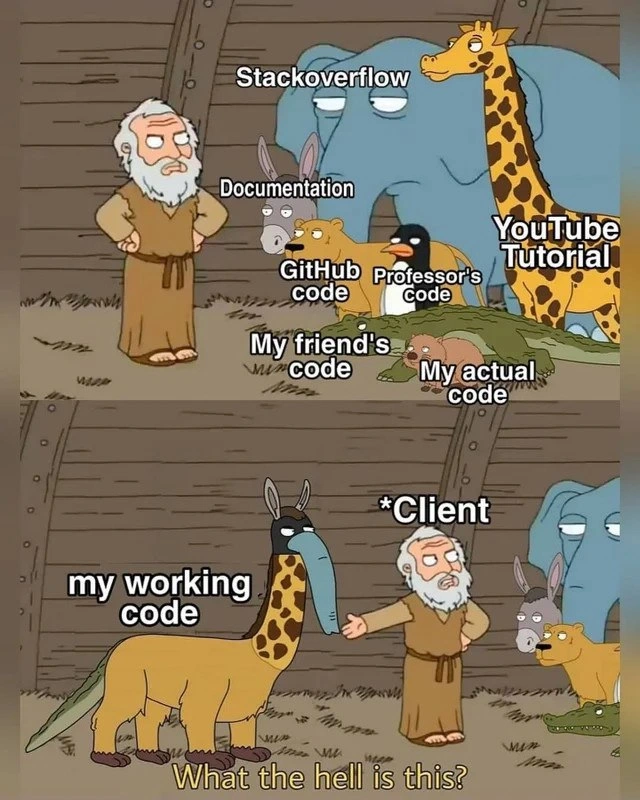
For a less experienced developer (or someone new to coding), let’s break down what’s going on in this meme. The developer has built something that works by copying and mixing code from many different places – practically creating a patchwork quilt of code. The first panel uses the funny setting of Noah’s Ark with animals to represent each source of code:

  • Stack Overflow (the elephant): Stack Overflow is a popular Q&A forum where developers ask questions and get code answers. Copying an answer from Stack Overflow can solve your problem quickly, but that code chunk might be huge (hence an elephant) and not exactly tailored to your project.
  • Documentation (the rabbit): This refers to official docs – the instructions or examples provided by the creators of a programming language or library. These examples are usually small and quick (like a rabbit) and show how to use a feature. The developer likely grabbed a tiny snippet from the docs and dropped it in.
  • GitHub code (the dog): Often, programmers search GitHub for code examples or use open-source projects. The “dog” symbolizes a piece of code fetched from someone’s repository or gist on GitHub – reliable perhaps, but you might not fully know where it’s been (good boy, but who’s your owner?).
  • Professor's code (the penguin): Many of us learned to code in school or from online courses where professors provide sample code or algorithms. This code might be correct in theory (penguins are smart!), but academic code can be a bit out of touch with practical needs. It might also follow old conventions. The developer included something they remembered or copied from a class or tutorial, even if it doesn’t perfectly fit the situation.
  • YouTube Tutorial (the giraffe): YouTube is full of programming tutorials. The “giraffe” suggests that this code might cover a big part of the project (tall and noticeable) because tutorials often walk through building a whole feature. However, tutorial code might be simplified for teaching and could stick out awkwardly when inserted into a real project (imagine a giraffe’s long neck poking out).
  • My friend’s code (the lizard): Many beginners ask friends for help. Perhaps the developer got a snippet from a friend who had a similar problem. This code might do something specific, but your friend’s environment or assumptions could be different. Like a lizard, it’s a small piece that might unexpectedly slither into the mix – potentially doing something sneaky or not fully understood by anyone except that friend.
  • My actual code (the opossum): This is the code the developer actually wrote themselves. In the meme, the opossum is lying on the ground looking tired or playing dead. That’s a humorous way to say the developer’s original contribution is perhaps the smallest part of the whole and is barely holding everything together. The developer might be exhausted from trying to make all these borrowed pieces work together, hence their own code is like “I’m done, whatever…” 🦥.

In the second panel, all those pieces have been combined into one creature, labeled “my working code”. Visually, it’s a mashup: a giraffe’s body with a duck’s bill, donkey’s ears, and a crocodile’s tail. This is a visual metaphor for the code itself being a mashup of different parts that don’t naturally belong together. It’s a “Frankenstein” or chimera in code form – meaning a mix of mismatched parts. Surprisingly, it’s alive (the code runs)! In software terms, the program does what it’s supposed to do (at least on the surface). The developer is likely feeling relieved or even proud that the patchwork actually functions. This scenario is often jokingly called “copy-paste coding” or “StackOverflow programming”, where instead of writing code from scratch, someone glues together pieces found elsewhere.

Now, enter the Client – basically the person who asked for the software or who is paying for it. In the cartoon, the client (dressed as Noah in panel 2) is pointing at the weird creature and asking “What the hell is this?”. This represents the moment when the client or maybe a senior developer or team lead looks at the spaghetti code that was delivered. The term spaghetti code is used to describe code that is tangled and messy, like a bowl of spaghetti. It’s hard to follow the logic because it twists and turns in an unstructured way. In our case, spaghetti code resulted from mixing all those different coding styles and sources.

The client demanding an explanation implies they want to know how the code works or why it was built that way. This is where the developer starts sweating 😅. If you’ve glued together solutions from various sources, explaining the internals can be really tricky. For example, the client might ask, “Why did you use this method here?” or “How does this part work?”. If the honest answer is “Because someone on Stack Overflow used it and I copy-pasted it,” that’s not very confidence-inspiring. Clients (or bosses) expect that the developer carefully crafted a solution with a clear understanding. Instead, here the developer would have to admit the code is an amalgam of other people’s work. That’s awkward, and it highlights a gap in DeveloperExperience: as developers gain experience, they learn that just making it work isn’t enough; you also have to make it clean and explainable.

We should also consider why a developer might end up with such a patchwork: often, it’s inexperience or a time crunch. A newer programmer might not know the “right” way to do something, so they search online and grab whatever seems to solve the problem. In a hurry, they might not fully understand the code they copied. They just test that it works for their case and move on. Over time, they accumulate a bunch of these “foreign” pieces in their program. The result is code mashup – think of it like making a quilt from patches of cloth that are all different colors and patterns. It might cover you (i.e., the software runs), but it definitely doesn’t look uniform. This can lead to code quality issues because the code might be hard to read, have redundant or conflicting parts, or be very hard to change later. Developers have a term for suspicious or poor coding decisions: we call them code smells. A code smell doesn’t mean the code literally stinks, but it’s a metaphorical smell – something that hints at a deeper problem. A patchwork codebase full of copy-pasted solutions has a strong smell of trouble – it suggests the person who wrote it may not fully grasp what each part does, and that can make the software fragile.

Another concept at play here is technical debt. This is when you take shortcuts in coding (like copying random code just to get things working) that you’ll eventually have to fix or “pay back” later. It’s like skipping homework – you save time now, but you create more work for yourself down the road. Every borrowed snippet that isn’t fully integrated or understood is a debt that might come due when something breaks or when the client asks for a new feature. If the code is a bizarre mix, adding anything new or debugging can become a nightmare, because you first have to untangle how all these pieces fit together (if they even truly fit).

In the meme, the client’s shocked question “What the hell is this?” perfectly captures the disconnect in expectations. From the developer’s side, they’re thinking: “It does what you asked! It works!” They see the “working code” as an accomplishment – after all, it was not easy to herd all those cats (or elephants, giraffes, and lizards) into a functioning program. But from the client’s side (or any outsider’s perspective), the implementation is baffling. It’s not just a matter of working; they care about how it works and whether the solution is professional. If this were a software deliverable, the client might also be worried about future maintenance: “If it’s built out of such random parts, can we fix it if something goes wrong? Can we extend it with new features? Who will understand this code other than the original developer?” These are valid concerns. Clean, well-structured code is like a well-built house – another developer can renovate it or fix a leaky pipe. Patchwork code is like a house held together with duct tape: you’re afraid to poke around in the walls because who knows what’s holding it up!

The meme is funny to developers because it exaggerates a real habit in the coding community: we often turn to DevCommunities and online resources for help. And that’s a good thing! Sites like Stack Overflow, GitHub, and tutorial videos are incredibly helpful for learning and solving problems. But there’s a right way to use those resources – as guidance and reference – and a wrong way – blindly copying without comprehension. Every experienced dev has a story of when they were a newbie and ended up copying a chunk of code that they didn’t fully understand. Maybe it caused a bug later, or during a code review a senior engineer asked “Why are you doing it like this?” and the newbie had no good answer. It’s a bit embarrassing, but it’s part of learning. The meme just pushes it to the extreme for comedic effect: imagine literally piecing together six or seven different sources of code, each as different as these animals, and miraculously getting something working. It’s like using glue, tape, and paper clips to fix a broken machine – it might run for now, but it’s not pretty or robust.

So, what’s the takeaway for a junior developer or someone learning? It’s okay to seek help and look at examples – everyone does it. However, be cautious of copy-paste coding. When you take code from somewhere, try to understand it and adapt it to your project’s style and needs. Ideally, you want your code to look like one cohesive whole, not a disjointed collage. If you ever find yourself merging a YouTube tutorial’s code with a StackOverflow answer and a friend’s snippet, step back and ask: Is there a simpler or cleaner way I can rewrite this in my own style? Often, you can use those references to inform your own implementation, which results in more consistent code. And if you do end up with a patchwork (we all have those crunch times!), be prepared to refactor – which means to go back and clean up the code once it’s working. That might involve rewriting parts now that you know they work, adding comments or documentation for clarity, and removing redundant or hacky sections. Think of it like after hurriedly throwing a bunch of ingredients to cook a meal, you later refine the recipe to make it actually taste good and be repeatable.

In summary, the meme uses humor (a giraffe-duck-donkey-crocodile monster!) to highlight common issues in software development: mixing too many sources leads to messy CodeQuality, and while the developer might cheer “It works!”, the client or anyone else looking at it will raise an eyebrow and say “Explain yourself…”. It’s a gentle poke at the differences in perspective: developer vs. client reaction. Developers celebrate the quick victory of a running program; clients (or senior reviewers) care about the long-term health and clarity of the code. Bridging that gap is a big part of growing as a programmer.

Level 3: Frankenstein's Ark

At first glance, this meme reveals a Frankenstein codebase stitched from disparate sources – something any battle-tested developer has either seen or (admit it) created under pressure. The cartoon Noah stands amid a motley crew of labeled animals, each representing a piece of code scrounged from a different corner of the developer universe: Stack Overflow (the elephantine chunk of Q&A wisdom), official Documentation (a quick-nimble rabbit snippet), a random GitHub code sample (loyal as a dog but with unknown pedigree), a Professor's code from school (the penguin – formal, a bit out of place in production), a YouTube Tutorial trick (the giraffe towering with newbie enthusiasm), and my friend's code (a sly lizard fix from that one buddy who “had a similar problem once”). Huddled in the corner is the exhausted opossum labeled “My actual code” – the few original lines the developer wrote to glue this mishmash together. The result? In panel 2, all those parts fuse into a bizarre hybrid creature labeled “my working code” – a giraffe-bodied, duck-billed, donkey-eared, crocodile-tailed chimera. The client (as Noah in the second panel) points in horror and demands, “What the hell is this?”

For seasoned engineers, this scenario is hilariously relatable and cringeworthy at the same time. It’s the quintessential example of StackOverflow-driven development (SOD) taken to an extreme, yielding what we fondly call a code chimera or Frankencode. The humor cuts deep because we’ve all been there: under a tight deadline or a late-night debugging session, frantically copying and pasting snippets from various sources until the program finally works. Each piece on its own made sense (more or less), but together they form a monstrous patchwork codebase that defies logical architecture – a true menagerie of code. This is spaghetti code on steroids, a code smell menagerie where each part follows different conventions and assumptions. The elephant from StackOverflow might be using an outdated API, the professor’s penguin code enforces strict paradigms (maybe an O(n²) algorithm the prof swore was elegant), while the friend’s lizard code slyly skips error handling (“it worked on my machine, bro”). The developer’s own few lines (the opossum, playing dead) barely hold the creature together with duct tape and prayer.

The senior-perspective irony is that it technically works – the stitched-together beast runs without crashing (yet) – so the developer feels a twisted sense of victory. But the client’s reaction (“What the hell is this?”) echoes the inevitable code review or stakeholder meeting where someone actually looks under the hood. In real projects, stakeholders or tech leads eventually ask for an explanation of the solution. And that’s when the fun begins: try justifying a codebase that’s half StackOverflow answers (some still with the original variable names like foobar123), a chunk of a GitHub gist you barely understood, and that one clever hack from your friend’s college project. Experienced developers know that explaining such a chimera is often harder than writing it from scratch. It highlights the gap between “it works” and “it’s maintainable/understandable”. The client (or project manager, or future you) expects a coherent design – maybe some design patterns or at least consistent style – but instead they find a (giraffe + duck + donkey + crocodile) monstrosity without rhyme or reason. This is where CodeQuality and ClientExpectations collide head-on. The client cares not just that the software works, but that it can be maintained, extended, and trusted. A mashup of arbitrary code brings uncertainty: Are there hidden bugs? Security vulnerabilities? License violations from copying random GitHub code? Each borrowed snippet could carry its own assumptions and quirks, so the system as a whole becomes unpredictable – a true chimera where no one fully understands all the parts.

From an architectural standpoint, this meme is a nod to anti-patterns. Instead of a clean, unified solution, the developer has created a big ball of mud (an infamous term for haphazard architecture). The Noah’s Ark imagery is apt: rather than two of each animal, the dev took one of every solution approach and crammed them onto the Ark of a single codebase. The Ark didn’t sink (the app runs), but now you’ve got an ark-full of dependency beasts that were never meant to live together. Senior devs will chuckle (or groan) recalling the Frankenstein’s monster they once built in a crunch and the painful refactoring safari that followed. They know that each “animal” in this scenario represents technical debt: shortcuts and borrowed parts that will eventually have to be paid back with interest. That interest might come due when a new requirement arrives or a bug surfaces and the next developer (or your future self) has to wade through this jungle and wonder “why on Earth is this piece here?”. The meme’s punchline nails the feeling of a stakeholder review: the client’s incredulous “What the hell is this?” is exactly what a no-nonsense tech lead or QA engineer would say upon viewing such a PR (pull request).

To make matters worse, explaining this kind of system can be an exercise in creative storytelling. Do you admit that your solution is essentially a copy-paste quilt? Developers often try to justify it with phrases like “we leveraged existing solutions from the community” (which is a polite way of saying stole code from Stack Overflow). The seasoned cynic in us knows that this is how spaghetti code and entropy creep into codebases. One quick patch turns into a permanent fixture, and over time you end up with a monstrosity no one can fully tame. There’s also a rich irony: We rely on DevCommunities (StackOverflow, GitHub, tutorial sites) to learn and solve problems – which is a great thing – but over-reliance without integration can lead to an unmanageable zoo of styles and hacks. It’s the classic “works on my machine” mentality extended to “works in production, don’t ask how.” The senior perspective also recognizes the failure in process here: Why wasn’t there a design review before coding? Did the team skip planning, or was the lone developer left without mentorship, leading them down the copy-paste rabbit hole? Maybe the schedule was so tight that “just make it work” was the unofficial motto, quality be damned. In any case, the final product became a Frankenstein’s Ark – alive, functional, but fundamentally wrong in the eyes of anyone who has to understand or maintain it. It’s a humorous cautionary tale: a DevExperience rite of passage that underscores why good engineering practices (and refactoring and documentation) exist. After all, you might get the Frankenstein code to walk and talk today, but eventually, like Dr. Frankenstein, you’ll face an angry mob – or in this case, an unhappy client – demanding to know what abomination has been brought into the world.

def build_monster_code(data):
    # Elephant from StackOverflow: a giant snippet to handle core logic
    result = stackoverflow_snippet(data)         # borrowed heavy-lifting code
    
    # Rabbit from Documentation: a quick example applied directly
    result = OfficialLibrary.do_thing(result)    # following a docs example literally
    
    # Dog from GitHub: integrating a friendly open-source helper function
    for item in github_example(data):
        result = apply_github_code(item, result) # using code found in a repository
    
    # Penguin from Professor: using an academic approach (perhaps not optimized for real-world)
    result = professors_algorithm(result)        # code from college assignment
    
    # Lizard from Friend: a sly fix from a friend’s past project
    if not is_valid(result):
        result = friend_quick_patch(result)      # "it worked for my friend's case!"
    
    # Opossum - My actual code: glue it all together, exhausted but holding on
    try:
        finalize_result(result)                  # developer's own attempt to finalize
    except Exception as e:
        print("Ignoring error:", e)              # just ignore any leftover errors
    
    return result

monster = build_monster_code(input_data)
print("It works, I guess:", monster)
# It's alive... ALIVE! (But please don't ask how)

In the code above (tongue firmly in cheek), each section corresponds to one of Noah’s “animals”:

  • We start with a StackOverflow elephant snippet to do the heavy lifting (likely copy-pasted without full understanding).
  • Then a Documentation rabbit – a tiny example from the official docs – is dropped in, possibly not tuned for our exact use-case but hey, it runs.
  • Next a GitHub dog – perhaps an open-source utility fetched from a gist or package – loyally loops over some data in a way we hope is correct.
  • We incorporate a Professor’s penguin algorithm (perhaps an outdated sort or search method from college) for a touch of theoretical correctness.
  • A Friend’s lizard patch slithers in to fix a specific error case (if not is_valid(result)) that we couldn’t solve alone.
  • Finally, the developer’s own code ties things together (finalize_result) and even here we see a red flag: catching a generic Exception and ignoring it, much like that opossum playing dead – an exhausted “just make it stop” approach.

It’s a comically tragic example of patchwork programming. Any veteran seeing this mix will either laugh or cry – because they remember doing something similar in their early years or during that one impossible deadline. It underlines the importance of having a coherent strategy: mixing too many coding styles and sources without a unifying vision leads to unmaintainable spaghetti code. In proper software engineering, we strive for a clean architecture, consistent conventions, and clear Documentation (not random comments like “Ignoring error, it’s fine” 😅). The meme exaggerates to make a point: while community snippets and tutorials are invaluable DevResources, blindly copy-pasting them together can birth a monster that shocks your Stakeholders_Clients and future maintainers. And if you’ve ever had to utter the words “It’s complicated, but it works, trust me” in a meeting, you know exactly why the client’s face in the meme is one of utter bewilderment. The Frankenstein’s Ark of code might sail, but everyone onboard is nervous about when it might capsize. This level of analysis acknowledges the shared industry truth hidden behind the humor: CodeQuality matters, because one day someone will point at your creation and ask for an explanation – so you’d better not have to answer with a sheepish grin and a stack of printouts from Stack Overflow.

Description

A two-panel meme using a scene from the animated TV show 'Family Guy' depicting Noah's Ark. In the top panel, Noah stands with his hands on his hips, observing a line of animals ready to board the ark. Each animal or group is labeled with a common source of programming code or knowledge: a tall giraffe ('Stackoverflow'), a blue elephant behind it, a donkey ('Documentation'), a lion ('GitHub code'), a penguin ('Professor's code'), a small rodent-like creature ('My actual code'), a beaver ('My friend's code'), and a crocodile ('YouTube Tutorial'). The scene represents the disparate sources developers use. The bottom panel shows Noah, now labeled '*Client', looking aghast at a bizarre, composite creature labeled 'my working code'. This creature is a monstrous amalgam of the animals from the first panel - possessing a giraffe's neck, a donkey's ears in a mask, an elephant's trunk, and a crocodile's tail on a lion's body. The client exclaims, 'What the hell is this?'. The meme humorously illustrates how software, despite being functional, can be an ugly, chaotic mess internally, cobbled together from various external sources. It highlights the conflict between a client's perception of a finished product and the often-messy reality of its underlying codebase, which is a classic representation of accumulating technical debt
Comments

10
Anonymous ★ Top Pick This is what happens when your project's dependencies aren't managed by a package manager, but by the developer's browser history
  1. Anonymous ★ Top Pick

    This is what happens when your project's dependencies aren't managed by a package manager, but by the developer's browser history

  2. Anonymous

    Client: “Can you walk me through the architecture?” Me: “Picture a giraffe with a duck bill and donkey ears - the head is a professor’s 2004 algorithm, the neck’s a ‘microservices in 5 minutes’ YouTube demo, each leg is a different Stack Overflow answer, and the tail is my 2 a.m. patch. If it squawks in prod we just call it ‘emergent design’.”

  3. Anonymous

    After 15 years in the industry, you realize the real miracle isn't that Noah got two of every animal on the ark - it's that your production code, assembled from 47 different Stack Overflow answers across 3 deprecated frameworks, somehow passes all integration tests while violating every SOLID principle known to computer science

  4. Anonymous

    This perfectly captures the journey from 'elegant Stack Overflow answer with 2,847 upvotes' to 'production code that somehow passes CI/CD despite violating every SOLID principle and containing three different date libraries because each tutorial used a different one.' The client's reaction is especially accurate - they don't care that your code is a chimeric horror of nested ternaries and global state; they just want to know why the button is slightly off-center

  5. Anonymous

    Not tech debt - it's a multi-vendor microservices chimera where each limb scales independently to its SO thread

  6. Anonymous

    StackOverflow-first architecture: eventual consistency between a YouTube tutorial, two GitHub gists, and my glue code - client sees a chimera; I call it MVP shipped

  7. Anonymous

    Behold SODD architecture: StackOverflow head, tutorial neck, GitHub legs - ships as “working code” until the client’s WTF/min dashboard hits p99

  8. @willowfragment 5y

    this is me

    1. dev_meme 5y

      Who exactly from this image is you?

  9. @willowfragment 5y

    $ErrorAction = Continue

Use J and K for navigation