Skip to content
DevMeme
781 of 7435
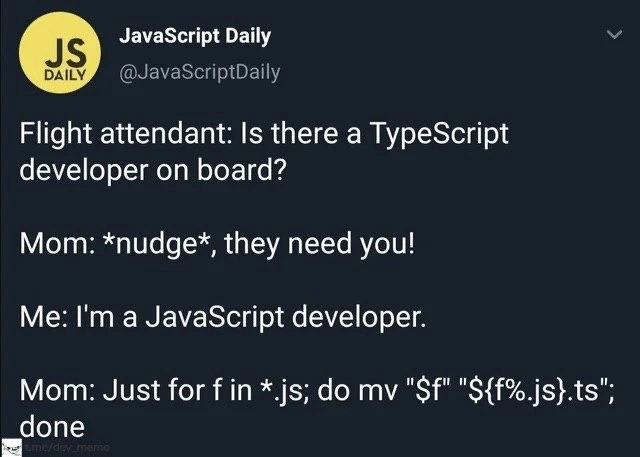
JavaScript to TypeScript Migration: Mom's Edition
Languages Post #885, on Dec 2, 2019 in TG

JavaScript to TypeScript Migration: Mom's Edition

Why is this Languages meme funny?

Level 1: New Name, Same Thing

Think of it like this: Your mom is trying to help, but she doesn’t really get the details. Imagine you have a storybook written in English, and suddenly the teacher asks if anyone has the book in Spanish. You only have the English copy. Your mom whispers, "Just write 'Spanish' on the cover, dear." She figures if the cover says "Spanish," that will be good enough. But of course, simply changing the label on the book doesn't transform the story inside. It's still all in English, and handing it in like that would just make people laugh. In the same way, renaming a bunch of JavaScript files to TypeScript doesn't magically turn the code inside into a different language. It's funny because we all understand that just changing a name tag or a label doesn’t actually change what something is.

Level 2: Shell Loops & Type Systems

Let's break down what's happening in this meme in simpler terms. The scenario is a bit silly: on an airplane, a flight attendant asks if there's a TypeScript developer on board. Our protagonist says, "Well, I'm a JavaScript developer, not TypeScript." JavaScript and TypeScript are closely related languages (TypeScript is basically a version of JavaScript with some extra rules), so the mom thinks, why not just quickly turn one into the other? Her suggestion is literally to rename all the .js files (JavaScript files) to .ts files (TypeScript files). In other words, she's treating it like a straightforward name change, as if that alone would qualify her child as a TypeScript expert. It's a joking example of someone misunderstanding what actually makes TypeScript different.

The last line of the tweet is a command you might run in a computer's terminal (command-line interface). It looks a bit cryptic, but here's what it does:

for f in *.js; do mv "$f" "${f%.js}.ts"; done

This is a one-liner written for a Bash shell (common on Linux and macOS). Let's dissect it:

  • for f in *.js; do ... done — This means "for each file f that matches *.js (every file ending in .js in the current folder), do the following ...".
  • mv "$f" "${f%.js}.ts" — The mv command moves/renames a file. $f is the current filename in the loop. The expression ${f%.js} takes the filename stored in $f and chops off the .js part. Then .ts is appended to it. So if $f was "app.js", this command renames it to "app.ts".
  • done — This marks the end of the loop. After executing the mv for one file, it goes back and picks the next .js file (if any) and renames it too, until all .js files have been processed.

In plain English, that one-liner finds every JavaScript file in the directory and renames each one to have a .ts extension instead of .js. It's a quick way to change file extensions via the CLI without manually renaming files one by one.

Now, why does the mom think this would work, and why is it actually not that simple? We need to understand what JavaScript and TypeScript really are:

  • JavaScript is a programming language that's commonly used to make web pages interactive (among many other uses). It's what we call a dynamically typed language. That means when you write JavaScript code, you don't have to declare what "type" of data each variable holds. For example, you can do let x = 5; and later x = "hello"; and JavaScript won't complain. The value of x can change from a number to a string on the fly. JavaScript will try to make sense of it at runtime (sometimes leading to weird bugs or behavior if you're not careful!). In JavaScript, the file extension is .js, but what's more important is that the content of the file is JavaScript code following JavaScript syntax rules.

  • TypeScript is like an add-on to JavaScript. It's actually a superset of JavaScript, which means all valid JavaScript code is also valid TypeScript, but TypeScript has additional syntax and rules. The big difference is that TypeScript is statically typed. In TypeScript, you (or the tools) explicitly specify the types of variables and function outputs, or let the compiler infer them, and the TypeScript compiler will check these types before the code runs. For example, if you say a variable should be a number, and later you try to assign a string to it, TypeScript will give you an error before you even execute the code. TypeScript files use the .ts extension and typically contain extra syntax for type annotations (like : number or : string after variable names, interface definitions, etc.). These files aren't run directly by browsers; instead, there's a build step: you run the TypeScript compiler which transpiles (converts) the .ts files into plain .js files, stripping out the type information (since the browser or Node.js just needs regular JavaScript to run).

To make this more concrete, here's a small comparison of the two languages in action:

// JavaScript:
let x = 5;
x = "hello"; // ✅ No error here (JavaScript is okay with dynamic types)
console.log(x * 2); // At runtime, this will try to do "hello" * 2, which results in NaN (Not a Number)
// TypeScript:
let y: number = 5;
y = "hello"; // ❌ Error: Type 'string' is not assignable to type 'number'

In the JavaScript example above, nothing goes wrong immediately when we change x from a number to a string. The code will run, and only when console.log(x * 2) executes will we see a problem (trying to multiply "hello" by 2 results in NaN, which stands for "Not-a-Number"). JavaScript doesn't stop you from making that mistake; it just does its best and you might catch the bug later. In the TypeScript version, because we declared y to be a number, the line y = "hello" is outright disallowed – the TypeScript compiler will show an error and refuse to compile that code. In this way, TypeScript acts like a helpful teacher that checks your work and points out mistakes before you run the program.

So, simply renaming script.js to script.ts does not transform the code inside into a different language. It's still the same JavaScript code content, just with a new label on the file. If you try to feed those renamed files to a TypeScript compiler or editor, a few things could happen:

  • The compiler will likely throw errors because the code inside doesn't follow the stricter TypeScript rules (no type annotations where there should be, or using variables in inconsistent ways). It's like telling a strict teacher that your paper is now a research report without actually adding any research — the teacher will immediately see it's not in the right format.
  • If the TypeScript settings are very lenient (for instance, there is a mode where TypeScript will basically treat plain .js files as if everything is of type any, meaning "don't check its type"), then the code might pass through the compiler, but you wouldn't gain any of the benefits of TypeScript. It would be running as if it were plain JavaScript, with no extra safety nets. In other words, just renaming to .ts without adding actual type info is pretty much a no-op; nothing really changes except the file name.

A helpful analogy is to think about file formats and labels in everyday computer use. Renaming a file's extension without converting its content is like taking a text file named story.txt and renaming it to story.docx (a Microsoft Word file extension) without actually converting the file. The computer might now think it's a Word document, but if you try to open it in Word, Word will either refuse or show gibberish, because the content is still plain text, not the Word format it expects. Similarly, if you have a video file movie.mp4 and you just rename it to movie.mp3, you haven't magically turned it into a song — most likely, your music player will either fail to play it or you'll hear nothing useful, because it's still video data inside. In the coding world, renaming .js files to .ts is the same idea — the label (extension) changed, but the content is still JavaScript through and through.

Many new developers learn this lesson early on: a file extension often indicates how to treat a file, but it doesn't translate or transform the content by itself. Each programming language (or format) has its own structure. TypeScript's structure expects types to be there. So if you really wanted to "convert" a JavaScript project to TypeScript, you'd have to go through the code and add all the missing type information (and possibly fix a lot of little issues that the TypeScript compiler points out). You might declare what types each function expects and returns, define interfaces or types for objects, and change some code to conform to stricter rules. It's a far more involved process than just renaming files.

To put it simply, the mom in the meme assumes that the difference between a JavaScript developer and a TypeScript developer is just what kind of files they work on. But in reality, it's about the methodology and rigor they apply in code. A JavaScript developer can certainly become a TypeScript developer (since TypeScript is just JavaScript with extra steps), but it takes learning the type system and actually modifying the codebase, not just relabeling files.

The joke is funny even to someone starting out, because it highlights a kind of obvious oversimplification: it's like thinking you can turn a book written in one language into another language just by changing the cover. We intuitively know that's not how it works. In tech terms, it reminds beginners that under the hood, there's more to a programming language than the file extension or name — it's what's inside that counts.

Level 3: File Extension Fallacy

Imagine you're on a plane and a voice on the intercom urgently asks, "Is there a TypeScript developer on board?" In classic developer humor fashion, the meme flips a life-or-death flight attendant plea into a coding emergency. And who steps up to volunteer you? Your well-meaning mom, of course. The twist is a classic mom-in-tech joke: she figures your JavaScript skills are close enough — after all, how different can one programming language be from another, right? So she nudges you and proposes a quick hack: a shell one-liner loop to rename every .js file in your project to .ts. Problem solved, you're now a TypeScript developer! If only it were that simple...

This meme is poking fun at the TypeScript vs JavaScript debate and a common misconception: that you can magically convert a codebase from one language to another just by changing file extensions. Seasoned developers recognize this as the classic file extension fallacy — the mistaken idea that changing a file's extension changes the language or the behavior of the code. The humor lands because any experienced engineer who has attempted a real JavaScript-to-TypeScript migration knows it's a far cry from a trivial search-and-rename job. Renaming .js files to .ts without changing the code inside is like swapping name tags on two animals – it doesn't turn your JavaScript duck into a TypeScript swan. The code remains fundamentally the same; the differences between these languages run much deeper than the file name.

The tweet's punchline is delivered in the form of a Bash command:

for f in *.js; do mv "$f" "${f%.js}.ts"; done

This compact Bash scripting gem loops through each *.js file and uses the mv command (short for "move", which here renames files) to give it a .ts extension. It's a nifty CLI trick many of us have used for bulk renaming tasks. The absurdity here is that Mom treats this one-liner as a panacea – as if running it will instantly infuse the project with all the strict type-checking and tooling that TypeScript offers. Every senior dev reading this has to chuckle, because we've learned (often the hard way) that strong type systems and large-scale refactors aren't achieved by such superficial means.

Why is this so funny to those in the know? Because it satirizes a reality in tech: non-developers (and yes, sometimes even bosses or clients) often underestimate what a seemingly "small change" entails. It's a classic scenario of naïve solution meets complex problem. Here are a few layers of the insider humor:

  • Dynamic vs Static Typing: JavaScript is dynamically typed, meaning variables don't have a fixed type and type-related errors only show up at runtime (if at all). TypeScript, by contrast, provides static typing: it lets you declare types (or relies on inference), catching type mismatches at compile time. Simply renaming files to .ts won't spontaneously introduce proper type annotations or catch bugs. Seasoned devs have spent weeks hunting down type errors when converting a codebase – something Mom's quick fix entirely glosses over.
  • Build Process and Tooling: TypeScript isn't just a different file extension; it comes with an entire compiler (tsc) that transpiles .ts files back to .js for browsers to run. If you rename .js files to .ts without adding type definitions or configuring a tsconfig.json, the TypeScript compiler will likely throw a fit (or at best, treat everything as the any type, defeating the purpose of using TypeScript). In real life, adopting TypeScript means setting up a proper build process, adding type annotations or interfaces throughout your code, and often rewriting parts of it – none of which happen automatically via a rename. The meme exaggerates the cluelessness by implying Mom expects the plane's systems (or whoever needed the dev) to accept these newly renamed files as a finished solution.
  • The Human Factor: There's an underlying, relatable chuckle at how parents or non-tech relatives view our skills. Many developers have had family members suggest hilariously oversimplified fixes or mix up our job titles (“You're good with computers, can you fix the Wi-Fi?”). This scenario hits home because it's Mom leaping to a wild conclusion: if her kid writes JavaScript, surely a quick tweak can make them a TypeScript savior in an in-flight crisis. It's endearing and face-palm funny at the same time.
  • Industry Hype and Misconceptions: In recent years, TypeScript has surged in popularity. It has become the cool new skill in web development, with many teams eager to reap benefits like fewer runtime bugs and better code maintainability. The meme riffs on that hype. A flight attendant asking for a TypeScript dev mid-flight is absurd, but it underscores how TypeScript was being seen as a “heroic” skill to have. And Mom's reaction (“Just say you can do it!”) mirrors how managers sometimes think adopting the latest tech is just flipping a switch. Veteran devs have seen this before: whether it's migrating a huge codebase to a new framework, moving everything to microservices, or rewriting an app in some hot language, someone in charge inevitably says, "Can't we just...?" as if it's plug-and-play. This tweet condenses that entire dynamic into one jokey exchange.

For those who have actually undergone a JavaScript-to-TypeScript conversion on a large project, the experience is both rewarding and painful. The codebase doesn't magically improve overnight; you wrestle with compiler errors, add countless type annotations, restructure modules, and confront weird bugs that were lurking undetected. You quickly realize some JavaScript patterns (the clever, quirky tricks that were fine in a dynamic language) don't translate well to a stricter typed world. The developer humor here comes from that collective memory: we laugh because we've been through the grind of making a sprawling untyped codebase conform to a strict type checker. Mom's breezy Bash command completely sidesteps the blood, sweat, and tears behind such a transition.

In short, this meme cleverly highlights a classic language-comparison pitfall: confusing a language's name or file extension for its actual essence. It's a reminder that in programming, file names and extensions are superficial conventions — what truly matters are the language's rules and the tools around it. The joke lands with a knowing wink: Sure, rename all your .js to .ts and you're all set! Every seasoned engineer reading that smirks because they've learned that real life in software is never that simple.

Description

This image is a screenshot of a tweet from the account 'JavaScript Daily' (@JavaScriptDaily). The tweet presents a humorous dialogue. A flight attendant asks for a TypeScript developer. The developer's mom nudges them, but they clarify, 'I'm a JavaScript developer.' In a surprising twist of technical knowledge, the mom replies with a shell command: 'Just for f in *.js; do mv "$f" "${f%.js}.ts"; done'. The joke centers on the vast oversimplification of migrating a project from JavaScript to TypeScript. While the mom's command correctly renames all JavaScript files to TypeScript files, it completely ignores the actual, often arduous, work of adding type annotations, fixing the resulting compiler errors, and configuring the entire TypeScript ecosystem. This is deeply relatable to senior engineers who understand that such a migration is a complex undertaking, not a mere file extension change

Comments

7
Anonymous ★ Top Pick The mom's script is the sales pitch for the migration. The 'any' types and 'ts-ignore' comments you'll be adding for the next six months are the technical debt
  1. Anonymous ★ Top Pick

    The mom's script is the sales pitch for the migration. The 'any' types and 'ts-ignore' comments you'll be adding for the next six months are the technical debt

  2. Anonymous

    Our org’s “TypeScript migration plan” was literally `git mv '**/*.js' '**/*.ts' && echo '// @ts-ignore' >> **/*.ts` - boom, instant type safety and another OKR in the bag

  3. Anonymous

    Mom's bash script is technically correct but philosophically wrong - exactly like every migration strategy I've ever proposed to management

  4. Anonymous

    Ah yes, the classic 'TypeScript migration' where you rename .js to .ts and suddenly have 47,000 type errors, zero type safety, and a codebase that's technically TypeScript but spiritually still JavaScript with trust issues. Mom's bash one-liner is actually the perfect metaphor for those 'we're migrating to TypeScript' projects where management thinks changing file extensions equals type safety, and six months later you're still using 'any' everywhere because nobody allocated time for actual migration work

  5. Anonymous

    TypeScript migration plan: rename *.js to *.ts, set strict:false, and declare victory - now the compiler confidently reports every bug as type any

  6. Anonymous

    Rename-driven development: for f in *.js; do mv "$f" "${f%.js}.ts"; done; then commit '@ts-nocheck' and report 'type safety achieved' to the steering committee

  7. Anonymous

    Mom's mv alias outpaces tsc - because at 30k feet, type errors are optional turbulence

Use J and K for navigation