Skip to content
DevMeme
395 of 7435
Browser Security Blocking Mixed Content Like a Pro
WebDev Post #460, on Jun 18, 2019 in TG

Browser Security Blocking Mixed Content Like a Pro

Why is this WebDev meme funny?

Level 1: Safety First

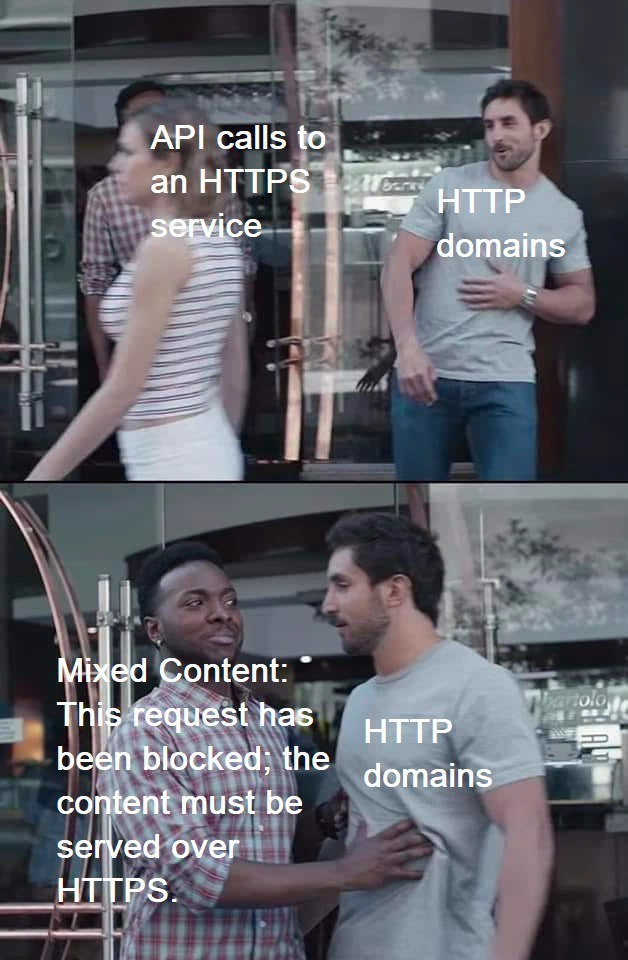
Think of it like a security guard at a club or a school dance. There’s a special safe conversation happening inside (that’s the HTTPS part, where everything is protected). Now, imagine one person from outside tries to join that conversation but they’re not following the safety rules (that’s the HTTP website, which isn’t secure). A big security guard (the browser) steps in front of the unsafe person and says, “Hold on! You can’t go in there unless you’re being safe too.” In the picture, the guard is literally stopping the guy from reaching the girl – just like a browser stops an unsafe website from talking to a safe server.

Why is this funny? Because as developers, we’re like the guy being stopped, and the browser is the friend with a hand on our chest saying “no way, not like this.” It’s a bit like trying to mix oil and water – or trying to enter a no-germs clean room while covered in mud. The rule is simple: everything has to be safe and secure, or the unsafe parts aren’t allowed in. The meme makes us smile because it shows that serious security rule as a real-life scene. It’s a playful reminder: if one part of your system isn’t secure, the browser won’t let it mess up the safety of the secure part. In short, safety first – everyone in the interaction has to wear their security seatbelt (use HTTPS), or the ride stops right there.

Level 2: HTTPS or Bust

Let’s break down what’s happening in this meme in simpler technical terms. It’s highlighting a rule in web development about HTTP and HTTPS and how browsers handle them.

  • HTTP vs HTTPS:
    HTTP stands for HyperText Transfer Protocol. It’s the basic way websites communicate, but on its own it’s not encrypted. Data sent over plain HTTP can be seen or modified by anyone intercepting the traffic (like someone eavesdropping on a conversation). HTTPS is HTTP with “Secure” added. It means the data is sent over a secure, encrypted connection (using TLS/SSL encryption). When you see the padlock icon in your browser’s address bar, that site is using HTTPS. This encryption ensures that others can’t easily snoop on or alter the data in transit. It’s the difference between sending a postcard (HTTP – anyone can read it) and sending a sealed envelope (HTTPS – private).

  • Mixed Content:
    Now, mixed content is what you have when some parts of a web page are loaded over HTTPS (secure) and other parts are loaded over HTTP (insecure). For example, imagine your main webpage was loaded securely (https://mywebsite.com), but then it tries to fetch data or load a script from an http:// URL. That mix is problematic. Browsers consider that a security risk because the insecure part could be compromised and it would compromise the secure page, too. The meme labels show an “HTTP domain” (a site served via http://) trying to interact with an “HTTPS service” (an API endpoint served via https://). That’s an example of mixed content usage – the two are from different security levels.

  • Browser Blocking the Request:
    Modern web browsers will block this kind of mixed request automatically. They enforce a policy: if your main page is secure, all additional content must also be secure. If not, the browser stops those requests. This is exactly what the big bold text in the bottom panel is saying: “Mixed Content: This request has been blocked; the content must be served over HTTPS.” That message comes from the browser’s developer console (the debugging output area for web pages). It’s telling the developer: “I refused to fetch that resource because it wasn’t using HTTPS.” In the meme, that message is personified as a guy physically restraining the HTTP domain character, which is a perfect visual metaphor! The HTTP domain in the story is the website that is not secure, and it’s trying to reach out to an HTTPS API. The browser stands in the way because from its perspective, an unsecured site has no business talking to secure content unless it also steps up its security.

  • Why is it blocked? (Security 101):
    The reason behind this is simple: an HTTP page is not safe from attackers. If a user is on an HTTP page, someone could intercept or change what that page does (since it’s not encrypted). If that insecure page could freely communicate with a secure API, an attacker could potentially hijack the insecure page and then misuse the secure connection. For instance, an attacker could inject some malicious script into the HTTP page (since it’s not protected), and then that script could call the HTTPS API and maybe steal sensitive data from it or send bad data. In essence, the weak link (HTTP) would break the security of the strong link (HTTPS). Browsers prevent this by saying: “No mixed content allowed. Go full HTTPS or go home.” It’s a bit all-or-nothing: either the entire chain is secure, or none of it can be trusted. That’s why developers will often see nothing happen when they try to do this, except for that warning/error in the console.

  • Typical scenario for developers:
    This often comes up during development or when integrating systems. For example, you might be building a front-end on your localhost (which might be using HTTP by default, like http://localhost:3000) and trying to fetch data from a live API at https://api.example.com. When you test it in the browser, the fetch request fails with a mixed content error. Another scenario is if you have an older website still on http, and you add a new feature that calls a third-party secure service (like a payment gateway or Google Maps API over https) – the browser will block that call. The fix is usually to serve your site itself over https as well (which often means getting an SSL certificate for your domain). These days, services like Let’s Encrypt have made it easier (and free) to get HTTPS for your site, so there’s less excuse to stick with HTTP. But if one part is still HTTP, the browser is going to complain.

  • What the meme visually represents:
    In the image, the HTTP domain guy reaching for the HTTPS API calls girl is like your insecure website code trying to call a secure API. The other guy stepping in with the Mixed Content message on him is literally the browser saying “nope”. It’s blocking that reach. The street-scene style dramatizes the concept: the browser is effectively acting as a bodyguard or gatekeeper. If the content isn’t all served over HTTPS, it doesn’t get through. The text on his body is exactly what you’d see in Chrome or Firefox console logs when this happens, which is why developers find this meme so spot-on and funny.

Here’s a quick example to illustrate. Suppose your main page is secure (https://myapp.com) but you accidentally wrote an API call URL with http:// in your JavaScript code:

// Inside a front-end script on a page loaded via HTTPS:
fetch('http://api.example.com/data')  // Oops, this is an HTTP URL call from a secure page
  .then(response => response.json())
  .then(data => console.log('Data:', data))
  .catch(err => console.error('Request failed:', err));

If you run this, the browser will block the request. You’d get something like this in your browser’s dev console:

Mixed Content: The page at 'https://myapp.com' was loaded over HTTPS, 
but requested an insecure resource 'http://api.example.com/data'. 
This request has been blocked; the content must be served over HTTPS.

As we can see, the browser explicitly says it blocked the request because of mixed content. The code never even gets a chance to .catch an error from the server, because the request never leaves the browser! The browser itself is stopping it upfront.

To solve it in this scenario, we’d simply change the fetch URL to https://api.example.com/data (assuming the API supports HTTPS, which it should). Or if the API didn’t have HTTPS (in 2019 most do, but let’s say it was legacy), then our site must also be served over plain HTTP to use it – but serving a site only over HTTP is not recommended at all nowadays. The real answer is: everything should be HTTPS. No mixing. That’s why we say “HTTPS or bust.” Either both sides are secure or the browser says “I’m not delivering that content.”

In summary: The meme is a funny way to remind developers about SecurityBestPractices on the web. If you try to mix HTTP and HTTPS, your browser will protect the user by blocking the non-secure parts. The categories like API, Frontend, and Security all come into play here: it’s an issue you hit in front-end web development when calling back-end APIs, and it’s all about web security rules. The “Mixed Content” error is basically the browser slapping your hand and saying, “No, you can’t combine insecure and secure content, it’s dangerous.” So the meme makes us laugh, but it’s also teaching (or reminding) us: keep everything encrypted with HTTPS to avoid that comedic smackdown by the protocol police!

Level 3: Protocol Police

This meme humorously personifies a browser security feature that web developers know all too well. In the top panel, "API calls to an HTTPS service" (the woman) catches the eye of "HTTP domains" (the guy in the grey shirt). In plain terms, we have a webpage served over HTTP trying to call an API endpoint over HTTPS. In the bottom panel, a vigilant friend labeled with that exact scary browser console message steps in to block him: “Mixed Content: This request has been blocked; the content must be served over HTTPS.” This is the browser’s friendly firm way of saying “Stop right there, you insecure site, you shall not pass!”

From a seasoned developer’s perspective, the humor hits home because it dramatizes a common Frontend integration snag. Modern browsers act like strict WebSecurity bouncers. They will block any resource loads or API calls that would result in mixed content. Mixed content means you're trying to mix secure and insecure resource requests: typically, an HTTPS page pulling in something over plain HTTP (which downgrades security). Here the roles are a bit flipped for comedic effect, but the principle stands: one side of the conversation isn’t playing by the security rules. In real life, if your main app is served over a secure https:// connection, but you accidentally call http:// for an API or script, the browser will literally refuse to deliver that resource. The dev console’s browser_console_warnings are essentially the browser going, “Nope, that API data isn’t coming through unless it’s all over HTTPS.”

Why so strict? Because an HTTP connection is not encrypted and not authenticated. If a secure page were to talk to an insecure endpoint, it opens a loophole for bad actors. An attacker could sniff or tamper with the insecure content, hijacking what was supposed to be a secure page. It defeats the whole purpose of HTTPS. Browsers enforce these secure_context_requirements to protect users by default. It’s like a form of damage control: better to break the functionality (with a big fat error) than silently expose the user to a security risk. This has become increasingly aggressive over the years – older browsers might have only shown a warning icon or mixed content notification, but modern ones will outright block the request as depicted in the meme. The result? A lot of developers scratching their heads at 2 AM when their front-end calls to a production HTTPS API mysteriously don’t go through from an HTTP page. (Cue the “it’s always DNS... or in this case, always HTTPS” jokes.)

The top panel’s scenario, “HTTP domains” watching “API calls to an HTTPS service,” captures that temptation developers have: “Surely I can just call this secure API from my old http page, right? It’s just one call.” But the bottom panel is reality slapping them in the face via the Mixed Content error. It’s funny because the Mixed Content error message is usually something we see in text form in the dev tools console – here it’s a literal guy physically stopping the action. Every experienced web dev can relate to seeing that exact phrasing in Chrome or Firefox and going “d’oh, forgot to change that URL to https.” The meme’s charm is in how accurately it portrays the browser as this uncompromising enforcer – a Protocol Police officer keeping HTTP and HTTPS apart unless they’re properly uniformed. It also winks at the fact that by 2019, running a site on HTTP (without the S) is seen as outdated or lazy. Security is no longer optional, and the browser will call you out. The FrontendHumor here hides a valuable lesson: if you’re mixing content, the browser will intervene like a chaperone at a middle-school dance, ensuring there’s no inappropriate “HTTP touching HTTPS.”

In summary, the meme cracks a joke about a WebDevelopment pitfall that’s both amusing and educational. It plays on the collective frustration of developers dealing with strict security protocols. The Mixed Content blocker (the guy with the hand out) is the unsung hero (or villain, when you’re debugging) of modern web apps – he’s saving your users from potential attacks, but also giving you a hard time until you do things the SecurityBestPractices way. And yes, the fix is usually simple (serve everything over HTTPS), but the moment of encountering that error unexpectedly is comedy gold in hindsight. This image says: “We’ve all been the grey-shirted HTTP guy, smugly thinking we can get away with an insecure call, and the browser is that friend who absolutely refuses to let it slide.” It’s a perfect mash-up of Frontend coding life and real-world bodyguard action, where the stakes are your site’s integrity instead of a nightclub’s orderliness.

Description

This two-panel meme uses the "Distracted Boyfriend" or "Gillette Ad" format to illustrate a common web development issue. In the top panel, a man labeled "HTTP domains" is enthusiastically trying to interact with a woman labeled "API calls to an HTTPS service". This represents a web page served over insecure HTTP attempting to fetch data from a secure HTTPS endpoint. In the bottom panel, the man is stopped by another man who represents the browser's security policy. This second man is labeled with the classic browser console error: "Mixed Content: This request has been blocked; the content must be served over HTTPS." The meme perfectly captures the frustration of a developer when a browser's security features, designed to protect users, prevent insecure pages from loading secure resources, effectively cockblocking their code

Comments

7
Anonymous ★ Top Pick The browser is just that overprotective friend who won't let your insecure HTTP frontend talk to that classy, certificate-having HTTPS API at the bar
  1. Anonymous ★ Top Pick

    The browser is just that overprotective friend who won't let your insecure HTTP frontend talk to that classy, certificate-having HTTPS API at the bar

  2. Anonymous

    Chrome’s mixed-content blocker: the bouncer that turns a “quick POC over HTTP” into an unscheduled Friday-night TLS migration

  3. Anonymous

    The same legacy vendor API that's been "migrating to HTTPS next quarter" since 2016 is now blocking your entire feature release because Chrome decided mixed content warnings weren't scary enough anymore

  4. Anonymous

    The eternal struggle of modern web architecture: your shiny new HTTPS frontend trying to talk to that one legacy HTTP service that 'still works fine' according to the team that hasn't touched it since 2012. Browser: 'I'm going to stop you right there.' Meanwhile, the backend team insists it's a frontend problem, the frontend team says it's infrastructure, and infrastructure claims they're just following security best practices. The real solution? A reverse proxy, three Jira tickets, two architecture review meetings, and one engineer muttering 'we should just rewrite the whole thing' into the void

  5. Anonymous

    Enable HSTS and Chrome’s Mixed Content bouncer starts carding every request - turns out your “modern SPA” is babysitting three HTTP pixels, a legacy CDN, and a vendor API that’s “adding TLS next quarter.”

  6. Anonymous

    HTTPS frontend ships, legacy HTTP API lingers - browser's mixed content block turns your prod traces into a graveyard of 'blocked' ghosts

  7. Anonymous

    After six months of zero-trust, mTLS, and a shiny service mesh, one stray http:// in an env file gets body-checked by the browser’s mixed-content cop harder than any change-control board ever did

Use J and K for navigation