Skip to content
DevMeme
3190 of 7435
Asked for a home-network diagram, delivers the ultimate two-node architecture meme
Networking Post #3511, on Aug 6, 2021 in TG

Asked for a home-network diagram, delivers the ultimate two-node architecture meme

Why is this Networking meme funny?

Level 1: My PC & Magic Cloud

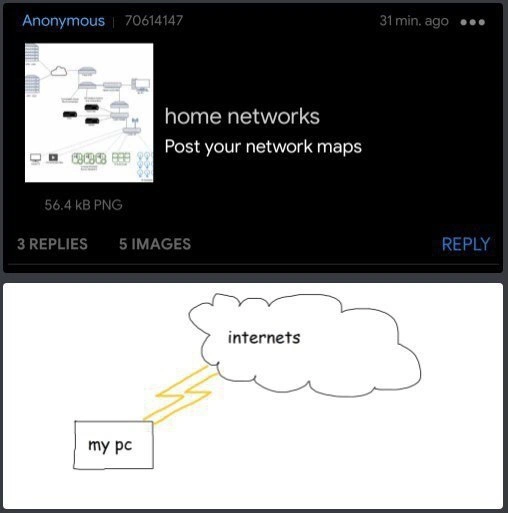
Imagine you ask someone to draw how their house is connected to the world, and they just draw a little house, a single road going out, and then a big fluffy cloud labeled “the world.” Pretty silly, right? They’ve basically skipped drawing all the other houses, streets, highways, and bridges — just a house and a magical connection to everything. That’s what this meme does with a computer and the Internet. The top part was asking people to show detailed “maps” of their home networks (like all the devices and cables). But instead of a big complicated map, the person replied with the simplest picture possible: one box for their computer and one cloud for the Internet, connected by a lightning bolt line. It’s funny because it’s such an extreme oversimplification. It’s like a kid’s drawing that says, “Here’s my entire network!” even though we know there’s actually more behind it (like the Wi-Fi router or modem that didn’t get drawn). The humor comes from how ridiculously simple that drawing is compared to what was asked. It makes us laugh because sometimes, when we don’t understand all the complicated stuff, we just imagine a direct, magical link — and seeing that drawn for real is both cute and absurd. In other words, the meme is joking that their home network is “just my PC and the mysterious cloud of internets,” which is a playful way to say “I have no fancy setup at all.” It’s the contrast between what was expected (a serious diagram) and what was delivered (a doodle a five-year-old could draw) that makes it so endearingly funny.

Level 2: Router Not Included

For someone just starting out or not deeply into networking, this meme might need a bit of decoding. In a real home setup, your computer doesn’t plug straight into the Internet like sticking a fork directly into an electrical outlet (ouch!). There’s usually a critical middle-man device: the router (often combined with a modem in one box). That router is the little box with blinking lights (maybe the Wi-Fi box given by your ISP) which routes data between your home and the wider internet. In the meme’s drawing, that device is completely missing — hence the humor. It’s like showing a car magically on a highway without any on-ramp or driveway. In reality, the router is that on-ramp, the gateway that connects your personal network (even if it’s just one PC) to your ISP’s network and beyond. By not even drawing a tiny rectangle for a router, the doodle creates a missing_router_joke that network-savvy folks immediately notice. They’re thinking, “Um, you forgot the most important piece!”

Let’s break down a few key terms and what a proper home_network_map includes versus what the meme shows:

  • Router: This is the device that sits between your home devices and the Internet. It usually has antennas (if it’s also Wi-Fi) and plugs into your phone/cable line or fiber. The router’s job is to forward packets of data back and forth. It gives your PC a local IP address (like 192.168.1.100) and knows your ISP’s provided address (your house’s public IP). In the meme, “my pc” is drawn as if it beams straight to the cloud; in real life, your PC always sends data to the router first (the router is your PC’s default gateway, literally the gateway to the internet). Not showing the router is a huge oversimplification, akin to showing a phone without a telephone line.

  • NAT (Network Address Translation): Sounds fancy, but it’s basically a trick the router uses so that many devices in your home can share one Internet connection (and one external IP address). Think of NAT like a receptionist in an office: you have one main phone number (your public IP) but that receptionist (the router) knows which actual office phone (your PC’s private IP) to ring when a call (data) comes in, and vice versa. So when your PC sends something out, the router swaps your internal return address with the house’s public address. The outside world only sees the router’s address, not your PC’s private number. The meme’s simple diagram doesn’t mention NAT at all — it’s as if every nuance of managing addresses just isn’t worthy of the drawing. A newcomer might not know about NAT, but it’s happening behind the scenes every time you watch YouTube or join a game from your home network. If you’ve ever tried to host a Minecraft server and struggled with port forwarding, you were wrestling with NAT. In short, the meme leaves out NAT and that’s one reason the image is so bare-bones compared to reality.

  • “Internets” (The Cloud): In the picture, the cloud labeled “internets” represents the entire Internet, drawn as one puffy blob. This is actually a common symbol in network diagrams. We often use a cloud icon to simplify diagrams, basically saying “beyond this point is the Internet at large, which we’re not drawing in detail.” For someone new to networking, think of the cloud as “everything outside your house.” It’s all the websites, servers, and other people’s networks out there. The meme uses that cloud to the extreme — it doesn’t show any of the steps between your home and, say, Google or Netflix. In real life, when your data leaves your router, it goes to your ISP (Internet Service Provider) first (maybe to a modem in your neighborhood, then to their regional hub), and from there it might traverse a bunch of other networks to reach a website. None of those steps are in the drawing; it’s just a cloud because, to someone who isn’t familiar with networking, the Internet really does feel like a shapeless cloud of “stuff out there.” The joke here is that the person delivered a minimalist_diagram that says “my PC connects to the Internet, end of story,” when actually there’s more in between.

Now, why is this funny? It’s because the request was to post network maps – presumably detailed schematics – and this person responded with something a child could have sketched in a minute. It’s the ultimate simple answer to a complex question. Early in your tech journey, you might actually think this way: I plug my computer in, and somehow the Internet shows up! Many of us only learn about the intervening pieces (router, modem, DNS, etc.) later on, perhaps when something breaks. So if you’re a junior developer or just building your first network, don’t worry if this meme diagram looks familiar – it’s making fun of exactly that initial mental model. Over time, you’ll come to appreciate why we add all those extra boxes and lines in real network diagrams. They’re not just fluff; each device and line has a job (security, reliability, speed, etc.). But hey, at a high level, it is true that ultimately your device talks to the big bad Internet. This meme just chooses to only show that high level, and nothing more, which is why it’s both amusing and a bit absurd to those in the know.

Level 3: Napkin Network Nirvana

Imagine a thread on a tech forum where enthusiasts proudly share elaborate maps of their home network setups. You’d expect to see fancy diagrams with cascading switches, overlapping Wi-Fi zones, maybe a NAS, a firewall appliance, and of course the trusty router connecting it all to the ISP. In fact, the screenshot’s top half hints at exactly that: a tiny thumbnail of a densely detailed network map (likely drawn with professional tools like Visio or adorned with official Cisco icons), and an invitation to “Post your network maps.” Everyone is gearing up to show off their nerdy network topology art. Then along comes this joker who posts a hand-drawn minimalist diagram that basically says: “here’s my entire network: one PC... and behold, THE INTERNET.” It’s the ultimate troll in a networking community context, and it’s hilarious precisely because it’s such an oversimplification. This person essentially drew their network on a napkin with a single scribble, next to others’ painstaking blueprints — a perfect deadpan response that subverts the expectation.

For seasoned engineers, the humor cuts deep. We obsess over details: IP schemes, subnet masks, NAT rules, which port goes to which switch, labeling every Raspberry Pi and smart fridge on the network map. Meanwhile, this meme just yeets all that meticulous detail out the window. The diagram contains zero of the usual suspects: no router (the device that every home network relies on), no modem or ONT (the gadget that actually links to the ISP), no Wi-Fi access point, no second PC or game console — nothing. Just “my pc” on one side and a cloud labeled “internets” on the other. By leaving out the router entirely, it sets up a classic missing_router_joke. Everyone reading it instinctively asks, “Wait, where’s your router? How are you even online?!” And that confusion is exactly the point — the meme is deliberately flouting the obvious reality to get a laugh. It’s poking fun at the naive view that many non-network people have: internet connection as black box. From that perspective, maybe the router is just some boring box the ISP gave me, so who cares — the “internets” come from the wall, right? The meme cranks this naive view up to eleven for comedic effect.

The choice to label the cloud “internets” (plural) is another tongue-in-cheek touch steeped in meme culture. Tech folks will recall jokes about older or less technical people calling it “the Internets” or “a series of tubes.” Here, the poster is likely self-aware and playing dumb on purpose. It’s like they’re saying, “Here’s my super serious network diagram: I connect my PC to them internets!” in the voice of someone who has no clue. That deliberate misuse of terminology is a staple of tech humor – by pretending to be clueless, you actually wink at those in-the-know. We recognize it’s a joke, and that makes it funnier. And the visual style drives it home: the bottom drawing looks like it was scrawled in MS Paint or drawn in 30 seconds, with jagged yellow lightning bolt lines as cables. (At least they drew two lightning bolts – maybe that’s “redundancy” for high availability? 😜 In reality it’s just doodle flair, but network HA nerds can have a chuckle pretending it’s a dual-link setup!)

What really sells this meme is the stark contrast. The top half of the image implies complexity, boasting file size and multiple replies, suggesting people are sharing dense network maps with dozens of nodes. The bottom half is the antithesis: an almost nihilistic minimalism. It’s as if the poster said, “You want a network map? Fine, here: one box and an arrow to the magical cloud. Happy now?” This kind of bait-and-switch humor resonates with experienced developers and network engineers because we’ve all been in scenarios where someone asks for an overly detailed plan or diagram, and part of us just wants to reply with the simplest possible picture. It’s a form of gentle mockery of our own tendency to overcomplicate things. After all, the simplest network (one device directly online) is kind of a network, just not the flex you’d expect to show off.

There’s also a bit of truth hiding in the joke. A lot of home users do effectively have a two-node network: one computer (or maybe one Wi-Fi router serving all devices, but conceptually one point of presence) and then the ISP’s cloud beyond. To them, drawing more than a box and cloud would feel unnecessary. Seasoned pros find that sweetly naive. We know there’s a tangle of wires and signals behind that simplicity. Many of us recall learning the hard way that the “cloud” isn’t magic — like the first time you had to login to your router’s admin page to troubleshoot why the internets were down, or when you discovered the concept of port forwarding because your game server wasn’t visible to friends. That moment you realize, “Oh, my Wi-Fi router is doing a lot!” is the day the one-box-and-cloud illusion shatters. This meme plays on that divide in understanding. It’s an inside joke among network folks, but it’s also funny to anyone who’s ever seen an overly complicated diagram and thought, “wow, mine’s just a PC and a modem… am I doing it wrong?”

In summary, the meme gets laughs by juxtaposing a minimalist_diagram against the expected complexity. It exaggerates the oversimplification to highlight the gap between how experts map out networks versus how a casual user might see their setup. It’s a little bit of techies laughing at ourselves for taking things so seriously, and a little bit laughing at the cluelessness of ignoring all those hidden wires. And at the end of the day, yes, technically “my pc -> internets” does describe a home network at the most abstract level. It’s the ultimate two-node architecture joke — one that both mocks and celebrates the simplicity that we know isn’t the full story.

Level 4: Two Nodes, Many Layers

Beneath this cheeky two-node cartoon lies a wealth of hidden networking complexity. On the surface it's just “my pc” connected to “internets” by a couple of lightning lines, but any network engineer knows that bridging a home PC to the global Internet involves numerous layers, protocols, and intermediate devices working in concert. Consider the OSI model: this doodle effectively compresses everything from Layer 1 (Physical) through Layer 4 (Transport) into a single scribbled connection hitting a cloud. In reality, Layer 3 (Network) and Layer 4 (Transport) are doing a lot of heavy lifting here that the drawing doesn’t show. The PC needs an IP address (likely a private one like 192.168.x.x on a home subnet) and uses a default gateway (the home router’s IP, e.g. 192.168.0.1) to reach outside. That gateway device performs critical functions like routing and ARP resolution on Layer 3, and it orchestrates TCP/IP handshakes on Layer 4 when your PC communicates with external servers. All of this is invisible in the minimalist sketch, which blissfully ignores the entire stack of networking operations required to get data from your machine to the wider world.

One crucial omission is NAT (Network Address Translation). In typical home setups, the PC’s private IP can’t directly communicate over the public Internet; a router in the middle must translate it to a shared public IP. NAT is a clever Layer-3/4 technique that rewrites packet headers on the fly, allowing multiple devices to share one external address. It was born out of IPv4 address exhaustion and has become an everyday cornerstone of home networking. The meme’s two-node “architecture” pretends NAT doesn’t exist — implying a direct connection as if the PC itself had a public IP and plugged straight into the Internet. In practice, unless you tether a single PC directly to a modem with an ISP-provided IP (an increasingly rare or at least risky scenario), there’s always a NAT device or router mediating. By omitting that, the drawing plays up an oversimplification that seasoned network folks recognize as a fantasy. The router (with its NAT, DHCP, firewall rules, etc.) is the unsung hero in real home networks, but here it’s cheekily invisible.

The cloud symbol in this diagram is doing an awful lot of work as an abstraction. In formal network diagrams, a fluffy cloud icon typically represents an external network or the entire Internet — basically “here be complexity we’re not drawing”. And indeed, this meme uses the cloud to stand in for everything beyond the PC. But that innocuous cloud hides countless components: your ISP’s infrastructure, the regional internet exchanges, the BGP routing that glues the global Internet together, and numerous intermediary routers that forward packets across continents. The Internet is not a single entity but a vast network of networks. Depicting it as one cloud is a convenient shorthand, but it collapses what is actually a multi-hop journey through many autonomous systems into a single hop. For perspective, if you run a quick traceroute from your PC to even a nearby server, you’ll see multiple hops:

$ traceroute 8.8.8.8   # tracing route to a Google DNS server
1   192.168.0.1       (home router)
2   203.0.113.1       (ISP network)
3   203.0.113.9       (ISP network)
4   198.51.100.42     (backbone router)
5   8.8.8.8           (Google DNS)

Even this simplified route shows how your data typically goes through a router in your home, then your ISP’s routers, then backbone routers, before reaching the destination. Each line above is one hop in the “cloud” that the meme draws as a single blob. The layer-3 routing decisions (which path to take) and layer-4 sessions (managing TCP/UDP ports and connections) are completely abstracted away by that cloud doodle. The humor here, from a deep technical perspective, is that the meme knowingly ignores all these networking fundamentals — as if decades of Internet engineering (from TCP/IP handshakes to DNS lookups and multi-hop BGP paths) were just poof, a fluffy cloud labeled "internets". It’s a playful wink at how non-network engineers might imagine the Internet works, while those of us who know the underlying complexity can’t help but cringe and chuckle at the nihilistic simplicity on display.

Description

The image is a split screenshot. The top half shows a dark-themed forum post titled “home networks - Post your network maps” alongside a tiny, densely detailed network diagram thumbnail filled with routers, switches and icons; beneath it are stats reading “56.4 kB PNG, 3 REPLIES, 5 IMAGES”. The bottom half contains a stark white doodle: a small rectangle outlined in black labelled “my pc” on the left, two jagged yellow lightning-bolt lines shooting rightward into a single amorphous cloud outlined in grey and labelled “internets”. No other devices - no router, modem, firewall, Wi-Fi, or subnets - are depicted, humorously reducing an entire home topology to one box and a cloud. Technically, the meme riffs on how non-network engineers often oversimplify layer-3/4 realities, ignoring NAT, gateways and routing complexity, while seasoned engineers obsess over detailed Visio maps; the joke lands by contrasting the request for elaborate network maps with an almost nihilistic minimal diagram


Comments

23
Anonymous ★ Top Pick Why overthink it? I containerised NAT, DHCP, DNS, firewall and Wi-Fi into one yellow squiggly line, called it “edge,” and boom - two-node microservice architecture
  1. Anonymous ★ Top Pick

    Why overthink it? I containerised NAT, DHCP, DNS, firewall and Wi-Fi into one yellow squiggly line, called it “edge,” and boom - two-node microservice architecture

  2. Anonymous

    After 20 years of designing multi-region failover architectures with BGP peering, MPLS backbones, and zero-trust microsegmentation, I've finally achieved enlightenment: every network diagram eventually abstracts to 'cloud go brrr to computer' - the rest is just billable complexity we invented to justify our salaries

  3. Anonymous

    Ah yes, the classic home network architecture: Layer 1 (my pc), Layer 2 (lightning bolt), Layer 3 (internets). No need for VLANs, redundant switches, or that Ubiquiti gear gathering dust in your cart. Who needs defense in depth when you can have defense in 'directly exposed to the entire internet'? At least there's no NAT traversal issues, no DHCP conflicts, and zero network latency - because there is no network. This is what peak performance looks like: O(1) hop count, infinite attack surface

  4. Anonymous

    Home network map: my pc → internets. The lightning bolts are “NAT” and “prayer”; everything omitted - CGNAT, pfSense, VLANs, hairpin NAT, mDNS - explains every outage

  5. Anonymous

    The perfect high-level diagram: my pc -> internets; the appendix (modem, CGNAT, double NAT, VLANs, Pi‑hole, hairpin NAT, mesh backhaul) ships after the first port‑forwarding ticket

  6. Anonymous

    Flattest network ever: zero STP needed, infinite collision domain, and electrocution as the failover

  7. @feskow 4y

    anyone get the reference

  8. @obinnaelviso 4y

    That's basically straightforward

  9. @ZgGPuo8dZef58K6hxxGVj3Z2 4y

    Funny how everybody thinks the internet is 1 thing as of the internet is in reality multiple decentralized computers and a network that connects all together

    1. @DanteAlighieri0 4y

      We look at it as if it's a black box, it doesn't matter what's inside we just upload and download data 🤷‍♂

      1. @ZgGPuo8dZef58K6hxxGVj3Z2 4y

        Well I am making the software for my own server. It will be a universal app store for multiple OSes

        1. @DanteAlighieri0 4y

          Dude You're talking above " hello world " so I'm just in a 404 state 😅 But jokes aside I hope your work goes smoothly and what do you mean multiple OSes ? If it's a app then i thinks it's for cellphones and the dominant cellphone OSes are Android and IOS. Are making for even more than those 2 ?

          1. @ZgGPuo8dZef58K6hxxGVj3Z2 4y

            Android, iOS, UWP, Symbian, (link to PWAs)

            1. @RiedleroD 4y

              Windows Mobile? 😀

              1. @ZgGPuo8dZef58K6hxxGVj3Z2 4y

                Yes!

                1. @RiedleroD 4y

                  BlackberryOS? 🙃

                  1. @ZgGPuo8dZef58K6hxxGVj3Z2 4y

                    Well I dont know a group for that os

                    1. @RiedleroD 4y

                      sad

            2. @DanteAlighieri0 4y

              Symbian ? Is there even a phone that runs on that ? And belive me it's the first time I've heard of UWP

              1. @ZgGPuo8dZef58K6hxxGVj3Z2 4y

                Lol UWP is a pretty cool platform if you have a use for it

              2. @ZgGPuo8dZef58K6hxxGVj3Z2 4y

                @symbianos

                1. @DanteAlighieri0 4y

                  Thx for the time man 👍 I'll check it out

  10. @ZgGPuo8dZef58K6hxxGVj3Z2 4y

    Sure thats why there are groups for that

Use J and K for navigation