That unsettling moment your manager joins your Figma live-collab session
Why is this UX UI meme funny?
Level 1: Peek-a-Boss
Imagine you’re drawing a picture, and all of a sudden you notice your teacher standing right behind you, watching you draw but not saying anything. You’d probably jump a little or get nervous, right? This meme is funny because it’s showing a grown-up version of that feeling. In the grown-up world, people use a computer program (like a digital art room) called Figma to make designs. It lets others come in and watch or help at the same time. Now picture you’re coloring in that digital art room, and then you spot your boss (like the teacher in our example) quietly looking at everything you do. It’s a bit like playing peek-a-boo, except instead of a friendly “boo!” it’s just your boss silently peeking. You feel surprised and maybe a bit scared, but it’s also kind of funny because the situation is so awkward. The meme’s image of a person in a window looking down at you is just like that: it’s showing how a boss watching you work can feel super creepy in a silly way, kind of like a scene from a funny/scary cartoon. The reason people laugh is because they recognize that weird, nervous feeling and it’s easier to joke about it — like telling a funny ghost story that everyone knows isn’t real, but the feeling behind it is!
Level 2: Live Cursor Anxiety
Let’s break down what’s going on here. Figma is a popular cloud-based design tool that many UX/UI designers use to create app or website layouts. One of Figma’s signature features is real-time collaboration – think of it like Google Docs but for design. When you’re in a Figma file (basically a digital canvas full of your designs), multiple people can open it at the same time from their own computers. You’ll actually see a little avatar or name bubble for each person currently viewing or editing. And if they move their mouse, a colorful cursor with their name tags along. This is super useful when teammates are working together on a design or when you’re presenting work live. But it can also lead to figma_live_cursor_anxiety – which is a jokey way to describe the nervous feeling you get seeing someone (especially someone important like your boss) watching your work as you’re doing it.
Now, management/PMs (product managers or project managers, basically bosses and team leads) sometimes join these design sessions. The meme describes that “unsettling moment your manager joins your Figma live-collab session.” Why unsettling? Imagine you’re in the zone, moving things around in the design, and suddenly you notice Bob from Management is now in the file too. He hasn’t said anything, but you know he’s there because his presence icon popped up. Maybe you even see his cursor hovering around. This is the hovering manager effect – the feeling that someone with authority is literally looking over your digital shoulder. In a physical office, it’s like your manager walking up quietly and staring at your screen without a word. It can be intimidating! You start second-guessing every move: “Should I rearrange this layout now, or will that look messy to him? Is he checking if I’m working? Did I do something wrong?” Your focus is broken because part of your brain is now worrying about what your manager might be thinking. This kind of design_tool_micromanagement is usually not a formal company policy or anything – it’s more of a byproduct of how these real-time tools work.
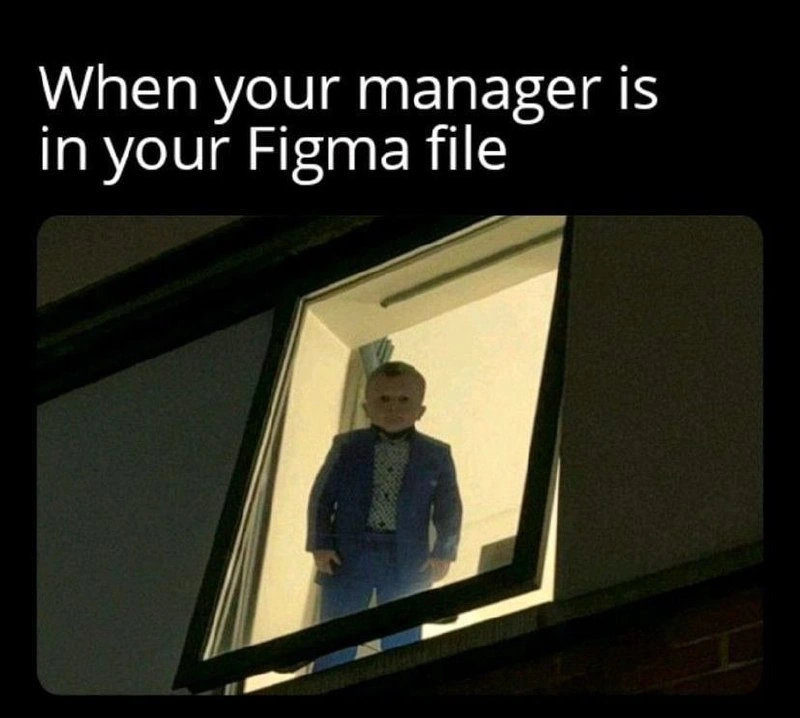
We also have to consider CorporateCulture here. In some workplaces, managers trust their team and won’t feel the need to constantly check in unannounced. In others, higher-ups can be very hands-on (sometimes too hands-on). If you’re a junior designer or new employee, especially, seeing a boss silently viewing your work-in-progress can feel very tense. It’s like an impromptu performance review! The meme is playing on that common WorkplaceHumor scenario. Even though Figma collaboration is meant to be positive and productive, it unintentionally creates these awkward moments. And because the meme uses an image that looks straight out of a horror scene (a person in a suit staring down through a window at night), it exaggerates that feeling of “being watched” to highlight the humor and mild terror of it. People who do UXDesign or UIDesign often share memes like this to laugh at the little anxieties of their job. It’s a way of saying “Yep, I know that feeling!” to fellow designers. So basically: Real-time collaboration is cool and efficient, but when your manager uses it to drop in on you without warning, it can spook you – that’s the joke here.
Level 3: Over-the-Shoulder 2.0
In the CorporateCulture of modern product teams, this meme nails a painfully familiar situation: the moment you notice your boss’s avatar pop up in your Figma toolbar is the digital equivalent of them suddenly appearing behind your desk, silently peering over your shoulder. It’s Over-the-Shoulder 2.0, upgraded by technology and complete with a creepy blue-suited specter in the window (as the image hilariously shows). The humor cuts deep because it’s WorkplaceHumor wrapped around a real anxiety. Designers and developers alike share this live collaboration dread. There’s even a term floating around design circles for it: “live cursor anxiety.” As soon as a manager's cursor (often a little colored dot or name tag) starts hovering near the element you’re editing, your heart rate spikes. Are they judging that unfinished toolbar design? Waiting for you to correct a typo in the UX copy? The meme’s image – a figure in a suit ominously lurking in a lit window at night – perfectly captures that vibe of figma_live_cursor_anxiety. It’s like your Manager/PM unlocked spectator mode on your design file.
This scenario is funny to those of us who’ve been there because it’s so true. Real-world example: You’re tweaking a UIDesign at midnight, and suddenly you notice “Bob (Manager) joined the file.” Bob isn’t saying anything in the chat or leaving comments; he’s just quietly in your Figma file. You pan the canvas a bit, and sure enough, there’s his cursor chilling in the corner of your prototype. In your mind, you’re thinking: “Uh, can I help you? Or are you just here to silently judge my spacing and color choices?” You might even stop moving things for a moment, pretending you’re away, hoping he leaves – a digital freeze-up caused by realtime_collaboration_fear. This is ManagementHumor with an edge: it satirizes how managers, especially micromanagers, can misuse a tool meant for creative collaboration as a surveillance mechanism.
Why does this happen? Partly, it’s a culture thing. In healthy environments, a manager might hop in to leave helpful notes or just understand progress. But many in tech have experienced the design_tool_micromanagement nightmare – a boss who virtually camps in your document, perhaps as a power move or out of distrust. Figma (and tools like Google Docs, Notion, or code live-share sessions) has made it incredibly easy for higher-ups to hover. In ye olde days of design, you’d send static mockups via email or present in a meeting, giving you time to polish and prepare. Now, with cloud collaboration, UXDesign work is laid bare in draft form. The meme exaggerates it to feel like a horror movie scene, but that kernel of truth is what gets a laugh (or a groan) from anyone who’s felt that creep of seeing an unexpected name pop into their online workspace. It’s a comedic depiction of a modern workplace problem: technology moved fast, but sometimes management instincts (for better or worse) moved right along with it. The result? We got seamless remote collaboration and a new flavor of performance anxiety as a package deal.
Level 4: Synchronized Surveillance
At the cutting edge of design collaboration, Figma harnesses complex real-time sync algorithms so multiple people can edit a design simultaneously. Under the hood, it’s likely using techniques similar to operational transforms or CRDTs (Conflict-Free Replicated Data Types) over WebSockets to merge everyone's changes without conflicts. In plain terms, every move you make on the canvas – dragging a button, typing a label – is instantly broadcast to all other viewers’ browsers. This strong consistency model means your manager’s screen reflects your actions almost in lockstep, enabling what is essentially digital shoulder-surfing. The same distributed systems magic that keeps everyone’s design in sync also enables synchronized surveillance: presence indicators show exactly who is watching, and even where their mouse cursor is hovering. It’s an elegant technical solution with an eerie side effect – turning on a kind of CCTV for design files.
From a theoretical perspective, this scenario echoes the observer effect (and its workplace cousin, the Hawthorne effect): the act of being observed in real-time changes the participant’s behavior. Here, that principle is baked into the software. The Observer pattern isn’t just a coding design pattern – it’s literally your boss observing every UI tweak as it happens. Figma’s collaborative architecture thus inadvertently creates a feedback loop between human psychology and software engineering. The very UX/UI feature that highlights collaborators’ cursors (meant to enhance teamwork) doubles as a spotlight, making you hyper-aware of any hovering_manager_effect. While the app’s real-time engine ensures eventual consistency of the design state across clients, it also assures immediate consistency of one unsettling fact: your manager can watch every pixel you push in real time.
Description
The meme is framed with a black border and white caption text at the top that reads: "When your manager is in your Figma file". Beneath the caption is a night-time photograph taken from outside a building, looking up through a wide-open, tilted window. Inside the brightly lit room, a person in a blue suit stands motionless, staring downward toward the viewer; their face is intentionally blurred for anonymity. The image visually conveys the intimidating feeling of a manager silently hovering over a designer’s real-time work cursor in Figma. Technically, it pokes fun at live collaborative design tools where every cursor movement is visible, highlighting the UX/UI anxiety and corporate micromanagement culture that many product teams experience
Comments
6Comment deleted
When the manager’s cursor pops into the Figma file, it’s like running git blame --live on every pixel - suddenly even the spacing tokens start accruing interest
Nothing says "agile methodology" quite like watching your manager's cursor hover over the component you just named "TemporaryHackV3Final" while you frantically rename it to "OptimizedDataRenderer" in another tab
The moment you see that manager cursor appear in your Figma file while you're still experimenting with that third completely different design direction at 2 PM - suddenly every half-baked component, misaligned layer, and 'DO NOT USE' frame becomes a performance review talking point. It's like having someone read your git commit messages in real-time before you've had a chance to rebase and make them presentable. At least with code reviews, you get to clean up your mess before anyone sees it; Figma's multiplayer mode is the design equivalent of pair programming with your boss who doesn't code but has 'thoughts on the color palette.'
Manager cursor in Figma: Auto Layout turns into Waterfall and your “exploration” collapses into a Q4 commitment
Figma collab: where managers bypass invites like a zero-day in your prototype permissions, dropping 'just move it 2px' exploits live
Figma’s multiplayer is basically Raft - once the PM cursor appears, they self‑elect leader and replicate “make it pop” to every frame