Skip to content
DevMeme
4631 of 7435
When ChatGPT writes code fast but triples your debugging hours
AI ML Post #5076, on Dec 10, 2022 in TG

When ChatGPT writes code fast but triples your debugging hours

Why is this AI ML meme funny?

Level 1: Genie Wish Gone Wrong

Imagine you have a magic genie for your homework. You snap your fingers and ask for all your math problems to be solved. In just a minute, poof!, the genie writes down all the answers – super fast! You’re happy because it saved you a couple of hours of work. But when you look at the answers, uh oh… some of them are wrong, and a few don’t even make sense. You end up spending the entire evening checking each answer, figuring out which ones are the mistakes, and then doing those problems over to get the right answers. In the end, you spent way more time fixing the genie’s work than you would have spent just doing the homework carefully yourself. It’s a bit funny and a bit frustrating – the magical helper who was supposed to save time actually caused even more work! That’s exactly what’s happening in the meme: the AI helper is like the genie that wrote the code quickly (solved the problems fast), and the developer is like you double-checking and correcting everything for the rest of the day. The joke is a reminder to be careful what you wish for: sometimes a quick fix can lead to a long mess. It’s funny because we expect the helper to make life easier, but instead it made the poor developer even more tired, just like you would feel if the genie’s “help” kept you up all night fixing things.

Level 2: Haste Makes Waste

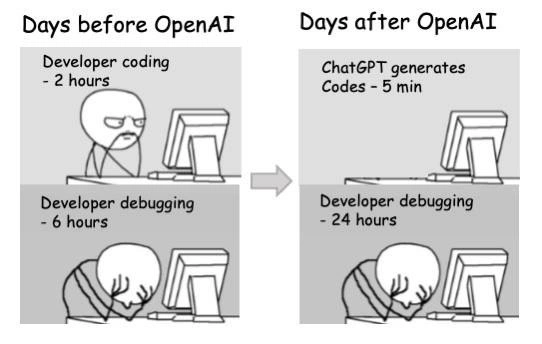
This meme is a simple four-panel cartoon that compares two situations: life as a developer before using OpenAI’s ChatGPT, and life after. On the left side (labeled “Days before OpenAI”), we see a developer working normally. First, the stick figure character sits upright at their computer, focused, with the caption “Developer coding – 2 hours.” That means it took them 2 hours to write the code for whatever task they were doing. In the next panel below, the same little developer is slumped over the desk with their head down, clearly exhausted or frustrated. The caption there is “Developer debugging – 6 hours.” Debugging is the process of finding and fixing bugs (errors or issues) in the code. So, before using ChatGPT, this dev spent 2 hours writing code, and then 6 hours fixing the problems in that code.

Now, the right side is labeled “Days after OpenAI” – implying once the developer started using ChatGPT (an AI tool from OpenAI) to help with coding. In the top-right panel, interestingly, the developer’s chair is empty and the computer is just sitting there by itself. The caption says “ChatGPT generates codes – 5 min”. In other words, instead of the developer manually typing out the code, they got ChatGPT to do it in only 5 minutes. ChatGPT is an AI assistant that can write code (and other text) when you give it a prompt (which is basically you describing what you want). It’s powered by a large language model, which you can imagine as a very advanced text generator trained on tons of examples (including lots of source code from the internet). So, with a quick question or instruction, the developer gets the code written almost instantly by the AI. Five minutes versus two hours – that’s a huge difference! It sounds like a dream come true for productivity, right?

But then comes the catch: the bottom-right panel shows the developer again face-down on the desk, and the caption reads “Developer debugging – 24 hours”. Ouch! Now the poor developer is spending 24 hours (literally an entire day, possibly an all-nighter) debugging the code that ChatGPT produced. The joke here is pretty clear: the AI can do the easy part (writing the code) really fast, but it might produce code with lots of issues, and then the hard part (debugging all those issues) ends up taking way more time than if the developer had just written it themselves carefully. It’s the classic case of “haste makes waste.” The “haste” is the 5-minute quick code generation; the “waste” is the 24 hours spent cleaning up the mess. The meme literally illustrates a scenario where using the AI made things worse for the developer’s productivity instead of better, because now they’re stuck in debugging hell for much longer.

Let’s break down some terms and why this happens in real life. ChatGPT (the AI in question) is a conversational AI model that became widely known around 2022. It can assist with coding by generating code snippets or even whole functions if you tell it what you need. This falls under the AI/ML (artificial intelligence/machine learning) domain, specifically an application of machine learning to developer tools. Many programmers started to use AI helpers like ChatGPT or GitHub Copilot to speed up mundane coding tasks or to get suggestions. The idea is the AI acts like a super-smart autocomplete, leveraging knowledge from lots of source code it has seen. However, ChatGPT doesn’t actually run the code it gives you, nor does it guarantee it’s 100% correct. It’s essentially guessing based on patterns. This means the code might contain mistakes or might not fit perfectly with your specific project. For example, maybe your prompt to ChatGPT wasn’t specific enough (this is where prompt engineering comes in – crafting just the right question or instructions for the AI to get the best answer). If the prompt left out details, ChatGPT might have to assume things, and it could assume incorrectly.

Now, debugging is where the developer has to take that code, test it out, and fix any problems. The meme shows “Developer debugging – 24 hours,” which is obviously an exaggeration for comedic effect, but it exaggerates a real concern: code that you didn’t write (or don’t fully understand) can take a lot longer to debug. Imagine ChatGPT gives you 500 lines of code. You didn’t write those lines, so you don’t immediately know why each decision was made in the code. If something’s wrong, you have to read through possibly unfamiliar code and figure out the issue. That could involve a lot of printing out values, running the program multiple times, or writing tests to pinpoint the bug. It’s very easy to burn hours this way. “Debugging hell” is a slang term developers use when this process becomes very long and painful – like you feel stuck in a never-ending loop of trying to find what’s wrong. The poor stick figure with their head on the desk illustrates that feeling of despair or exhaustion after hours of fruitless troubleshooting. (That pose is a common sight in developer memes and cartoons – it instantly communicates “I give up” or “I can’t deal with this”).

Let’s consider a simple hypothetical example of how AI-generated code can lead to more debugging. Say you ask ChatGPT, “Give me a function that sorts a list of numbers in Python and returns the sorted list.” ChatGPT might give you code like this:

numbers = [3, 1, 2]
sorted_numbers = numbers.sort()  # AI-generated code; sorts the list in place but returns None
print(sorted_numbers)  # This will output None, not the sorted list as intended

In this snippet, the AI produced something that looks reasonable at first glance. In Python, list.sort() sorts the list, but one tricky detail is that it doesn’t return the sorted list — it returns None (it does the sorting in-place). A human Python programmer might know that and instead use sorted_numbers = sorted(numbers) to get a new sorted list. But if ChatGPT missed that nuance (or if the developer using ChatGPT didn’t notice the issue), you now have a bug. sorted_numbers isn’t a list but None, so any further use of it will be wrong. Tracking down why your data is None could take time if you’re not already aware of that Python quirk. This is a simple example, but it shows how an AI’s output can have subtle mistakes. Multiply that by a larger, more complex piece of code, and you can imagine how debugging could become a huge task.

The meme’s timeline exaggeration (5 minutes vs 24 hours) highlights a potential time estimation failure. If someone only looks at the coding part, they’d think “Wow, we went from 2 hours to 5 minutes, what a time saver!” But that’s a trap if you don’t also account for the testing and debugging part of the job. In software development, it’s well known that you should factor in time for verifying and fixing things. Here, presumably, the developer (or their boss) might have thought using ChatGPT would make the task finish in basically no time, but in reality the total time (coding + debugging) ended up being much longer. So the plan or estimate failed because it didn’t anticipate the LLM limitations.

Let’s talk about those limitations in simpler terms. An LLM (Large Language Model) like ChatGPT is very powerful, but it’s not perfect. It’s been trained on a lot of text (including code), but its knowledge has a cutoff (for example, ChatGPT’s training data was mostly up to 2021 and it doesn’t automatically know about events or changes after that without updates). It also doesn’t truly know what it’s doing – it doesn’t run the code, it doesn’t have a compiler in its head checking things. It’s just predicting what code could solve the problem based on patterns it has seen. This means it can sometimes produce incorrect code confidently. We call these confident mistakes hallucinations in AI terms, because the AI isn’t trying to lie, but it “thinks” a solution is right when it might be made up. For instance, ChatGPT might even invent a function that doesn’t exist because it sounds plausible (e.g., suggesting a library.sortArray() function that isn’t real). A developer using the AI’s output must be alert for these kinds of errors. That’s why thorough testing or careful reading is needed even if the code appears instantly – you have to verify it.

The concept of “shift left testing” comes in as a smart strategy here. “Shift left” means do things earlier in the process (imagine a timeline going left to right – moving testing to the left means doing it sooner). In practice, that means instead of waiting until after you integrate the code into your whole project to test it, you test the AI’s code right after it’s generated, on the spot. For example, you might write a few quick unit tests to make sure the function ChatGPT wrote actually gives the expected output for various inputs. If the developer in the meme had done that, maybe they’d catch issues at the 5 minute mark, and the debugging might only take 1 hour, not 24. But the joke assumes that this step was either skipped or turned out to be more complicated, leading to the epic 24-hour debugging session. Essentially, the meme is a funny reminder: “Don’t celebrate finishing the code in 5 minutes until you’ve proven it actually works!”

Another aspect shown is the post-OpenAI workflow shift. Before these AI tools, a developer would allocate a certain amount of time to write code and then test/debug it. After AI, the workflow changes: you spend time crafting a prompt for ChatGPT (which might take a few minutes), and it spits out code, then you spend time integrating that code and debugging it in your application. Some things get easier (less typing and maybe learning syntax), but other things can get harder (figuring out why the AI code isn’t doing exactly what you wanted). The meme simplifies it to just raw time spent, but it reflects this new way of working. The empty chair in the “ChatGPT generates code” panel is a cute detail: it’s as if the developer left the desk to grab a coffee because the AI is doing the work. Five minutes is barely enough to boil water, so that’s a joke about how fast and hands-off code generation becomes. Then the developer comes back and finds out the real work is just beginning.

In sum, the meme uses a clear, easy-to-get scenario (fast coding vs slow debugging) to convey a lesson: If something seems too good and fast to be true, it probably has a catch. The catch here is that AI-written code isn’t automatically perfect. Even though this is presented in a humorous way (with the comically drastic 24-hour fix-it marathon), it’s actually teaching a bit of caution. For a new developer or someone outside the field, the takeaway is: writing code is just one part of making software; you also have to make sure the code works correctly. An AI can help you write it quickly, but you (the human) might then spend a lot of time checking and correcting it. It’s like getting a super fast assistant who does the job almost right, and you as the boss have to finalize all the details. Developer productivity isn’t just about speed; it’s about achieving a correct result efficiently. Here, the “productivity” gained in writing was lost in fixing. That’s why the meme is funny to developers – it highlights this ironic trade-off in a simple cartoon format that anyone who’s wrestled with a tricky bug (especially in code they didn’t write themselves) can appreciate.

Level 3: AI Giveth, Debugging Taketh

On a practical level, this meme speaks to experienced developers who’ve tried using AI assistants for coding and found the results to be a mixed blessing. It’s poking fun at the “ChatGPT revolution” in programming: suddenly, mundane coding tasks that used to take hours can be done in minutes by simply asking an AI. OpenAI’s ChatGPT (especially around late 2022 when it became widely available) felt like a miraculous hack – you type a problem description, and out pops code. That’s the left side of the right column: “ChatGPT generates code – 5 min”. Any seasoned dev initially reacts with awe and excitement at seeing an algorithm or function materialize almost instantly. But the punchline lands in the next panel: “Developer debugging – 24 hours”. The humor is in this AI humor paradox: the tool that writes code fast can cause you to debug forever. It’s a scenario many developers recognize, often with a weary laugh: “Sure, the code was done in 5 minutes, but then I spent the rest of the day finding out why it didn’t work!”.

Why is this so funny (and painful) to developers? Because it rings true. The meme exaggerates the timeline for effect, but not by much in some cases. There’s a common experience where a developer copy-pastes a solution (whether from Stack Overflow or now ChatGPT) and then hits a wall when it doesn’t quite fit their situation. The visual of the stick-figure developer face-down on the desk for 24 hours straight is an all-too-relatable representation of debugging pain. It screams “I am so done with this”, a feeling many of us have had at 3 AM when a supposedly quick fix turned into an all-night bug hunt. The left side (before AI) shows a 2:6 ratio of coding to debugging hours – a wry nod to the reality that debugging often takes longer than writing code in the first place. As Brian Kernighan famously quipped:

Debugging is twice as hard as writing the code in the first place. Therefore, if you write the code as cleverly as possible, you are, by definition, not smart enough to debug it.”

In the context of ChatGPT, we’re letting the AI write the code very cleverly (and very quickly) – so what happens next? By Kernighan’s logic, debugging that AI-written code might be more than twice as hard, which the meme amplifies to four times longer (from 6 hours to 24 hours!). We’ve essentially handed the keyboard to an extremely fast but inexperienced developer (that’s one way to personify ChatGPT’s coding ability), and now we have to play the senior engineer reviewing and fixing everything.

The meme also reflects an industry pattern: shortcut solutions often have hidden costs. Using ChatGPT to code is like outsourcing work to an unpredictable contractor – you save time upfront, but you might get back something that doesn’t quite meet your needs. Seasoned devs have seen analogous patterns, for example with early code generation tools or excessive copy-paste coding. Initially, you think you’ve avoided tedious work, but later you pay the price in integration effort and troubleshooting weird issues. Technical debt is a concept that comes to mind: you “borrow” time by having AI do quick work, but you incur a debt that you repay with interest during debugging. The meme’s day-long debugging marathon is the interest payment (with penalties!) for that 5-minute coding loan. It’s a comically exaggerated “interest rate,” but it underscores a truth: quick fixes can lead to prolonged clean-up. In agile planning terms, this is a time estimation failure – focusing only on how fast code can be written, and not accounting for the testing and debugging that inevitably follows. Many experienced engineers are nodding knowingly at this, because they’ve had to explain to non-technical managers why “coding is done” doesn’t mean “feature is done” when you factor in the validation phase. If a manager saw just the first part of the “Days after OpenAI” panel, they might cheer that productivity has skyrocketed (5 minutes! amazing!), only to be puzzled or horrified when the developer is still fixing bugs one or two days later. The meme humorously educates: developer productivity isn’t just about writing code faster; it’s about producing working code, and that’s a whole process.

The unspoken shared experience here is also a commentary on LLM limitations in a real-world dev workflow. Large language models like ChatGPT do a great job of producing code that looks legitimate. They might even run correctly for the basic case. But they have no concept of the specific application’s nuance, environment, or edge cases unless the developer meticulously includes all that in the prompt (and sometimes you don’t even know what edge case to mention until it fails). For example, the AI might use a deprecated function or an outdated library method because its training data included that usage. It won’t know that in your project’s context, that method was replaced in a newer version. So the developer runs the AI-generated code and hits an exception or a deprecation warning — surprise! Now starts the detective work to figure out what part of the AI’s code is incompatible. Or the AI might simply hallucinate a solution that sounds right but is logically flawed. Perhaps it got the algorithm slightly wrong — it sorts a list but accidentally leaves out an element, or mis-handles a boundary condition. The human developer now has to sift through the AI’s logic to pinpoint the bug. This is often harder than if they had written it themselves, because it’s like debugging someone else’s code without that someone else to clarify why it was written that way. You’re reverse-engineering the AI’s intentions. In the meme, the poor stick figure is essentially drowning in “debugging hell”, an informal term we use when a bug or series of bugs consumes an absurd amount of time. Every developer has had that one bug that just would not die – fix one thing, discover another issue, realize the fix introduced a new bug, and so on. AI-generated code can lead you straight into that quagmire if you’re not careful, as the meme dramatizes.

One of the reasons this resonates with veteran engineers is that it echoes the importance of understanding your code. If ChatGPT writes a chunk of code in 5 minutes, you still have to understand that code to maintain it. If it’s tricky or uses a different style, you might spend hours just parsing it mentally. It reminds me of the old joke: “It compiles, ship it!” – except here it’s “The AI wrote it, run it!”. Experienced devs know that’s dangerous. We usually have coding standards, code reviews, and tests to catch issues, but when an AI is involved, some people might skip straight to running it because “hey, it looks legit.” The meme’s extreme jump to 24 hours of debugging is like a cautionary slap: Don’t trust code blindly, even if it was written by a super-smart AI. In fact, treat AI code output as if it were written by a junior developer or an overenthusiastic intern. That’s both a humorous and practical framing — seniors often joke that GitHub Copilot or ChatGPT is like a very fast junior programmer that writes a lot of code with confidence, but still needs oversight. An intern can produce 1000 lines of code quickly, but you might spend the next day fixing style issues, logic errors, and making it production-ready. AI assistants are similar: they accelerate the easy part (writing code), but the hard parts (ensuring correctness, handling edge cases, integrating with the rest of the system) remain.

Organizationally, the meme also hints at the hype vs. reality gap. Post-ChatGPT, there was (and is) massive excitement about how AI will make developers 10x more efficient. But developers joke that now they’re just debugging 10x faster – or rather, debugging the machine’s mistakes rather than their own. The time savings can evaporate if the AI’s output isn’t perfect (which it rarely is). This is why some teams adopting AI have also doubled down on code review and testing practices. The tag shift_left_testing comes to mind: you want to catch problems as early as possible. If you generate code with AI, you might immediately write unit tests for it (or even have AI suggest tests) before integrating it, to validate it quickly. A savvy dev might run the AI snippet in a sandbox or add print statements to verify it behaves as expected, effectively shifting the testing left to right after generation. The meme’s scenario likely assumes the developer took the AI code and tried to integrate it or run it in their application, only to find out much later (when things broke) that it wasn’t working – hence a mad scramble for a full day. In real life, good practice would be to test early, but we often skip straight to “see if it runs” and then get burned by obscure bugs that only show up after further integration or in production. Many in the community have half-jokingly suggested pairing AI code generation with AI-driven debugging or verification tools – essentially not trusting the AI’s work until another system checks it. But in 2022, that was not common; a human developer is the safety net.

In summary, from a senior perspective this meme is funny because it’s true enough to sting. It captures the ironic reality that using cutting-edge AI/ML tools doesn’t automatically eliminate the grunt work – it just shifts it around. The developer still ends up doing arduous debugging & troubleshooting, possibly even more of it. It’s a gentle reminder that glamorous new tools come with caveats. Developer humor often revolves around these “caught off guard by reality” moments, and this meme nails it: You saved 1 hour of typing, but now you have a day of debugging. Every experienced programmer has learned that lesson in one form or another, which is why we can laugh (and maybe groan) at this depiction. The next time someone proudly says, “Look, ChatGPT did my task in 5 minutes!”, a wise developer might quip, “Sure, just keep an extra day free to make that code actually work.” The meme’s arrow splitting “Days before OpenAI” and “Days after OpenAI” succinctly visualizes this new workflow: we’re in a post-OpenAI world, and it has its own pitfalls along with the promise. As the saying might go: AI giveth code, and debugging taketh away (your time).

Level 4: No Free Lunch in Code

At the deepest level, this meme hints at fundamental truths in computing theory and AI design. It’s essentially a case of “no free lunch” in software development: if an AI assistant magically reduces effort in one part of the process, that effort (or complexity) reappears elsewhere. ChatGPT can produce code in seconds because it’s a Large Language Model (LLM) trained on vast amounts of programming data. It uses a transformer-based architecture to predict likely code sequences given a prompt. However, it does not truly understand the code’s meaning or the problem’s requirements. There’s no formal guarantee the AI-generated code is correct or optimal – it’s simply statistically plausible based on training data. In theoretical computer science terms, ChatGPT’s approach is akin to an oracle that suggests a possible solution without proof. The burden of verification falls entirely on the developer, which is where the hidden complexity emerges.

From a complexity theory standpoint, verifying that code works as intended can be as hard as or even harder than generating it. Ensuring a program is bug-free for all cases relates to the Halting Problem and Rice’s theorem – essentially, there’s no general algorithm that can automatically check every aspect of an arbitrary program’s correctness. In practice, this means we must test and debug manually. The meme’s exaggerated “24 hours debugging” dramatizes this reality: you can’t bypass the inherent difficulty of debugging just by offloading coding to an AI. Debugging involves exploring the state-space of the program’s behavior, finding counterexamples where it breaks, and understanding why – a process that can grow combinatorially complex as the code or problem domain expands. The AI’s lack of program semantics awareness means it might introduce subtle bugs that are non-trivial to uncover. For example, ChatGPT could produce an algorithm that works for many inputs but fails on edge cases; detecting those edge cases is equivalent to solving the problem the code was meant to solve, which often carries the same complexity as writing the code from scratch. In short, the LLM limitations force the developer to perform all the hard logical reasoning after the fact.

We can also interpret this scenario through the lens of performance and systems theory. Think of the development process as a pipeline with stages (coding, testing, debugging). Speeding up one stage can reveal or worsen bottlenecks in another. This is reminiscent of Amdahl’s Law: the maximum speed-up of a process is limited by the portion that isn’t improved. Here, coding time was a small portion of the whole task, and ChatGPT massively accelerates that part (from 2 hours to ~5 minutes). But debugging/troubleshooting was the larger portion, and if anything, AI code generation increases that load due to lower initial code quality or misalignment with the developer’s intent. The result? The overall developer productivity might actually decrease, as seen in the meme’s total time ballooning from 8 hours to 24+ hours. It’s a tongue-in-cheek illustration of a kind of “conservation of complexity” – the complexity isn’t gone, it’s just moved and often magnified in the debugging phase. Researchers in program synthesis know this well: generating a program automatically is one challenge, but ensuring that program is correct (meeting the specification) is a whole other challenge, often an NP-hard search through possible fixes. In essence, the meme captures a truth that formal methods and software engineering theory have long recognized: you can’t skip the hard part by brute force generation; eventually, troubleshooting and verification will consume the time saved, unless those are also automated or assisted in a rigorous way. The “5 min vs 24 hours” joke is a playful nod to these deep ideas – a reminder that even in the age of advanced AI/ML, the classic complexities of software correctness and debugging still apply, sometimes with a vengeance.

Description

Grayscale four-panel cartoon meme divided by a grey arrow. Left column is titled "Days before OpenAI" and shows: (1) a stern stick-figure developer at a computer with text "Developer coding - 2 hours"; (2) the same figure slumped face-down on the desk with text "Developer debugging - 6 hours". Right column is titled "Days after OpenAI" and shows: (1) an empty desk and monitor with text "ChatGPT generates Codes - 5 min"; (2) the developer again face-down with text "Developer debugging - 24 hours". The joke highlights how large-language-model helpers radically shorten initial coding time but dramatically increase debugging effort, a familiar pain point for engineers integrating AI-generated snippets into production code


Comments

6
Anonymous ★ Top Pick LLM workflow: 5 min to prompt, then the rest of the sprint tracing why its “ResilientServiceFactory” singleton uses reflection, global state, and a busy-wait loop that keeps your entire K8s cluster at 100 % CPU - apparently by design
  1. Anonymous ★ Top Pick

    LLM workflow: 5 min to prompt, then the rest of the sprint tracing why its “ResilientServiceFactory” singleton uses reflection, global state, and a busy-wait loop that keeps your entire K8s cluster at 100 % CPU - apparently by design

  2. Anonymous

    The real 10x developer is the one who can debug ChatGPT's interpretation of your requirements faster than it would've taken to just write the damn thing yourself

  3. Anonymous

    Ah yes, the classic 'move fast and debug things' paradigm shift. We've successfully optimized the wrong metric: ChatGPT writes code in 5 minutes that would take 2 hours to write properly, then gifts you 24 hours of debugging time trying to understand why it confidently hallucinated a non-existent API, mixed Python 2 and 3 syntax, and somehow introduced a race condition in single-threaded code. It's like having a junior developer who codes at 24x speed but with the architectural judgment of a caffeinated random number generator. The real productivity gain is in teaching us that 'works on my machine' has evolved into 'works in the LLM's training data from 2021.'

  4. Anonymous

    ChatGPT: Proving premature code generation is the new root of all tech debt, now with plausible deniability

  5. Anonymous

    ChatGPT cuts coding to minutes; the pager covers the next 24 while we excavate the invariants it hallucinated

  6. Anonymous

    LLMs made typing O(1); reconciling their hallucinated method signatures with 37 microservice contracts is O(weekend)

Use J and K for navigation