When fixing production bugs is just a sneaky git revert
Why is this Bugs meme funny?
Level 1: Magic Undo Button
Imagine you’re building a tall tower out of LEGO blocks during playtime. You excitedly add one more fancy piece to the top, but uh-oh – that last piece made the tower unstable and it collapses! Blocks everywhere, problem everywhere. Now, your teacher is walking over, and you need to fix the tower fast. Instead of doing something complicated, you simply gather the blocks and rebuild the tower just the way it was before you added that wobbly piece. By the time the teacher arrives, the tower is standing tall again, just like nothing bad happened. The teacher smiles and thanks you for solving the problem so quickly. You feel a little proud and a little embarrassed, because all you really did was put things back to how they were before you made the mistake.
In this story, you pressing the “undo” by removing that last wobbly piece is like the developer using a magic undo button in his code. The funny part is the teacher (or the boss) thinks you did something super clever to fix the mess, but really you just undid the mistake. It’s like spilling juice on the floor and simply wiping it up – problem gone! Sometimes fixing a big problem is as easy as reversing what you just did, and everyone will cheer for you because the trouble is gone. That’s why this meme is funny: the boss is praising the developer as a hero, but the developer knows he solved the issue by just going back to the old, working version – a secret little “oops eraser” saved the day.
Level 2: Git Revert 101
Let’s break down what’s happening in this meme in plain terms. We have a software bug that showed up in production – that means the problem occurred in the live application, the one real users or customers are interacting with. Production bugs are serious because they can affect many people and the company’s reputation, so there’s huge pressure to fix them fast (think of production as the “real game” as opposed to a practice match in testing). In the meme’s story, a developer had just made some changes to the code (developers save changes in units called commits using a tool called Git). Unfortunately, the latest commit contained an error that caused things to break.
Now, how do you resolve a crisis like a ProductionBug quickly? One reliable way is to revert the bad change. In Git, a revert is essentially an “undo” for a specific commit. The developer realized “Hey, my last commit caused this bug. I’ll just undo that commit.” By running the command git revert HEAD (HEAD means “the latest commit”), Git will create a new commit that removes the changes from the bad commit. This is a standard VersionControl maneuver: it’s like if you wrote a bad paragraph in an essay, and instead of trying to fix it word by word, you just delete that paragraph and revert to the previous version that was working fine. After the developer does the revert, they deploy the code again, and voilá – the app is back to the state before the buggy code was introduced. The bug is gone, and everything is stable again. This quick action is often called a hotfix or a rollback. It’s one of the first things you learn in Debugging_Troubleshooting for emergencies: if a new change broke stuff, the fastest fix is often to roll back that change.
Here’s how that might look step by step:
New code is deployed: The developer pushed a new update (a commit) to the app. Let’s say this commit added a feature but also unintentionally introduced a bug.
Bug surfaces in production: Right after the deployment, something is clearly wrong – maybe users can’t log in or a page is crashing. This is the dreaded moment when you realize you have a ProductionIssue.
Developer identifies the culprit commit: The developer quickly figures out that the issue started with the latest changes (perhaps by checking what changed or using error logs). It points to that last commit as the cause.
git revertto the rescue: The developer runsgit revert <bad_commit>(in many casesgit revert HEADif it’s the most recent commit). This command tells Git to make a new commit that undoes whatever was in the bad commit. For example:$ git revert HEAD [main 1a2b3cd] Revert "Add Feature X that caused bug Y" 5 files changed, 0 insertions(+), 50 deletions(-)The output above is an example of Git creating a new commit that deletes the changes introduced by the faulty update. It even auto-generates a commit message like
Revert "Add Feature X that caused bug Y". After this, the codebase essentially looks as if that bad feature was never added – we’ve time-traveled the code back to its earlier good state.Redeploy and all is well: The developer then deploys this new “revert commit” to production. The live app is now back to the stable version from before the bug. Users stop complaining, errors disappear, and everything works again. BugFixing accomplished! 🎉
Boss praises the developer: To the non-technical boss, the developer just performed a miracle in record time. The boss might not understand that the solution was simply removing the change; they just see that the problem vanished and the dev fixed it. So the boss is genuinely thankful and perhaps a bit impressed at how fast the developer solved this scary problem.
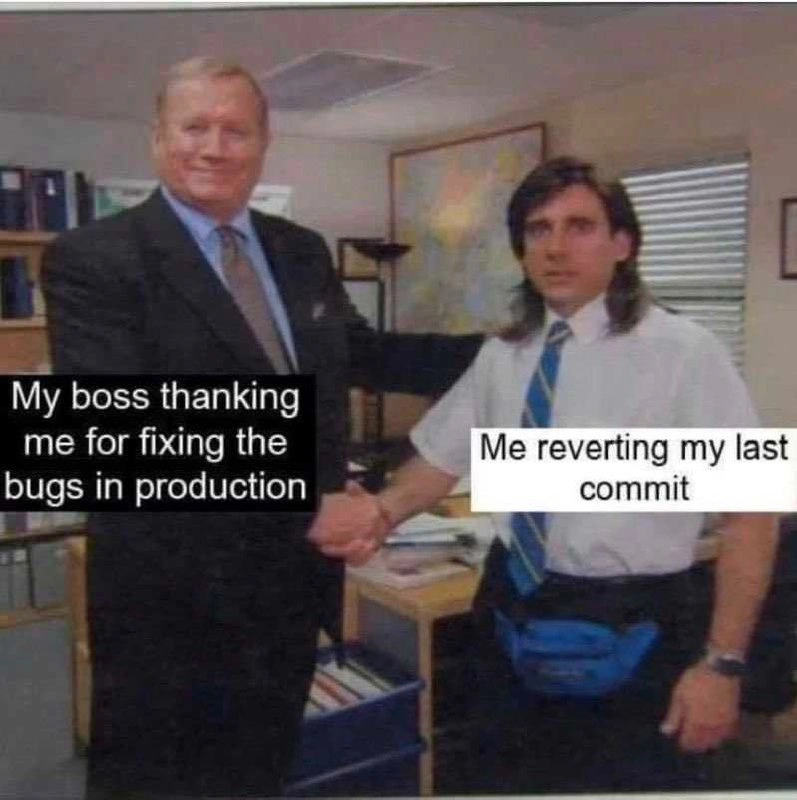
In the meme image, this whole drama is summarized in one humorous scene: The boss is formally shaking the dev’s hand saying “Thank you for fixing the bugs in production,” while the dev’s caption says “Me reverting my last commit.” The dev is casually dressed (he’s even wearing a bright blue fanny pack – very much not typical corporate attire!), which emphasizes that he’s just an ordinary tech guy, not some magician. Yet to the boss, what he did seems like magic. The humor here is pretty straightforward: the big fix was literally just using Git to undo a mistake. It’s a situation many junior devs will eventually encounter and find both funny and relieving – sometimes solving a nasty ProductionIssue is as simple as pressing an undo button, thanks to tools like Git. The lesson? Don’t be afraid to use your version control’s features. They’re there to save your bacon when things go wrong. And when you do save the day with a one-command fix, enjoy that thumbs-up from your boss... even if you’re chuckling inside because of how simple it was. 😅
Level 3: The Ol’ Revert Trick
At 3 AM on a Saturday, the production site is on fire because of a deploy gone wrong. The boss in his suit is ecstatic, shaking the developer’s hand for heroically fixing the bugs in production. Meanwhile, the developer (rocking that blue fanny pack and casual IT-guy look) knows he pulled off the oldest trick in the VersionControl book: he quietly ran git revert on his last commit. This meme nails that classic production firefight scenario where the quick hotfix isn’t some brilliant new code or complex debugging feat – it’s literally undoing the change that caused the mess.
What makes this hilarious to developers is the contrast between perception and reality. The boss thinks some genius debugging_troubleshooting happened overnight – perhaps imagining the dev painstakingly combed through code to vanquish a tricky ProductionBug. In truth, the dev basically pressed the “undo” button on a mistake they introduced earlier. It’s a textbook example of the hero culture in IT: you accidentally break something with a bad commit, then redeem yourself by swiftly un-breaking it, and suddenly you’re the “hero.” The handshake in the meme perfectly captures that awkward moment – formal gratitude from management for what was, in technical terms, a one-command fix. The developer’s face (half proud, half guilty) says it all: “Sure, I’ll take the praise, but all I did was revert to yesterday’s code.”
From a senior engineer’s perspective, this scenario is both painfully relatable and a bit ironic. In robust processes, you’d hope to catch such BugsInSoftware before they ever hit Production, but real life isn’t perfect. Maybe there was a rush to push a feature on Friday (rookie move – we know deploying on Friday invites chaos). The new commit goes live, triggers a nasty bug, and suddenly users are complaining or the site is crashing. The on-call dev scrambles, realizes “Oh, it was my last commit that caused this”, and uses Git’s safety net to reverse it. Git is a distributed version control system where every change (each commit) is tracked; the git revert command creates a new commit that negates a previous commit’s changes. It’s a lifesaver in emergencies because it undoes the bad code without rewriting history or causing even more issues. Unlike a brute-force git reset (which rewrites commit history and is dangerous once code is shared), git revert is a clean, transparent rollback. In the repository you might see a new entry like “Revert ‘Add Feature X’” – effectively erasing the buggy feature from the live code. Problem solved, lights back on, users happy.
The beauty and humor here is that the boss_praise_moment is completely disconnected from the technical simplicity of the fix. Management often doesn’t care how you put out the fire, just that you did. The boss in the image is beaming like the developer just performed open-heart surgery on the codebase, but the dev is standing there with the mild dissonance of someone who knows the ProductionIssue was solved by a few keystrokes. As a battle-scarred veteran, you chuckle because you’ve been there – rolling back a bad deployment in seconds and then getting high-fives for “saving the day.” Sure, it feels a bit like cheating to get praise for undoing your own goof-up, but hey, at the end of the day the site is back up and the ProductionDebugging nightmare is over. And you better believe you’re not going to mention to the boss that the “fix” was essentially a single Git command. Let them think you performed magic while you quietly thank Git for the get-out-of-jail-free card.
Description
Meme composed of a low-resolution office photo where two people with blurred faces shake hands: a formally dressed boss on the left and a casually dressed developer on the right. Black caption over the boss reads, "My boss thanking me for fixing the bugs in production"; white caption over the developer reads, "Me reverting my last commit." The humorous juxtaposition highlights that the apparent heroic production fix was merely a simple Git revert. Visually, the scene has muted office colors, filing cabinets in the background, and the developer sports a blue fanny-pack, driving home the informal coder vibe. Technically, it pokes fun at production firefighting, version-control rollbacks, and the disconnect between managerial praise and the simplicity of the actual fix
Comments
6Comment deleted
15 years of designing blue-green, canary, auto-rollback pipelines, and the lowest MTTR in the org chart is still whoever types “git revert HEAD~1 && git push” - leadership logs it as “advanced resiliency engineering.”
The best part about git revert is that it generates a new commit, so technically you're still shipping code to production and your velocity metrics look great
The most elegant production fix is often `git revert HEAD` followed by a carefully worded commit message about 'architectural considerations' and 'strategic rollback procedures.' Bonus points if you can deploy it before anyone checks the diff and realizes your 'comprehensive debugging session' was literally three keystrokes and a push to master
Our DORA metrics call it reducing MTTR; I call it git revert‑as‑a‑service
Prod hotfixes: where git revert HEAD earns more praise than a flawless PR
Rebranded git revert as a time-travel hotfix - the CAB called it resilience; I called it undo