Skip to content
DevMeme
6170 of 7435
The AI Teammate for Tasks You'd Rather Not Do
AI ML Post #6765, on May 20, 2025 in TG

The AI Teammate for Tasks You'd Rather Not Do

Why is this AI ML meme funny?

Level 1: Robot Does Chores

Imagine you and your friends have a big playroom that’s gotten really messy. There are toys everywhere, some broken gadgets, and a list on the wall of things that need tidying up or fixing. None of the older kids want to clean it – they always find an excuse to avoid the work because it’s boring. Now picture a friendly robot (let’s call him Jules) with many arms like an octopus rolling in and saying, “I’ll clean everything up for you!” Jules starts picking up the toys, fixing the broken ones, putting old unused stuff away, and even updates the game console to the latest version. He’s doing all the chores that everyone else was avoiding. You and your friends feel relieved and maybe a bit guilty, but mostly happy that it’s getting done without you having to do it. It’s kind of funny because usually nobody wants to do those boring chores, and here comes someone (or something) actually volunteering to do them with a slight smile (or in Jules’s case, a lil’ frown but he’s still on it!). This meme is like that story, but for computer programmers: Jules is the helpful robot friend who tackles the dull, important tasks in the code so the human developers don’t have to. It’s amusing and heartwarming at the same time – we’re laughing because we all know how nice it would be to have a helper like that for our chores!

Level 2: Boring but Important

If you’re a junior developer or just starting out, some of the terms and situations in this meme might need a bit of unpacking. Essentially, it’s highlighting the less glamorous side of programming – the chores that keep a codebase healthy. Let’s break down what’s going on in simpler terms:

  • Backlog: This is like the team’s to-do list for the project. It includes new features to add, but also a bunch of outstanding tasks that no one has done yet. Often, things that aren’t urgent – like minor bug fixes or cleanup tasks – sit in the backlog for a long time because people focus on bigger features first. Here, “the backlog no senior wants to touch” implies there’s a list of tasks that all the experienced developers are kind of avoiding, possibly because they’re tedious or tricky.
  • Bug Fixing: A bug is an error or flaw in the code that causes it to behave unexpectedly or crash. Fixing bugs can range from super simple (change one line) to very challenging (hours of debugging). In the meme’s code snippet, there’s a clear bug: const step = this.steps[thi is incomplete and would cause an error. A developer needs to fix that to probably this.steps[this.currentStep] so the code runs correctly. Bug fixing isn’t always fun – it often involves digging through someone else’s code or logs to find out what went wrong. That’s why the idea of a robot happily doing BugFixing for you sounds appealing!
  • Version Bump: Software projects use other libraries or frameworks, and those have versions (like 1.0, 1.1, 2.0, etc.). A version bump means updating from an older version of a dependency to a newer one. For example, if your web app uses React v16 and React v18 comes out, bumping the version means changing it to use React v18. It sounds straightforward – just change a number – but doing this can break your project if there are incompatibilities. It’s a bit like updating the engine in a car: you expect it to run better, but you might have to adjust other parts to fit the new engine. Because of that risk, developers often postpone version bumps until necessary. We even have automated bots (like Dependabot) that make pull requests to bump versions, but someone still has to merge them and handle any fallout. So “Version Bump” showing up as a button suggests Jules the AI can take care of updating those libraries and dealing with the boring follow-up work if something breaks.
  • Tests: These refer to automated tests (like unit tests or integration tests) that developers write to check that the code is working correctly. For instance, you might write tests to ensure that the UserOnboarding flow returns the right next step, or eventually returns "done" when it’s finished. Writing tests is super important for CodeQuality – it helps catch bugs early and gives you confidence when changing code. However, writing tests can feel dull to some developers, especially if they’re adding tests for code that was written a while ago (sometimes called retrofitting tests). The meme jokes that Jules will eagerly write those tests. For a newcomer, imagine being told to write dozens of tests for someone else’s code: it’s a bit like doing homework assignments for someone else’s project. Not the most exciting thing, right? That’s why having an AI friend to generate those tests sounds awesome, if it were possible. There are actually some tools and research into AI-generated tests, but it’s early.
  • Legacy Code: This means old code that was written in the past, which the system still uses. It might not follow current standards or might be something the team plans to replace. In the snippet, legacyNotification() is an old method that probably welcomed a user (maybe in a popup alert). The comment says “Old method – to be removed,” and indeed they commented out the line that calls it. This is typical when you have a new way of doing things and you’re phasing out the old way. Working with legacy code can be painful because it might be poorly documented or use outdated practices. Seniors often groan at legacy code because changing it can have unexpected side effects (since nobody touched it in ages). “Fixing Jed’s Code” is basically a friendly way of saying fixing a messy piece of LegacyCode someone (Jed) left behind. If you’re new, picture inheriting a big, messy notebook from a former classmate – you have to continue the project in it, but their handwriting is sloppy and their methods are archaic. Not fun!
  • DeveloperExperience_DX: You might not hear this term as a beginner, but it refers to the overall experience developers have with their tools and processes (kind of like UX, user experience, but for developers building software). Good DX means it’s easy and maybe even pleasant to develop, test, and deploy code. Bad DX means the tooling or the workflow frustrates developers. The tasks listed – bug fixing, updating versions, writing tests, cleaning legacy code – significantly affect DX. When those are hard or constantly neglected, developers get unhappy or stressed. That’s why improving automation for these can improve a team’s morale and velocity. In plain terms: if an AI tool like Jules could handle some of the boring stuff, developers would likely be happier and more productive, focusing on creative work instead of grunt work.

So, from a junior perspective, this meme is basically saying: imagine you had a helper bot that takes care of all the mundane programming tasks. Every team has some boring, important things that people put off. When you’re new, you often get handed some of these ("Hey, can you write tests for this module?" or "Can you look into this minor bug?"). It can be a bit overwhelming or just dull. The meme uses humor – a little sad-faced AI named Jules with an octopus avatar – to highlight that feeling. Jules volunteering means you, as the developer, don’t have to dread these tasks as much. It’s like having a super eager junior developer (who never gets tired or upset) in the team. While in reality you won’t have a magical AI to do all this (at least not yet), it’s true that tools are getting better. We have linters to catch bugs, bots to update versions, frameworks that generate test files, etc. Those are the early steps of what Jules represents. The core joke is clear even if you’re relatively new: there are things in coding everyone should do but doesn’t want to, and handing them off to a friendly robot would be a dream come true for many. It underscores the value of those tasks too – they’re not fun, but they keep the software running smoothly. So even juniors learn quickly that yes, you need to fix bugs and write tests, and seeing an AI do it in a meme is both funny and a tiny bit wishful. After all, who wouldn’t want a helpful octopus assistant handling the boring stuff while you get to build the cool new feature?

Level 3: The Many-Armed Maintainer

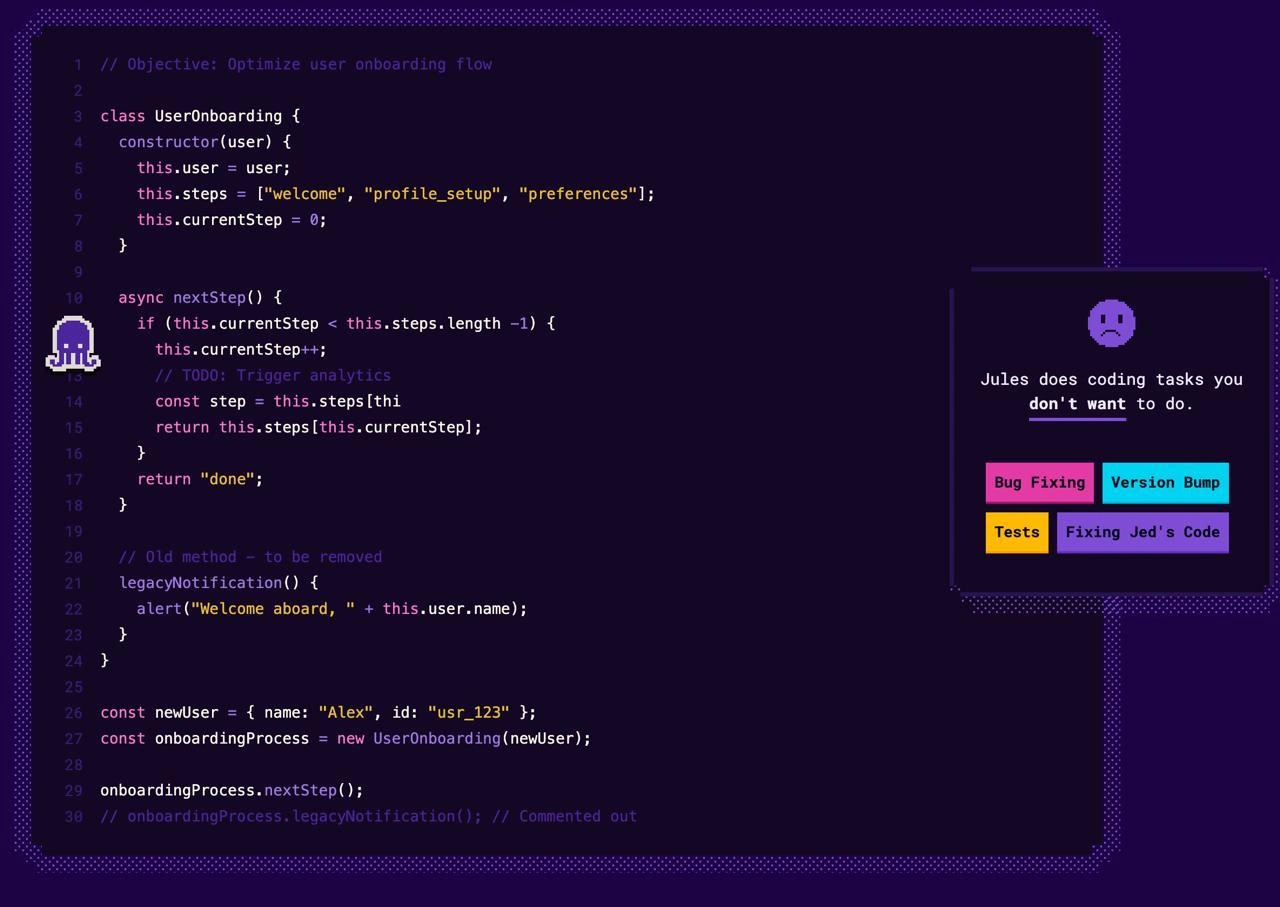
This meme hits home for any seasoned developer by portraying an AI volunteer stepping up to do the backlog tasks that every human developer avoids. The left side shows a code snippet in a dark purple editor theme: a UserOnboarding class with a clear mission (// Objective: Optimize user onboarding flow) but littered with the hallmarks of Technical Debt. There's a subtle bug in the async nextStep() method – the code const step = this.steps[thi is cut off, hinting at a typo or incomplete refactor that would likely throw an error. Right above it is a // TODO: Trigger analytics comment, which is basically a neon sign saying "unfinished work here!" And just below, we see a legacyNotification() method labeled "Old method – to be removed," along with its call commented out at the bottom. This single snippet encapsulates a mini-backlog: fix the Bug, finish the analytics integration, remove or replace the LegacyCode. In other words, it’s exactly the kind of cleanup and maintenance that gets procrastinated sprint after sprint.

Enter Jules, our AI octopus assistant, represented by a cute pixel-art octopus icon floating next to the code. The right side of the meme is styled like a playful task dashboard: a sad-faced emoji and the line “Jules does coding tasks you don’t want to do.” It’s like a tongue-in-cheek advertisement for an AI assistant intern. Each neon button highlights a category of chore: Bug Fixing, Version Bump, Tests, and “Fixing Jed’s Code.” These are brightly colored bait for Jules, the eager helper who apparently has infinite patience for drudgery. The humor here is that every one of those buttons names a job that human developers (especially seniors) often dread or defer:

  • Bug Fixing: Tracing through code to squash pesky bugs can be tedious, especially in someone else’s module. Seniors sometimes triage and schedule these for "later," hoping someone (or now something) else will handle it. Jules will dive right in, no complaints.
  • Version Bump: Updating dependencies or frameworks to newer versions – a simple concept (just change the version number) that can become a trial-and-error nightmare of broken builds and deprecation warnings. It’s a running joke that these tasks get automated by bots (like Dependabot in GitHub) because no one volunteers to risk breaking the build. In the meme, one button is literally “Version Bump,” implying Jules will gladly submit those dull version upgrade PRs that we often procrastinate on.
  • Tests: Writing unit tests or integration tests is crucial for CodeQuality, but let’s face it, many developers find it less thrilling than writing feature code. A common DeveloperPainPoints is having to halt new feature work to backfill tests or fix flaky ones. The meme suggests Jules even takes on test-writing: an AI diligently scripting Testing routines while devs focus elsewhere. (There’s some real-world precedent: tools that can suggest test cases or generate boilerplate tests using AI, which is both cool and a bit uncanny.)
  • Fixing Jed’s Code: Ah, the classic blame-the-colleague trope. LegacyCode often comes with a name attached (“Jed” here stands in for that one teammate or predecessor whose code is notoriously hard to maintain). It’s a shared laugh in dev teams: “Who wrote this? …Oh, Jed did.” Everyone has dealt with a “Jed’s code” scenario – messy, outdated, or over-complicated code that nobody wants to touch because it’s a can of worms. The meme tongue-in-cheek assigns even this thankless task to the AI. Jules presumably has no ego and infinite time, so refactoring Jed’s hairy codebase segment is just another Tuesday for our octo-friend. For human devs, fixing a colleague’s neglected code can be politically delicate (nobody wants to offend Jed) and technically arduous (unexpected side-effects galore). Offloading it to an uncomplaining robot is a hilarious wish-fulfillment.

The DeveloperExperience_DX angle here is strong and satirical: imagine having a tool that improves your day-to-day life by handling the boring bits. In reality, senior devs often end up acting as the custodians of quality—reviewing code, nudging others to fix bugs, writing that one missing test at midnight before a release. It can lead to burnout and frustration, since these tasks are important but undervalued. This meme envisions an alternate reality (or near-future reality, given advancements in Automation) where an AI like Jules cheerfully takes on the role of code janitor or AI intern. The pixel_art_octopus_icon isn’t just cute; an octopus has many arms to multitask, implying Jules can handle multiple to-dos at once. And maybe it's a sly nod to GitHub’s Octocat: here, the octopus is the one actually doing the GitHub chores (like making those automated PRs and fixes). Seniors looking at this meme chuckle because wouldn’t it be nice to have Jules around? It's an acknowledgement of the pile of unloved_coding_tasks every project accumulates. We typically try to assign these to newcomers or squeeze them in during “cleanup sprints,” but they often linger. The meme is essentially saying: "What if an AI could volunteer for the tasks even interns side-eye?" – tasks so thankless that even human newcomers learn to avoid them if they can.

From an organizational perspective, the humor also exposes how teams handle TechnicalDebt. Ideally, each sprint would include some bug fixes, some refactoring, some test improvements. But companies reward delivering new features more than invisible cleanups. So the backlog of fixes grows until it’s daunting. Seniors know tackling, say, a version bump can spiral into days of work if things break, with little glory at the end (nobody throws a party because you updated lodash or wrote five tests for login). There’s a silent agreement on many teams: “someone should do it, but maybe not me right now.” This meme resonates because it visualizes a guilt-free solution: an automated helper that lives for these tasks. Jules doesn’t get bored, doesn’t complain about how boring writing tests is, and doesn’t mind cleaning up Jed’s spaghetti code.

Of course, there’s an ironic twist: even if Jules exists, senior devs still have to review Jules’s work! Code doesn’t magically fix itself (at least not yet). If an AI opens a pull request to fix that UserOnboarding bug or remove legacyNotification(), a human maintainer must ensure it’s correct. In that sense, Jules doing the first pass could save time, but the team must still pay attention. It’s a bit like having an ultra-efficient junior developer who works at superhuman speed but still needs oversight to make sure it didn’t misunderstand something. The meme doesn’t show that part – it’s funnier to imagine we can just click “Bug Fixing” or “Tests” and boom, done. It taps into the dream of effortless maintenance where tools eliminate the drudgery of CodeQuality upkeep. For now, that remains partly a dream: tools like linters, formatters, and CI bots handle small pieces (linters auto-fix simple bugs, Dependabot handles version bumps, some frameworks auto-generate test scaffolds), but a lot of it still needs a developer’s careful brain.

In summary, this level reveals why the meme’s combination of elements is so amusing to experienced devs. We see a code snippet practically begging for maintenance, and a jovial multi-armed AI character ready to tackle it all. It’s a satire of real DeveloperPainPoints – those necessary tasks that keep software healthy but that humans procrastinate on. The shared experience of every senior dev: seeing a // TODO or a deprecated function and thinking “I really should fix that… maybe later.” Now, we get to laugh at the idea that “later” might be handled by a digital volunteer named Jules. The meme exaggerates to make a point: modern tooling and Automation are inching towards this fantasy. Until then, one can dream (and chuckle) about handing off that ugly refactor or long-neglected bug to a tireless octopus assistant. 🐙🤖

Level 4: Automated Program Repair

Behind this humorous scenario lies a surprisingly complex technical challenge: automating code maintenance. Getting an AI to reliably fix bugs or refactor code touches on deep computer science problems. For instance, to correct that async nextStep() bug (the unfinished this.steps[thi... index) Jules would need to understand the code’s intent. That means parsing the code into an Abstract Syntax Tree (AST) and analyzing program logic. Tools in static analysis try to catch such syntax errors or detect an unused legacyNotification() method automatically, but going from detecting an issue to generating a correct fix is hard. In research on automated program repair, algorithms often use test cases as a guide: they make code changes and check if tests pass. It's like a search problem in a massive space of possible edits – in fact, discovering the right patch can be an NP-hard problem because the tool might have to consider countless variations. Academic projects (and some industry tools) use techniques from genetic algorithms to SMT solvers to generate fixes, essentially treating bug-fixing as an optimization problem.

There’s also the theoretical limit: ensuring an automated fix doesn’t break anything else is related to the Halting Problem and Rice’s Theorem territory – meaning it's generally undecidable to perfectly verify arbitrary program changes. That’s why even the most advanced code AI needs safeguards like extensive testing or constraints. In practice, AI assistants (like our fictional Jules) leverage machine learning on huge code corpora to suggest likely fixes or improvements. They operate kind of like a super-smart linter or code reviewer, having seen many examples of bug fixes. Under the hood, they might use transformer models that have "learned" common patterns (for example, recognizing that const step = this.steps[thi is incomplete and probably meant to use this.currentStep). Still, without human oversight, such automated fixes can be risky – a generated patch might solve the immediate error but introduce a subtle side-effect. The meme plays with the idea that an AI could seamlessly handle these unloved coding tasks, but in reality, turning code maintenance over to AI involves careful handling of program semantics, formal verification of changes, and lots of trust (or verification). It’s a light-hearted nod to the holy grail of developer tooling: an AI assistant that not only finds issues but also intelligently fixes them, mastering the art of dealing with TechnicalDebt through pure algorithms.

Description

A promotional graphic for a service or tool named 'Jules'. On the left, a larger panel displays a syntax-highlighted JavaScript code snippet within a dark-themed editor. The code shows a 'UserOnboarding' class being refactored, with comments like '// Objective: Optimize user onboarding flow', '// TODO: Trigger analytics', and an old, commented-out 'legacyNotification' method. On the right, a smaller, separate panel features a sad face icon and the text 'Jules does coding tasks you don't want to do.' Below this are four colorful tags representing these tasks: 'Bug Fixing', 'Version Bump', 'Tests', and 'Fixing Jed's Code'. The image effectively communicates the value proposition of an AI assistant designed to handle the mundane, tedious, and often frustrating aspects of software development, such as dealing with tech debt, writing tests, or deciphering a colleague's questionable code

Comments

7
Anonymous ★ Top Pick I'd pay for the 'Fixing Jed's Code' feature alone, especially if it includes a module that automatically translates his commit messages from 'minor tweaks' to 'I rewrote the auth logic on a Friday afternoon'
  1. Anonymous ★ Top Pick

    I'd pay for the 'Fixing Jed's Code' feature alone, especially if it includes a module that automatically translates his commit messages from 'minor tweaks' to 'I rewrote the auth logic on a Friday afternoon'

  2. Anonymous

    If Jules can patch the stray ‘this.steps[thi…]’ before QA notices, I might finally get to spend a Friday refining the event-driven roadmap instead of spelunking in legacy pop-ups

  3. Anonymous

    After 15 years in the industry, you realize 'to be removed' comments age like fine wine - they get more complex notes of irony with each sprint, and everyone's afraid to touch them because they might be load-bearing comments holding up production

  4. Anonymous

    Ah yes, the inevitable evolution of AI coding assistants: from 'revolutionary pair programmer' to 'that intern we assign all the grunt work.' Jules here has achieved what every senior engineer dreams of - successfully delegating bug fixes, test writing, and especially 'Fixing Jed's Code' (we all know a Jed). Notice the deprecated legacyNotification() method with the optimistic '// Old method - to be removed' comment - a monument to technical debt that's probably been there since the last refactoring sprint three years ago. The real genius is the TODO for analytics that'll never get prioritized, because if there's one thing we've learned, it's that AI assistants are perfect for the tasks that sit in backlog purgatory. At least Jules looks appropriately concerned about its fate as the team's designated code janitor

  5. Anonymous

    if(task.author==='Jeff') this.currentStep='onboarding'; // skips bugfix eternally

  6. Anonymous

    Jules fixing Jed’s code is the first time I’ve seen an AI convert morale debt into compute spend - an O(1) improvement that no retrospective ever delivered

  7. Anonymous

    We hired a chore-bot for bug fixes and version bumps so the async nextStep nobody awaits - and our hand‑rolled onboarding state machine - can ship to prod blamelessly

Use J and K for navigation