Skip to content
DevMeme
6169 of 7435
A Snapshot of AI's Rapid Obsolescence
AI ML Post #6766, on May 20, 2025 in TG

A Snapshot of AI's Rapid Obsolescence

Why is this AI ML meme funny?

Level 1: Hammer or Screwdriver?

Imagine you have two special helpers to solve problems. One helper is like a friendly teacher who talks you through everything. The other helper is more like a skilled builder who just gets the job done quietly. Now, if you needed to understand a tricky homework question, you’d ask the teacher-like helper so they can explain it step by step. But if you wanted to build a toy or fix something, you might ask the builder-like helper who can actually do it for you. You have to choose the right helper for the right task.

This meme is showing that choice. It’s like having a hammer and a screwdriver in your toolbox: both are really useful, but for different jobs. If you want to put a nail into a piece of wood, you’d pick the hammer. If you want to tighten a screw, you’d grab the screwdriver. Using the wrong one would be pretty silly – imagine trying to hammer a screw into the wall, it wouldn’t work well at all! In the picture, “ChatGPT” is like the talkative teacher friend (the hammer for one kind of nail) and “Codex” is like the quiet builder friend (the screwdriver for a different kind of screw). The person using the app has to tap the right option, just like picking the correct tool.

It’s funny because even though these helpers are super high-tech and smart, the situation is very relatable: you don’t want to mix them up. We’ve all pressed the wrong button or grabbed the wrong tool by accident and then said, “Oops, not that one!” Here, picking the wrong option would mean you either get a big explanation when you just wanted quick code, or you get a chunk of code when you really wanted an explanation. So the meme is basically a little reminder: choose wisely! Even in a futuristic world of AI, sometimes it all comes down to a simple choice – and making the right choice will save you from a head-scratching moment. It’s that little moment of double-checking, the same way you might pause and make sure you have the right key before unlocking a door. The humor is in realizing that, high-tech or not, we’re still careful about the basics: using the right tool for the right job.

Level 2: Chat vs Code Mode

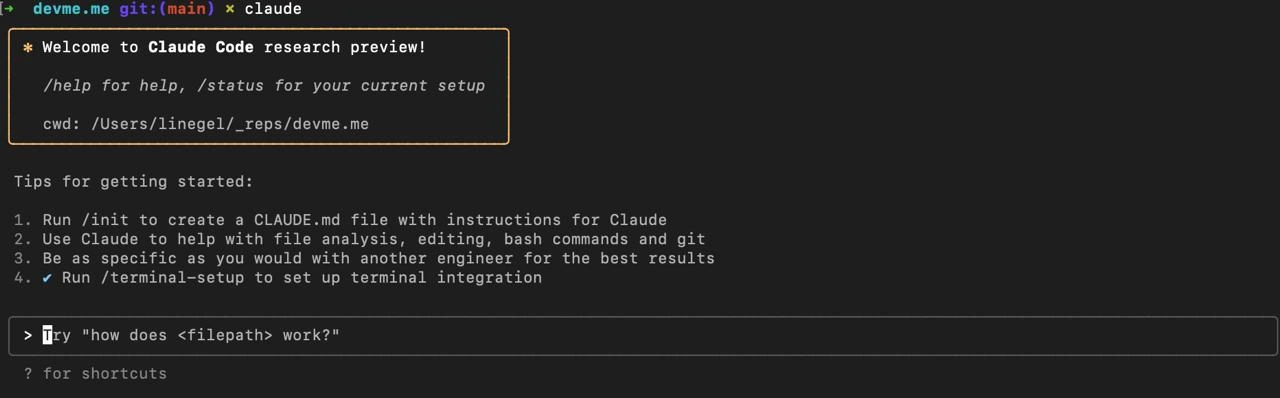
Let’s break down what’s happening in this image. It’s a user interface (in sleek dark_theme_ui mode) for selecting an OpenAI model. You have two choices listed: ChatGPT and Codex. Both are AI models (specifically, large language models or LLMs) made by OpenAI, but they serve different purposes:

  • ChatGPT – This is the AI assistant that acts like a friendly expert you can talk to. It’s designed for conversation. If you ask ChatGPT a question (for example, “Can you explain what a binary tree is?”), it will respond with a thoughtful, well-rounded explanation in natural language. It was trained with a lot of human feedback to give helpful, detailed answers and to handle follow-up questions. Think of ChatGPT as the AI you go to for eloquent explanations, brainstorming, or step-by-step guidance. It’s like having a knowledgeable mentor who will not only give you an answer, but also clarify why and how.

  • Codex – This is a specialized AI model fine-tuned for writing code. If you give Codex a prompt like “Write a function to sort a list of numbers in Python,” it will directly output the Python code to do that. Codex was trained on heaps of source code, so it’s great at turning natural language into functioning code or completing your code snippets. It’s basically an AI pair programming assistant. Unlike ChatGPT, Codex isn’t as chatty – it won’t typically produce long explanations or have a back-and-forth conversation. Instead, it will give you what you need in code form (maybe with a brief comment). Many developers know Codex as the model behind tools like GitHub Copilot, which suggests code in your editor. In short, Codex is for LLM code_generation tasks: you describe what you want in plain English (or start writing some code), and it writes the rest in the target programming language.

In the screenshot, those icons next to each name are visual hints. The swirl icon by “ChatGPT” is the official OpenAI logo (by now synonymous with the ChatGPT assistant). The little >_ codex_cli_icon by “Codex” looks just like a terminal prompt – a classic symbol for a command-line interface. That icon is basically telling you “this mode is about code.” It’s a subtle way the UI says: ChatGPT = chat mode, Codex = code mode.

Now, why is the meme comparing this to toggling Kubernetes contexts or AWS profiles? Here’s the connection:

  • In software development, context switching is a big deal, especially when deploying or running commands on different environments. For Kubernetes (the system for managing containerized applications), you might have multiple clusters (for example, a testing cluster and a production cluster). A developer uses contexts to switch between them. You might run kubectl config use-context my-prod-cluster when you need to operate on production. It’s crucial to be on the right context; if you run a destructive command (like deleting pods or services) on the wrong cluster, you could take down the wrong environment.
  • Similarly, with AWS profiles, developers configure different profiles for different accounts or projects. You could have an AWS profile named “personal” (for your own projects on your credit card) and another named “company-prod” (for the company’s production cloud account). If you forget to switch and run aws s3 delete on the wrong profile, you might wipe out something important or rack up unexpected charges. Yikes! So, developers get into the habit of double-checking AWS_PROFILE or kubectl config current-context before doing anything major.

For a new developer, these might be fresh concepts. But basically, it’s about safety by choosing the right setting. The meme humorously suggests that picking between ChatGPT and Codex in the UI feels the same as those high-stakes context switches. Of course, asking the wrong model won’t destroy anything – the stakes are much lower! – but there’s a shared feeling of “better make sure I click the right one.” If you want a straightforward code solution, you select Codex. If you need an explanation or a more dialog-based answer, you select ChatGPT. It’s like having two modes in one tool, and you manually toggle the right one for the job.

So, the developer in this scenario is essentially making sure they use the correct AI tooling. It’s part of good DeveloperExperience_DX to have that choice, but it also introduces a tiny worry: What if I use the wrong mode? The meme plays on that tiny worry for laughs. Every developer remembers a time they had the wrong context – maybe deploying to the wrong server or committing to the wrong Git branch – and the minor panic that follows. Here it’s on a much smaller scale (at worst you get an answer in the wrong format), but the feeling is relatable. The dark theme UI, the careful selection highlight, the blank search bar ready for a query – it all sets a mood that a developer is about to do something “important,” so of course they pause to be sure they chose correctly. In summary, ChatGPT vs Codex is selecting how you want your answer: as an AI assistant chat or as an ai_pair_programming code dump. And just like any dev tool, choosing the right mode upfront makes all the difference in what you get back!

Level 3: Production vs Playground

This seemingly simple UI screenshot hides a context crisis every seasoned dev knows too well: picking the right environment before hitting Enter. In dark-mode glory, we see two model options – ChatGPT with that familiar OpenAI swirl, and Codex with a minimalist >_ terminal icon – listed like a drop-down of deployment targets. It’s basically a model_selection_dropdown for your AI, and one mis-click feels as perilous as using the wrong Kubernetes cluster. Experienced developers are getting flashbacks: “Am I on the right context?” Just like double-checking you’re on the staging cluster (not production) with kubectl or verifying your AWS profile isn’t still set to --profile prod when running a delete command, you hover nervously before choosing the AI model. One click here decides if your AI buddy will act like a chatty explainer or a silent code generator.

In other words, ChatGPT is the eloquent advisor – ask it a question and you’ll get paragraphs of helpful context, explanations, maybe some pseudocode, basically an AI that talks you through the solution. Codex, on the other hand, is the terse code machine – you give it a prompt and it spits out raw code completion with minimal commentary, like a pair-programming partner who assumes you just want the fix. It’s the difference between an answer that’s a well-commented essay and one that’s a stack of code. If you accidentally query the wrong one, you’ll either drown in friendly verbosity or scratch your head at a wall of code with no explanation. Seasoned devs chuckle (and cringe) because we’ve all been there with tools: pick the wrong mode and unexpected output ensues.

Notice the UI even highlights the selection (the “Codex” row is on a darker gray rounded rectangle). That’s the app saying “Hey, Codex is currently selected”, much like a big bold “PRODUCTION” label on your terminal prompt. And thank goodness – any hint to prevent using the wrong setting is welcome. We treat this tiny toggle with almost the same reverence as a sudo rm -rf / prompt (you triple-check before committing). Sure, choosing the wrong AI model won’t bring down your site or page you at 3 AM – it’s not actually a server-killer – but the familiar pain of a context mix-up is real. It’s a playful exaggeration: advanced AI/ML at your fingertips, yet the scariest part is still a human UI choice. As an old-timer might say with a smirk, “We have GPTs writing our code now, but heaven forbid we click the wrong button.” One click here is the difference between an eloquent explanation and a raw code completion, and that absurd contrast is exactly why this meme tickles any developer who’s ever deployed to the wrong environment by mistake. It’s highlighting a core truth in DeveloperExperience_DX: no matter how powerful our tools get, using the right context remains everything.

Description

A screenshot of a dark mode user interface, likely from a mobile or desktop application. The UI presents a search bar at the top and two selectable options below. The first option is labeled 'ChatGPT' and is accompanied by the swirling OpenAI logo. The second option is labeled 'Codex' and has a simple icon representing a command-line prompt '(>_)'. This image captures a specific moment in the evolution of OpenAI's models, where 'Codex', the specialized model for code generation, was offered as a distinct choice alongside the more general-purpose 'ChatGPT'. For experienced developers, this is a nostalgic look at how quickly the AI landscape changes, as Codex's powerful capabilities were eventually merged into the main GPT models, making the standalone 'Codex' offering a piece of tech history
Comments

7
Anonymous ★ Top Pick Remember when Codex was the future? That was, like, two major JavaScript framework releases ago. In AI years, it's practically a fossil
  1. Anonymous ★ Top Pick

    Remember when Codex was the future? That was, like, two major JavaScript framework releases ago. In AI years, it's practically a fossil

  2. Anonymous

    Choosing between ChatGPT and Codex is like deciding whether to call the verbose architect who writes 10-page design docs or the cowboy who force-pushes to prod - both powerful, but one definitely leaves more comments

  3. Anonymous

    Ah yes, the classic developer dilemma: choosing between the AI that confidently explains why your code is wrong while suggesting a completely different approach, and the one that silently autocompletes your bugs with mathematical precision. Either way, you're still debugging at 3 AM, but now with existential questions about whether you or the AI wrote that regex

  4. Anonymous

    The eternal question: Do I ask ChatGPT to explain why my code doesn't work, or do I ask Codex to write code that also won't work? At least with Codex, I can blame the AI for the bugs instead of admitting I forgot to check for null again. Though let's be honest - we all know both will confidently hallucinate a solution that compiles but somehow makes the problem worse, and we'll still merge it at 2 AM because the sprint ends tomorrow

  5. Anonymous

    Picking “ChatGPT” vs “Codex” feels like load‑balancing across two frontends that terminate on the same LLM; the Codex path just logs more deprecation warnings

  6. Anonymous

    Pareto workflow unlocked: Spotlight's top 20% generates your 80% of code - senior dev delegation at scale

  7. Anonymous

    Picking between ChatGPT and Codex is choosing pair-programming with a generalist staff engineer who reads the whole repo vs a specialist frozen at the 2021 build - either way, it beats scheduling another sync

Use J and K for navigation