Hacker Aesthetic vs. The Reality of a 12GB Log File
Why is this Security meme funny?
Level 1: Clues vs Gadgets
Imagine you’re trying to solve a mystery, like who messed up something in your house. You have two approaches:
One approach is to use a bunch of cool spy gadgets – like night-vision goggles, fingerprint dust, laser sensors – all the fancy tools that look impressive. You run around the house with these gadgets hoping to catch the culprit. It makes you feel like a high-tech detective, but it might not immediately tell you what happened.
The other approach is to simply check a big book of clues that’s been quietly recording everything. Let’s say there’s a huge diary or logbook where every event in the house is written down: when doors opened, what was moved, who came in or out. It’s not shiny or exciting to flip through pages of a diary, but if something went wrong, that book will likely have the answer, because it’s all in there in black and white.
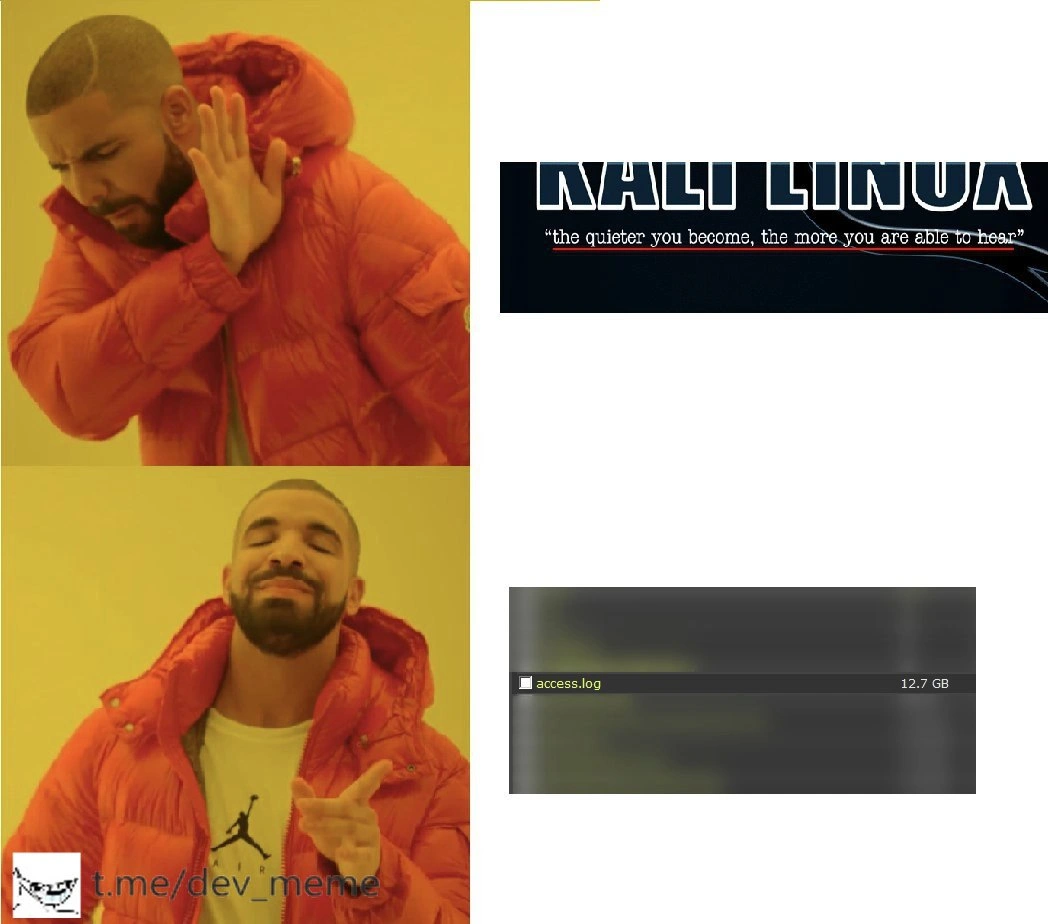
In the meme, Drake is basically saying he prefers the big book of clues over the fancy spy gear. The “fancy spy gear” is like the Kali Linux hacking tools – very cool and powerful, but noisy and showy. The “big book of clues” is like the access log file – a plain record of what actually happened. It’s funny because normally people think the cool gadgets are the way to solve a problem, but Drake knows that just reading the record of events can be a smarter, faster way to figure things out. The joke is that sometimes boring old clues beat shiny new tools when you really need to know the truth.
Level 2: Flash vs Substance
Let’s break down the elements for those newer to this. In the top panel, Drake is dismissing Kali Linux. Kali Linux is a special version of the Linux operating system that’s all geared up for hacking and penetration testing. Think of it like a hacker’s toolkit bundled into an OS: it comes pre-loaded with dozens of cybersecurity tools — for example, Nmap (which scans networks to find open ports and services), password cracking tools, and exploit frameworks like Metasploit (used to test and execute known exploits against a target system). Kali is super popular in the security community for tasks like ethical hacking, pentesting (penetration testing), and capture-the-flag competitions. It even has that motto shown in the image, “the quieter you become, the more you are able to hear,” suggesting a stealthy, listening approach to hacking. So normally, you’d think a pro investigator or hacker would reach for Kali and its flashy tools when there’s a security question.
Now, the bottom panel is what Drake prefers: an access.log file that’s 12.7 GB in size. An access.log is a very common log file on web servers (like Apache or NGINX servers). It literally records every access to your web service. Each time someone visits a page or calls an API, the server makes a one-line entry in this file. A typical access log line includes things like: the visitor’s IP address, the date and time, the HTTP method and URL they requested, the status code the server returned (200 for success, 404 for not found, 500 for server error, etc.), and maybe the size of the response and the “user agent” (what program or browser they were using). For example, a single entry might look like:
203.0.113.50 - - [10/Oct/2021:13:37:20 +0000] "GET /index.html HTTP/1.1" 200 1250 "-" "Mozilla/5.0"
That line would mean: someone at IP 203.0.113.50 requested the page /index.html on Oct 10, 2021 at 13:37 UTC, the request succeeded (200 OK) and the page was 1250 bytes, and the user’s browser identified itself as Mozilla/5.0. Multiply this by millions of requests, and you get a huge file capturing the history of what’s happening on your website. Logging like this is a fundamental part of running web services – it’s how developers and admins can later review what happened.
So why is Drake happier about a giant log file than a cool hacking toolset? Because in everyday Debugging and system Troubleshooting, logs are often the most direct and useful source of information. This is a bit of an in-joke among developers: whenever something goes wrong, the first advice is usually “Check the logs.” It might sound obvious, but you’d be amazed how often people overlook it and jump to elaborate theories or tools. The meme humorously suggests that even with all the advanced KaliLinuxTools available, the simple act of reading the logs can be more powerful.
If you’re on production support or OnCall duty, you quickly learn that Monitoring dashboards (graphs and alerts) only tell you that something is wrong, but the logs tell you what exactly went wrong. For instance, say your website started crashing at midnight. A monitoring tool might show you, “hey, error rates went up 500% at 12:00 AM” or CPU usage spiked. That’s useful, but not enough. To find the root cause, you’d open the logs around 11:59 PM and see what led up to the crash. Maybe you find a sudden surge of requests from a single IP, or an error message repeating that a certain database query failed. That’s observability in practice: using the data (like logs) emitted by the system to figure out its internal state. Logs are a key pillar of observability because they record events in detail.
In a Security context, logs are invaluable for investigation and forensics. Imagine you suspect someone attempted to hack your site. One way is to run your own scans (using Kali Linux tools) to look for weaknesses. But another way – often the quicker way – is to review the logs (what we might call access log analysis or log-based forensics). If someone tried a bunch of common attack paths, those attempts would likely show up in the logs. For example, if an attacker was looking for a vulnerable admin page or trying default passwords, you’d see lots of log entries like “GET /admin” or POST requests to login pages with suspicious payloads. Each entry has a timestamp and IP, so you can trace when and from where the attempts came. It’s like retracing the intruder’s footsteps after the fact.
Kali vs logs boils down to proactive vs reactive approaches. Kali is proactive: you actively probe the system for weaknesses. Log analysis is reactive: you study what has already happened for clues. The meme’s joke is that sometimes the reactive approach (though not as exciting) is more straightforward. Drake saying “yes” to the access.log implies that plenty of insight (or evidence) is readily available in that 12 GB of entries, perhaps more than what you’d get from running new scans. This resonates with developers because we often find ourselves opening giant log files to debug problems. Sure, a 12.7 GB log file is intimidating – that’s file size anxiety for real, since it’s so large that normal text editors might crash trying to open it. But engineers have tools to handle this, like using grep on the command line to search within the file, or splitting it into chunks, or using specialized log viewers. It’s not glamorous work, but it’s effective.
And about the meme format: This is the well-known Drake Hotline Bling meme template. In the first image (from Drake’s “Hotline Bling” music video), Drake is holding his hand up, as if to reject something – here, that something is the big “KALI LINUX” banner with the quote. In the second image, Drake is pointing approvingly toward something he likes – in this case, the screenshot of the access.log file entry showing it’s 12.7 GB. So Drake is essentially saying “No, not this, but that.” Memes often use this format to compare two choices or habits, one that’s “not preferred” and one that’s “preferred.” It’s a funny visual way to show a preference or priority. Here: flashy hacking tools = not preferred, massive log file = preferred. It’s a tongue-in-cheek way to say experienced devs would rather have good logs to look at than the coolest hacking distro when solving an issue in production.
In short, the meme is highlighting that in software and IT, the practical, unglamorous work (like reading log files) often solves problems more reliably than the flashy, hardcore techniques (like running Kali Linux attacks). It’s the classic case of substance over style, which is why it gets a knowing chuckle from folks who’ve been there.
Level 3: The Logs Never Lie
This meme hits home for every battle-scarred engineer who’s dug through server logs at 3 AM. Drake (in the famous Hotline Bling format) is shown rejecting Kali Linux – the flashy penetration-testing distro loaded with hacking tools – and instead pointing to a humongous access.log file (we’re talking 12.7 GB of raw text). The humor comes from flipping the script: Instead of embracing the cool hacker toolkit with its edgy motto "the quieter you become, the more you are able to hear", Drake chooses the boring, unglamorous log file. And here’s the punchline for senior devs and ops folks: Observability beats novelty. In real-world Security incidents and ProductionIssues, combing through giant log files often reveals the truth faster than running loud pentest tools.
Why would a seasoned pro favor logs over Kali’s arsenal? Because those web server logs are a source of ground truth. They’re essentially a transcript of everything that happened on your server. Meanwhile, launching Kali Linux tools at your own system is often overkill (and ironically noisy – both in network traffic and in drawing attention). Kali’s great for a planned penetration test or red-team exercise, but when your site’s crashing or you suspect an intruder, the first thing an on-call veteran does is say: “Check the logs.” The meme nails this mindset. The top panel’s Kali Linux banner (with its Zen quote about being quiet and hearing more) is actually ironic: the quiet, patient act of reading logs will “hear” all the important hints left in the system, whereas firing off Kali’s exploits is like shouting into the void.
Think of a real incident scenario: your monitoring dashboard shows an odd spike in traffic or errors, or an alert goes off that something’s wrong (CPU thrashing, 500 errors – the usual OnCall panic moment). What now? A junior might think, “Oh no, did we get hacked? Should I run nmap or launch a Kali VM to investigate?” But an experienced engineer knows the answers are probably already recorded in the logs. You pull up that massive access.log (maybe via ssh and grep because 12 GB won’t even open in a normal editor without causing file size anxiety major stress). Sure enough, within those millions of lines, you might find the smoking gun: maybe one IP address spamming the checkout endpoint 10,000 times a minute, or a certain URL returning a bunch of errors right before the crash.
It’s a classic case of flashy vs. pragmatic. Kali Linux comes with Metasploit, Hydra, Wireshark, and a whole zoo of cool security tools – awesome for ethical hacking, Red Team drills, or probing a network you know nothing about. But in a pinch, if it’s your own system misbehaving, those tools won’t tell you what already happened. The log file will. A 12.7 GB access.log suggests an absolute trove of information: every request, every client IP, timestamp, URL, response code, perhaps user agent, all chronologically ordered. That’s pure observability data. Maybe you’ll spot an obvious pattern, like a flood of 404 errors for “/admin.php” (hinting someone – possibly a bot or attacker – is scanning for admin pages). Or you’ll discover a specific query hitting the database repeatedly right before the outage. These are real clues that lead to real fixes. It’s boring, tedious work – basically debugging via text search – but it’s how countless bugs and exploits are uncovered. As the meme hints, “the quieter you become, the more you are able to hear” could be the tagline for log analysis itself: sit quietly with the data and let it tell the story.
To illustrate, if someone did try a Kali Linux web exploit tool against your server, your logs would tattletale on them. For example, a tool like Nikto (a common website scanner included in Kali) might leave traces such as:
203.0.113.45 - - [08/May/2020:02:14:07 +0000] "GET /etc/passwd HTTP/1.1" 404 150 "-" "Nikto/2.1.6"
203.0.113.45 - - [08/May/2020:02:14:08 +0000] "GET /admin/ HTTP/1.1" 403 489 "-" "Nikto/2.1.6"
// A scanning tool (Nikto) attempted sensitive URLs; the log captured each probe and the 404/403 responses.
See that? The logs show an IP 203.0.113.45 trying to access /etc/passwd and an /admin/ page, likely looking for vulnerabilities. The server returned 404 Not Found and 403 Forbidden – and crucially, it logged those attempts. This is a snippet of log-based forensics in action. Long after the hacker (or pentester) packs up their Kali toolkit, the evidence of their activities lives on in the access log. A security analyst reviewing these logs later will immediately know “Ah, someone ran a scanner (Nikto) against us at 2:14 AM.” In other words, instead of needing Kali to find a vuln, just reading the logs reveals that someone already tried (and potentially failed) a known attack.
From an Observability_Monitoring standpoint, logs are one of the three pillars (alongside metrics and traces) that give you insight into a system. Metrics might tell you something’s off (“CPU usage 100%” or “error rate up by 500%”), but logs will tell you why. They contain actual error messages and requests. When you’re on OnCallDuty and woken up by an alert, you often jump straight into log analysis – either by tail -f-ing the log file in real time or querying it in your log aggregator (like Splunk or ELK Kibana). That 12 GB access log could be a nightmare or a goldmine, depending on your tooling. Pro tip: you’d use command-line power tools (grep, awk, maybe even piping to sort/uniq) to slice and dice that file rather than trying to read it raw top to bottom. It’s not elegant, but it works. Many a veteran engineer has whispered a thanks to past-self for leaving verbose logging on, as they uncover exactly which request caused the blow-up.
It really comes down to an active vs passive approach in problem solving. Kali’s approach is active and exploratory, whereas log analysis is passive and forensic. Here’s a quick comparison:
| Kali Linux Approach | Log Analysis Approach |
|---|---|
| Active scanning (sends new traffic) | Passive listening (reads existing records) |
| Probes for potential vulnerabilities | Finds evidence of actual issues that occurred |
| Used by red teams (offense) | Used by blue teams (defense) |
| Flashy and loud (noticeable network activity) | Quiet and stealthy (no extra traffic) |
| Tools: Nmap, Metasploit, etc. | Tools: grep, awk, Splunk, etc. |
No surprise, Drake is pointing at the quiet, stealthy method on the right. The meme humorously sides with the boring but effective tactic. It’s a nod that in the life of Debugging_Troubleshooting and real incident response, log analysis is king. After all, in a crunch, in logs we trust — the boring old log file will tell you more about what’s going on than the coolest new hacking toy. Drake (channeling every grizzled senior engineer) knows that when production is on fire, boring logs > cool hacker OS every time.
Description
This meme uses the classic two-panel Drake 'Hotline Bling' format to contrast the perception of cybersecurity with its reality. In the top panel, Drake, with a look of disapproval, rejects an image of the 'KALI LINUX' logo, which includes the tagline 'the quieter you become, the more you are able to hear'. In the bottom panel, Drake smiles approvingly at a screenshot of a file listing. The listing shows a single file, 'access.log', with a size of 12.7 GB. The joke satirizes the 'script kiddie' or Hollywood hacker image associated with penetration testing distros like Kali Linux. It posits that true, effective security and systems analysis doesn't come from a cool brand name or a dramatic tagline, but from the unglamorous, painstaking work of analyzing massive log files. For senior engineers, this is a relatable truth: the most valuable insights are often buried in gigabytes of raw data, not found through a fancy GUI
Comments
7Comment deleted
Sure, Kali is quiet. But a 12GB access.log is screaming at you exactly which microservice has a memory leak, who's running a crypto miner, and why the bill from your cloud provider suddenly looks like a phone number
Skip the Kali glam - nothing humbles you faster than `grep -E ' 500|_union_' access.log | wc -l` on a 12 GB file at 2 AM; prod is the ultimate pen-test
The irony of running Kali Linux to 'listen quietly' while your access logs are screaming at 12.7GB - it's like trying to meditate in a data center where someone forgot to implement log rotation and now your observability stack has become the very noise you were trying to avoid
Kali Linux teaches you to be quiet and listen carefully to network traffic, but after analyzing 12.7 GB of access.log entries, the only thing you hear is your disk crying for mercy and your grep command entering an existential crisis. Turns out the real penetration test was whether your infrastructure could survive your own logging verbosity
Kali gets likes on LinkedIn; closing the incident is knowing which column in access.log is the real client IP behind three proxies
Kali: “be quiet to hear more”; seasoned SRE: enable TRACE - 12.7GB access.log will scream the root cause and the SIEM invoice
Hackers flaunt Kali; real pros just tail -f the 13GB access.log spilling all the prod secrets