Junior Dev Brags About 1000 Lines of Prisma Schema in 3 Hours
Why is this Databases meme funny?
Level 1: Rome Wasn’t Built in a Day
Imagine you have a big box of LEGO and you decide to build a huge castle as fast as you can. You rush and stack up a thousand bricks in just an hour. It’s tall and looks kind of like a castle, and you’re super proud – you did it so quick! Now, your older sibling or parent comes over, looks at it and smiles because they can see things you didn’t. Maybe the base is wobbly because you didn’t make it strong. Maybe you used pieces in the wrong places (and one tower is spelled “Castl” because you forgot an “e” on a sign!). They know that if you keep building on this rushed castle, it might collapse or be hard to fix later.
This meme is funny in the same way. The young developer built something really fast and is happy, like “Look what I made!” The senior developers are like the experienced builder saying, “Nice start, but we need to rebuild some parts so it doesn’t break later.” It’s a bit like the story of the tortoise and the hare: the hare dashed off to a quick lead (the junior made the database in a flash), but the tortoise takes its time to do things properly (the seniors plan the database slowly). In the end, slow and steady wins the race. The junior will learn that doing something quickly isn’t the same as doing it right. The meme makes us laugh because we’ve all been that excited person who thinks our fast creation is perfect, only to have a wiser person point out the things we missed. It’s a gentle reminder: big, important things (like a solid building or a good database) take time and care to build.
Level 2: Three Hours vs Three Weeks
So what’s actually happening here, in simpler terms? A junior developer used Prisma ORM to create a database schema really fast – in just three hours – and is super proud of it. Prisma is a tool (an Object-Relational Mapper) that lets you define your database tables and relationships in code (like writing a config or schema file) and then it takes care of generating the actual database structure and queries for you. It’s great for productivity because you can describe your data models in a high-level way without manually writing tons of SQL. Our junior dev wrote over 1000 lines of this Prisma schema code in one go. That likely means they defined many models (which become tables in the database), fields, and maybe some relations, all at once. In their tweet, they’re essentially saying, “I just designed the whole database in one sitting, I’m exhausted, I deserve a reward.” They see the sheer number of lines and the short time as an achievement. And honestly, from a newbie’s perspective, it is a lot of work to churn out!
However, the senior developers are chuckling (or sighing) because they know database design isn’t just about writing code or getting something that works initially. It’s about planning. The phrase “spend weeks/months on database design” refers to how experienced devs will carefully think through the data model. They will ask a bunch of important questions before writing those lines of code:
What are the right tables and how should they relate? For example, if we have Hackathons and Applications (people applying to those hackathons, presumably), we need to decide how to link an Application to the Hackathon it’s for, and to the User who submitted it. In the quick 3-hour schema, it looks like the developer might have missed adding a field to connect the Application to the Hackathon. That’s a fundamental piece of data modeling – you want your tables to mirror the real-world relationships between entities. Seniors often draw diagrams (ER diagrams) or lists of relationships to ensure nothing is missing. A junior in a rush might accidentally leave out a key relation (like a foreign key linking Application to Hackathon), which means the database wouldn’t actually know which hackathon an application is associated with. Big problem!
What should we name things? This sounds trivial, but naming is super important for CodeQuality and clarity. Teams often have conventions: e.g., use singular names for models (
Applicationinstead ofApplications) or always include certain prefixes/suffixes. Names should be consistent and descriptive. In the meme, we see a funny example: there’s anenummeant to represent application status, but it’s namedapplicationStatu(missing the “s”). This is clearly a typo – the kind of mistake you make when you’re rushing or tired. It’s minor, but if that made it into the code, it would cause errors (since the code that tries to use anapplicationStatustype wouldn’t find it). Even if it’s caught, it’s a bit embarrassing and means someone has to go back and fix it everywhere. This illustrates why taking time is valuable: in a slower, careful design phase, you have time to double-check naming and avoid these slip-ups. Plus, consistent naming helps everyone understand the schema later. If half your tables are plural and half singular, or an enum has a weird name, future developers (and even your future self) might get confused. NamingThings is a known hard part of development – here the junior dev learned it the hard way with that one-letter typo.Did we enforce the right rules in the database? Seniors worry about referential integrity and constraints. For instance, if an Application should always have a related User (the applicant), the database schema should enforce that (maybe by making
userIdmandatory and setting up a foreign key constraint so you can’t have an invalid user). If those rules aren’t set up, you could end up with an Application entry that doesn’t have a valid user or is not linked to any hackathon – which would be nonsense data. In a 3-hour blitz, a junior might not even realize they need to add those constraints. They might assume “oh, we’ll handle that in code.” But seniors prefer a belt-and-suspenders approach: enforce data consistency at the database level and in the application code, because if something can go wrong, it eventually will. The meme’s situation hints that the quick schema might not have all those safe-guards, and the senior review will point that out.What about future changes (migrations)? When requirements change, we often need to change the database schema (like adding a column, renaming something, etc.). These changes are called migrations and can be tricky. If you chose poor names or a poor structure initially, migrations become more painful. For example, renaming that
applicationStatuenum to the correctapplicationStatuslater isn’t just a search-and-replace in code; it might involve writing a migration script to alter the database, updating any existing data entries, and making sure all code uses the new name. Doable, but extra work. If the initial design was done carefully (with the right names and structure), you avoid a lot of these headaches. Seniors think about this upfront: they imagine, “a few months from now, if we have thousands of applications, what if we need to change something – will it be easy or a nightmare?” That influences how they design today. A junior might only think, “I need it to work for the current problem,” whereas a senior thinks, “I need it to work for this problem and not paint us into a corner for next problems.” That’s a big difference.Performance and scaling considerations: An experienced engineer, even at design time, will consider how the database will be used. Will some queries be slow if we set it up this way? Do we need an index on this column because we’ll search by it often? For instance, if we frequently need to get all Applications for a given Hackathon, we’d want an index on the
hackathonIdfield in Applications. But if our junior didn’t even includehackathonId(oops!), they definitely didn’t add an index for it. It’s not that the junior is “dumb” or anything; it’s that these considerations come with experience. At first, you just focus on making it work. Later, you learn to also make it efficient and robust. That’s why a senior might spend days just refining the schema without writing much actual code – they’re thinking through usage patterns, edge cases, and growth. Three hours is barely enough time to type out the models, let alone ponder these deeper questions.
So in simpler terms, why does design take weeks for seniors? Because they’re doing a lot of thinking, checking, and planning that isn’t immediately visible in code. It’s like writing a blueprint for a building: you measure twice (or ten times) and cut once. Our enthusiastic junior skipped straight to cutting and hammering things together in code. It feels great to see something built quickly, but if the blueprint was flawed, that structure might be unstable.
The meme is poking fun at this contrast. The junior is not being lazy – they actually worked hard for 3 hours nonstop – but they’re a bit naive, thinking that’s all it takes to “design a database”. The senior’s tweet (“POV: about to find out why we take months”) is a gentle “you’ll see”. It suggests that during the upcoming design review (where senior devs go through the plan/code with the junior), they will uncover many issues that need fixing or rethinking. The junior will likely realize that what they thought was a finished design is actually the first draft at best. And like any first draft, it’s going to go through revisions. Lots of them.
For a junior developer or anyone new: this is a relatable learning moment. Early in your career, you might measure success by “I wrote a lot of code and it runs”. It’s an accomplishment, so you feel you deserve goodies (maybe a break, a reward, some recognition). And you should feel proud of tackling something new! But experienced devs have the perspective that quality trumps quantity. Sometimes writing less code (or writing it more carefully) is better. They’ve learned the hard way that a quick solution can lead to long-term maintenance pain. This meme humorously captures that rite of passage – going from “It works, I’m done!” to “Is it actually good? Did I consider X, Y, Z? Oh no, back to the drawing board…”.
So if you’re a newcomer seeing this meme: don’t be discouraged. Instead, take it as free advice. Slow down and plan a bit when designing something as critical as your database. Ask yourself those questions seniors would ask. And if a senior dev wants to review your design, that’s a great opportunity to learn. They’ll likely point out things you hadn’t thought of – not because you’re bad, but because you just haven’t encountered those problems yet. As the meme implies, you will find out why they worry so much, and it usually makes your project better. In short, three hours might get you a working database schema now, but spending a few weeks (on and off) to refine it can save you months of trouble later. It’s the classic junior vs senior perspective: both want a good product, but one of them has learned the long game through experience. And if you do crank out something big quickly? Double-check those names… even one missing letter can come back to bite you!
Level 3: Speedrun to Technical Debt
When a junior developer proudly proclaims they designed a whole database in 3 hours with Prisma (a popular ORM for Node/TS), every battle-scarred senior in the room raises an eyebrow. Three hours? 1000+ lines of schema code? That’s a red flag waving frantically. This meme sets the stage: a newbie boasts on Twitter about cranking out an entire database schema in one sprint, expecting praise and goodies, while the senior devs get flashbacks of late-night emergencies and messy refactors. It’s a classic JuniorVsSenior showdown in the realm of DatabaseDesignPrinciples.
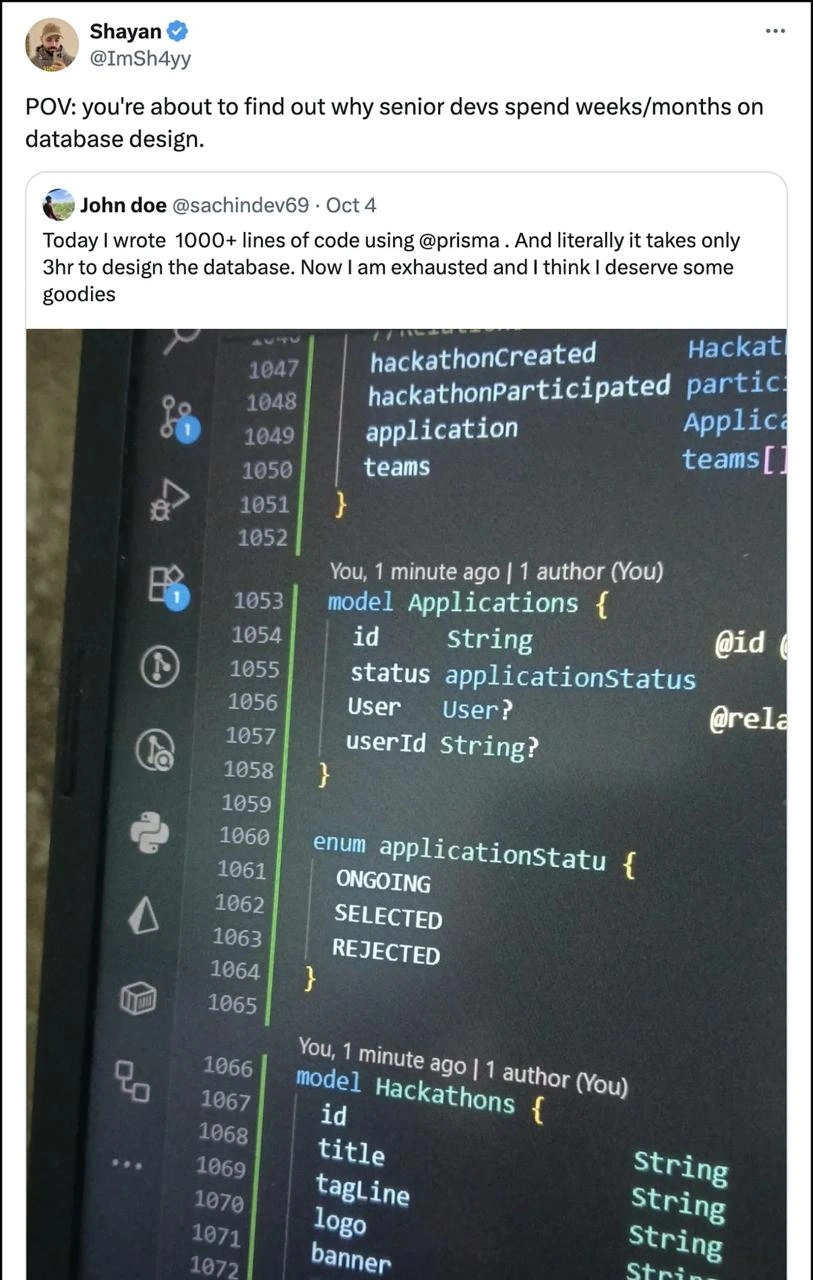
First, let’s inspect the evidence in that VS Code screenshot (the classic dark theme, of course). We see a model Applications with fields id, status, User, userId. Right below, there’s an enum applicationStatu { ONGOING, SELECTED, REJECTED }. Oh dear – do you spot the subtle horror? The enum is named applicationStatu (missing an s at the end), whereas the model’s field expects a type applicationStatus. This little typo might seem trivial, but it’s exactly the kind of NamingThings mishap that keeps seniors up at night. In programming lore, there’s a joke that the two hardest problems are cache invalidation and naming things (and off-by-one errors). Here we’ve got an off-by-one-letter error in a name! This schema likely wouldn’t even compile because the field’s type and enum name don’t match. Congratulations, you now own a one-letter typo bug across 1000 lines of schema.
model Applications {
id String @id
status applicationStatus // expects an enum type "applicationStatus"
User User? @relation
userId String?
}
enum applicationStatu {
ONGOING
SELECTED
REJECTED
}
// <-- Oops, missing 's' in enum name. That's gonna hurt in review.
Now, a senior engineer in a senior_architecture_review will pounce on more than just that applicationStatu typo. Database design is not merely about making the code run; it’s about DataModelingTechniques that ensure the system stays consistent, performant, and adaptable. Let’s list a few things a seasoned architect is silently screaming about when they see this 3-hour wonder:
Inconsistent Naming Conventions: The model is called
Applications(plural) but references aUser(singular). Are table names plural or singular? Pick one convention and stick to it. A rushed job often produces this mishmash of naming, which down the line causes endless “Wait, what did we call that table?” confusion. Seniors have spent weeks establishing naming guidelines (and probably bikeshedding oversnake_casevsCamelCase) for a reason. SeeingapplicationStatuwith a missing letter is the icing on the cake – it screams “I didn’t even run a basic check.”Referential Integrity (or Lack Thereof): In the snippet,
Applicationshas a fielduserIdand a relation toUser. Is that relation properly set up with foreign keys? It’s marked optional (User?andString?), which raises design questions: Can an application exist without a user? If not, that should be a required relation. If yes, what does it mean in the business logic? Also, where is the link between an application and a hackathon? The schema shows amodel Hackathons, but theApplicationsmodel doesn’t list ahackathonIdorhackathonfield. If this schema were a quick scaffold, maybe the dev forgot to connect applications to the specific hackathon they’re for. Uh-oh – that’s a broken data model lurking in plain sight. A senior reviewing this will likely facepalm: “So… how do we know which hackathon this application is for? Magic?” This is the kind of oversight that happens when you rush data modeling. Seasoned devs design relationships carefully to enforce referential integrity – ensuring, for example, you can’t have an application that points to a hackathon that doesn’t exist. Without these constraints, data becomes a wild west of orphan records and inconsistent states.Lack of Normalization & Foresight: Quick ORMs let you throw in models and fields rapidly, but did our intrepid junior consider normalization? Experienced database designers often spend days on entity-relationship diagrams, making sure the data is properly normalized (e.g., no redundant data, each concept has its own table, relationships make sense). In a “3-hour design”, chances are there was no deep thought about avoiding data duplication or future changes. For instance, they have an enum for application status with values
ONGOING, SELECTED, REJECTED. Fine – but what happens when someone inevitably wants to add a new status like “WAITLISTED”? Will the junior know how to alter the enum and perform a data migration gracefully? Seniors think about these future migrations up front. They might even ask in the review: “Hey, should ‘status’ maybe be its own table or at least be designed to change easily? What if we need to localize status names or add more statuses?” A newbie might reply, “I’ll just update the enum later,” and every senior will exchange knowing glances – they’ve fought those battles where a “simple update” cascades into downtime because of a billion records update.Missing Indexes and Performance Gotchas: The meme doesn’t explicitly show it, but if someone cranked out 1000 lines of Prisma schema in one sitting, we can bet they didn’t carefully consider which fields need indexing for fast queries or how the ORM queries will scale. A senior reviewing this might ask, “How will we query for all applications for a hackathon? Will this do a full table scan because there’s no index on hackathonId (which isn’t even there yet)? What about searching by status or user – are those indexed?” Inexperienced devs lean on ORMs to handle queries, often unaware that under the hood it’s generating SQL that could be slow without proper indexes. By contrast, a dev who spends weeks on design will identify hot fields and large data volume concerns ahead of time.
Technical Debt Accumulation: Perhaps the biggest thing is the invisible technical debt this speedrun likely created. Sure, the schema exists after 3 hours, but at what cost? Seniors know that every sloppy decision here is a debt that will have to be paid with interest later – maybe when writing complex features or during production incidents. The tweet’s author is “exhausted” after this sprint and wants some goodies (maybe stickers or a treat). The dark humor is that the real exhaustion often comes later, when you have to refactor or fix the design under pressure. It’s like writing 1000 lines of code really fast and feeling good, only to discover 6 months later that half of it needs to be rewritten to support a new requirement. That’s the quick_scaffold_regret every senior has either experienced or witnessed. As the saying goes, “Build it quick, build it twice.”
All these reasons are why the original meme states, “POV: you’re about to find out why senior devs spend weeks/months on database design.” The senior engineers aren’t trying to rain on the junior’s parade for fun; they’re speaking from hard-earned scars. They’ve dealt with the fallout of rushed schemas – from endless migrations that could have been avoided with upfront planning, to production bugs because of subtle issues like a misnamed enum or a missing constraint. CodeQuality isn’t just about getting something working; it’s about making it clear, maintainable, and robust. In a senior design review, our enthusiastic Prisma user is about to get a crash course in quality: every enum_naming_pain, every inconsistent field, every unintended nullability will be put under the microscope.
The humor here has a bit of a dark edge: It’s funny because it’s true. Every senior dev can recall a time they were that junior, triumphantly presenting a “finished” data model or feature they whipped up in a day, only to have a mentor or code review point out a truckload of issues. It stings in the moment, but it’s how we learn. The tweet-by-tweet format highlights that contrast: one tweet full of youthful exuberance (“I did it in 3 hours!”) and the response tweet essentially saying, “Heh, wait until the real world hits.” The meme gets DeveloperHumor mileage by capturing a universal tech workplace scenario: JuniorVsSenior expectations. The junior is focused on raw speed and output count (1000+ lines! wow!), while the senior cares about design correctness and maintainability (weeks of careful thought, which sounds boring until you’ve lived the alternative).
In summary, this “3-hour Prisma schema” is the hare racing ahead, and the senior “tortoises” know that slow and steady (with planning, reviews, and revisions) usually wins the race in database design. Sprinting through a complex task like data modeling is a surefire way to trip over all the details you didn’t consider. The meme’s punchline is essentially: Rookie, you have no idea what you overlooked, but you’re about to learn. And trust me, the seniors in that design review will make sure it’s a lesson that sticks — possibly with a side of good-natured ribbing and a NamingThings horror story or two from their past.
Description
A quote tweet from Shayan (@ImSh4yy) saying 'POV: you're about to find out why senior devs spend weeks/months on database design.' The quoted tweet from John doe (@sachindev69, Oct 4) reads: 'Today I wrote 1000+ lines of code using @prisma. And literally it takes only 3hr to design the database. Now I am exhausted and I think I deserve some goodies.' Below is a photo of a screen showing Prisma schema code around line 1047-1072, featuring models like 'Applications' with fields (id, status, User, userId), an enum 'applicationStatu' (truncated name, missing the 's'), and a 'Hackathons' model with fields (id, title, tagLine, logo, banner). The code shows classic junior mistakes: the enum name is misspelled as 'applicationStatu' instead of 'applicationStatus', the schema structure suggests poor normalization, and the pride in LOC count reveals the misconception that more code = more productivity

Comments
24Comment deleted
1000+ lines of Prisma schema in 3 hours is impressive -- that's roughly the same speed at which you'll be rewriting it once you discover what database normalization is
Scaffolding a schema in three hours is easy - just reserve the rest of the quarter for the migration that fixes “applicationStatu” after prod dashboards are already hard-coded to it
Nothing says 'production-ready schema' quite like optional User relations and string fields for everything - can't wait for the sequel where they discover why we have foreign key constraints, indexes, and why 'logo' probably shouldn't be a String field in the database
Ah yes, the classic '3 hours of database design' followed by 3 months of migration hell when you realize your optional User relationship and String-based IDs don't scale, your enum can't be extended without a migration, and you've accidentally created a many-to-many relationship that should have been many-to-one. Senior devs don't spend weeks on database design because they're slow - they're preemptively debugging the production incidents that junior devs schedule for 2 AM on a Saturday
John's schema proves every user-team relation spawns three junction tables - like a fractal of indirection no query planner can love
Anyone can ship a 3‑hour Prisma schema; seniors spend three weeks deciding cardinality and constraints because backfilling a misspelled enum on 200M rows teaches you CAP: Can’t Alter in Production
Designing the schema in 3 hours just means your next 3 quarters are spent writing zero‑downtime migrations to fix pluralized models, optional FKs, and an enum that will inevitably need a fourth state during Black Friday
application statue Comment deleted
It's statu, plural form of stat (according to slop) Comment deleted
YES we Absolutely NEED UUID AS Primary KEY Comment deleted
jokes aside its has its own advantages Comment deleted
aside from GIGA CORP like system its best used in loggings,traces it can act as timestamp and UUID what you use it for? Comment deleted
any customizable parameter system would run over bigint quite fast while being run in relatively active prod. or any other case of m-m relation table between 2 big tables that could be autogenerated Comment deleted
UUIDs are inevetible in distributed systems, as you don't have single issuing service for incremental bigint Comment deleted
good enough for a first prototype Comment deleted
Fuck prisma Comment deleted
all my homies use drizzle Comment deleted
That one is REJECTED one I guess Comment deleted
Oops, ment for the comment above Comment deleted
humor brigade pls Comment deleted
the implication is that AI-generated code will suck massive cock "POV" means it will be John who finds it out Comment deleted
literally just learn SQL and it looks exactly the same Comment deleted
looks even better Comment deleted
Why prisma and not atlas? Comment deleted