A Literal Spill of JPEG Compression
Why is this Graphics meme funny?
Level 1: Spilled Paint
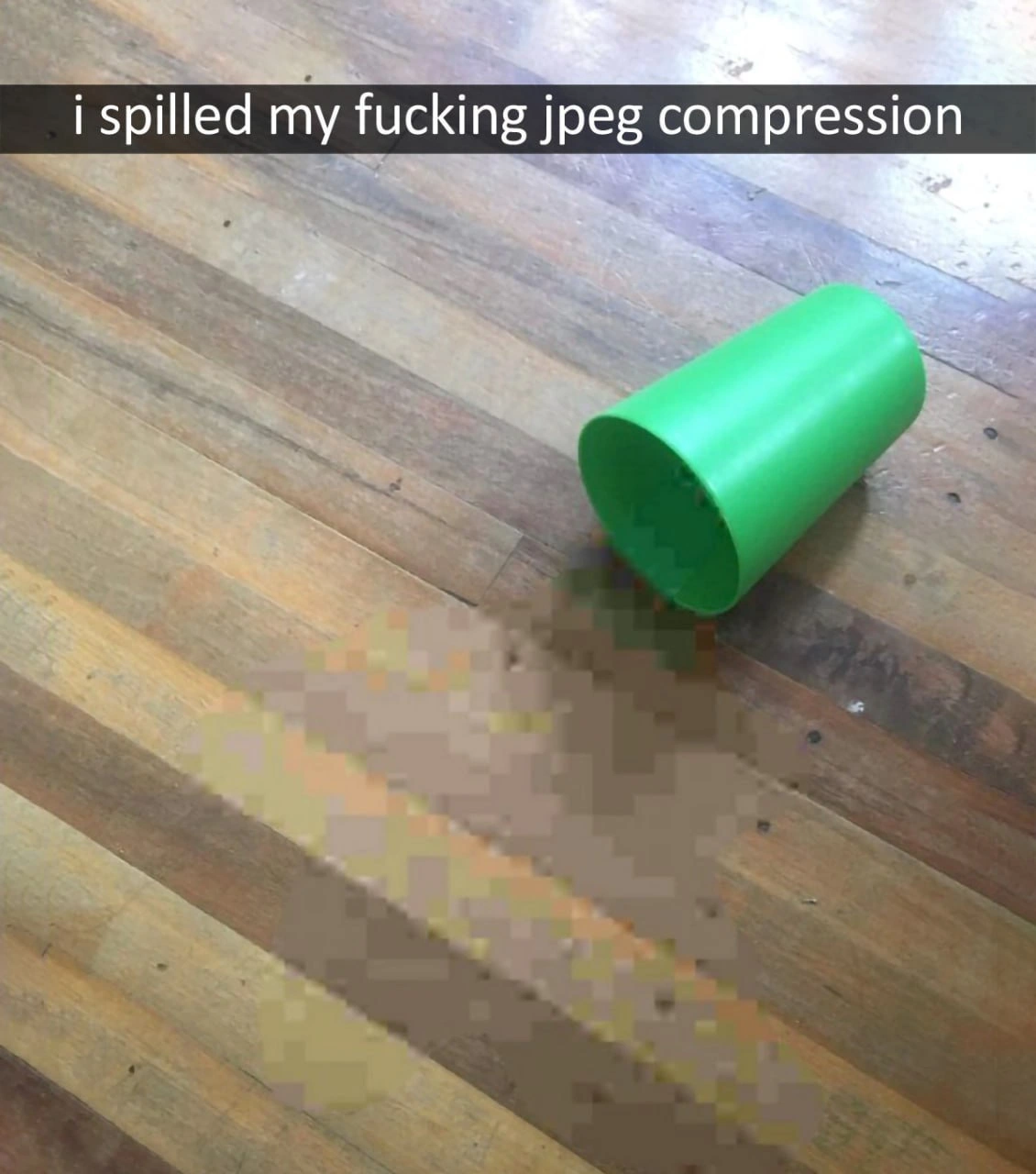
Imagine you have a beautiful painting, full of tiny details, and you accidentally knock over a cup of water onto it. The colors start to run and the fine details blur into big smeary patches. That’s essentially what’s happening in this meme, but with a digital twist. The picture shows a cup that tipped over and “spilled” a bunch of blurry squares onto the floor. Those squares represent parts of a picture that got all smudged and blocky. The joke is saying: “Oops, I spilled my picture’s quality everywhere!”
Think of a digital image like a mosaic made of countless small tiles (pixels). If you suddenly remove a lot of those tiles or make them all one color to simplify the mosaic, the picture loses its clarity and you start seeing the square tiles themselves. It’s like if you had a detailed LEGO sculpture and then took away a bunch of the small LEGO pieces – what’s left would look chunky. In the meme, the person pretends that the process of making a picture file smaller (which normally happens invisibly inside a computer) turned into a gooey, pixelated liquid that you can accidentally spill. It’s funny because we know you can’t really pour out image pixels onto the floor, but the picture makes it look as if the blurriness and blockiness of an over-compressed image became a puddle. The feeling it conveys is the same as messing up a nice painting by spilling something on it – for developers, “spilling JPEG compression” is messing up a nice image by over-compressing it. So in simple terms: the meme shows a cup spilling a fuzzy pixel mess, joking that someone “spilled” the image’s quality like it was a drink. It’s a silly, visual way to say “whoops, I ruined the picture!”
Level 2: Puddle of Pixels
So, what exactly are we looking at here? For a newer developer or someone just learning about images, let’s break it down. We have a photo of a tipped-over green cup on a wooden floor. But instead of water or juice spilling out, it’s a splash of blurry squares. Those squares are meant to represent pixels (the tiny dots that make up digital images) that have become chunky and blocky due to compression. The meme’s text says “I spilled my f***ing JPEG compression” – joking that the fuzzy, blocky look of an over-compressed image is like a liquid you could spill. It’s a funny visual metaphor: normally, “JPEG compression” is just a setting when saving an image file. Here, it’s imagined as a physical thing that can leak out of a cup!
Let’s decode some terms:
- JPEG: This stands for Joint Photographic Experts Group, which is actually the name of the committee that created this image format standard. When someone says “a JPEG,” they usually mean a picture file ending in
.jpgor.jpeg. JPEG is super common for photos because it makes files much smaller by cleverly reducing detail (this is called compression). - Compression: This means squeezing data to take up less space. There are two kinds: lossless (no information is lost, like a ZIP file making something smaller but you get it all back when you unzip) and lossy (some information is thrown away to save space, so you don’t get it back). JPEG is lossy compression. It permanently removes some image details to make the file smaller.
- Lossy Compression Artifacts: These are the unwanted changes or errors introduced by throwing away data. In images, artifacts often look like blocky shapes, blurriness, or weird colors around edges. The meme shows JPEG artifacts – those large square areas and muddy colors are exactly what happens when a picture is saved with very high compression (low quality setting).
- Pixelation: This term describes when individual pixels (squares of color) become visible in an image. If you zoom in too much on a low-resolution image, or if an image is heavily compressed, it starts to look like a Minecraft version of itself – you see the little squares. That’s pixelation. Here the “puddle” on the floor is extremely pixelated on purpose.
Imagine you have a nice photograph and you want to shrink its file size. JPEG will split the image into tiny blocks and simplify the details in each block. If you tell it “really prioritize a small file; I don’t care about quality,” it will take a broom and sweep away a lot of the detail. The result is a smaller file, but when you open it, the photo might look grainy or blocky – because all that sweeping (data loss) shows up as missing info. The meme jokes that this sweeping or discarding of detail became an actual puddle of “lossy” goo on the floor.
For someone new to this, think of it like drawing a detailed picture with pencil, and then erasing some details to make the drawing simpler. If you erase lightly (lossless or mild compression), you might not notice a difference. But if you erase a lot (heavy lossy compression), the picture loses so much detail that you now see big plain spots where detail used to be. Those big plain spots are like the squares in the spilled JPEG. ImageProcessingAlgorithms like JPEG try to erase just the “right” details — things our eyes might not notice — but push it too far, and we definitely notice! That’s why we have different image file formats: for example, PNG is a lossless format (keeping sharp lines and exact pixels, good for logos or text), while JPEG is lossy (better for reducing photo file size, but not great for preserving fine lines or text). As a junior developer, you learn pretty quickly that using the proper format and the right compression level is important. Otherwise, you might check your app or website and gasp, “Why does my image look so bad and blocky?!” – essentially discovering you “spilled some JPEG compression” on it. This meme is just a comical, exaggerated depiction of that scenario. It’s popular in DeveloperHumor circles because it turns a technical mishap (over-compressing an image) into a physical comedy scene.
Level 3: Quality Down the Drain
For seasoned developers and graphic designers, this image hits a nerve in the funniest way. It captures that exasperating moment when you push an image’s compression too far and end up with a blocky mess. We’ve all been there: you have to make a web page load faster or shrink an app’s download size, so you aggressively compress your images. The next thing you know, that once-crisp photo now looks like it had a pixelation accident – as if all the fine details just leaked out, leaving behind a puddle of giant squares. The meme literally shows a bright green cup knocked over on a wooden floor, with a trail of big square pixels spilling out. It’s labeled “i spilled my fucking jpeg compression,” perfectly capturing the dark humor a developer feels seeing a beautiful image ruined by over-compression. Those chunky squares on the floor are instantly recognizable as JPEG compression artifacts – the blocky distortions you see when an image has been saved at very low quality. The humor is that developers deal with these artifacts so often that we joke about them as if they were a physical substance.
In real-world projects, striking the right balance between image quality and file size is a constant battle. Need your website to load faster? You might compress images to half their size – but do it too much and the images start to look like a chunky mosaic. It’s like wringing out a sponge: squeeze harder (more compression) and more water (image detail) drips out. This meme imagines that literally: the lossy compression dripped out of the image and made a mess on the floor! For a senior dev or an experienced graphic artist, the phrase “spilling JPEG compression” evokes memories of all those times a client or manager said, “Can we make the file smaller?” and you thought, “Sure, if you don’t mind a few minor large squares all over your photo.” It’s DeveloperHumor 101: FileCompression is always a trade-off.
This meme also satirizes the everyday mishaps in graphics work. Perhaps you’ve accidentally saved a high-detail illustration as a JPEG instead of a lossless PNG, and all the clean lines turned fuzzy and blocky – essentially spilling JPEG artifacts all over your artboard. Or maybe you received a company logo that someone kept re-saving as JPEG; each save dumped out a bit more image fidelity, until the logo looked like it was underwater. In team chats or subreddits, developers might share screenshots of UI images gone wrong – “Oops, our profile pictures feature just spilled JPEG compression everywhere after the last deploy.” It’s a way to laugh off what is otherwise a frustrating quality issue. Experienced devs also recognize the Graphics category truth hiding here: formats matter! We choose data formats carefully – use JPEG for photos, PNG for sharp logos or diagrams. If you mix them up, you either waste space or, conversely, end up with unwanted artifacts. This meme implicitly teaches that lesson by example: compress something too much in JPEG and you’ll literally see the compromise.
Finally, the style of the meme – with a Snapchat-style caption bar and casual profanity – is typical DeveloperHumor tone: a bit of exaggeration, a bit of rage, and a heap of technical inside joke. The caption “i spilled my fucking jpeg compression” reads like a panicked message to a friend after discovering your image asset looks terrible in production. It anthropomorphizes the software process (you can’t really spill compression, of course) to highlight how tangible those compression artifacts feel when you see them. The senior perspective here is basically a knowing smile and a facepalm: “Yep, been there, done that. Time to grab the mop and clean up those pixels.” It’s funny because it’s true – in our line of work, even something as abstract as a compression algorithm can come back to haunt our visuals in a very obvious, ugly way. And hey, better the JPEG spilled all over the floor than the coffee on your keyboard, right?
Level 4: Macroblock Meltdown
In the depths of image processing, this meme is a tongue-in-cheek nod to the inner workings of JPEG compression. It visually manifests what happens when a lossy compression algorithm goes overboard. JPEG’s compression pipeline divides an image into 8×8 pixel blocks (often called macroblocks or simply blocks) and applies a Discrete Cosine Transform (DCT) to each. The DCT converts each block from the spatial domain (actual pixel colors) into the frequency domain (coefficients representing patterns of color change). High-frequency details (like sharp edges or fine textures) get converted into coefficients that are then heavily quantized (rounded towards zero) to save space. Under an aggressive compression setting (very low quality), most of those high-frequency coefficients vanish, leaving only the coarse low-frequency components in each block. The result? Each block reconstructs as a nearly uniform area of color or a big blurry patch. Multiply that across the image, and you see a patchwork of blocky artifacts at the former block boundaries. In other words, the algorithm’s lossy nature means it permanently “spills” detail out of the image. The meme brilliantly imagines this by showing giant square pixels pouring out of a cup, as if the quantization residue itself became a tangible liquid. It’s a playful take on the fact that heavy JPEG compression leaves behind chunky squares – those familiar JPEG artifacts – which here have literally “spilled” onto the floor.
This humorous visual also hints at the concept of compression artifacts accumulation. Every time an image is saved as a JPEG, especially at low quality, more data is discarded. The spilled “puddle” of big squares represents all those discarded bits of detail pooling together. It’s as if the floor is covered in the image information that the JPEG algorithm threw away to reduce file size. Advanced developers might chuckle at how accurately the meme captures the essence of a lossy compression algorithm’s byproducts. The use of a Snapchat-style caption (“i spilled my fucking jpeg compression”) adds an extra layer of irony: a modern meme format depicting a very technical issue. There’s even a whiff of data format history here – the blocky artifact pattern has been a known “occupational hazard” of JPEG since its standardization in 1992. Long-time graphics programmers recall that these artifacts (often called blocking artifacts or macroblocking) are not bugs but an inevitable consequence of JPEG’s design: optimizing for human perception by discarding high frequencies. The meme exaggerates it by treating those lost high-frequency details as a visible sludge. In essence, this is a master-class joke in Graphics and Multimedia Processing: it takes an invisible algorithmic compromise and makes it visible (and laughably messy) on the floor.
# Pseudocode: Simulating the JPEG compression steps that lead to block artifacts
image = load_image("high_res_photo.bmp")
blocks = divide_into_blocks(image, size=8) # Partition image into 8x8 pixel blocks
compressed_blocks = []
for block in blocks:
coeffs = DCT(block) # Convert spatial pixel values to frequency coefficients
quantized = quantize(coeffs, quality=5) # Aggressively quantize (low quality => many coefficients to 0)
block_out = inverse_DCT(quantized) # Reconstruct block from remaining data
compressed_blocks.append(block_out)
compressed_image = merge_blocks(compressed_blocks, image.width, image.height)
save(compressed_image, "spilled_compression.jpg")
# The resulting "compressed_image" will show chunky 8x8 pixel blocks (lossy artifacts) just like the meme's puddle.
In the code above, using a very low quality factor (e.g., quality=5 on a 0-100 scale) causes extreme quantization. Most of the fine details in each 8x8 block are discarded, so when we invert the transform, each block comes out as a smoothed, simplified version of the original – essentially a solid or gently graded square. The final merged image visibly contains a grid of these squares, matching the meme’s pixelated spill. This is exactly what’s being joked about: the JPEG algorithm spilled its guts, and what we see are the DCT coefficients (or lack thereof) splattered as big pixels. The meme’s absurd literalism is hilarious to anyone who has dug into image processing algorithms – it’s a celebration of understanding that behind every pretty JPEG image, there’s serious math chopping the picture into pieces and (sometimes messily) gluing it back together.
Description
The image displays a surreal and humorous scenario. On a wooden plank floor, a simple green plastic cup lies on its side as if it has been knocked over. Emanating from the cup's opening is a 'spill' that, instead of being liquid, is a patch of pixelated, blocky digital artifacts characteristic of severe JPEG image compression. The wood grain in the affected area is distorted into a grid of discolored squares. A caption in a black bar at the top of the image reads, 'i spilled my fucking jpeg compression'. The joke comes from the literal, physical manifestation of a purely digital concept. It personifies 'JPEG compression' as a substance that can be contained and spilled, creating a mess of visual data corruption that anyone who has worked with digital images will instantly recognize and find amusing
Comments
15Comment deleted
That's not just a spill; that's the Discrete Cosine Transform algorithm leaking onto the floor. Good luck cleaning up those frequency coefficients with a paper towel
Set quality = 20 to save bandwidth, they said - now prod’s floor is covered in 8×8 DCT blocks and we’re debating whether the mop needs a higher quantization table
After 20 years of explaining to clients why their 10KB logo looks terrible on a 4K display, I've finally found the perfect visualization for 'you can't just keep compressing it' - though I suspect they'll still ask if we can clean up the spill with some AI upscaling
Ah yes, the classic 8x8 DCT block spill - happens to the best of us when we set the quality slider below 50. At least it's not a PNG spill; those are lossless and impossible to clean up. Pro tip: next time use WebP with adaptive quantization, or just keep your compression coefficients in a sealed container away from wooden surfaces
Proof someone set quality=12 in the CDN - 8x8 DCT blocks and 4:2:0 chroma all over the floor
Classic JPEG spill: 8x8 macroblocks of regret when you chase that last 10KB savings over smooth gradients
Facilities says they can mop the floor, but not 8x8 macroblocks - please stop setting quality=10 to hit your Lighthouse budget
I just can't understand why PNG is better than the JPEG. U can download high-quality pics in JPEG as well Comment deleted
scalabilty Comment deleted
png is lossless jpeg is near-lossless at best Comment deleted
Hmmm... Now I catch it, tnx budd Comment deleted
Some people say there is such a thing as lossless JPEG, but I have not seen one yet. And, in my understanding, such JPEG would generally consume much more space than PNG. Comment deleted
jpeg is a massive standard with many extensions, it's entirely possible that there's a way to make a lossless jpeg. Comment deleted
true but still 😁 Comment deleted
as for space - jpeg is generally better with photos, and png is better with simple graphics. that's just because their method of compression is very different. Comment deleted