Skip to content
DevMeme
750 of 7435
Infinite Recursion Leads to Chrome Tab's Existential Crisis
Bugs Post #849, on Nov 24, 2019 in TG

Infinite Recursion Leads to Chrome Tab's Existential Crisis

Why is this Bugs meme funny?

Level 1: Never-Ending Task

Imagine you’re told to start doing a chore, like cleaning your room, over and over again and no one ever says “stop.” 😫 You clean it, then immediately start cleaning again, and again, infinitely. You’d never get to rest! Eventually, you’d probably give up or collapse because the task would never end. This meme is joking about the same idea, but with a web browser (Google Chrome) and some code.

In the meme, a person (the developer) accidentally wrote instructions (a function in code) that tell the computer to repeat something forever with no stopping point. The computer (specifically, the Chrome browser tab running that code) tries its best but quickly gets overwhelmed because it’s stuck in an endless loop of work. It’s like the browser was asked to count “1, 2, 3…” and never told to stop counting. At some point, the browser just says, “Nope, I’m done!” and quits. The joke shows the Chrome tab choosing to “die” — which is a funny way of saying the tab crashed or closed itself because it couldn’t handle the never-ending task.

So why is it funny? It’s the cartoonish exaggeration. We’re imagining the browser tab as if it’s a person with feelings who decides, “I’d rather die than keep doing this forever.” Of course, in reality the computer doesn’t have feelings; it just hit a limit and stopped the program. But thinking of it like a dramatic scene makes us laugh. It’s basically humor about a very human mistake (forgetting to put an exit in your instructions) and the computer’s very dramatic reaction. Even if you’re not a programmer, you can relate to being stuck doing something repetitive until you just can’t take it anymore. The meme takes that relatable feeling and shows it in a silly tech context: a web browser that would rather crash than continue an endless job.

Level 2: The Missing Base Case

Let’s break down what’s happening in simpler terms. The meme is talking about a JavaScript function that is recursive but has no base case to stop it. Recursion means a function calls itself. It’s a useful concept: for instance, you might use recursion to navigate through nested folders or to compute something like factorials. However, every recursive function needs a base case – a condition that tells it, “okay, stop recursing now.” The base case is like the exit door of a loop.

In this scenario, “no exit condition” means the function never finds a reason to stop calling itself. Think of it as a loop that never breaks. That’s what we call an infinite recursion (a type of infinite loop). In code, it might look like:

function endless() {
    endless();  // calls itself with no check to stop
}
endless();

When you run something like this in a browser, several things happen. Each time a function is called in JavaScript, the engine puts it on the call stack (which keeps track of function calls and their variables). With endless() calling itself over and over, the call stack grows and grows without bound because the function never returns or finishes. Computers don’t have unlimited memory, so there’s a limit to how much can be put on this stack. Eventually, you hit that limit – in Chrome, this usually triggers a stack overflow error. In JavaScript, that appears as a RangeError about the call stack size. Essentially, JavaScript throws an error saying “Too many nested calls – I can’t handle this recursion depth!”

At the same time, because this is running in a web page (the frontend), your browser tab becomes unresponsive. JavaScript in a web page runs on the main thread that also updates the UI and processes user interactions. If that thread gets stuck (here it’s stuck in our never-ending function), nothing else on the page can work. You might click buttons or try to scroll, but the page is frozen because the script is busy looping forever.

Chrome (the browser) has a safety mechanism: it notices that the page isn’t responding and it effectively stops the script. Sometimes it outright crashes the tab (you’ll see the “Aw, Snap!” error page or a little dead tab icon). In less dire cases, it might show a prompt, “This page is not responding. Do you want to wait or exit?”. In the meme, they personified the Chrome tab as saying “I have decided that I want to die.” That’s a humorous way to describe the tab crashing itself. In reality, the tab process hits an error and stops the runaway code to protect the rest of the system (and your sanity).

Why is this funny to developers? Because it dramatizes a common debugging experience. Making an accidental recursion with no base case is a mistake many of us have made. The result is always the same: the program either throws an error or completely freezes/crashes. It’s frustrating when it happens, but looking back it’s a bit funny how the browser essentially gives up in response to our mistake. The meme uses that subtitle (“I want to die”) to exaggerate the browser tab’s point of view, as if the tab is saying, “Your code is making me kill myself.” It’s dark humor, but it hits home for anyone who’s spent a afternoon trying to figure out why their webpage suddenly went blank or unresponsive – only to find out they wrote an infinite loop by mistake.

In simpler terms: the developer did something wrong (forgot the base case in a recursive function), and the consequence was the Chrome tab crashing. Everything here – infinite recursion, stack overflow errors, and a browser crash – ties together to show cause and effect. Forget to tell your function when to stop, and it might run literally forever (or until the environment forces it to stop). The meme just conveys that with a lot more humor and a dash of melodrama.

Level 3: Call Stack Catastrophe

From a seasoned developer’s perspective, this meme is a tongue-in-cheek reminder of a classic bug: the accidental infinite loop, specifically in the form of recursion without an exit. The setup “me: accidentally makes recursive function with no exit condition” immediately evokes facepalms among experienced coders. We’ve been there – writing a seemingly innocent recursive function and forgetting the base case, or messing up the termination condition. The result? One doomed Chrome tab.

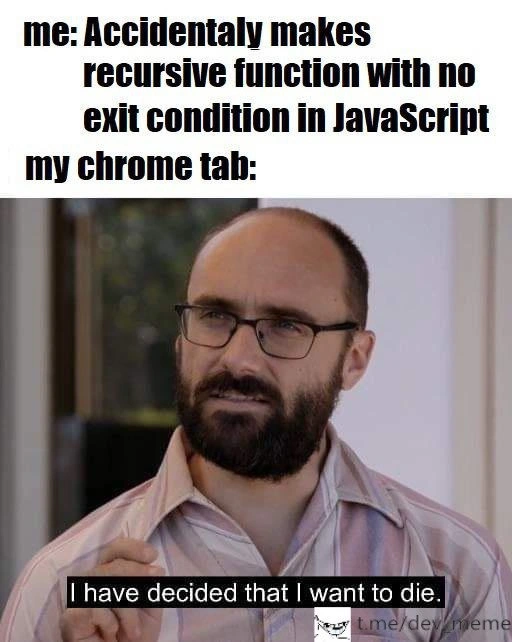
When Chrome (or any browser) encounters such a bug in frontend JavaScript, the outcome is painfully relatable: the tab freezes and often displays that dreaded “Aw, Snap!” error or a “Page Unresponsive” dialog. The meme captures this with dark humor by showing a man solemnly saying “I have decided that I want to die,” labeled as the Chrome tab’s reaction. It’s as if the tab itself is consciously choosing to crash rather than continue the futile task – a perfect personification of a process hitting its breaking point. Developers find this hilarious because, emotionally, it’s exactly how it feels in the moment: your program essentially rage-quits on you.

Why is this scenario so familiar? In day-to-day development, especially in JavaScript, it’s easy to create an infinite recursion or infinite loop by mistake. Maybe you wrote a recursive function to traverse a data structure or update part of the UI and forgot to handle the “done” condition. Or perhaps a termination check was written incorrectly (an off-by-one error, or the logic never becomes false). For example, consider a naive recursive function to decrement a number:

function countdown(n) {
    console.log(n);
    // Oops: missing a proper base case when n <= 0!
    if (n > 0) {
        countdown(n - 1);
    }
}
countdown(5);

If that if condition or the decrement was wrong, you might never stop. In our meme’s scenario, the function just calls itself unconditionally, so it never breaks out. What does that mean in a browser? Each recursive call goes onto the call stack, which is like a stack of plates tracking active function calls. Pretty soon, you have a teetering tower of calls with no end in sight. Eventually, the JavaScript runtime throws its hands up: usually logging a "RangeError: Maximum call stack size exceeded" in the console. That’s the engine’s way of saying “this recursive call depth is absurd – I’m stopping now.” The page becomes unresponsive because JavaScript is single-threaded on the main thread; it’s stuck in that function and nothing else (no user input, no rendering updates) can happen until it unwinds. But it never unwinds normally, so the browser has to intervene.

Chrome is engineered to handle these situations gracefully (or at least isolate them). Each tab runs in a separate process, so one tab’s demise doesn’t take down your whole browser. When a script goes haywire (like our infinite recursion), you might see the tab crash with a sad face icon or a prompt to kill the script. In essence, the Chrome tab crashes itself to escape the infinite loop – hence the meme’s suicidal-sounding caption. The humor here also taps into developer debugging frustration: that feeling when you run your code and the only response is your application committing figurative seppuku. It’s both tragic and comic – tragic because you probably lost some state or have to restart, comic because the situation is so over-the-top (the program would rather die than continue with your bug).

We also recognize in this meme a shared lesson from many a debugging session: always define your base case! It’s Programming 101 – whether you’re writing a recursive function or any loop, you plan how it will terminate. Missing that is a coding mistake that can bring even a mighty browser like Chrome to its knees. The image of Chrome “tapping out” acknowledges that even powerful tools have limits when our code is flawed. It’s a gentle roast of every developer who’s seen their app hang and thought, “Not again… what did I do this time?” And trust me, virtually every developer has seen it. The meme speaks to a camaraderie: Yep, I’ve crashed my browser with a bad script too. It’s a rite of passage in frontend humor circles (or really any programming humor).

In sum, the senior perspective sees this meme and nods knowingly. It pokes fun at a classic bug while reinforcing a best practice. The next time we review code and see a recursive function, that voice in our head whispers, “Don’t forget the base case, unless you want Chrome to decide it’s done with life.” It’s funny because it’s true – and we’ve all learned the hard way at least once!

Level 4: Turtles All The Way Down

At the most theoretical level, this meme highlights a fundamental concept in computer science: recursion without a terminating condition. In mathematics and programming, recursion is like a self-referential definition – a function that calls itself. For recursion to be meaningful (and to ever finish!), there must be a base case (a simple scenario where the function doesn’t recurse further). Without a base case, we get infinite recursion, a scenario akin to the classic anecdote of the world standing on a turtle, that turtle standing on another turtle... and so on ad infinitum – essentially “turtles all the way down.” 🐢🐢🐢

In theoretical terms, a function with no base case represents a process that never meets a halting condition. This touches on the famed Halting Problem: figuring out whether an arbitrary program will ever finish is generally undecidable. Here, however, it’s no mystery – we've explicitly created a function that will never halt. The JavaScript engine (Chrome’s V8, in this case) will try to keep calling the function indefinitely, but this runs up against real-world limits: computer memory and stack depth. Each function call consumes a stack frame (a chunk of memory to keep track of local variables, return addresses, etc.). With unbounded recursion, these stack frames pile up like an endless stack of plates until there’s no more room.

Most environments have a guardrail: in JavaScript, a runaway recursion usually triggers a RangeError (specifically: Maximum call stack size exceeded). This is essentially the language self-defense kicking in to stop an infinite regress before it brings down the entire runtime. It’s the engine saying, “I can’t keep going – I’ve overflowed the call stack.” (Fun fact: the developer Q&A site Stack Overflow gets its name from this very kind of error!) If such safeguards didn’t exist, an infinite recursion could consume all available memory (a browser OOM – out-of-memory scenario) or hang the process forever.

Different languages and runtimes handle this scenario differently. Low-level languages like C might blindly march into an infinite recursion until a stack overflow crashes the program (often with a segmentation fault). Higher-level languages and VMs (like JavaScript on V8) detect the runaway depth and throw an exception to unwind safely (or at least not corrupt memory). Some functional languages even employ tail-call optimization to reuse stack frames for certain kinds of recursion, allowing very deep or theoretically infinite recursion without growing the stack. But even tail-call optimization can’t magically make an endless recursion terminate – it only means the function could loop forever without eating memory, still requiring an external intervention to stop. In Chrome’s case, if a script truly runs wild, the browser’s UI thread is blocked indefinitely. The event loop can’t do anything else because it’s stuck in that function, so the tab becomes unresponsive. Modern browsers like Chrome run each tab in a separate process, which means one hung tab won’t freeze the entire browser. Eventually, the tab’s process hits a safety limit or the user is prompted to kill it. In meme-speak, the Chrome tab essentially chooses to terminate itself once it realizes the code has looped into oblivion.

So, in summary, this top-level view connects the joke to deep CS concepts: a recursive function with no exit is like a logical paradox – it never resolves. The browser’s response (“I have decided that I want to die”) humorously echoes the inevitable outcome dictated by theory: an uncaused cause in code leads to a fatal conclusion for that process. The meme gets a laugh by dramatizing a fundamental truth – in computing, as in storytelling, every recursion needs a base case or you’ll be stuck in an endless story, one that reality (or your OS) will eventually put a stop to.

// A JavaScript example of an infinite recursion (no base case):
function recurseForever() {
    return recurseForever();  // the function calls itself unconditionally
}
recurseForever();  // This will never return - eventually triggers a RangeError in Chrome

Description

A two-panel meme communicating a common developer error. The top panel has bold, black text on a white background that reads: 'me: Accidentaly makes recursive function with no exit condition in JavaScript' followed by 'my chrome tab:'. The bottom panel features a still image of Michael Stevens from the YouTube channel Vsauce, looking somber and thoughtful. A subtitle at the bottom of the image says, 'I have decided that I want to die.' There is a small watermark in the bottom right corner with a troll face icon and the text 't.me/dev_meme'. The meme humorously personifies a browser tab that is about to crash due to a fatal coding mistake. A recursive function without a proper exit condition, or base case, will call itself indefinitely, consuming system memory and causing a stack overflow error. This inevitably leads to the application or browser tab becoming unresponsive and crashing, hence the tab's decision 'to die.'

Comments

7
Anonymous ★ Top Pick A recursive function without a base case is like a microservice that only calls itself. Eventually, the stack trace is longer than the sprint planning meeting, and just as painful to unwind
  1. Anonymous ★ Top Pick

    A recursive function without a base case is like a microservice that only calls itself. Eventually, the stack trace is longer than the sprint planning meeting, and just as painful to unwind

  2. Anonymous

    V8 happily inlines the first dozen calls, remembers ECMAScript never shipped tail-call optimization, and hands the tab a self-SIGKILL before GC finishes counting the frames

  3. Anonymous

    The real tragedy isn't the stack overflow - it's that Chrome's task manager shows your tab using 2GB of RAM and you still have to explain to the junior why tail call optimization wouldn't have saved them in JavaScript anyway

  4. Anonymous

    The Chrome tab didn't crash - it achieved enlightenment through infinite self-reflection. Unfortunately, V8's garbage collector isn't equipped to handle existential recursion, and now your 32GB of RAM is a philosophical graveyard of stack frames. Pro tip: Always define your base case before your recursive case, unless you're trying to empirically determine your browser's maximum call stack size (spoiler: it's disappointingly finite)

  5. Anonymous

    Forget a base case in JS - V8 performs the ultimate tail-call optimization: it optimizes away the tail by terminating the tab

  6. Anonymous

    JS recursion without a base case: the only time V8 does proper tail calls - straight into “Aw, Snap.”

  7. Anonymous

    The browser's V8 engine hits recursion depth limit and thinks, 'If I must call myself one more time, make it the last.'

Use J and K for navigation