The True Power Couple of Programming
Why is this DeveloperProductivity meme funny?
Level 1: Two Screens Are Better Than One
Think of it like doing a big puzzle with a picture of the finished puzzle right next to you. Stack Overflow is like the picture on the box that shows you what the puzzle (your code problem) should look like, and the second monitor is like having a bigger table to spread out all your puzzle pieces. When you get stuck trying to fit a piece, you glance at the picture (Stack Overflow) on your extra table (second screen) to see how it’s supposed to go. It makes solving the puzzle much easier and faster. In simple terms: having an extra screen with helpful answers on it while you work is a bit like having a friend guide you while you build something. No wonder developers feel they work better and faster with this duo — it’s like having an extra pair of eyes and a cheat sheet right there with you.
Level 2: Trusty Coding Companions
For newer developers, let’s break down why Stack Overflow and a 2nd monitor are such a beloved combo. Stack Overflow is a huge question-and-answer website where programmers ask for help and share solutions. Imagine you have an error or need an example on how to use a library—chances are someone on Stack Overflow has already asked the same thing, and an expert provided an answer with code that works. It’s like a gigantic public encyclopedia of coding problems and fixes (part of the wider StackExchange network of Q&A sites). Now, a second monitor is exactly what it sounds like: an extra screen hooked up to your computer. Developers often use a dual monitor setup so they can spread out their workspace. One screen might show their code editor or IDE, and the other screen can display documentation, a web browser, or in this case, Stack Overflow. Why is this helpful? Because when you’re writing code and you get stuck, you can quickly glance at the second screen to read suggestions or copy-paste an answer without switching windows. This feels super convenient compared to having everything jumbled on a single screen. It’s common in a developer’s day-to-day workflow: code on one monitor, reference materials on the other. In fact, using two monitors has become a productivity tip taught in many workplaces. It helps you keep your focus because you don’t have to constantly shuffle between applications — both the problem and the solution are in front of you. This meme is DeveloperHumor at its finest because it highlights a RelatableDeveloperExperience: almost every programmer has Googled an error message, clicked a Stack Overflow link, and put the solution right into their code. That practice is sometimes jokingly called copy_paste_coding. Of course, good developers make sure they understand the code from Stack Overflow before relying on it, but it’s amazing how often the community’s answers save the day. Pairing that knowledge base with a second monitor (so you can see it at all times) is a simple but powerful trick. It’s a bit like having a teacher’s answer key open while you work through your code—except it’s community-sourced answers on your desk. Together, these tools turn a newbie programmer’s workstation into a learning cockpit: one screen to practice coding, and one screen as a constant mentor.
Level 3: Augmented Developer Memory
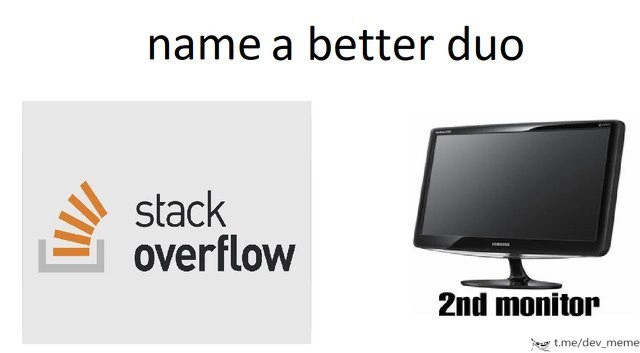
At a senior engineering level, the combination of Stack Overflow and a second monitor feels like an extension of your own brain. It’s essentially an external memory cache for coding. By keeping Stack Overflow always open on a side screen, developers create a dual channel of information flow: main code on one display and community-sourced solutions on the other. This setup minimizes costly context-switching—no more Alt+Tab chaos—so you maintain your flow state longer. The meme’s caption “name a better duo” riffs on a popular format, implying that this pair is practically unbeatable in the realm of DeveloperProductivity. Experienced devs chuckle because it’s relatable: we’ve all pasted a snippet from Stack Overflow at 2 AM to fix a prod issue, proudly utilizing what I like to call Stack Overflow–Driven Development. This humorously acknowledges an open secret in our industry: even the most seasoned programmers lean on the collective wisdom of dev communities like Stack Overflow. In fact, having a dual_monitor_setup is now as standard in a developer_workstation as having a mechanical keyboard; it’s a piece of Tooling that pays dividends in efficiency. By splitting work across two screens, you effectively offload part of your cognitive load onto the “external brain” of the internet. The result? Fewer interruptions to your train of thought and quicker problem-solving. No wonder the meme canonizes this pair as the ultimate productivity duo—StackOverflow on one screen supplies instant answers while your code lives on the other, making you feel like a multitasking wizard. Seasoned developers find this funny because it’s true: our real superpower isn’t memorizing the entire standard library, it’s knowing how to quickly leverage resources (and screens) to get the job done.
Description
A classic 'name a better duo' meme format presented on a plain white background. The text 'name a better duo' is centered at the top. Below, two images are placed side-by-side. On the left is the official logo for Stack Overflow, showing its name and the iconic orange stacked-pages icon. On the right is a picture of a generic black desktop monitor, labeled underneath with '2nd monitor'. The meme humorously asserts that the combination of the Stack Overflow website and a second monitor is the most indispensable and iconic pairing for a software developer. This is a universally relatable joke for engineers, as it highlights the common workflow of writing code on a primary screen while constantly referencing documentation, forums, and especially Stack Overflow for answers on the secondary screen
Comments
7Comment deleted
My second monitor's primary job is to keep the Stack Overflow tab open. The actual display is just a side effect
High-availability coding: main monitor runs the monolith, second is hot-standby with Stack Overflow - instant failover via ⌘-C/⌘-V, RTO under five seconds
The second monitor is for the IDE. The first monitor is for Stack Overflow. The third monitor is for explaining to management why the solution marked as duplicate from 2012 doesn't work with your current tech stack
The real question isn't whether you need a second monitor - it's whether Stack Overflow should count as your primary IDE. After all, we've all shipped production code where the git blame points to 'anonymous user from 2012' more than our own commits
Stack Overflow on one screen, second monitor for pasting the 12-year-old answer - because at scale, understanding is optional, deployment is mandatory
The real upgrade isn’t dual monitors; it’s treating Stack Overflow as a read replica - IDE is the primary, SO the secondary: low-latency queries, eventual consistency in comments, and a write path that’s 90% Ctrl+C/V
My second monitor is the read replica; clipboard-based eventual consistency syncs Stack Overflow to my codebase, with merge conflicts surfaced by the compiler