JavaScript's Date Object Delivers Another Round of Parsing Surprises
Why is this Bugs meme funny?
Level 1: Accidental Time Travel
Imagine you have a magical calendar and clock. You tell it “zero” in one way, and it takes you to the very beginning of time (1970). But if you say “zero” a little differently – maybe in a funny voice or with quotes – it suddenly takes you to a party in the year 2000! Now, you change a tiny detail in a date (like writing it with dashes - instead of slashes /), and your magic clock shows your friend the day before instead of the day you meant. It’s like you wanted to meet on New Year’s Day, but because of how you wrote it, your friend showed up on New Year’s Eve! 😮 This is funny in a goofy way: the computer is that literal genie that twists your wish based on small phrasing changes. Developers laugh (and sigh) because dealing with dates in coding can feel like accidental time travel — a small mistake, and you’re in the wrong year or the wrong day!
Level 2: Date Parsing Surprises
Let’s break this down in simpler terms. JavaScript, like many programming languages, has a built-in Date object to handle dates and times. You can give it different types of data to create a date. Two common ways are providing a number or a string. But as we see, the outcome can be very different, and that’s the joke here – it’s a confusing quirk that often causes bugs.
Epoch Time (Number 0): In computing, we often count time as milliseconds from a fixed starting point called “the epoch.” For JavaScript, the epoch is January 1, 1970 at 00:00:00 GMT (UTC). So if you say
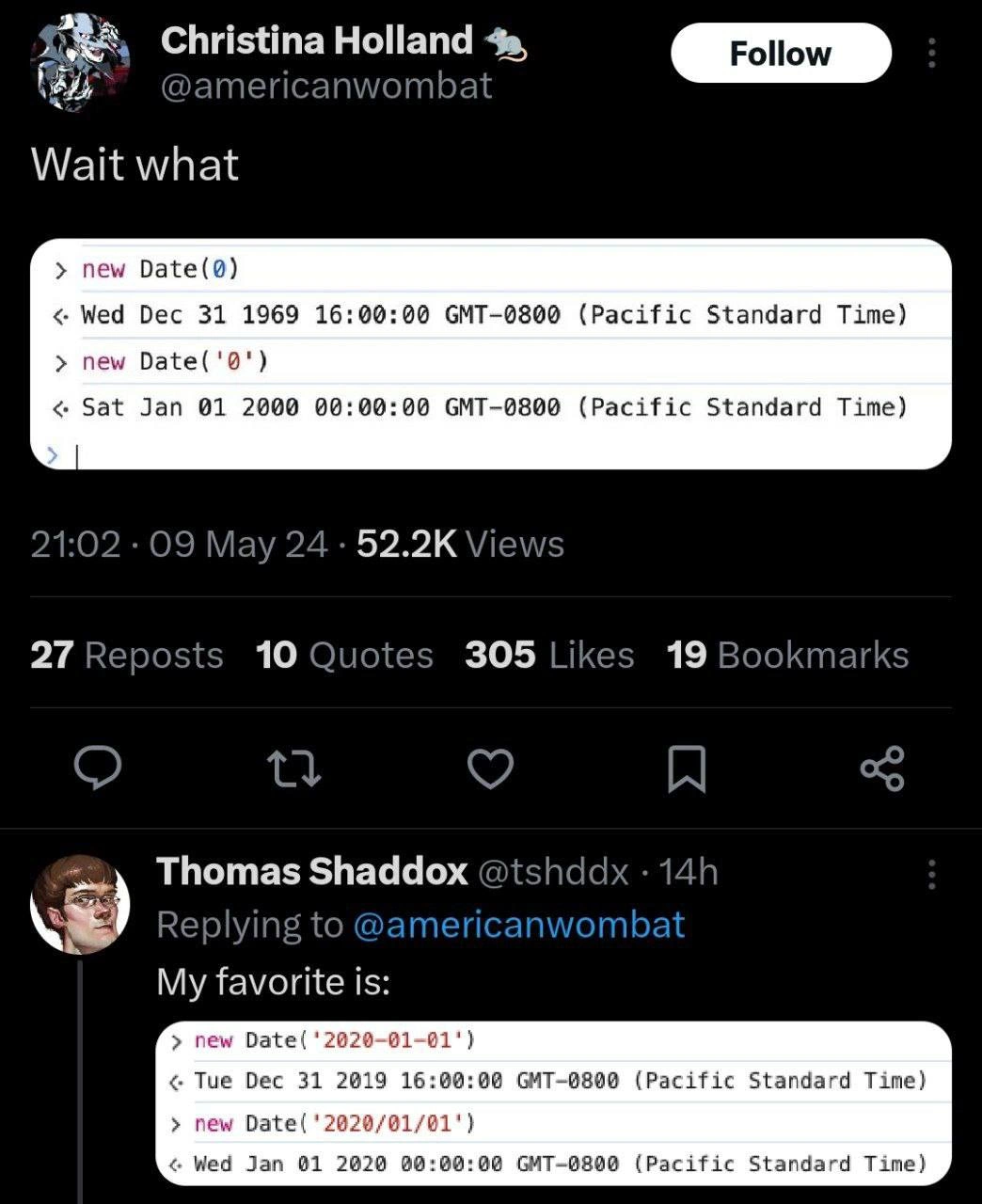
new Date(0), you’re asking for the date/time that is 0 milliseconds after this start point – essentially the epoch itself. Now, if your computer is set to the Pacific Time zone (which is 8 hours behind GMT), that exact moment of the epoch will display as December 31, 1969 at 4:00 PM PST. Why 1969? Because when it’s midnight on January 1, 1970 in London (GMT), it’s still the afternoon of December 31, 1969 in California. Sonew Date(0)shows the local equivalent of that epoch moment. This often surprises new developers: the code asked for Jan 1, 1970 but the console shows Dec 31, 1969. It’s not a bug – it’s just time zones. The clock in your computer adjusts the GMT time to your local time. This is our first “aha!”: the meme shows that and says “Wait what” because at first glance it looks like JavaScript went to the wrong year, but in reality it’s just showing the time in a different region.String "0": Now, what about
new Date('0')(zero in quotes)? In JavaScript, putting quotes around something makes it a string (text), even if it looks like a number. When you give a string to the Date constructor, JavaScript tries to parse (interpret) that string as a date. The string"0"is not a typical date format (like"2023-12-25"or"March 15, 2025"). But JavaScript doesn’t just give up; it guesses. In this case, it guesses that'0'might be meant as a year—specifically the year 2000. This is a bit of a historical quirk. A lot of older systems interpreted two-digit years like "00" as 2000 (to avoid the infamous Y2K problem where "00" could be 1900 or 2000). Here, with just a single digit "0", JavaScript essentially treats it like "00". Sonew Date('0')becomes January 1, 2000. The console output confirms this: Sat Jan 01 2000 00:00:00 GMT-0800 (Pacific Standard Time). That’s midnight at the start of year 2000 in PST. So just by adding quotes, we went from 1970 to 2000! Pretty wild, right? The meme finds humor in this epoch_zero_inconsistency – two seemingly similar calls (0vs'0') yield dates 30 years apart. It’s as if the computer heard a number and went to the 1970s, but heard a string and went to the millennium party in 2000. For a junior coder, this is super confusing! The key concept is type coercion: JavaScript handles the type of input differently. A number is treated as an exact timestamp, while a string goes through a date parser that has its own rules (and oddities).'2020-01-01' vs '2020/01/01': On to the next surprise. Both of these look like they represent January 1, 2020. But the meme shows that
new Date('2020-01-01')resulted in a date that appears as December 31, 2019 at 4:00 PM (in PST), whereasnew Date('2020/01/01')gave January 1, 2020 at midnight (PST). What’s going on? The difference is the format of the date string – dash (-) versus slash (/). The version with dashes ("2020-01-01") is recognized as an ISO 8601 date format. ISO 8601 is an international standard format for dates (YYYY-MM-DD). JavaScript (especially modern engines) knows this format and treats it in a special way: it assumes the date is given in the UTC (Greenwich Mean Time) time zone. So "2020-01-01" is taken to mean2020-01-01T00:00:00.000in UTC. If your local time is PST (which is 8 hours behind UTC), that moment in UTC is still 2019 in your local time (because when it’s Jan 1, 2020 00:00 in London, in California it’s Dec 31, 2019 16:00). That’s why it showed up as the previous date and time. It can be really confusing if you weren’t expecting the conversion to UTC under the hood!The version with slashes (
"2020/01/01"), on the other hand, is not recognized as ISO format. JavaScript then falls back to a more forgiving date parse, often treating it as a local date. Different browsers might parse slashes differently (sometimes like MM/DD/YYYY or YYYY/MM/DD depending on how it’s written and local conventions), but in this case"2020/01/01"clearly reads as YYYY/MM/DD. The key is it assumes the given date and time are already in the local time zone. So"2020/01/01"gets parsed as Jan 1, 2020 at 00:00 in PST directly – no time zone conversion. Therefore, when you output it, you get exactly Wed Jan 01 2020 00:00:00 GMT-0800 (PST), matching what you put in.
In summary, the meme is poking fun at how two tiny differences – adding quotes around 0, or using a dash vs a slash – lead to big surprises in the output. It’s a classic case of JavaScript doing something logical in the background (logical to the computer, based on rules) but very unexpected to humans who aren’t aware of those rules. This often leads to bugs where your program might be off by one day, or even dealing with the completely wrong year, if you don’t handle date inputs carefully. Debugging such issues can be frustrating (“Why is my date off by one day?!” is a common question on forums). That’s why experienced developers have learned to be extra careful: they use standard date formats (for example, always include a timezone or use the full ISO format with a Z at the end for UTC), or they rely on well-tested libraries like Moment.js or date-fns to handle these conversions. The FrontendHumor of this meme is that feeling of facepalming when you realize, “Oh… the difference between a hyphen and a slash cost me eight hours.” It’s funny after you’ve figured it out (and after you’ve fixed the bug in your code). For newcomers, it’s a lesson: always be mindful of how you create dates in JavaScript, because the language might interpret your input in a way you didn’t expect. Just like the meme’s caption jokes, this isn’t necessarily JavaScript being broken – it’s often JavaScript being too helpful or following a rule you didn’t know about. And now you know!
Level 3: Temporal Type Coercion
At the most granular level, this meme highlights JavaScript’s uncanny ability to send you on a time-traveling debugging adventure. Seasoned developers immediately recognize the interplay of type coercion and date parsing at work here. Why on earth does new Date(0) return a date in 1969, while new Date('0') catapults us to 2000? And how can a tiny difference between using a dash (-) versus a slash (/) in a date string cause an 8-hour time warp between New Year’s Eve 2019 and New Year’s Day 2020? The humor (and horror) comes from knowing these are not random bugs, but byproducts of JavaScript’s design and historical standards – the kind of BugsInSoftware that lurk in the language’s dark corners.
Let’s unpack the 0 vs '0' paradox first. In JavaScript’s type system, numbers and strings are handled very differently, and the Date constructor is an overachiever that tries to make sense of whatever you throw at it. When you call new Date(0), you’re passing the number 0 directly. JavaScript interprets that as 0 milliseconds since the Unix epoch (the Unix epoch is January 1, 1970, 00:00:00 GMT). So new Date(0) returns the date-time representing the epoch start in GMT. However, the screenshot shows Wed Dec 31 1969 16:00:00 GMT-0800 (Pacific Standard Time) – that’s the same absolute moment in time, but adjusted for a system in the Pacific time zone (GMT-8). In other words, 0 ms GMT is 4:00 PM on Dec 31, 1969 in California. This is a classic timezone_offset_surprise: the code asked for the epoch, and the console dutifully displayed it in local time, which happens to be the previous date. Every senior dev has experienced that “Wait, why is it yesterday?” moment when dealing with time zones.
Now consider new Date('0'). Here we passed in the string '0', triggering JavaScript’s Date parsing algorithm (Date.parse() under the hood). The language attempts to interpret '0' as a date/time string. But “0” isn’t a date… or is it? It turns out many JavaScript engines, following legacy ECMAScript guidelines (and a bit of Y2K edge case magic), treat a lone number string as a year – specifically, as the year 2000. This stems from older conventions where two-digit years like "50" or "05" had to be mapped to 1950 or 2005, and "00" often meant 2000. A single "0" gets interpreted as "00" (year 2000) by the parser in a quirk of the spec. So new Date('0') is essentially read as "Jan 1, 2000" in your local time zone. Indeed, the console shows Sat Jan 01 2000 00:00:00 GMT-0800 (Pacific Standard Time) – midnight of Y2K in PST. TypeCoercion strikes again: the JavaScript Date constructor’s logic diverges wildly based on whether it receives a number or a string. This epoch_zero_inconsistency is both hilarious and exasperating – it’s as if JavaScript said, “Oh, you gave me the string '0'? You must mean the year 2000!” It’s a mind-bending JavaScriptEcosystem oddity that senior developers know too well. We chuckle (and cringe) because we’ve been bitten by strings like "0" or "08/09/1995" parsing into unexpected dates, leading to those baffling debugging sessions at 2 AM.
The second part of the meme (from Thomas’s reply) showcases an ISO vs slash delimiter showdown. Here, new Date('2020-01-01') yields Tue Dec 31 2019 16:00:00 GMT-0800 (PST), but new Date('2020/01/01') gives Wed Jan 01 2020 00:00:00 GMT-0800 (PST). Both strings look like January 1, 2020, so why is one 8 hours off (showing up as Dec 31, 2019 at 4 PM)? The devil is in the format: the first uses dashes (2020-01-01), which is recognized as an ISO 8601 date. According to the official standard (and modern ECMAScript), a date-only ISO string is parsed in UTC by default. So “2020-01-01” is understood as 2020-01-01T00:00:00.000Z (midnight UTC on January 1, 2020). When displayed on a machine set to Pacific Time, that exact moment is 8 hours earlier on the clock (because PST = UTC-8), which falls on December 31, 2019 at 16:00 (4 PM). In contrast, the string with slashes (2020/01/01) is not a standardized ISO format. JavaScript falls back to a looser, locale-based parser for slashed dates. Most browsers interpret YYYY/MM/DD as a local date (often assuming MM/DD/YYYY or YYYY/MM/DD by context – here clearly YYYY/MM/DD since “2020” is a four-digit year at the start). The key point is it treats it as local time. So “2020/01/01” gets parsed as midnight in the local time zone (PST), which, when printed out, remains Wed Jan 01 2020 00:00:00 GMT-0800 – no conversion necessary because it was already assumed to be local. The humor here is how a tiny difference (dash vs slash) triggers a completely different parsing strategy. To a seasoned dev, this is a facepalm but an unsurprising one: we’ve seen how forgetting a single letter or delimiter can invoke a different code path. It’s frontend humor at its finest – the kind where you laugh only to keep from crying. We know that debugging date bugs often means spelunking into how browsers handle javascript_date_parsing, and we’ve learned (the hard way) to always use standard formats or libraries to avoid such pitfalls. As the meme caption sarcastically notes, “No, it’s not a problem with JS, it’s just how you didn’t use the standard.” 🌚 This wry commentary echoes what veterans might say: JavaScript isn’t “broken” here; it’s actually doing what the specification or legacy behavior dictates – but that standard is so unintuitive that it feels like a bug. The shared laughter comes from recognition: we’ve all been that developer scratching our head at the JavaScript console, exclaiming “Wait, what?!” at these kinds of developer_console_surprises. In the end, the meme pokes fun at how even simple tasks like creating a date can turn into a Debugging_Troubleshooting saga due to JavaScript’s quirky history and attempts to be helpful with types. Experienced devs have a healthy cynicism about dates and will tell you: always be careful with date strings in JS – otherwise you might unintentionally schedule your meeting 20 years in the past!
Description
A screenshot of a Twitter thread discussing the notoriously quirky and inconsistent behavior of JavaScript's `Date` object constructor. The initial tweet by Christina Holland shows a code snippet where `new Date(0)` correctly returns the Unix epoch start time (Dec 31, 1969, in a GMT-0800 timezone), but `new Date('0')` unexpectedly returns January 1, 2000. This is because the constructor's string parsing behavior is highly implementation-dependent and often leads to non-intuitive results. A reply from Thomas Shaddox adds another example, showing that `new Date('2020-01-01')` is parsed as UTC, resulting in a date in the previous year for the local timezone, while `new Date('2020/01/01')` is parsed correctly as local time. This meme is deeply relatable to any developer who has struggled with date and time manipulation in JavaScript, a classic pain point that has led to the widespread adoption of libraries like Moment.js or date-fns
Comments
43Comment deleted
The JavaScript Date constructor is the ultimate legacy system: it's been broken in weirdly specific ways for so long that all the bizarre behavior is now considered part of the spec
JavaScript’s Date constructor: where int 0 means 1969, string “0” means Y2K, and “2020-01-01” means 2019 - because nothing says ‘web standard’ like three decades of history encoded in one ambiguous overload
After 20 years in the industry, I've learned that JavaScript's Date constructor isn't broken - it's just teaching us that time is relative, formats are suggestions, and the only consistent thing about dates is that they'll consistently surprise you in production at 3 AM
Ah yes, JavaScript's Date constructor - where passing 0 gives you 1969 (Unix epoch), passing '0' gives you Y2K, and the difference between '2020-01-01' and '2020/01/01' is whether you want your dates served with a side of timezone confusion. It's the API equivalent of a restaurant where ordering 'steak' gets you chicken, ordering '"steak"' gets you fish, and the format of your reservation determines which kitchen prepares it. No wonder the TC39 committee is building Temporal - Date() has been gaslighting developers since Netscape Navigator
JS Date('2019-01-01'): because nothing says 'Happy New Year' like teleporting to 2018 in PST
Hyphens parse as UTC, slashes as local - if your ETL partitions use new Date(string), congratulations: you’ve implemented accidental time-travel and a quarterly restatement
JavaScript Date: '-' is ISO/UTC, '/' is legacy locale, and '0' hits the Y2K two‑digit‑year pivot and lands in 2000 - aka Surprise Standard Time
This all very well may be in full accordance with the specification but really, the specification that allows this is very much fcked up. Comment deleted
No way this shit can be included in specification. This is one of the "you are not supposed to" ways of using parameters Comment deleted
Skill issues Comment deleted
2020-01-01 is treated as Date time string format (pretty much ISO 8601) and being restored as 2020-01-01T00:00:00.000+00:00 , which gives us UTC timezone, whereas 2020/01/01 is a subject for some uugh-we-gotta-support-this-shit-implemented-parsing that doesn't affect the timezone (and, imho, it's much more useful this way). Now, new Date('0') is a real nightmare, because it's an uugh-we-gotta-support-this-shit-implemented-parsing that decides that 0 means 0'th year (which's 2000), but if we make it new Date('1'), then boom! - it's 1-1-1 in US notation (m/d/y). As well as new Date('3') is 3-1-1 = 3/1/2001. Comment deleted
So basically US date formats are fucked up in any language. 😇 Comment deleted
More like US date format fucks up any date format that's "not clear enough" in implementer's opinion Comment deleted
Kill it with fire Comment deleted
thank god for datefns Comment deleted
I’m using Day.js instead Comment deleted
Avoid creating dates using strings without explicit in-place format specification. If you create from string always specify format Comment deleted
In any language! Comment deleted
I remember JS Date month start index from 1...right? Comment deleted
JS should come up with a new set of primitives that are implemented without those shitty legacy 'uhh we gotta support this garbage' edge cases and then we can all start pretending all that old shit does not exist, same way we pretend node.js style callbacks never happened Comment deleted
or whatever the fuck we were doing before querySelectorAll became a thing Comment deleted
The language should be backwards-compatible. It's amazing tho how many slow and idiotic decisions might have been thrown off from, for example, jQuery, if they'd just dropped old browser support (like really old, e.g. IE 9 and below). I guess, the only reason for not implementing some brand new Date class (with different name ofc) is that people would still have to code all the backwards compatibility mumbo-jumbo with current Date class - for old browser support, for another 15+ years. While, at the same time, there's Luxon which a lot of people use anyway. Comment deleted
I'm not saying it shouldn't be backwards compatible but there's a reason why most JS developers have no idea what document.write is and how it works, even if it still does Comment deleted
Let alone JS, HTML and CSS are rarely used to now. Just slap a design in figma and extract it as jsx, lol. What you really have to know about js is not how to deal with types. More than half of what you need to understand are events and requestAnimationFrame Comment deleted
not sure if trolling or just dumb so /thread for me lol Comment deleted
plain html with a small amount of css and maybe js (only if it's absolutely necessary) is all you need Comment deleted
Fuck CSS, I still sometimes try using table to align elements Comment deleted
why not flexbox/grid? Comment deleted
I hate CSS as a whole, bcuz the end result is always ambiguous. All those em, %, vh, make me use js getComputedStyle method on element to find out wtf is its actual size Comment deleted
wtf are you trying to do Comment deleted
Adaptive carousel with scroll snapping Comment deleted
people would still have to code all the backwards compatibility mumbo-jumbo with current Date class everyone (except DHH lol) uses transpilers these days so that's a non-issue, just slap a polyfill on top and wait 2-3 years Comment deleted
So, generally, it's MS who should add a new Date class, not ECMA, right? 🌚 Comment deleted
it's 2024, you mean Google 😁 Comment deleted
I think MooTools should do that, last time they've added .flatten on Array.prototype we almost ended up with .smoosh in the standard lib 🤡 they clearly know how to force everyone to support them 😂 Comment deleted
While, at the same time, there's Luxon which a lot of people use anyway. I mean, Luxon runs on Intl so it already uses "the new APIs" (which is a problem in JS environments where Intl is poorly supported, e.g. JSC/Hermes) Comment deleted
To add to this, everything is documented. Don't fuck around with passing vague types to methods, pass unix timestamp as an int or supply a date in a standard ISO format as a string. Have a fucky date format like in the US? Normalize it to ISO first. Want to *get* a fucky format for display? Intl class has you covered. Especially with dates, you have to be very specific. Hell is date "0"? 1970? Birth of Jesus? In what timezone? Comment deleted
Soon we will reinvent babel Comment deleted
or document.write, or a dozen other shitty APIs that are still lingering but we have better alternatives Comment deleted
It is a JS problem... it shouldnt try to cast to 90 different types to make sense of the content in any way possible. It should fail and throw an exception. Comment deleted
https://tc39.es/proposal-temporal/docs/ Comment deleted
Learn English please Comment deleted
I wish CSS perishes one day, the worst thing in web Comment deleted