Skip to content
DevMeme
6268 of 7435
When iOS Control Center turns into an accidental recursion demo
Bugs Post #6871, on Jun 10, 2025 in TG

When iOS Control Center turns into an accidental recursion demo

Why is this Bugs meme funny?

Level 1: Mirror, Mirror

Imagine you’re looking into a mirror, and behind you is another mirror. What do you see? Your reflection repeated again and again, going off into the distance. Kinda cool, kinda dizzying, right? That’s basically what happened to the iPhone in this meme! The phone tried to show its Control Center (the little panel with all the handy buttons like Wi-Fi and flashlight). But because of a little hiccup, it ended up showing that panel inside itself over and over, like a reflection of a reflection. It’s like the phone was saying, “Here’s your Control Center... and here it is again, and again!” The screen turned into a crazy stack of the same icons and sliders, jumbled on top of each other.

Why is this funny? Well, we expect our fancy gadgets — especially something as polished as an iPhone — to work perfectly and look smooth. When it messes up in such an obvious and silly way, it’s a surprise! It’s the same kind of chuckle you get when a usually well-behaved robot vacuum starts spinning in circles — you’re thinking, “Haha, it’s not supposed to do that!” Even if you don’t know anything about coding, you can see that the phone’s software got confused. It’s a bit like if a teacher wrote on a transparency sheet on an overhead projector, forgot to replace it with a blank sheet, and then wrote again — you’d have two layers of writing projected at once, making a mess of words. Here, the iPhone kind of “forgot to wipe the screen clean” before drawing the new panel, so everything piled up.

The core feeling is surprise and irony: even a super high-tech phone can stumble and do something as goofy as showing duplicate control panels. It makes the mighty iPhone look momentarily like it’s doing a child’s recursion magic trick (“look, I put a copy inside the copy!”). In simple terms, the phone got a bit confused and accidentally played mirror-mirror with its own display. And just like seeing infinite mirrors in a funhouse can make you giggle or gasp, seeing a normally sleek iOS screen turn into a digital hall-of-mirrors is both funny and fascinating.

Level 2: UI Hall-of-Mirrors

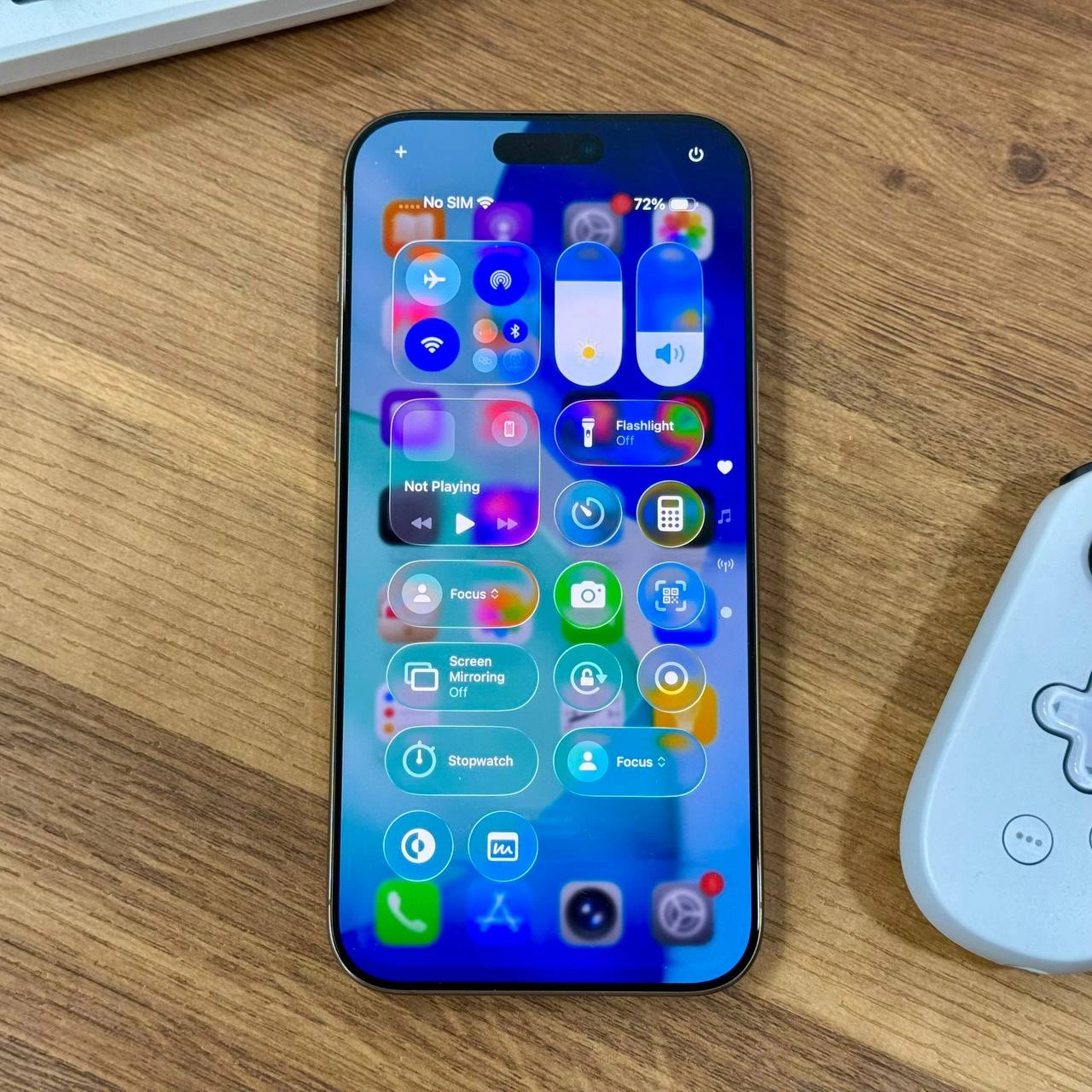
So what exactly are we looking at here? This is an iPhone’s Control Center (that quick-settings panel you get by swiping down from the top-right on modern iPhones) gone horribly wrong. Normally, Control Center appears once, filling the screen with a translucent overlay of buttons: airplane mode, Wi-Fi, Bluetooth, music controls (“Not Playing” means no music is active), brightness and volume sliders, a flashlight toggle, camera shortcut, and a Focus mode toggle (Focus is Apple’s Do Not Disturb/notification profiles). In the meme’s image, however, we see those same toggles and sliders repeated multiple times, layered on top of each other. It looks almost like someone copy-pasted a screenshot of Control Center onto itself over and over, each copy slightly lower than the last. The effect is a bit like a hall of mirrors – hence the term infinite_overlay. You can still make out the phone’s home screen icons beneath (slightly blurred, as is normal when Control Center is open), but the Control Center UI isn’t just one clear overlay; it’s stacked. In fact, two “Focus” buttons are visible, two “Stopwatch” icons, two sets of Wi-Fi/Bluetooth toggles… clearly, that shouldn’t happen!

For a junior developer or someone new to IOSDevelopment, this is a classic example of a bug in the UI rendering. The word “recursion” in the title refers to when something (like a function in code) ends up calling itself. Here it’s like the user interface called itself or drew itself again inside itself. Why would that happen? One likely cause is a race condition. That’s when two parts of a program try to do things at the same time, and the end result “depends on who wins the race” – in other words, the outcome is unpredictable and can go wrong. In an iPhone, there’s a main thread (the UI thread) that must handle showing screens, and there’s the graphics system (often on another thread or even another chip, the GPU). If the code that opens Control Center was triggered twice rapidly (maybe by a weird gesture or an unexpected signal), the system might have started to open one Control Center on the screen, and then before it finished, started another. Since the first one wasn’t cleared away yet, they ended up rendering on top of each other. This is what we mean by a rendering_layer_bug – the layers of the UI (the Control Center is essentially a layer drawn over the screen) didn’t behave as expected. Instead of replacing the old layer, the new one got added again.

Let’s break down how this sort of glitch could happen in steps:

  1. User triggers Control Center – e.g. by swiping down on the top of the screen. The system starts to display the Control Center overlay (the translucent panel with all the toggles). A flag in the system might flip to “Control Center is now showing.”
  2. Unexpected second trigger – before the first overlay is fully in place, something triggers Control Center again. This could be a second swipe (accidental), or even a software event (perhaps another gesture or a notification that coincidentally tries to open a related panel). If a software flag wasn’t set quickly enough or the event system isn’t protected against re-entry, the phone might start to open Control Center a second time.
  3. Overlay drawn twice – The graphics compositor (which puts together what you see on screen) now has two instances of the same UI element to draw. Instead of one unified Control Center, you get one on top of another. Each one has those semi-transparent backgrounds and icons, so layered together they look extra opaque and confusing. The phone essentially drew one Control Center, then without clearing it, drew another. Think of stacking two sheets of tinted glass each printed with the same icons slightly offset – you’d see a double image.
  4. Resulting glitch – You get duplicated buttons and text like “Not Playing” appearing twice. The device is still functional (it didn’t crash), but the interface is obviously broken. It’s an embarrassing bug because average users might encounter it and think “Whoa, my phone is possessed!” or just be very confused. For developers, it’s embarrassing because it means something wasn’t safeguarded properly in code.

Some key terms defined in this scenario:

  • Race condition: when two actions don’t happen in the order expected, and the final state goes wrong because of timing. (Imagine two people trying to write on the same whiteboard at nearly the same time – one’s writing might overlap or interfere with the other’s if they’re not coordinated.)
  • UI thread: the main part of an app that updates what you see and responds to touches. It usually can only do one thing at a time (to keep things simple for programmers and ensure consistent updates).
  • GPU/Compositor: the part of the system (Graphics Processing Unit) that actually takes the layers of images and draws them on the screen. It’s like the stage crew setting up the scenery that the UI thread has designed. If the UI thread gives conflicting instructions quickly (e.g., “show this” and then “show this again”), the compositor might end up putting everything on stage at once.
  • Recursion: when a function or process ends up repeating itself by calling itself. In code, if not controlled, recursion can lead to infinite loops or until something breaks. In our case, the “recursion” is that the interface appears inside itself, like facing mirrors.

For a new developer, encountering a bug like this can be baffling. You’d be checking your code thinking, “Did I accidentally copy-paste the draw routine twice? Is the system sending the gesture event twice?” It becomes a game of detective to figure out why the double-drawing happened. You learn that Debugging_Troubleshooting such issues often involves looking at system logs, and maybe using specialized tools (for iOS, Apple’s Instruments) to see the sequence of events. A similar simpler situation might be if you ever clicked a button in an app and somehow two pop-up dialogs appeared instead of one — that’s a small-scale version of what’s going on here. It means the button’s code ran twice by accident.

The important takeaway is that even in polished AppleEcosystem products, weird bugs slip through. Mobile developers (especially in Apple iOS development) have to think about concurrency and timing, not just getting the layout right. And when you see something as visually absurd as this “UI hall-of-mirrors”, it usually means a state management issue in code. The device status text “No SIM” and the battery at 72% in the image are probably unrelated – they just indicate this was a real phone (with no SIM card inserted) where the glitch occurred. The little white game controller on the desk is likely just a prop, but ironically it emphasizes how even a device built for interactive entertainment (game controller) can’t control a wild glitch!

In summary, for a junior dev: the meme is highlighting a funny but instructive lesson. It shows what happens when the normal rules (only one Control Center at a time) aren’t enforced due to a bug. It’s both a MobileDevelopment blooper and a visual teaching aid: if you ever wondered what ui_recursion might look like, well, here it is on an iPhone screen! The humor comes from the sheer absurdity — seeing a normally slick UI feature break into an infinite_overlay looks like the phone is doing a magic trick (or having a bit of a meltdown). But behind that humor is a real lesson on why handling app state and timing correctly is important.

Level 3: Control Center Inception

For seasoned developers, this image prompts a knowing groan — and maybe a chuckle. It’s a BugsInSoftware tale as old as multi-threaded GUIs: an interface element duplicating itself due to a synchronization slip-up. The iPhone’s Control Center (that slick panel with toggles for Airplane Mode, Wi-Fi, Bluetooth, etc.) is not supposed to appear nested endlessly like this. Seeing it recursively stacked hints that the system somehow invoked “open Control Center” again before the first one finished opening. In other words, the software let the Control Center pop up inside an already open Control Center — Inception-style. This kind of ios_control_center_glitch likely comes from a missed guard or a race condition: maybe the code didn’t set a flag fast enough on the main thread, or an animation completion callback fired out-of-order. The result? The UI drew a second overlay without clearing the first. All those translucent icons (Wi-Fi, Bluetooth, Flashlight, Focus, etc.) appear twice in a slightly offset “ghost” alignment, creating a trippy infinite_overlay effect. Notably, there are two Focus buttons visible, one just a bit lower than the other — a dead giveaway that the Control Center is rendered twice. To a developer, that’s evidence of the UI recursion: you’re literally seeing the interface repeated.

From a debugging standpoint, this is the kind of nightmare that gives mobile engineers cold sweats. It probably only occurs under very specific timing conditions (say, an interrupt or gesture at the exact wrong moment), which is why it slipped past unit tests and QA. Perhaps on an iPhone 14 Pro with its fancy Dynamic Island (the new style notch) and complex gesture recognition, an edge-case in the event handling allowed re-entrant calls to the Control Center routine. When such DebuggingNightmares hit production, the dev team’s reaction is equal parts horror and fascination. Horror, because a core UX feature is embarrassingly broken in the wild. Fascination, because it’s an opportunity to hunt a race condition – those nearly mythical bugs that occur only when multiple processes “race” each other unpredictably.

In practice, a senior iOS dev would suspect some logic like if (controlCenterVisible == NO) { showControlCenter(); } failing. Maybe that flag wasn’t yet true when a second trigger came in on another thread or interrupt. A simplified illustration in pseudo-code might look like:

var isControlCenterVisible = false

func onControlCenterGesture() {
    // Suppose a quick second gesture comes before the first one completes...
    if !isControlCenterVisible {
        isControlCenterVisible = true      // mark it as showing
        presentControlCenterOverlay()      // add the Control Center UI to screen
        // ... imagine some delay or race here ...
        isControlCenterVisible = false     // erroneously reset too early by another process
    }
}

If that isControlCenterVisible resets at the wrong time (or wasn’t thread-safe), a second call to presentControlCenterOverlay() could occur, stacking another overlay on the screen. MobileDevelopment veterans will recognize this as a lack of proper locking or state management – something that should be handled by Apple’s frameworks or careful coding.

So why is this funny? Because it’s a prime example of a slick, supposedly bulletproof Apple UX going off the rails in a cartoonish way. It’s the equivalent of a Ferrari losing a wheel on a slow turn – unexpected and absurd. Developers share these moments for a laugh (once the initial panic passes) because we’ve all been there. That one bug that only manifests at 3 AM or only on the CEO’s phone during a demo. Seeing Control Center implode into itself is humorous because it visualizes an abstract concept (recursion) in an everyday UI. It’s a UXFailure that any dev can empathize with: the app did exactly what the code told it to do, but not what anyone intended. As a senior engineer, you laugh because otherwise you’d cry — these concurrency issues are fiendishly hard to track down. Logging often makes them disappear (the infamous Heisenbug effect), and reproducing the exact timing requires luck or sophisticated tools. One can imagine the Apple devs furiously shaking their heads: “Of course it had to be a race condition… it’s always concurrency 🐛.”

Phone’s OS: “Oh, you wanted Control Center? Sure, here’s a Control Center inside your Control Center… and another, and another!”

In summary, the meme pokes fun at how even top-tier, Apple-polished software can face Debugging_Troubleshooting hell due to a tiny synchronization oversight. “Accidental recursion demo” indeed – it’s the kind of bug that becomes an inside joke for the team (after it’s fixed, hopefully via an iOS update patch). Now every time this engineer opens Control Center, they’ll double-check it’s not secretly multiplying like a rogue Gremlin.

Level 4: Framebuffer Feedback

At the deepest technical layer, this meme highlights a screen_compositor_issue that’s glitching out in spectacular fashion. In iOS’s rendering architecture, the UI is drawn through a complex pipeline: the main UI thread (running the app’s event loop) issues drawing commands, and a separate GPU render pipeline (driven by frameworks like Core Animation/Metal) composites those layers onto the screen. Normally, a double-buffered frame buffer strategy ensures each new frame cleanly replaces the last. But here, a subtle event_loop_race_condition likely broke that contract. It’s as if the compositor failed to clear the drawing surface between iterations — causing the Control Center overlay to render on top of its previous instance, over and over. This is essentially a feedback loop in the display system: the output of one frame became the input of the next, resulting in an accidental Droste effect (an image recursively containing itself).

To a graphics engineer, this cascaded UI is reminiscent of pointing a video camera at its own monitor, creating infinite regress of images. In more formal terms, we’re seeing an unexpected recursion in the view hierarchy: the Control Center view (containing toggles like Wi-Fi, Bluetooth, etc.) is being added multiple times instead of just once. A race condition between the gesture handling (or system trigger) and the rendering cycle could allow openControlCenter() to execute twice in rapid succession, each time stacking a new CALayer on screen before the previous one is properly flushed out. The hall-of-mirrors visual is the symptom; at the root is a concurrency bug deep in the UI framework. These kinds of bugs skirt the usual unit tests because they emerge from timing and state conditions that are hard to deterministicly reproduce. They live in the twilight zone between the deterministic realm of the CPU and the pipelined parallelism of the GPU.

Mathematically, think of the UI’s state as something that should follow a function $f$ such that $state_{new} = f(state_{old}, input)$. If $f` is idempotent and well-synchronized, applying it once yields the correct new state (one Control Center). But if due to non-atomic updates we effectively do $state_{temp} = f(state_{old}, input_1)$ and then inadvertently $state_{final} = f(state_{temp}, input_2)$ before the screen has caught up, we end up with $f(f(state_{old}))$ visible simultaneously. In other words, the compositor applied the transformation twice without an intermediate clearing. This violates assumptions of the UI’s state machine. It’s a classic concurrency anomaly: ordering of operations got scrambled. At 60 frames per second, even a few milliseconds of desynchronization between threads can manifest as UI elements drawn twice. The rendering_layer_bug shown here is a high-level example of how even polished OS animations can break if underlying synchronization primitives or state flags fail. Apple’s iOS, despite its reputation for smooth UX, is still at the mercy of low-level race conditions and timing hazards that are fundamental to parallel computing. The joke, of course, is that this spectacular failure turned an everyday feature into a recursion demo — a very Computer Science 101 concept popping up inside a cutting-edge smartphone by accident.

Description

A modern iPhone lies face-up on a wooden desk with a small white game controller nearby. The display shows the iOS Control Center repeatedly super-imposed on itself, creating a dizzying cascade of translucent toggles and sliders - Airplane Mode, Wi-Fi, Bluetooth, ‘Not Playing’, ‘Flashlight Off’, ‘Screen Mirroring Off’, ‘Stopwatch’, two separate ‘Focus’ buttons, battery at 72 %, and the status text ‘No SIM’. Each layer is slightly offset, producing a hall-of-mirrors effect that suggests the compositor kept re-drawing the same view hierarchy without clearing the frame buffer. To a senior mobile engineer, it screams of a race condition between the UI thread and the GPU render pipeline, the kind that slips past unit tests but embarrassingly ships to production. Visually, the phone’s sleek black bezel and Dynamic Island notch contrast with the vibrant, glitch-stacked icons, emphasizing how even polished UX can break spectacularly

Comments

6
Anonymous ★ Top Pick Somewhere inside UIKit, a while(true) just discovered what happens when you forget the ‘removeFromSuperview’ call - now Control Center is basically a Russian nesting doll
  1. Anonymous ★ Top Pick

    Somewhere inside UIKit, a while(true) just discovered what happens when you forget the ‘removeFromSuperview’ call - now Control Center is basically a Russian nesting doll

  2. Anonymous

    After 15 years of iOS development, I still instinctively swipe up for Control Center, then remember it's been top-right since iPhone X, then accidentally trigger Reachability, then finally get it right - all while my Android colleagues watch in horror at the 'intuitive' UX

  3. Anonymous

    Ah yes, the iOS Control Center - where developers spend hours implementing custom widgets only to realize users just want airplane mode and flashlight. Notice the 'No SIM' status? That's either a developer testing on a device without cellular, or someone who's achieved the ultimate work-life balance by making themselves unreachable. The real engineering marvel here isn't the glassmorphism or the widget architecture - it's Apple convincing us that we need two separate Focus mode toggles in the same interface. Classic Apple: when one abstraction layer isn't enough, add another and call it 'intuitive design.'

  4. Anonymous

    iPhone home screen: more unpruned services than a decade-old monolith - Joy-Con's analog stick for precise refactoring navigation

  5. Anonymous

    Control Center duplicating like this screams 'stale UIVisualEffectView not removed from SpringBoard’s hierarchy' - a Core Animation race so Heisenbuggy it fixes itself the moment you open the screen recorder

  6. Anonymous

    Classic: present Control Center in a new UIWindow and snapshot the key window each update - now every pull-down includes the last one; congratulations, you’ve built a recursive compositor and a free GPU stress test

Use J and K for navigation