Skip to content
DevMeme
6267 of 7435
Redacting the trauma of our Windows Vista days
Microsoft Post #6869, on Jun 10, 2025 in TG

Redacting the trauma of our Windows Vista days

Why is this Microsoft meme funny?

Level 1: Erasing a Bad Memory

Imagine you tried a new recipe that looked really fancy, but when you tasted it, it was awful and even made you feel sick. You’d probably never want to cook that again, right? You might even cross out its name in your recipe book so you don’t accidentally relive that unpleasant experience. This meme is doing the same thing, but with a computer operating system called Windows Vista.

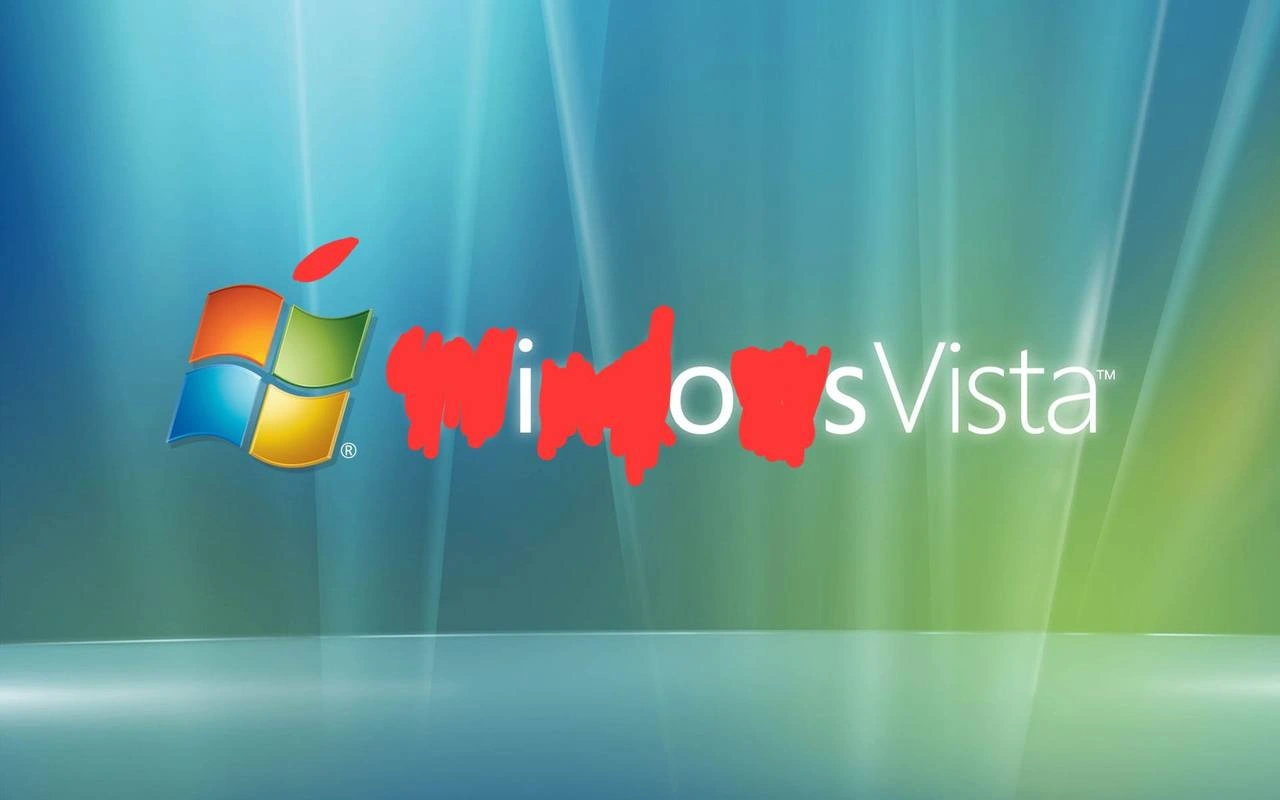
For a lot of people who work with computers, Windows Vista was like that bad recipe – it looked pretty and promising, but using it was frustrating and troublesome. It caused so many headaches that those folks joke about pretending it never happened at all. In the picture, the name “Windows Vista” is on the screen, but someone has scribbled over the word “Windows” in bright red, leaving just a jumbled “sVista”. It’s as if they’re trying to wipe away the memory of this pesky software.

The funny part is the relatable feeling behind it: we’ve all had something we wish we could erase from our past. Maybe a really bad day, a mistake we made, or an experience so unpleasant we don’t even want to say its name. Here, the tech community is exaggerating that feeling – treating Windows Vista like a “dirty word” to be crossed out. Even if you don’t know Vista, you can giggle at the idea: computers folks had an experience so bad that they’re literally crossing it off the list! It’s a playful way to say “Nope, let’s pretend that never existed.”

So, just like you might scribble out a nasty recipe or a bad grade on your report card, the meme shows scribbling out Windows Vista to forget that “yucky” chapter in computer history. It’s silly, a bit dramatic, and that’s why it’s amusing – everyone can understand wanting to forget something that caused a lot of trouble.

Level 2: Ghost of an OS Past

Windows Vista was a version of Microsoft’s operating system released in early 2007, following the very popular Windows XP. An operating system (OS) like Windows is the core software that manages your computer’s resources and hardware, letting you run applications. Vista was meant to be a major upgrade with better security and flashy new visuals, but it quickly became infamous for how many problems it caused. Think of Vista as the “problem child” in the Windows family. Here’s why it got that reputation:

  • Driver chaos: A driver is a special program that helps the operating system talk to a specific hardware device (like your printer, graphics card, or webcam). When Vista came out, it required many new drivers because it changed how the OS and hardware interact (especially for graphics with the new WDDM system). Unfortunately, lots of manufacturers hadn’t updated their drivers in time. The result? When people installed Vista, many devices didn’t work right. Printer not printing, sound card silent, random system crashes – it was often because the existing drivers were not compatible with Vista. IT support teams were scrambling to find updated drivers or workarounds for every piece of hardware. In a corporate setting with hundreds or thousands of PCs, that’s a huge headache.

  • User Account Control (UAC) overload: User Account Control is a security feature Vista introduced that pops up a dialog asking for permission whenever a program wants to make a big change to your system (like installing software or changing settings). The idea was to make sure the user is aware and approves, which helps stop viruses or malware from silently installing. Great idea on paper! But Vista’s UAC was very aggressive. Even performing routine tasks would trigger a “Do you want to allow this?” prompt. Imagine trying to adjust a simple setting and having to confirm “Yes, I really meant to do that” every single time – it gets annoying fast. Many regular users found this new feature confusing or irritating (“Why is my computer always asking me to click OK?”). Later versions of Windows kept UAC but made it smarter and less intrusive. Vista’s first take was a bit too paranoid, and it turned a lot of people off.

  • Aero and hardware demands: Vista came with a new design theme called Aero Glass, which made windows and toolbars semi-transparent with fancy blur effects. It looked cool and modern compared to the older, boxy look of Windows XP. However, those visual effects needed a more powerful GPU (Graphics Processing Unit) and more memory to run smoothly. Many PCs, especially in offices, didn’t have strong enough graphics cards at the time, or enough RAM. If the hardware wasn’t up to spec, Vista either ran very slowly or had to turn off the pretty effects. This was a big deal because companies that upgraded from XP to Vista suddenly found some PCs performing worse, or had to invest in hardware upgrades just to support the new visuals. The Aero Glass wallpaper in the meme (that blue-green swirly background) is instantly recognizable as Vista’s default background – a reminder of that whole Aero era.

  • Compatibility and legacy apps: “Legacy” software means older applications that were created for a previous system. Vista changed a lot under the hood compared to Windows XP. Because of that, some older programs (especially in corporate environments, like custom business software or older versions of office tools) wouldn’t run properly on Vista until they were updated. This caught people by surprise. If your business relied on a particular app and it didn’t work on Vista, that was a serious problem. IT teams either had to find patches, replace the software, or delay the Vista upgrade. It made Vista feel like a risky update for companies worried about breaking important tools.

All these issues combined made Windows Vista’s rollout quite rocky. It’s not that everything about Vista was bad – in fact, it introduced important improvements (better security, a more modern foundation, improved search, and a prettier interface). But the user experience suffered because the changes weren’t smooth or fully ready for prime time. Many users and admins felt like they were beta-testing an unfinished product.

Now, about the meme image itself: It shows the Windows Vista logo and name on that iconic background, but the word “Windows” is scribbled out in thick red paint. Only the “sVista™” part remains clear. This looks like someone angrily tried to erase any mention of “Windows” from “Windows Vista.” In tech circles, people actually joke about Vista like it’s something to forget or hide – as if it’s the Voldemort of operating systems (“the OS that shall not be named”). The red scribble is a humorous way to redact (cover or censor) the name, almost like you’d black out sensitive text in a document. Here, it symbolizes trying to forget the entire Windows Vista incident.

For context, it’s common in tech humor to poke fun at failed or problematic products. Under Microsoft’s umbrella, Vista is often remembered as a “failed” Windows release (not financially – Microsoft sold it – but in terms of reputation and smoothness). The fact that the scribble is done crudely with a red color adds to the humor: it’s like someone couldn’t redact Vista’s name fast enough, using the digital equivalent of a red sharpie in a fit of frustration. Red, incidentally, is often used by teachers to mark errors or by editors to strike through text – a fitting color for highlighting a mistake.

This meme falls into TechNostalgia and LegacySystems humor. “Tech nostalgia” doesn’t always mean fond memories; sometimes it’s recalling painful lessons. Younger developers or IT folks who never dealt with Vista might not immediately get why it was traumatic. That’s why the meme resonates especially with seasoned engineers who lived through it. It’s both a chuckle at a shared past ordeal and a small history lesson: remember Vista? Yikes. And if you weren’t there for it, the meme might prompt you to ask, “Was Vista really that bad?” – to which any graying sysadmin will vigorously nod and perhaps tell you a few horror stories.

In short, Windows Vista is now a legacy system – a thing of the past that modern IT rarely touches – and this meme is a lighthearted way of saying “good riddance” to that chapter. It’s the tech equivalent of a veteran telling a rookie, “Back in my day, we had to deal with Vista… and we’d rather not talk about it.” By scribbling out the name, the community collectively jokes that we’d prefer to pretend Vista never even existed.

Level 3: The Aero of Our Ways

Windows Vista still gives veteran IT folks a thousand-yard stare. This meme’s scribbled-out logo hits home because many of us wish we could literally redact the Windows Vista era from tech history. Vista was supposed to be the shiny successor to Windows XP back in 2007, introducing the glossy Aero Glass interface and a modern foundation (Windows NT 6.0). Instead, it became a case study in how ambitious upgrades can go off the rails. Under the hood, Microsoft made sweeping changes for the better – in theory. In practice, those changes turned into an on-call engineer’s nightmare:

  • Driver Disasters: Vista rolled out a new driver model (the Windows Display Driver Model and others) to improve stability and security. Great idea, except most hardware vendors weren’t ready. Printers, graphics cards, you name it – their old drivers (the low-level software that lets the OS talk to hardware) would either refuse to work or straight-up crash Vista. Corporate IT teams spent late nights hunting down updated drivers or hacks to get essential devices working. If you’ve ever heard an older sysadmin mutter “It’s always the drivers” with a pained look, Vista is a big reason why.

  • UAC Everywhere: Vista introduced User Account Control (UAC) as a security safeguard. Every time a program wanted to do something major (like install software or change system settings), UAC would flash the screen and ask “Cancel or Allow?” This was meant to curb malware by making users approve sensitive actions. The problem? In Vista’s early days, everything triggered UAC. Setting the clock? Update a program? Every step felt like a mini-interrogation. Users hated it with a passion. Many of us in IT remember frantic calls from confused coworkers: “Why is my computer always asking me permission for stuff I just clicked on?” We’d grit our teeth and explain it was for their own good – even as we secretly agreed Vista’s UAC was overzealous. It got so bad that some techs just turned UAC off to silence the complaints (trading security for momentary sanity).

  • Hardware Overhead: Vista was a resource hog at a time when 1GB of RAM was still a common PC configuration. The new Aero visual effects (transparent windows, fancy animations) required a decent GPU (graphics card) and plenty of memory. On a properly equipped machine, Vista looked futuristic; on typical office PCs of 2007, it ran like molasses. Imagine rolling out an OS upgrade across a company only to find half the PCs crawling because their integrated graphics couldn’t handle translucent window borders! Many IT departments had to disable Aero effects company-wide (so much for that flagship feature) or delay the rollout until hardware was upgraded. Vista’s beautiful UI quickly lost its luster when it made doing actual work painfully slow.

  • Software Incompatibility: Vista’s deep internal changes broke a lot of older software. Critical apps that ran fine on Windows XP would sputter or refuse to run on Vista until patched. From custom business software to popular utilities, the compatibility issues were endless. We found ourselves maintaining XP fallback machines or virtualization just to keep legacy apps running. Each patch Tuesday came with a bit of dread: would this fix something or trigger a new wave of “Vista broke my app!” tickets?

On paper, Vista wasn’t trying to be evil. It brought genuine improvements: a more secure architecture, better system search and indexing, improved graphics drivers that wouldn’t take down the whole OS on a crash, and a bunch of under-the-hood modernizations. But being the first adopter of a “new and improved” platform is rough. As seasoned engineers, we bore the brunt of that roughness. Vista was supposed to be the future of Windows, but it felt like an unstable beta we all got forced to use. The trauma was real – late-night troubleshooting sessions, dealing with frustrated end-users and managers, and the sinking feeling that maybe we’d rolled this out too soon.

The meme nails this feeling by literally defacing the Windows Vista name. Those thick red scribbles over “Windows” are the visual equivalent of a frustrated scream. It’s like we, collectively, are trying to blot out the very memory of implementing Vista. Only “sVista™” remains visible, which isn’t even a real word – fitting, because many of us considered Vista not a “real” Windows release so much as a mistake to be corrected. (In fact, a common industry joke was that Windows 7 was the “real” Vista done right, and many companies indeed skipped Vista entirely and jumped from XP to 7.)

For the Microsoft old-timers, seeing that familiar blue-green Aero Glass wallpaper with the name obscured hits a darkly comic note. It reminds us how we’d love to pretend the whole Vista rollout never happened. This is classic TechNostalgia with a twist: not warm, fuzzy nostalgia, but a “remember that ordeal? let’s never do that again” pact. The humor lands because it’s painfully relatable – anyone who managed corporate Windows machines in the late 2000s has war stories from the Vista debacle. The meme essentially says, “Vista was so bad, we’ve erased it from our memory (and this picture).” It’s a sarcastic salute to a legacy system that most of us would rather forget, delivered in the one medium Vista truly excelled at: unintended comedy.

Description

The image shows the classic Windows Vista blue-green "Aero Glass" background with the multicolored Windows logo on the left. To the right, the white text "Windows Vista™" is partially obscured: the letters in the word "Windows" are aggressively scribbled over with thick, messy red paint strokes, leaving only the "sVista™" portion legible. The crude redaction humorously suggests an attempt to erase or forget the notorious operating-system release. For seasoned engineers who supported corporate fleets in the late-2000s, Vista evokes memories of driver chaos, UAC complaints, and premature Aero GPU requirements - an era most of us would rather blot out just like this image does

Comments

6
Anonymous ★ Top Pick If your incident post-mortems still list “upgraded from Vista” as a mitigation step, you’ve earned your battle ribbon
  1. Anonymous ★ Top Pick

    If your incident post-mortems still list “upgraded from Vista” as a mitigation step, you’ve earned your battle ribbon

  2. Anonymous

    The red paint perfectly captures what every senior engineer did to their Vista deployment plans in 2007 - though most of us used stronger language than paint while waiting 45 seconds for UAC to let us delete a text file from our own desktop

  3. Anonymous

    Windows Vista: the OS so universally despised that even Microsoft pretends it never happened. Remember when 'Vista Capable' stickers meant your PC could technically boot it... in about 20 minutes? It's the operating system equivalent of technical debt personified - bloated, slow, incompatible with everything, and requiring a complete rewrite (Windows 7) to fix. UAC prompts became so infamous they spawned an entire generation of developers who learned to hate permission systems. Vista taught us that sometimes the real legacy code isn't in your codebase - it's the entire platform you're building on

  4. Anonymous

    Vista’s postmortem: WDDM churn, UAC nagging, SuperFetch thrash - mitigation plan from marketing was a red leaf on the logo

  5. Anonymous

    Vista: The OS that made XP callbacks feel like microservices migration

  6. Anonymous

    Classic enterprise rewrite: sed -e 's/Windows/iOS/' in the brand guide - WDDM drivers, UAC prompts, and performance tax still ship to prod

Use J and K for navigation