Salute to the IKEA dev debugging the live shopping-cart console errors
Why is this OnCall ProductionIssues meme funny?
Level 1: Hang In There
Imagine you’re at a big store with your family, and suddenly all the shopping carts’ wheels get stuck. Nobody can push their cart anymore. One store worker is rushing around, trying to figure out why the carts broke and how to fix them so people can keep shopping. It’s already a tough day for everyone, and this is the last thing the poor worker needed! Now, instead of people yelling or getting upset, one customer smiles and shouts:
“Hang in there, you’re doing great! We know it’s a tough day, but we appreciate you trying to fix this!”
The worker feels a little better hearing that. Other people see this and start to relax instead of being angry, because they realize someone is working hard to help.
This meme is just like that scenario, but on a website. The “shopping cart” on IKEA’s online store wasn’t working properly, and a developer (the person who builds/maintains the website) was scrambling to fix it right then and there. It was a stressful week for everyone (lots of things going wrong in the world, and now this technical problem too). Instead of complaining, a person on Twitter basically cheered the developer on, saying “I salute you” – which means “I respect and appreciate what you’re doing.” It’s funny and heartwarming because usually when something breaks, customers might be mad, but here we see people being kind and patient. The message is simple: mistakes and glitches happen, and when they do, a little empathy and encouragement for the one trying to fix it goes a long way. We’re all human, and we’re all having a hard time, so let’s support each other.
Level 2: Console Crash Course
Let’s break down what’s happening here in simpler terms. The tweet is basically giving a shout-out to a programmer at IKEA who is trying to fix the online shopping cart on the live website. When we say something is happening "in production," we mean on the real site that all the customers use (as opposed to a hidden test site). So imagine the online shopping cart is broken while people are trying to use it — that’s a high-pressure situation! Instead of getting mad, the person tweeting (who is also likely a developer) is saying, “I see you working hard over there, hang in there!” to the IKEA developer. It’s a mix of empathy and humor among tech folks.
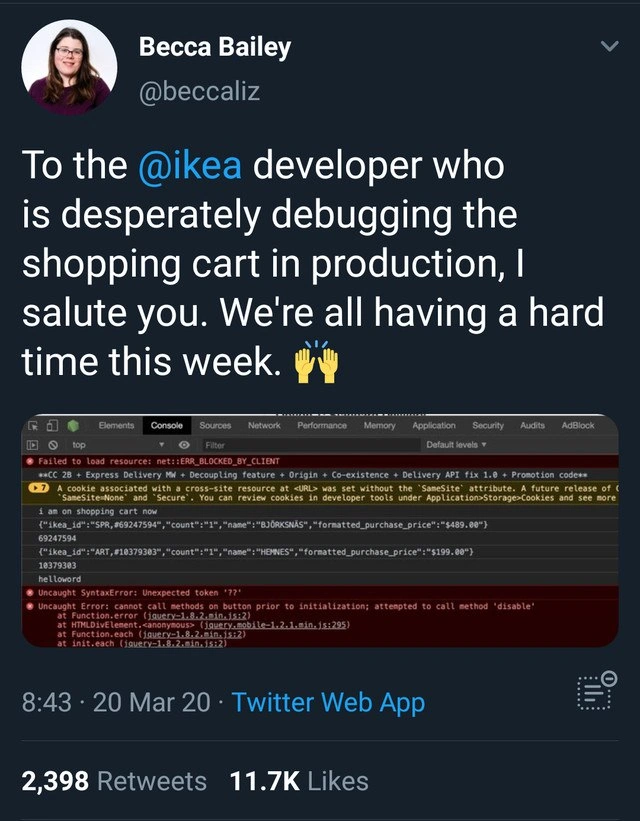
Now, how do we know the developer is debugging the cart issue? Because the tweet includes a screenshot of the Chrome DevTools console filled with messages. The DevTools console is a panel in your web browser where developers can see logs, errors, and warnings that the web page throws, and even type JavaScript commands on the fly. When something goes wrong on a webpage, error messages often show up there in red. In this screenshot, there’s a whole bunch of technical gibberish — but each part tells us a bit of the story. Let’s decode the main messages:
Failed to load resource: net::ERR_BLOCKED_BY_CLIENT– This one sounds super serious, but it often isn’t the core problem. “Blocked by client” usually means the browser refused to load something, often due to an extension like an ad blocker or privacy tool. For instance, maybe the IKEA site tried to load an advertisement or a tracker, and the user’s browser (or extension) said “Nope, blocked that.” It’s basically a resource that didn’t load because the client side (the browser) prevented it. This happens all the time and would typically just be a side-note. In the middle of a bigger issue, though, it’s like extra static noise — not causing the big problem, just cluttering the view.A SameSite cookie warning – The console also shows a yellow warning about a cookie missing a “SameSite” attribute. To unpack that: cookies are small pieces of data websites save in your browser (like your session ID, or in e-commerce, maybe your cart ID). The SameSite attribute is a setting that tells the browser whether that cookie should be sent when you’re coming from another site or not. Around early 2020, browsers (Chrome in particular) started changing defaults to make the web more secure against certain attacks (like CSRF). If a cookie didn’t explicitly say
SameSite=None; Securefor cross-site usage, the browser would soon start blocking it. The warning in the console is Chrome giving the developers a heads-up: “Hey, this cookie isn’t labeled for cross-site use; in a future update I’m gonna block it by default.” Now, this sounds important but it’s more of a precautionary note – it likely did not break the shopping cart that day. It’s something the dev team should fix eventually, but it’s not the fire they’re putting out right now. You can think of this like a car’s dashboard warning light for low tire pressure on a day your engine is stalling; useful info, but not the main issue at that moment.The JSON snippet of cart items – In the screenshot, we see something that looks like an object or some data printed out:
{count: 1, name: "BÖKSNÄS", formatted_purchase_price: "$489.00"}
and another similar line for"HEMNES"priced at $199.00. This is likely the content of the shopping cart being logged to the console. BÖKSNÄS and HEMNES are actual product names from IKEA (they always have quirky names!). The format looks like an object with a count and price, etc. Why would this be in the console? Probably because the developer inserted aconsole.login the code to dump the cart’s data for debugging purposes. It’s like the developer saying, “Okay, what items are in the cart right now? Let me print them out to see if that part is working.” Seeing this output tells us: the site did manage to retrieve the cart items and their prices. So the backend (server) likely sent the right data, and some part of the front-end code is working enough to display it in the console. This is a clue that the issue isn’t that the cart is empty or the server is down — the data is there. The dev probably put this log in because they want to check if, say, the cart count is correct or if a certain function ran. Also, seeing"helloworld"appear (as mentioned in the description) suggests the dev literally added a test message to trace execution. This is classic debugging/troubleshooting strategy: when all else fails, sprinkle print statements to see where the code is going.Uncaught SyntaxError: Unexpected token '??'– Now we get to a red error that likely is the culprit. A SyntaxError means some code on the page was written in a way the browser can’t even understand. Think of it like a sentence with a word that doesn’t exist in the language – the reader (browser) gets completely stuck. The token??is pointed out, which is actually a relatively new JavaScript operator known as the nullish coalescing operator. It was introduced in modern JavaScript (ES2020) to handle default values more safely. For example, the expressionA ?? Bmeans “if A is notnullorundefined, use A; otherwise, use B.” It’s a neat shorthand. But not every browser in early 2020 understood??yet, and if the site’s code wasn’t compiled to a backwards-compatible version, encountering??would throw a syntax error. For instance, Internet Explorer (which some people unfortunately still used then) would see??and go “I have no idea what that is” and crash on that line. Even some older Chrome/Firefox versions from before 2020 wouldn’t know it. When a JavaScript file has a syntax error like this, nothing in that file runs. That’s a big deal! If this??was inside the shopping cart script, it means the whole cart functionality might have ceased executing at that point. In other words, one modern piece of code (??) caused the entire shopping cart script to break for certain users. This is likely why the cart is malfunctioning. It’s the digital equivalent of a single bad part causing an entire machine to stop working.// Modern JS example: using the nullish coalescing operator (??) let itemsInCart = cart.count ?? 0; console.log(itemsInCart);(In a modern browser,
cart.count ?? 0is a fine line of code that logs the cart count or 0 if it’s null. But in an older browser, this line would throw an error and prevent the rest of the script from running.)Uncaught Error: cannot call methods on button prior to initialization; attempted to call method 'disable'– This error message is coming from jQuery (specifically jQuery UI, a library for interactive UI components). jQuery is a JavaScript library that was hugely popular for building web pages, and jQuery UI is an extension that adds ready-made components like dialog boxes, datepickers, and buttons. The error here basically says: “We tried to do something to a button before setting that button up.” In practice, the code attempted to call a methoddisableon a button element that was supposed to be turned into a jQuery UI widget first. Typically, you’d do something like:$("#checkoutButton").button(); // initialize the button as a jQuery UI widget $("#checkoutButton").button("disable"); // now call the 'disable' method on that widgetIf the initialization (
.button()) never happened (say, because an earlier part of the script never ran due to an error), and yet the code still reached the.button("disable")call, jQuery throws this error. It’s basically a symptom of the earlier failure. Think of it like trying to drive a car that you never actually started — the car will complain (or just not move). So seeing this error tells us: some code that was supposed to run didn’t run (initializing the button), and later code tried to use the uninitialized thing. This aligns perfectly with the??error above. If the script crashed at??, it likely skipped over the part where it set up fancy behaviors on the “checkout” button. But another part of the code still tried to disable the checkout button (maybe to prevent multiple clicks or because something went wrong), and since the button wasn’t in the expected state, an error was thrown. The file referencejquery-3.2.1.min.js:295suggests the error was caught in the minified jQuery library code at line 295 (minified files throw errors at weird places because all code is squished together, but the message text is a known jQuery UI gripe).
So, putting it together in plain terms: The IKEA site likely pushed a quick update or hotfix to their shopping cart code — perhaps to add a feature or deal with an urgent problem. Unfortunately, that change introduced another bug: using a new JavaScript ?? operator without proper support. For some users (depending on their browser or certain conditions), this caused the cart script to crash. Once that happened, other parts of the code that assumed everything was normal started failing too (like the jQuery button issue). The developer on duty probably realized something was wrong (maybe alerts went off, or customer service got calls) and jumped into action. They opened up the live site’s console, started adding console.log statements (like printing cart items, printing "helloworld") to diagnose the issue in real-time, because it might have been something they couldn’t replicate in a testing environment easily. This is debugging on hard mode: doing it on the live site, in front of the users, essentially performing surgery with people watching. 😬
Now, the tweet itself – why did it go viral and why do developers find it funny/relatable? Because instead of a normal user complaining “Ugh I can’t checkout my IKEA order!” we have a developer-minded user who noticed those logs and errors and thought, “Oh man, a developer is in the trenches right now trying to fix this… I feel you, buddy.” The tweet says, “I salute you… We’re all having a hard time this week.” It’s written in a humorous, compassionate tone. This was March 20, 2020, which was the first week many people were dealing with COVID-19 lockdowns and a lot of stress. So the tweet is also acknowledging that, hey, it’s a rough week globally, and on top of that this poor dev has to save the shopping cart from burning down. In the developer community, especially on Twitter, this kind of dev humor and camaraderie is common. We share these war stories of production bugs and give virtual fist-bumps to each other. It’s both comforting and comical to know that even huge companies have these hiccups and that behind the scenes there’s just a fellow human pressing refresh 100 times and praying their fix works. For a junior developer, it’s a lesson that no matter how much experience you gain, things can still go wrong in production – but also that the dev community is generally supportive. Today it’s someone else’s turn in the hot seat, tomorrow it might be yours, and we’ll give you a thumbs-up meme when it happens. 🙂
Level 3: Some Assembly Required
This meme snapshot feels like walking into an on-call warzone of production issues and frantic debugging. The tweet’s author is addressing the IKEA website developer who's frantically fixing a broken online shopping cart in production. Seasoned engineers instantly recognize this nightmare scenario: a critical e-commerce feature failing at the worst possible time, real customers hitting errors, and a developer knee-deep in the browser DevTools console trying to patch things live. The humor (and horror) comes from how publicly relatable this is – instead of angry users complaining, we have a fellow dev saluting the poor soul debugging under pressure.
From the console output alone, an experienced eye can reconstruct the chaos behind the scenes:
- Multiple errors & warnings are lighting up the console. It's a palette of panic:
Failed to load resource: net::ERR_BLOCKED_BY_CLIENThints some file (likely an ad or analytics script) was blocked by the client (often due to an ad-blocker). Not directly the bug, but just extra noise. Of course, during a crisis, there's always unrelated noise in the logs to make things more interesting. - There’s a warning about a cookie’s SameSite attribute. In early 2020, Chrome was rolling out stricter cookie policies (requiring
SameSite=None; Securefor third-party cookies). The console is basically nagging, “This cookie isn’t set up for the new rules; a future Chrome update might block it.” This is a heads-up for developers to fix eventually, but it’s not the immediate cause of the cart failure. It does, however, clutter the console, making the developer’s life harder as they sift through messages. Debugging frustration: important error messages drowned in a sea of warnings. - We see what looks like a JSON dump:
{count: 1, name: "BÖKSNÄS", formatted_purchase_price: "$489.00"}(and another for"HEMNES"at $199.00). Those are actually IKEA product names (leave it to IKEA to make even console logs sound Scandinavian!). This suggests the dev probably added aconsole.logto print out the cart contents or state – a classic live debugging tactic. When you're desperate to figure out what's wrong in production, you sometimes drop in quick logs like printing the cart data or a"helloworld"message (which, fun fact, also appears in the screenshot) to confirm your code is running at certain points. It’s unorthodox (like a surgeon shouting updates from the operating room), but when time is short, you do what you must. The cart data appearing here is reassuring (the items BÖKSNÄS and HEMNES with their prices are loaded), so the backend is likely fine – but something on the frontend is clearly going off the rails. - Then the big red flag:
Uncaught SyntaxError: Unexpected token '??'. Ah, the double question marks – the nullish coalescing operator. This was a new JavaScript feature around that time (ES2020) that provides a handy way to default to another value when something isnullorundefined. Great syntax sugar – unless your environment doesn't support it. If an older browser or an un-transpiled script encounters??, it will choke. A SyntaxError like that means the browser couldn't even parse the code. Critically, when a script has a syntax error, that whole script bundle fails to run. This is likely the root cause of our shopping cart meltdown: a piece of code used??(perhaps to handle a missing value gracefully), but because of either a missing polyfill/build step or a user on an older browser, it bombed out. So the cart script stopped dead in its tracks at that point. - The coup de grâce:
Uncaught Error: cannot call methods on button prior to initialization; attempted to call method 'disable', with a reference tojquery-3.2.1.min.js:295. This is a jQuery UI error message, essentially complaining “you tried to use a button widget method before setting it up.” Many front-end veterans have seen this one. In jQuery UI, you first turn a plain element into a UI widget by initializing it (e.g.$("#checkoutButton").button();). Only then can you call widget methods on it (like$("#checkoutButton").button("disable");to grey it out). If you skip the init or it never runs, calling a method like disable will trigger this error. Now, why would that initialization never run? Probably because the earlier SyntaxError blew up the script before it got to the line that initializes the button. Yet some code later still tried to disable the button (maybe as part of error handling or a cleanup routine), and jQuery threw up its hands. In short, the nullish operator crash caused a cascade: the checkout button was never properly set up, leading to this secondary error when code tried to interact with it.
Put together, this console output tells a story of a production bug piling on in real-time. Likely a new update or a hotfix was rushed out (perhaps to deal with a sudden spike in online orders or a quick feature addition), and it wasn’t thoroughly tested on all browsers or scenarios. The double-?? slipping through suggests a build/configuration oversight – maybe the code worked fine on the dev's Chrome (which supports ??), but not on older browsers or IE (which definitely would barf on it) if those are still in play. The result? The shopping cart code breaks for a segment of users, potentially halting purchases – a big no-no for an e-commerce site. The on-call developer is now doing live troubleshooting: tailing the errors, pushing temporary logs (like printing out cart items and "helloworld" in the console), and likely trying incremental fixes directly on production. This is the kind of situation that gives frontend engineers cold sweats: mixing legacy library quirks (hello jQuery from 2017) with cutting-edge JS syntax, all under the intense pressure of a production outage. It’s a greatest-hits collection of front-end pain points: browser compatibility issues, third-party script interference, deprecation warnings, and brittle integration between old and new code.
What makes the meme funny (and kind of heartwarming) is the solidarity and dark humor. In tech circles, we often joke about "testing in production" or "works on my machine" with a wry smile, because we know it happens more than we’d like to admit. Here, instead of a user ranting "Ugh, IKEA’s site is broken!", a fellow developer essentially says, “I see the battle you’re fighting, and I salute you.” By adding "We're all having a hard time this week," she’s likely referencing the larger context (late March 2020 — as if a global pandemic and sudden lockdowns weren’t enough stress!). It implies, “Everyone’s under stress right now, so I empathize with you dealing with this production fire on top of everything.” For seasoned developers, this hits home. We’ve all been that person on the other end of the screen at 3 AM, desperately deploying fixes while error logs flash by like a thriller movie. The tweet and console screenshot turn an otherwise stressful, isolating moment of on-call debugging into a community nod of respect. It’s a reminder that behind every 500 error or glitchy checkout, there’s a human frantically trying to fix it — and sometimes, a little thumbs-up from someone who gets it can make that hard week just a bit easier. Because let's face it, nothing says "2020 developer life" like juggling new Chrome cookie rules, legacy jQuery bugs, and JavaScript syntax surprises, all while the world is figuratively (and sometimes literally) on fire. Some assembly required, indeed.
Description
Screenshot of a tweet by 'Becca Bailey - @beccaliz' on a dark Twitter UI. The tweet reads: "To the @ikea developer who is desperately debugging the shopping cart in production, I salute you. We're all having a hard time this week. 🙌🙌" Below the tweet text is an embedded photo of a Chrome DevTools Console full of red errors and warnings: "Failed to load resource: net::ERR_BLOCKED_BY_CLIENT", "A cookie associated… with SameSite attribute", a JSON snippet `{count:1,name:"BÖKSNÄS",formatted_purchase_price:"$489.00"}`, and two red stack traces: "Uncaught SyntaxError: Unexpected token '??'" and a jQuery error "cannot call methods on button prior to initialization; attempted to call method 'disable'" referencing `jquery-3.2.1.min.js:295`. Timestamp shows "8:43 · 20 Mar 20 · Twitter Web App" with 2,398 Retweets and 11.7K Likes. Visually it mixes social-media praise with a real production console dump, capturing the anxiety of front-end engineers firefighting e-commerce issues live in production and the wider developer community’s empathy
Comments
6Comment deleted
Live-patching the IKEA cart: a jQuery 3.2 flat-pack, SameSite screws missing, an extra ‘??’ left in the box, and you’re tightening ERR_BLOCKED_BY_CLIENT with the prod deploy Allen key before the customer leans on it
Nothing says 'enterprise e-commerce architecture' quite like debugging CORS issues and SameSite cookie warnings in production while your shopping cart throws syntax errors - at least IKEA's furniture assembly instructions suddenly seem crystal clear by comparison
Nothing says 'we're all in this together' quite like watching someone debug CORS and jQuery initialization errors in production on a Friday afternoon. The real MVP here isn't the code - it's the developer who's simultaneously fighting cross-site cookie policies, ad blockers, and the existential dread of 'attempted to call method disable' before the button even knows it exists. At least when IKEA furniture assembly goes wrong, you just have extra screws; when their shopping cart breaks, you have extra console errors and a global audience of sympathetic engineers nodding knowingly at their screens
E‑commerce architecture in 2020: AdBlock 404s telemetry, Chrome’s SameSite evaporates the session, the '??' wasn’t transpiled, and jQuery insists you initialize before disabling - true end‑to‑end chaos engineering for checkout
IKEA cart triage: ERR_BLOCKED_BY_CLIENT, SameSite nags, and jQuery “disable before init” - a polyglot microfrontend where the only shared interface is suffering. Allen key sold separately
IKEA carts: where session affinity crumbles faster than particle board under prod load, proving e-comm scale demands more than Swedish minimalism