Skip to content
DevMeme
2182 of 7435
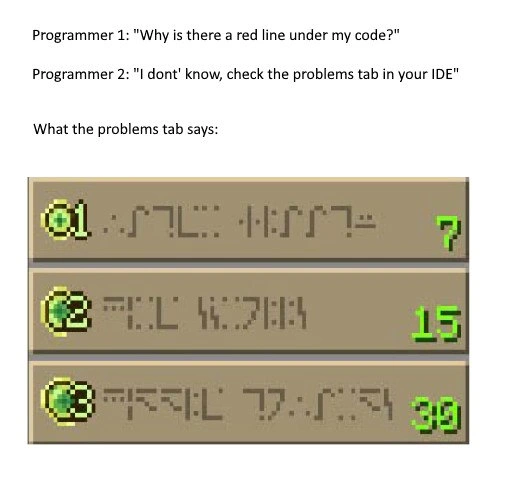
When the IDE's error messages are written in Minecraft enchanting language
Debugging Troubleshooting Post #2434, on Dec 9, 2020 in TG

When the IDE's error messages are written in Minecraft enchanting language

Why is this Debugging Troubleshooting meme funny?

Level 1: Magic Runes

Imagine you're doing homework and your teacher marks an answer with a big red "X" because it's wrong. You ask, "Why is this wrong?" hoping for an explanation. But instead of a clear answer, the teacher shows you a note written in some mysterious symbols that you can’t understand at all. You'd be super confused, right? That’s exactly the joke here: a person writing code sees a red error marker, asks the computer what's wrong, and the computer’s “explanation” looks like magical gibberish. It’s funny (and frustrating) because the help message might as well be nonsense, leaving them just as clueless as before.

Level 2: Why the Red Squiggle?

In this meme scenario, a programmer sees a mysterious red line under their code in the IDE and asks a friend, essentially, “What did I do wrong?”. The friend replies: “Check the problems tab in your IDE,” meaning the answer will be shown by the IDE itself. But when they open this Problems tab, the information there looks totally unintelligible (like gibberish or Minecraft runes!). In other words, the supposed explanation of the error is just as confusing as the error indicator.

Let's break down some of these terms and ideas:

  • IDE (Integrated Development Environment): This is a software application (for example, Visual Studio Code, IntelliJ, or Eclipse) that provides a complete workspace for programming. It includes a code editor and often tools that compile or run your code. An IDE will typically highlight mistakes in your code as you write, to help you catch errors early.
  • Red squiggly line: A wavy red underline that appears under parts of your code when there's a problem. Many code editors and IDEs use this to mark errors or serious warnings. It’s just like how a word processor (like Microsoft Word) puts a red underline under misspelled words – except here it means “there’s something wrong with your code syntax or logic.”
  • Problems tab: A panel or tab in the IDE that lists all the errors and warnings the system has detected in your code. Each entry in this list usually includes a short description of the problem and maybe the file name and line number where it happened. It’s basically a to-do list of issues you need to fix for your code to run.
  • Error message: This is the text describing what went wrong. For example, an error message might say “Syntax error: missing ‘;’ before ‘}’”. That sounds complex, but it’s telling you that you likely forgot a semicolon somewhere before a closing brace. The error message is meant to hint at what is wrong (and sometimes where), so you can fix it.
  • Compiler: A compiler is a program that translates your source code into actual running program code. If your source code has a mistake that violates the rules of the programming language (a syntax error or a type mismatch, for instance), the compiler will generate an error instead of producing a program. Those errors are what you see in the Problems tab. (In some setups, an interpreter might play this role, checking your code as it runs, but the idea is similar: it will stop and report an error if it hits something it can’t understand.)
  • Minecraft enchantment runes: In the game Minecraft, when you use an enchanting table, the game shows you options written in a made-up language – they look like strange symbols or runes. It’s actually a fake alphabet (for fun) and you can’t really read it without a special key. The important part is: it looks like a secret or foreign language at first glance.

In short, the meme is saying: "I asked what my error was, and the answer might as well have been in another language." It's funny to developers because we all remember the first time we saw a baffling error message and thought, What on earth does that mean? The combination of a familiar coding frustration (unclear error messages) with a pop culture reference (Minecraft's unreadable text) makes the joke both easy to get and very relatable.

Level 3: Reading Error Runes

Programmer 1: "Why is there a red line under my code?"
Programmer 2: "I don't know, check the problems tab in your IDE."

That exchange sets up the punchline: the second programmer expects the IDE to provide clarity, but the error list (the Problems tab) turns out to be as indecipherable as an enchantment table scroll. This confusion isn't limited to fancy IDEs – if you compile code using a plain text editor and command-line tools, the errors dumped to your terminal can be just as head-scratching. The IDE is simply collecting those messages in one place, not magically translating them into plain English.

As seasoned devs, we’ve all seen that red squiggly line and felt a mini heart-sink. It flags something’s wrong, but the details often live in the problems tab or compiler output. And quite often, those details are not written in plain language. For instance, a message might say SyntaxError: Unexpected token ';' in JSON at position 105, which might as well be hieroglyphics if you're new to that error. Reading such error text is a learned skill – over time you memorize patterns or know exactly which part of the gibberish to Google. The humor here is that even though the IDE is technically telling you what's wrong, it can feel like it’s teasing you with a secret code.

Often, one small bug can produce many confusing messages. For example, missing a curly brace } might make the compiler think everything after it is out of place, leading to a dozen errors when really there was just one typo. So the Problems tab might inundate you with a wall of text, none of which plainly says “hey, you forgot a brace”. It's like burying a simple issue under a pile of cryptic complaints. No wonder it feels unparseable.

So the meme exaggerates this by literally showing gibberish from Minecraft’s enchantment table as the error output. It's poking fun at how poor Developer Experience (DX) can be when error messages aren't accessible or newbie-friendly. For a seasoned developer, this meme triggers a knowing laugh: we've all spent absurd amounts of time deciphering some nasty compiler or build error. It's almost a rite of passage to realize that the tools we use, as powerful as they are, sometimes speak in riddles.

And of course, mixing in a Minecraft reference makes it even funnier. Many devs have a soft spot for Minecraft (or at least get the reference), so the comparison is instantly recognizable and extra amusing. Finally, there's an element of camaraderie. When someone jokes that their IDE is "speaking enchantment table," every programmer who’s struggled with opaque errors nods in solidarity. It's a shared experience – we groan, we laugh, and then we swap war stories about the most confusing error we’ve ever seen. Memes like this almost serve as group therapy for debugging frustration.

Level 4: Arcane Syntax Runes

Deep under the friendly UI of an IDE, a strict language grammar and a compiler are at work. Those red underlines and entries in the Problems tab are born from this process: they’re the compiler’s way of pointing out where your code broke the language’s rules. When you write code, the compiler's parser tries to match every symbol you type to a formal set of rules (often described in Backus–Naur Form). If something doesn't fit – say you forgot a ; or mis-nested a bracket – the parser can get confused. It might throw an error at the first point it realized something was off, but the message it provides often reflects the grammar rule it expected rather than a plain-English clue. This is why you sometimes see cryptic bits like “expected ';' before '}'” or an error code with no obvious meaning on first glance. The compiler essentially speaks in its own strict language, and if your code breaks that language’s structure, the feedback can feel like an arcane incantation rather than a helpful tip.

Compilers and static analyzers have historically not been great at user-friendly error output. Early tools often emitted terse numeric codes or abbreviated messages – partly due to memory constraints and partly assuming that programmers would consult a manual. (One could say older compilers practically spoke in cryptic riddles by design.) Over time, languages and IDEs have improved their diagnostics, but even today, a deeply technical error (especially from template-heavy C++ or complex type inference) can read like hieroglyphics if you aren't intimately familiar with the context. It's as if the tool is delivering a prophecy from the code oracle, and you're left doing the translation.

Fun fact: the unreadable glyphs shown in the meme aren’t random; they come from Minecraft’s enchanting table interface and are written in the Standard Galactic Alphabet (SGA) (a fictional cipher from an old Commander Keen game). Decoding those runes into our alphabet yields real words, but – just like many raw error logs – they still don’t tell you what you actually want to know. In Minecraft, the translated enchantment text is just flavor (words like “Vorpal” or “Arcana”), unrelated to the actual enchant. And in programming, deciphering an error code or message often requires prior knowledge or looking up documentation: the text is real English (or at least real tech jargon), but its meaning isn't obvious until you know the context.

In both cases – enchanted books or error outputs – you’re dealing with a layer of obfuscation. To get the meaning, you often need a Rosetta Stone: perhaps an online translator or documentation (for the runes or the error code). Modern language designers have realized this pain point; for example, the Rust compiler is celebrated for error messages that try to be explanatory (“help: consider adding a semicolon here”). Still, as this meme jokes, plenty of times we’re stuck deciphering what our tools are telling us. Debugging at this level can feel like linguistics: you debug not just the code, but also the error message itself!

Description

A meme that humorously depicts the frustration of cryptic error messages in an Integrated Development Environment (IDE). The top half of the image contains a short dialogue: 'Programmer 1: "Why is there a red line under my code?"', 'Programmer 2: "I dont' know, check the problems tab in your IDE"'. Below this, under the heading 'What the problems tab says:', is an image of the enchanting interface from the video game Minecraft. The interface shows three options with unreadable, alien-like text (the Standard Galactic Alphabet) and corresponding experience level costs (7, 15, 30). The joke lies in the comparison: the IDE's 'problems' or 'diagnostics' tab, which is meant to provide clear, helpful information about code errors, can sometimes be so obscure and unhelpful that it might as well be written in a fictional, cryptic language. This deeply resonates with experienced developers who have spent hours deciphering vague errors from compilers, linters, or complex frameworks


Comments

12
Anonymous ★ Top Pick Ah, the classic 'undefined is not a function' enchantment. It costs 30 levels of sanity to decipher and usually just means you missed a comma in a 1000-line YAML file
  1. Anonymous ★ Top Pick

    Ah, the classic 'undefined is not a function' enchantment. It costs 30 levels of sanity to decipher and usually just means you missed a comma in a 1000-line YAML file

  2. Anonymous

    Clang 18’s new “Runic Mode” compresses the entire 500-line template-instantiation error into three Minecraft glyphs - figure if you’ve survived 20 years of C++, you can decode your own misery

  3. Anonymous

    That moment when you realize the IDE's error suppression limit is the only thing standing between you and an existential crisis about your architectural decisions from three sprints ago

  4. Anonymous

    Ah yes, the classic 'Problems' tab experience: when your IDE decides to communicate exclusively in Zalgo text and ancient Sumerian. The error count escalating from 7 to 30 suggests the compiler is having an existential crisis about character encoding - probably because someone on the team committed a file with the wrong encoding, and now the IDE is trying to parse UTF-8 as Latin-1 while simultaneously questioning its life choices. At this point, you're not debugging code anymore; you're performing digital archaeology on corrupted artifacts. The real problem isn't in your code - it's that your tooling has achieved sentience and chosen chaos

  5. Anonymous

    IDE Problems tab in runes: 7, 15, 30 - classic sign the language server negotiated UTF-8 with your plugin stack and lost; ship it, CI will fail in plain English

  6. Anonymous

    Red squiggly: polite nudge. Problems tab: '55 sins in Klingon - refactor or perish.'

  7. Anonymous

    Awesome - my IDE's Problems panel now speaks Standard Galactic Alphabet; finally a unified error format for TS2345, 'no-undef', and whatever the linter invents after a fresh npm install

  8. @Sans91o 5y

    True

  9. @Wild_Nixon 5y

    WoW. what a helpful tab! XD

  10. @UQuark 5y

    Nah actually I hate my groupmates in university who ask me "wHy Isn't My CoDe WorKiNg" and don't bother to read error message

  11. @hyadum2 5y

    most often a syntax error. and when you’re tired you can’t find the problem in one line

  12. @zherud 5y

    You have 3 errors in 7th 15th and 30th line. Isn't that obvious?

Use J and K for navigation