The 'S' in HTTPS Stands for Security Guard
Why is this Security meme funny?
Level 1: S is for Secure
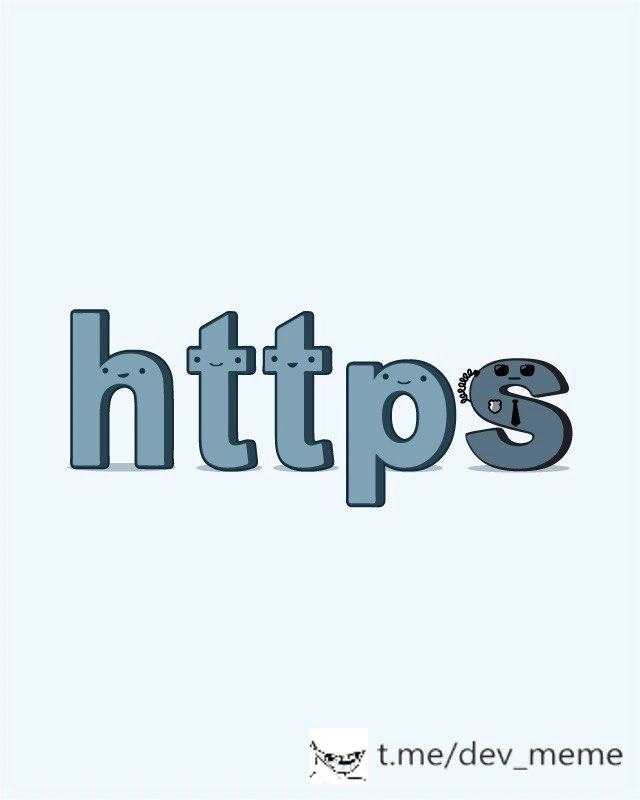
Imagine you’re sending a secret message to a friend. If you just hand it to the mailman as a regular postcard, anyone along the way can read what’s written – the mailman, the sorting office, nosy neighbors. That’s like HTTP: the message is out in the open. Now imagine you put your message in a special box and lock it with a padlock, and only your friend has the key to open it. Even if someone grabs the box, they can’t read the message because it’s locked. That’s what HTTPS does! The little extra “s” is like that padlock on the box. It makes sure that your message (whether it’s “Hi, how are you?” or your password or credit card number) stays secret and safe on its journey. In the funny picture, the letters “http” are like happy friends, and the last letter “s” is carrying a lock – showing that it’s protecting all of them. So basically, HTTP with an “s” means Secure HTTP. It’s a tiny change that makes a big difference: it keeps your private information private, and that’s why that little “s” is shown smiling – it’s keeping everyone safe and happy!
Level 2: HTTP Gets a Bodyguard
Let’s break down the basics behind this meme. HTTP stands for HyperText Transfer Protocol – it’s the fundamental way web browsers and web servers communicate. When you visit a website starting with http://, your browser uses HTTP to fetch pages, send form data, etc., but all that data is sent in plain text. That means if someone is lurking on the network (imagine a person tapping the wires or a Wi-Fi eavesdropper), they could read everything – usernames, passwords, the content of the site – like reading an open book. HTTPS, as you might guess, stands for HTTP Secure (or some say **HyperText Transfer Protocol Secure). The only difference in the URL is that little “s”, but conceptually it means HTTP is now happening inside a secured, encrypted connection. In other words, HTTP got itself a bodyguard named TLS (Transport Layer Security).
TLS is the modern name for what was originally called SSL (Secure Sockets Layer). It’s a protocol – basically a set of rules – that the browser and server follow to encrypt the data they send each other and to ensure each party is who they claim to be. Encryption is like scrambling the message using a secret code, so if someone intercepts it, all they see is gibberish and not your password or personal info. How do the browser and server agree on the secret code? That’s where the TLS “handshake” comes in. Think of it as them agreeing on a language only they understand. The server proves its identity by presenting a certificate (a digital certificate issued by a trusted company called a Certificate Authority). This certificate essentially says “Hi, I’m www.example.com, here’s my proof.” Your browser checks that proof against a list of trusted certificate signers it already knows about (these are built into your device or browser). If everything checks out, the browser and server proceed to establish a secure channel by exchanging some cryptographic information (keys) that will be used to lock and unlock the data. After this setup, all the HTTP data (the page requests, the HTML, JSON, etc.) will be encrypted before it leaves your computer and only decrypted when it reaches the other side.
In the meme’s illustration, the letters “http” have friendly faces, and the letter “s” is darker with a little chain and padlock attached. This depicts exactly what’s happening: adding “s” to HTTP adds a padlock. In real life, that padlock icon you see in your web browser (usually next to the address bar) indicates that the site is loaded over HTTPS. It means the connection is secure. A newbie web developer learns pretty quickly that if you don’t see that padlock (for example, if you serve your site over plain http://), modern browsers might even show a “Not Secure” warning to users. Getting that padlock involves a few steps in practice: you need to obtain an SSL/TLS certificate (these can be purchased or obtained for free from services like Let’s Encrypt), then configure your web server (like Apache, Nginx, or a cloud service) to use it. The result is your site becomes accessible via https://your-site.com. The data between your site and its visitors is now encrypted. For a concrete image, think of an HTTP request as a letter. Without HTTPS, it’s like a regular letter – anyone along the mail route can open it and read it. With HTTPS, it’s like that letter is sealed inside a special locked box that only the sender and receiver can open. The padlock in the meme is showing that locked box concept in a playful way.
Key terms simplified: Encryption means turning plain information into secret code so that only someone with the key can read it. A certificate is like a website’s ID card or passport – it’s issued by a trusted authority and helps prove the site is legitimate. TLS/SSL handshake is just the initial mutual greeting where the browser and server decide on how to encrypt stuff and make sure they trust each other. After the handshake, you get a secure connection. Thus, HTTPS = HTTP + this secure connection. For a junior dev or anyone new to web tech, the takeaway is: Always use HTTPS for websites, especially if any sensitive data is involved. It’s considered a Security Best Practice because it protects users and their data from bad guys on the network. And as the meme humorously points out, sometimes the difference between being secure or not is literally one character in the URL – but that one character triggers a whole lot of protective measures behind the scenes.
Level 3: Little 's', Big Security
To an experienced developer, the humor in this meme comes from how small the difference seems – just an extra 's' – versus how huge the impact is. We’ve all seen that padlock icon in our browser’s address bar. It’s practically a requirement now for any respectable website. One small letter for the URL, one giant leap for security! The meme personifies “https” to remind us: switching from HTTP to HTTPS is a simple change for the user (just a single character in the scheme), but it represents a major upgrade in how data is handled. Seasoned web developers nod knowingly at this: Yep, that little 's' means the site won’t flag a “Not Secure” warning, and our users’ data isn’t flying around in plain text. It’s a cornerstone of WebDevelopment today that any sensitive site (login pages, e-commerce, APIs – you name it) must use HTTPS. In fact, it’s no longer just for sensitive pages; best practice is to use HTTPS everywhere. Google and other tech giants pushed this by favoring HTTPS sites in search rankings and marking HTTP sites as insecure. So that cheeky smiling padlock is also a victory emblem of how far we’ve come in prioritizing security.
The anthropomorphic letters in the image drive the point home in a friendly way. The first four letters “http” look calm and content, but something is missing – enter the final “s” with a grin and a chain-and-padlock. It’s like the crew had no protection until their buddy “S” showed up with locks and keys. 😄 This is poking fun at the classic contrast: HTTP vs HTTPS. The HTTP protocol by itself is open and unencrypted, meaning data traveling between the client and server can be intercepted or altered by anyone on the network (think of an open postcard that anyone can read). The HTTPS protocol, on the other hand, wraps HTTP inside a secured tunnel (TLS). So the cartoon 's' carrying a padlock cheerfully visualizes “I brought security with me!” For veteran developers, this triggers memories of implementing TLS: obtaining certificates, setting up redirects from http to https, and finally seeing that padlock appear after wrangling with the config. For many of us, setting up HTTPS the first time was a rite of passage. You might recall generating a CSR (Certificate Signing Request), puzzling over PEM files, or the mini-heart attack of an expired certificate taking down your site (“Oops, forgot that it only lasted a year!” 🤦♂️). So the smiling 's' could also be winking, “Don’t forget to renew me!” – a reminder that security is an ongoing responsibility.
From a high-level perspective, this meme also highlights Security in a very approachable way. There’s an implicit best practice: always use HTTPS in web applications. It’s not just about encryption for privacy; it’s also about trust. The padlock means users can trust they’re connected to the real site and that no one has meddled with the content on the way. In developer terms, we think about TLS certificates and trusted authorities. In user terms, it’s simply “seeing the padlock means I can safely enter my password or credit card.” The meme condenses all those security assurances into one cute image. It resonates with senior devs because it simplifies a complex reality that we grapple with (cert management, TLS versions, compliance requirements) into a single, happy symbol. The irony and charm here: a huge stack of technology and years of evolving Networking protocols are distilled into a tiny letter “s” and a padlock emoji. It’s a pat on the back to the industry for making security so standard that we joke about it with a single character. After all, it wasn’t that long ago that many sites were plaintext and SecurityBestPractices like “always-on SSL” were aspirational. Now, even the memes are telling us: just add the ‘s’ and you’re doing the right thing.
Level 4: Asymmetric Lock & Key
Under the hood of that friendly padlock is some serious cryptography. When you see HTTPS, your browser isn’t just adding a letter – it’s performing a complex TLS handshake that involves asymmetric keys, certificate chains, and robust encryption ciphers. Essentially, the client (your browser) and the server engage in a secret handshake using public-key cryptography to agree on a shared secret. This involves the server presenting an X.509 certificate (a digital ID card signed by a trusted Certificate Authority). Your browser checks this certificate against its built-in list of trusted CA root certificates. If it trusts the signer, it knows the server really is who it claims to be (e.g., example.com and not an imposter). This trust model – the Public Key Infrastructure (PKI) – is why the padlock can smile confidently: it means a chain of trust from a known authority down to that website has been verified.
Once trust is established, they perform a key exchange. Modern TLS (especially TLS 1.2+ and TLS 1.3) typically uses ECDHE (Elliptic Curve Diffie-Hellman Ephemeral) or similar algorithms for this step. In simple terms, both sides cleverly derive a symmetric session key over an open network such that eavesdroppers can’t figure it out, thanks to one-way math. 🎩 This is the “lock and key” magic: the public key in the server’s certificate is used to securely share a secret, and then that secret becomes the key for a fast symmetric cipher like AES-256. The padlock icon in HTTPS is a visual metaphor for these crypto mechanisms locking up your HTTP messages. It guarantees confidentiality (others can’t read your data) and integrity (others can’t tamper with it unnoticed). And because of the certificate, it also provides authenticity – you’re talking to the genuine server, not a Man-in-the-Middle.
All this happens within milliseconds. The Transport Layer Security protocol ensures that every bit of HTTP data is encrypted and authenticated. It’s a layer running atop TCP (often seen as “below” the application layer, hence the old name SSL for “Secure Sockets Layer”). There’s heavy-duty math at play: algorithms relying on the difficulty of factoring huge primes or computing discrete logs on elliptic curves. That’s why a tiny “s” in the URL packs a punch – it invokes decades of research in cryptography. In fact, pioneering work by Diffie, Hellman, and Merkle in 1976 introduced the concept of public key exchange, and RSA encryption (Rivest-Shamir-Adleman, 1977) provided a practical method to encrypt and sign data. These advances made protocols like SSL/TLS possible. Each time you see the padlock, you’re benefiting from those mathematical breakthroughs.
From a systems perspective, enabling HTTPS means an extra round-trip handshake during connection setup, and some CPU work to do encryption/decryption. Early on, people worried this overhead would be too slow, but modern TLS is highly optimized. Session resumption, HTTP/2 multiplexing, and hardware acceleration (AES-NI instructions, etc.) have largely eliminated performance concerns. TLS 1.3 streamlined the handshake to just 1-RTT (one round-trip) or even 0-RTT for repeat visits. As a result, that little 's' now comes almost free in terms of speed, but priceless in terms of security. The meme’s smiling padlock is a lighthearted nod to this robust invisible machinery: a tiny letter triggers strong encryption, protecting billions of web transactions every day. In essence, the “s” is a sentinel that stands guard using uncrackable math, turning the simple HTTP pipeline into a fortress of WebSecurity. It’s a cute cartoon, but it represents serious SecurityBestPractices and the sophisticated NetworkProtocols that keep our data safe.
Description
This is a simple and clever illustration that personifies the HTTPS protocol. The image shows the word 'https' written in friendly, rounded, cartoon-style letters against a light blue background. The first four letters, 'h,' 't,' 't,' and 'p,' are a lighter shade of blue and each has a simple, happy face. In contrast, the final letter, 's,' is a darker, more serious character. It's drawn to look like a security guard or a secret service agent, complete with a black suit, a tie, a coiled earpiece, and a stern, protective expression. The 's' character is looking back over the other letters as if guarding them. This visual pun effectively explains the role of the 's' in HTTPS, which stands for 'Secure.' It represents the SSL/TLS encryption layer that protects the standard HTTP data from being intercepted, making the entire communication secure. The watermark 't.me/dev_meme' is visible at the bottom
Comments
32Comment deleted
The 'S' in HTTPS is the bouncer performing a TLS handshake at the club door; it's not letting your packets in until it sees some valid certificates
“Just add the S,” they said - now I’m babysitting 300 Let’s Encrypt renewals and a 2008-era SOAP server that still treats TLS 1.2 like an unknown cipher at the door
After 20 years of explaining why HTTPS matters, we've finally found the perfect visualization: cute letters that make security approachable. Now if only we could make certificate chain validation this adorable, maybe developers would stop ignoring SSL warnings in development
When your infrastructure team finally deprecates HTTP endpoints and the 'S' realizes it's now mandatory for survival - though judging by this illustration, the transition might be more hostile takeover than peaceful migration. At least it's not another 'works on my machine' scenario where the S only gets eaten in production
After years of HSTS headers and cert wrestling, HTTPS is finally smiling back at us
HTTPS: the S is the bouncer - negotiates TLS 1.3 at the edge, then watches your east‑west services gossip over plain HTTP because “it’s inside the VPC.”
HTTPS: one letter that turns “it works” into cert rotation, cipher‑suite negotiations with the ALB, and a 3am page when OCSP stapling dies behind the proxy
вотерки для пидоров Comment deleted
@RiedleroD Comment deleted
крыса Comment deleted
and u r criminal Comment deleted
thank Comment deleted
F🤬cking RAT Comment deleted
fckn russian)) Comment deleted
you must visit a therapist if you hate yourself don't you? Comment deleted
i don't Comment deleted
no russian here, please warning 1/3 for @m4xx1m for speaking russian twice (translation: "watermark for faggots" and "rat") Comment deleted
all https are bastards Comment deleted
i don't want to see Russian in English only chat Comment deleted
Still a fucking rat. Moreover, nation traitor Comment deleted
i hate all Russians Comment deleted
What's your reason? Do you get something from hating russians? Comment deleted
Why do i need to get sth to hate sth? I can hate nazi and don't get anything from it Comment deleted
Well you don't hate or don't hate on random, do you Comment deleted
i don't. I am Russian and I know those people more than every person on Earth does, so I've got my reasons Comment deleted
Do you hate yourself? Comment deleted
1) What's the problem? 2) I didn't say "I hate the only Russian: myself", but i said that i hate all of them Comment deleted
Mod could see this anyways, without him. But don't forget there are rules Comment deleted
https://t.me/devs_chat/21715 As long as translation to English is present, you can talk in any language you want Comment deleted
ok, he didn't translate in brackets what he has written Comment deleted
It's a pity Comment deleted
S - as "Security" Comment deleted