Skip to content
DevMeme
820 of 7435
Accept My Cookies or Be Forgotten
WebDev Post #927, on Dec 22, 2019 in TG

Accept My Cookies or Be Forgotten

Why is this WebDev meme funny?

Level 1: Who Are You Again?

Imagine it’s the first day of school and the teacher is handing out name tags to help remember each student. You decide you don’t want to wear the name tag. The next day, you come back to class and the teacher looks at you blankly and asks, “Sorry, what’s your name again?” Because you never wore the name tag, the teacher had nothing to remind them who you are.

This meme is making the same point: a website offering you a “cookie” is like a teacher offering a name tag so they’ll know you later. If you say “No thanks,” then by tomorrow the website (like that forgetful teacher) won’t remember you were there before.

Let’s break this down in simpler terms. HTTP is called a "stateless" protocol, which means whenever you load a webpage or make a request, the server doesn’t remember anything about you from last time automatically. There’s no built-in memory of “who you are” or what you were doing. To create a sense of continuity (like keeping you logged in or remembering your settings), websites use cookies. An HTTP cookie is a small piece of data that a site asks your browser to save. The browser will then send that data back to the site on each subsequent request. This way, the site can recognize you. For example, when you log in to a site, the server might send a cookie saying (in effect) "this browser = user123". Your browser stores it, and on your next click or visit, it sends that cookie back, so the server knows "aha, this is user123 again."

Think of a cookie as an ID card or a claim check. If you accept it, the website can say “Oh, I know which session this is” the next time you show up. If you refuse it, the poor server is like a clerk with no ticket stub – it has no idea you were the same person who visited before. In practice, if you block or refuse cookies, things like staying logged in or keeping items in your shopping cart between pages might not work, because the site can’t link your actions from one page load to the next. To a developer, what's happening is roughly like this:

# Pseudocode: how a web server uses a cookie to identify a user session
session_id = request.cookies.get('session_id')
if not session_id:
    # No cookie sent by browser -> first visit or cookie was not accepted
    session_id = generate_new_session_id()
    sessions[session_id] = {}  # start a fresh session for this user
response.set_cookie('session_id', session_id)

In the above snippet, the server checks if the browser sent a cookie called session_id. If not (meaning the user has no stored ID yet, possibly because they didn’t accept any cookie), it creates a new session and gives the browser a new cookie. The next time, if the browser returns session_id, the server knows it’s the same user session. But if the browser never stores or sends that cookie (say the user has cookies disabled), the server will run that "new session" branch every time. Essentially, the site will treat every visit like the first time it’s ever seen you.

Now, what about those “This site uses cookies – Allow or Deny?” pop-ups everywhere? Those are cookie consent banners. They started appearing because of privacy laws like GDPR (General Data Protection Regulation in the EU) which require websites to get your permission before using certain cookies, especially for tracking. Cookies can be used to track your activity; for example, third-party cookies (placed by ads or embedded content from other companies) can follow you across different sites to build a profile of what you like – which a lot of people find creepy. Many modern browsers even block or limit third-party cookies by default now as a privacy safeguard. So, these consent banners let you choose. If you click “Accept all cookies,” the site will set cookies not just for basic functionality (login, preferences) but also any analytics or advertising cookies it uses. If you click “Decline” or “Allow only necessary cookies,” the site should then use only what's needed for it to run (like a session cookie for keeping you logged in, maybe a cookie to remember that you opted out, etc.) and skip the tracking stuff.

However, some users go even further for privacy: you can configure your browser or use extensions to block all cookies by default, or you might always browse in private/incognito mode (which typically doesn’t keep cookies once you close the window). If you do that, then yes – the website will completely forget you by the next day (or even between separate visits in the same day). Any time you come back, it’s like starting fresh. This is great for privacy (no lingering data about you), but it also means no convenience. You’ll have to log in every single time, re-add items to your cart, and you'll keep seeing that cookie consent banner repeatedly because the site can’t remember that you already said “no” before.

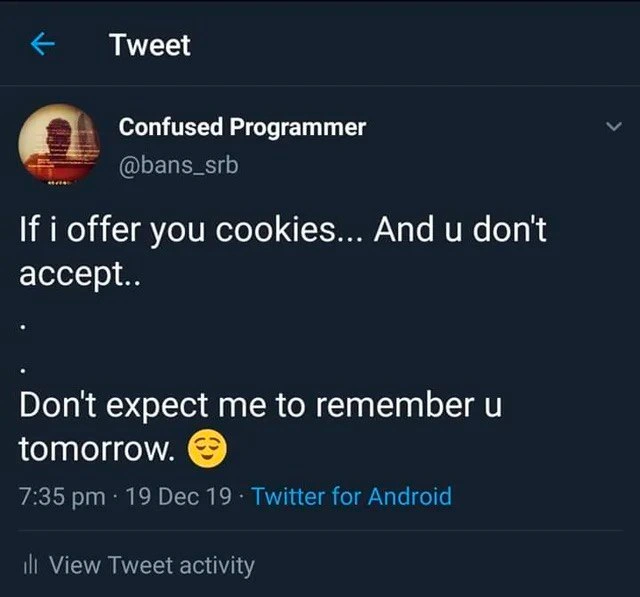
So there’s a trade-off: privacy vs. convenience. Accepting cookies (at least the first-party, essential ones) makes your web experience smoother – the site can keep you logged in and remember your preferences. Declining cookies keeps your footprint minimal and your data safer from tracking, but the "stateless" nature of web servers kicks in: the server treats you like a stranger each visit. That “Remember Me” checkbox on login pages? All it does is tell the site to give you a long-lasting login cookie so it recognizes you even after a week. If cookies are blocked or you choose not to accept them, that feature won’t help – the site simply can’t recall who you are on return visits. In short, the tweet is joking that a web server offering to “give you a cookie” is basically saying: if you won’t let me store a little memory of you, then I won’t know who you are next time. Don’t expect to be remembered tomorrow!

Level 3: Stateless by Design

This tweet-turned-meme uses a playful metaphor to highlight a fundamental truth of web development: the web is built on a stateless protocol. HTTP doesn't remember anything from one request to the next – by design. That’s great for scalability and simplicity, but it means servers have the memory of a goldfish unless we explicitly teach them who you are. The way we do that is by offering HTTP cookies. A cookie is like a small ID tag that the server asks the browser to hold onto and send back with each request. It's the cornerstone of session management. For example, when you log in, the server might set a session cookie (say, SESSIONID=XYZ123) in your browser. On your next request, your browser sends that cookie back, so the server says “Ah, I know you – welcome back!”

The tweet jokes, “If I offer you cookies and you don’t accept... don’t expect me to remember you tomorrow.” This is exactly how servers behave. If your browser refuses to store that session cookie, the server is clueless about who you are on the next visit. You're essentially invisible – a brand new user every time. Seasoned developers have encountered this: a user complains the site keeps logging them out or forgetting their preferences, and after some head-scratching we discover they had cookies disabled or were using a strict privacy mode. Without that little data crumb, the server can’t tie your requests together over time. It’s a classic ironic twist from a UX perspective: we want personalized convenience, but the web’s stateless nature requires that small shared token (the cookie) to achieve it.

Now enter modern privacy laws and concerns like GDPR. Thanks to these regulations, most sites display a cookie consent banner politely asking if you’ll accept cookies (especially the tracking kind). Many privacy-conscious folks click “Decline” to avoid unnecessary tracking. But here’s the rub: if you decline all cookies, you might also be declining the very thing that lets the site remember you. Often, sites separate essential cookies (for login sessions, shopping carts, etc.) from non-essential ones (like analytics or ads). However, some users employ browser settings or extensions that block everything by default. In those cases, the next time you visit it's like Groundhog Day – the server has no memory of you at all. (Ironically, even your “no cookies” choice can’t be remembered without at least one cookie to store that preference! This is why you might see the same consent prompt over and over – a little UX irony we all endure.)

From a developer’s perspective, it's a careful balancing act between convenience and users’ privacy concerns. We implement features like a “Remember Me” checkbox on login forms, which in reality just means “set a long-lived cookie so this browser stays recognized.” But if the user’s browser won’t accept it, that “Remember Me” feature can’t do its job. Meanwhile, we take security precautions: cookies are subject to web security practices (marking them HttpOnly or Secure to protect them) and browsers impose browser security limits (like blocking third-party cookies by default to prevent tracking across sites). The humor in this meme hits home because it personifies a server saying what every dev knows: if the user won’t hang onto the little identifier we give them, we have no way to tell them apart from anyone else next time. No cookie, no recognition – the stateless server just shrugs and says, “Who are you again?” 😉

Description

A screenshot of a tweet from the user 'Confused Programmer' (@bans_srb). The tweet, set against a dark blue background, reads: 'If i offer you cookies... And u don't accept.. Don't expect me to remember u tomorrow. 😏'. This is a clever pun that plays on the double meaning of 'cookies'. In the real world, it's a social offering, but in web development, HTTP cookies are essential for websites to remember users and maintain session state. The tweet personifies a web application, humorously threatening to forget the user if they decline the cookie, which is precisely what happens technically. The joke is highly relatable to web developers who deal with session management, user authentication, and the now-ubiquitous cookie consent banners

Comments

7
Anonymous ★ Top Pick It's the only relationship where accepting cookies is a sign of commitment, and clearing them is the digital equivalent of saying 'it's not you, it's me deleting my local storage'
  1. Anonymous ★ Top Pick

    It's the only relationship where accepting cookies is a sign of commitment, and clearing them is the digital equivalent of saying 'it's not you, it's me deleting my local storage'

  2. Anonymous

    Listen - without SameSite=Lax and a persistent session cookie, you’re just another anonymous 200 OK to me

  3. Anonymous

    After 15 years of implementing session management, I've realized cookies are just distributed state with trust issues - we keep asking users to accept them while secretly knowing localStorage and IndexedDB are having an affair behind their backs

  4. Anonymous

    The eternal struggle of web developers: explaining to product managers why users who reject cookies can't have personalized experiences. 'But can't we just remember them anyway?' No, Karen, that's literally what cookies do. Without them, HTTP is more forgetful than a goldfish with amnesia. This tweet perfectly captures the passive-aggressive relationship between privacy-conscious users and the stateless nature of the web - where rejecting cookies is essentially telling the server 'treat me like a stranger every single time.' It's the technical equivalent of refusing to wear a name tag at a networking event and then complaining nobody remembers you

  5. Anonymous

    Without cookies, our relationship stays strictly RESTful - no state, no memory

  6. Anonymous

    Decline cookies and our “remember me” devolves to LRU eviction with cache_size=0 - GDPR-compliant amnesia

  7. Anonymous

    No cookie consent? Then our relationship reverts to pure stateless HTTP - just cold GETs, no session ID, and a nightly cron clearing whatever you thought was “remember me.”

Use J and K for navigation