Skip to content
DevMeme
5447 of 7435
The 'Chuck Norris' Red: A Deep Dive into HTML's Quirky Color Parsing
WebDev Post #5971, on Apr 22, 2024 in TG

The 'Chuck Norris' Red: A Deep Dive into HTML's Quirky Color Parsing

Why is this WebDev meme funny?

Level 1: Color Surprise

Imagine you are drawing with crayons, and you ask for a color called “chucknorris” – a totally made-up name. Instead of saying “I don’t have that color,” the crayon box magically gives you some color anyway! You might be surprised – you invented a nonsense word, but still got a real paint. That’s what web browsers do in this joke.

On a web page, you can tell the computer the background should be red or blue by name. But if you tell it the background color is “chucknorris” (which isn’t a real color name at all), the browser doesn’t get mad or stop. It’s very friendly and tries to be helpful. It says, “Hmm, I don’t recognize that name… I’ll just make a color out of it!” And it does – the screen turns a particular red color. If you change the word slightly (like dropping the last letters to make “chucknorr”), the browser will still give you a color, but a different one (in this case, a funny yucky yellow).

It’s like a little magic trick: any word you type becomes a color. This is both cool and silly. It’s cool because the computer is smart enough to always produce a result. It’s silly (and the reason people laugh) because we normally expect computers to say “error” if we feed them gibberish. But here, the browser is overly polite – it guesses a color from the gibberish. The meme is showing a real Q&A where someone basically asked, “Why on earth does putting chucknorris as a color turn my page red?!” The answer: that’s just how browsers were built long ago, to always give you something rather than nothing.

So the funny part is imagining HTML (the language of web pages) as a person who won’t argue with Chuck Norris – the famous tough guy. It’s like the browser is thinking, “Well, it’s Chuck Norris… I better give him a color or else!” 😄 In simple terms, the web browser is doing a color surprise: no matter what weird name you throw at it, it will splash some paint on the page. And that unexpected surprise color is what makes everyone chuckle!

Level 2: When Browsers Guess

In modern web development, you usually specify colors either by named keywords (like HTML color names such as "red", "blue", "goldenrod") or by numeric codes (like a hex code #FF0000 for red, or an rgb(255,0,0) value). Typically, if you mistype a color name, you’d expect it not to work. For example, "redd" or "bled" aren’t valid color names, so in proper CSS those would just be ignored and you’d likely get no color.

However, this meme refers to an older way of doing things: using the HTML attribute bgcolor on the <body> tag (common in the 1990s) to set page background color. Back then, browsers were designed to be very forgiving. Instead of strictly erroring out on unknown values, they often tried to guess or compute a result. So if you put something totally random for a color, the browser wouldn’t throw a fuss – it would internally try to turn that text into a color anyway! This is what’s happening with bgcolor="chucknorris" in the screenshot.

Let’s break it down in simpler terms:

  • HTML is the language that structures web pages. Older HTML had presentational attributes like bgcolor to set background colors.
  • Browsers had a predefined list of color names (like "red", "green", "black", etc.). If you used one of those, the browser applies that exact color.
  • If you used a value it didn’t recognize as a name, the browser wouldn’t just give up. Instead, it performs a little trick: it tries to interpret the string of characters as if it were a number in some base (a bit like decoding a hexadecimal string, which uses 0-9 and A-F). Characters it doesn’t understand as numbers, it treats as zero. In tech terms, this is a form of hashing or coercion – basically converting the text into a numeric color code.
  • Because this algorithm is deterministic (meaning the same input always yields the same output), the word "chucknorris" ends up being translated into a specific color value every time. In this case, it becomes a shade of red. If you drop a letter ("chucknorr"), it becomes a different numeric result, which corresponds to that ugly yellow. Another example: the word "crap" gets turned into a color that looks like… well, 💩 poop (a brownish color) – an amusing coincidence!

So, browser quirks are those weird behaviors browsers have for historical reasons. This one is a prime example: it’s not documented in big bold letters in tutorials, but it’s known among developers that older features like bgcolor will attempt to render something even for unknown inputs. The tags on the screenshot (html, browser, background-color) indicate it’s about how browsers handle color input.

For a newcomer, the key takeaway is:

  • Modern practice: use CSS background-color with valid values. If you make a typo, usually nothing happens (or the browser falls back to a default).
  • Legacy quirk: using the old bgcolor attribute, the browser might guess a color from any string. It doesn’t throw an error – it just does some math behind the scenes to turn text into a color.

Think of it like this: the browser has an algorithmic crayon box. Standard colors have names on the wrapper. If you give it a crayon name it’s never heard of, it won’t say “Nope, no color.” Instead it goes, “Hmm, I don’t have that, but let me mix something up for you anyway.” The result is consistent but arbitrary – a kind of pseudo-random color unique to that made-up name. That’s why "chucknorris" consistently gives red on any browser – the mixing formula is part of the HTML standard now for backward compatibility. Seasoned devs find this amusing because it shows how the web platform bends over backward to be user-friendly (or code-error-friendly). It also teaches new devs an important lesson: always double-check your color strings! If you saw a weird off-color on your page, it might not be your eyes deceiving you – it could be a sneaky typo that the browser kindly “guessed” into a real color.

Stack Overflow, the site in the screenshot, is a Q&A site where developers share knowledge. This particular question became popular because many were curious or confused by this exact behavior. It highlights an unexpected corner of web development, and now it’s a bit of shared lore among web developers. In short, HTML + Browser + random string = some color. The meme gets a laugh because it personifies the browser, almost saying: “I have no idea what ‘chucknorris’ means, but here’s a color anyway!”

Level 3: Hashing Out a Hue

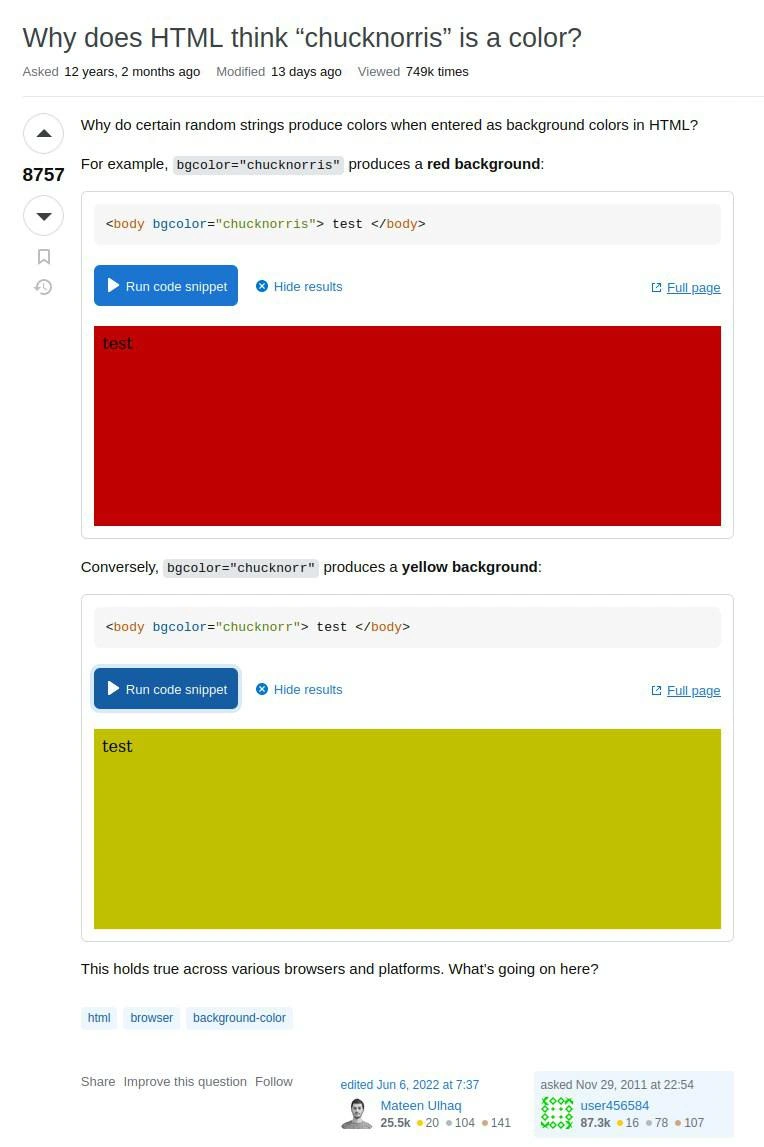
For seasoned front-end devs, this meme hits on a hilarious browser quirk. The Stack Overflow question “Why does HTML think ‘chucknorris’ is a color?” became famous because it unveils an odd legacy feature: feed a completely random string into an old-school HTML bgcolor attribute, and the browser cheerfully produces a color instead of complaining. The humor comes from the specific example – “chucknorris” – because it’s a nod to the Chuck Norris internet meme (where Chuck is notoriously capable of anything). Here, the joke is that even HTML/CSS seems to fear Chuck Norris enough to give him a color 🎨. When you set bgcolor="chucknorris", the page doesn’t error out or give a blank background; it actually renders a red background. Conversely, one letter off ("chucknorr") yields a mustard-yellow background. It’s as if the browser is saying: “I don’t know what word that is, but I’ll still turn it into some RGB value.”

Why is this so funny to devs? Because it’s so unexpected and counter to how we think code should work! We expect strict rules: an unknown color name should just not work. But browsers, especially in legacy modes, are extremely forgiving. This is born from the old days of the web (Netscape, IE4, etc.), when HTML was parsed very loosely. Typos and random inputs would often be handled by making a “best guess.” In this case, the “best guess” is a fixed algorithm that maps any string to a color. The result? Typos in color names might go unnoticed because instead of obvious failure, you get a weird but real color. For example:

<body bgcolor="chucknorris">Test</body>  <!-- Renders a red background -->
<body bgcolor="chucknorr">Test</body>    <!-- Renders a yellow background -->
<body bgcolor="reed">Hello</body>       <!-- Typo for "red", might still show some color! -->

In a real project, if a junior dev accidentally wrote bgcolor="reed" instead of "red", the page might still show a tinted background, leaving everyone scratching their heads 😀. This meme reminds experienced devs of countless hours chasing ghosts: “Is my eyesight off, or is that background slightly off-color?” It’s Frontend Humor 101: the browser ultimately says “I’ll allow it.”

The senior perspective here also recognizes why this happens. It’s a legacy compromise: early browsers had a short list of named colors (like "black", "white", "blue", etc.). But they didn’t want to break pages with unknown values (forward-compatibility, or just sloppy HTML). So unknown bgcolor strings were fed into a routine that effectively does color name hashing – churning characters into a consistent color. It’s deterministic (the same input always yields the same output across browsers), which is why every platform shows “chucknorris” as that same red. Seasoned devs chuckle because they see the absurdity: a misspelled or completely made-up color name triggers a hidden algorithm that nobody would anticipate without insider knowledge. It encapsulates the browser quirks tag perfectly – those weird behaviors that aren’t in the shiny CSS spec, but persist for decades for backward compatibility.

This also highlights the contrast between modern best practices and real-world web behavior. Nowadays, we teach newcomers to use CSS and its strict set of color names or hex codes, and if you use an invalid name in CSS (background-color: chucknorris; in a CSS file), it won’t apply at all. But the old HTML attribute parsing (still supported for historical reasons) doesn’t outright reject the value. So the meme is like a rite-of-passage snippet from Stack Overflow: once you’ve been around the block, you’ve either encountered it or heard the tales. It’s a benign bug that turned into a piece of trivia every web developer can appreciate. And of course, we can’t ignore the comedic cherry on top: the Stack Overflow user even jokes about another string – "crap" – producing a color, asking “Guess the color 💩?” Seasoned devs can guess it’s a brownish hue (indeed, “crap” produces a sorta brown-gold). The browsers have no sense of humor, but the coincidence of the algorithm yielding a thematically appropriate color is pure comedic gold (or… brown).

In summary, this meme resonates because it’s too real and too funny: a mix of browser backward-compat hacks, a dash of internet meme culture, and the shared understanding that “the web platform carries a lot of weird baggage.” Every experienced frontend engineer has a war story about Browser Quirks, and “random strings as colors” is a standout example where the absurdity is harmless and entertaining. It’s the kind of thing that makes you both laugh and facepalm — classic web development nostalgia.

Level 4: Color by Coercion

Deep in the browser’s rendering engine, HTML color parsing demonstrates a classic case of Postel’s Law in action: instead of throwing an error for an unknown color name, the browser coerces any string into a numeric color value. Under the hood, this behaves much like a hash function mapping an arbitrary word to an RGB triplet. In legacy HTML (think <body bgcolor> from the 90’s), browsers implemented a deterministic algorithm to convert unrecognized color names into actual colors. This wasn’t an intentional Easter egg for Chuck Norris – it’s a side effect of a generic algorithm that will hash any unidentified token into a 24-bit color code.

Let’s sketch a simplified version of what might be happening for bgcolor="chucknorris" (in reality each browser had its own C/C++ routine, but the logic is analogous):

function legacyColorFromName(name) {
  let colorValue = 0;
  for (const ch of name.toUpperCase()) {
    let nibble;
    if (/[0-9]/.test(ch)) {
      nibble = ch.charCodeAt(0) - '0'.charCodeAt(0);         // '0'->0x0 ... '9'->0x9
    } else if (/[A-F]/.test(ch)) {
      nibble = ch.charCodeAt(0) - 'A'.charCodeAt(0) + 10;     // 'A'->0xA ... 'F'->0xF
    } else {
      nibble = 0;  // Non-hex letter (like 'G' or 'Z') treated as 0
    }
    colorValue = (colorValue << 4) | nibble;  // shift 4 bits and append nibble
  }
  // Use lowest 24 bits as RRGGBB color
  const rgb = colorValue & 0xFFFFFF;
  return '#' + rgb.toString(16).padStart(6, '0');
}

console.log( legacyColorFromName("chucknorris") ); // "#c00000" (a red shade)
console.log( legacyColorFromName("chucknorr")   ); // "#c0c000" (a dull yellow)
console.log( legacyColorFromName("crap")        ); // "#c0a000" (brownish gold 🤎)

// Demo output: 'chucknorris' → red, 'chucknorr' → olive-yellow, `'crap' → a crappy brown color. Yes, the algorithm is consistent – any string becomes a color code!*

In essence, the browser is reading any valid hex digits in the string and treating missing pieces as zeros, then masking the result down to 3 bytes. The reason this works across browsers is that the modern HTML5 standard actually specifies how to parse legacy color values in a backward-compatible way. All major browsers aligned on this quirky behavior to avoid breaking old web pages. Historically, this traces back to the era of X11 color names and early web permissiveness: if a name wasn’t in the known list, the browser’s attitude was “no color name? no problem – we’ll make one up from the letters”. The deterministic hashing means “chucknorris” consistently yields the same red on any browser because the algorithm (shifting and accumulating hex values) is well-defined.

From a theoretical standpoint, this is a neat if bizarre example of graceful degradation. Instead of failing on unknown input, the system falls back to a pseudo-random but reproducible conversion. There’s a parallel to hashing in CS: different strings map to different outputs, and while it’s not cryptographic, it’s a simple function of the input characters. It’s also a lesson in how specifications evolve – HTML5 turned what was once an undefined quirk into a standardized procedure. So when you see <body bgcolor="chucknorris"> painting the page bright red, it’s not that the browser particularly reveres Chuck Norris; it’s applying a hexadecimal heuristic that would do the same for “mysterymeat” or any other random identifier. The legend here isn’t Chuck at all – it’s the legacy code lurking in browsers, ensuring that even “impossible” colors get a representation on screen.

Description

This meme is a screenshot of a popular Stack Overflow question titled, "Why does HTML think 'chucknorris' is a color?". The post, which is highly upvoted (8757 points), demonstrates a peculiar behavior in web browsers. It shows two code snippets: the first uses `<body bgcolor="chucknorris">` which results in a solid red background. The second, `<body bgcolor="chucknorr">`, produces a yellow background. The image clearly displays the rendered output for both examples, confirming the unexpected color generation. The humor and technical interest come from this arcane browser behavior. It's a classic piece of web development trivia that reveals how legacy HTML parsers handle invalid color names. Instead of failing, the browser attempts to convert the string into a hexadecimal color by replacing non-hexadecimal characters with zeros and then truncating the string, leading to these surprising but consistent results. For senior developers, it's a nostalgic reminder of the forgiving, and often bizarre, nature of early web standards

Comments

16
Anonymous ★ Top Pick The HTML color parser was clearly written by Chuck Norris. It doesn't throw errors; it just gives you the color it thinks you deserve
  1. Anonymous ★ Top Pick

    The HTML color parser was clearly written by Chuck Norris. It doesn't throw errors; it just gives you the color it thinks you deserve

  2. Anonymous

    Every time a junior writes <body bgcolor="chucknorris">, a senior is reminded that the 1995 color-name hashing algorithm can still roundhouse-kick our 2025 design tokens

  3. Anonymous

    After 20 years in tech, I've learned that Chuck Norris doesn't just roundhouse kick production servers - he's been living rent-free in HTML parsers since Netscape, silently turning himself red with rage at our invalid color values while we blame it on 'legacy compatibility'

  4. Anonymous

    After 12 years and 749k views, we've learned that Chuck Norris doesn't conform to web standards - web standards conform to Chuck Norris. Turns out browsers parse invalid color strings by treating them as hex values with missing digits, padding and truncating until they get something renderable. It's not a bug, it's a feature of the HTML color parsing algorithm's 'best effort' approach - because in the 90s, we decided fault tolerance was more important than failing fast. Now we're stuck with 'chucknorris' being a valid color forever, which is somehow both the most and least surprising thing about legacy web standards

  5. Anonymous

    CSS shorthand vs longhand: where 'chucknorris' parses to yellow victory or red defeat - standards at their most 'consistent'

  6. Anonymous

    Somewhere in a browser’s legacy color parser, a 1998 committee decision is still turning your nonsense strings into production color palettes - because nothing says forward compatibility like parsing by stripping non-hex and praying

  7. Anonymous

    bgcolor="chucknorris" turning red is the web’s quirks-mode roundhouse: the legacy parser scavenges any hex it finds and spits out #CC0000 - because backward compatibility hits harder than Chuck Norris

  8. @RiedleroD 2y

    it's a bug in IE having been carried into other browsers because people kept using it

  9. @exWTF 2y

    this is how blink deal with it, ParseColorStringWithCrazyLegacyRules

    1. @ZgGPuo8dZef58K6hxxGVj3Z2 2y

      Reminds me of when msn didn’t load on anything else than ie

    2. @Vanilla_Danette 2y

      Idk why I find this genius, it's... It's just awesome

  10. @ZgGPuo8dZef58K6hxxGVj3Z2 2y

    To this date I don’t understand who uses msn💀

  11. @Vanilla_Danette 2y

    Like the whole story, name of the function, how it works, etc.

  12. @SamsonovAnton 2y

    "chucknorris" is a color because, when Chuck sent his RFC to W3WG, nobody dare to argue. 😎

  13. @seekonelinesky 2y

    How does it look like if set bgColor to virgin's blood?

    1. @seekonelinesky 2y

      It tells vivid red I'm surely w3c embedded AI in HTML

Use J and K for navigation