Skip to content
DevMeme
4468 of 7435
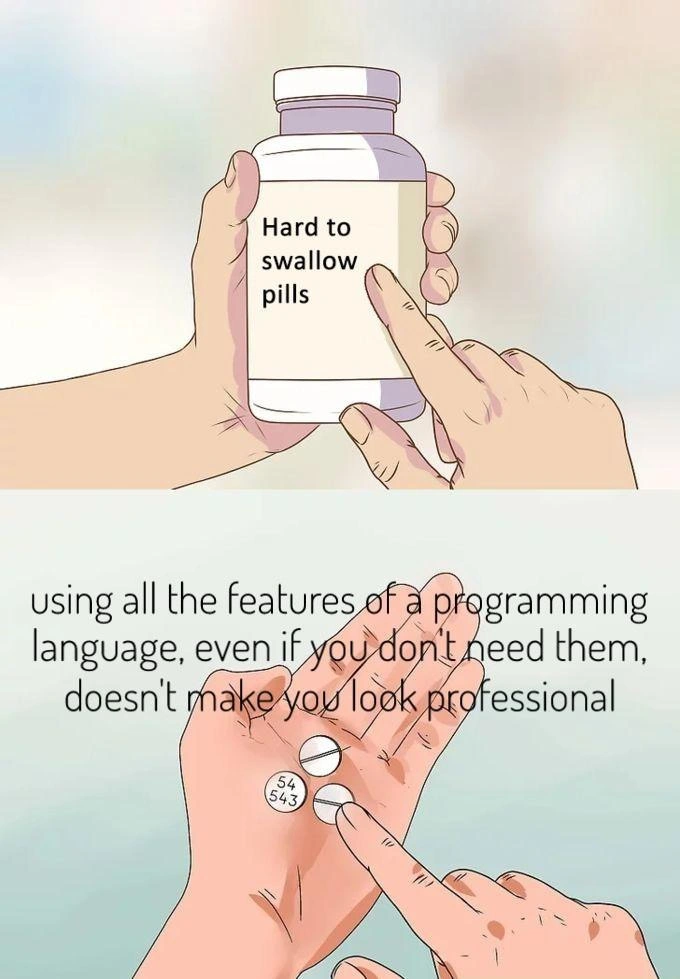
When overusing language features feels pro but actually hurts code clarity
CodeQuality Post #4899, on Oct 5, 2022 in TG

When overusing language features feels pro but actually hurts code clarity

Why is this CodeQuality meme funny?

Level 1: Less Is More

Imagine you have a big box of art supplies with all sorts of tools: crayons, markers, paint, glitter, stickers, you name it. Now, if you try to use all of those in one single picture just because you have them, what happens? The picture could end up looking really messy and confusing. Maybe the colors get all mixed up, the glitter covers everything, and the original drawing is lost under all those extras. It doesn’t actually make the art better, right? A skilled artist might instead pick a few right tools – say, just some nice markers and a little bit of paint – that suit the picture they want to create. The result would be a clearer, more beautiful picture that people can easily appreciate.

This meme is saying the same thing, but about writing code. Sometimes new programmers get excited and use every fancy programming trick or feature they know in their code (kind of like using every art supply on the drawing). They think it will make their program super impressive. But often, it just makes the code chaotic and hard to understand – kind of an overdone mess. The truth (the “hard-to-swallow pill”) is that doing less can actually be better. In other words, less is more: using just the right features and keeping the code simple will make the program clearer and more effective. It’s like how a simple story written in plain language is easier to read than one crammed with tons of big, difficult words. Being a pro isn’t about how complicated you can make something – it’s about how clearly and effectively you can get the job done with what’s really needed. So, just like choosing only a few toppings makes a tastier pizza than throwing the whole kitchen on it, choosing simplicity in coding makes your work look more professional in the end.

Level 2: Syntactic Sugar Crash

Let’s break down what this meme is saying in simpler terms. The image uses the popular "hard to swallow pills" meme format. In the top panel, a hand is holding a pill bottle labeled "Hard to swallow pills". This setup tells us the meme is about to deliver a truth that people often find tough to accept. In the bottom panel, we see two actual pill tablets being presented, and over them is the text: "using all the features of a programming language, even if you don't need them, doesn't make you look professional." That sentence is the pill we’re being asked to swallow – a message to accept even if it’s a bit uncomfortable for some developers. The humor comes from how directly it calls out a common habit in programming culture.

Now, what does "using all the features of a programming language" mean? Every programming language (like Python, Java, C++, etc.) comes with lots of built-in capabilities and special syntax — we call these language features. They include things like unique operators, fancy shortcuts, advanced constructs, and little-known functions. For example, Python has list comprehensions and lambdas (small anonymous functions) that let you do things in one line that might normally take several. C++ has things like template metaprogramming or operator overloading, which are powerful but can be complex. Using a feature “even if you don’t need it” refers to when a developer writes code with an advanced or obscure feature in a situation where a simple, straightforward approach would work just as well (or better).

The meme is highlighting that doing this doesn’t actually make you look professional. Being a professional developer isn’t about cramming as many tricks as possible into your code. It’s often about good design, clarity, and maintainability (meaning others can easily understand and modify your code later). There is a set of ideas called Clean Code Principles which basically advocate for writing code that is easy to read and simple where possible. Overusing every possible feature is usually against those principles. In fact, it can be seen as a code smell, which is a term developers use for patterns in code that signal a potential problem. A code smell doesn’t mean the code is definitely wrong, but it suggests it might be poorly designed. If you open a file and see super dense, complicated expressions everywhere (when they could be simple), that “smells” like a maintenance headache.

For a newer developer (or anyone early in their coding journey), it’s easy to fall into this trap. You learn a cool new syntax or a powerful concept and you want to use it – it’s exciting! Maybe you just discovered the ternary operator (?: in some languages for concise if-else), or just learned about recursion, or found out you can do crazy one-liners with functional programming methods like .map().filter().reduce(). It feels good to apply them and show that you mastered them. I remember the first time I learned about Python list comprehensions: I started turning every loop into a single list comprehension, even in cases where it actually made the code harder to read. I thought, "Woah, look at me using this slick one-liner, I’m such a pro!" My code worked, but if someone else (or even me after a week) had to read it, they'd probably need extra time to decipher the dense syntax. In reality, a simple loop with a clear comment might have been more readable and thus more professional in a teamwork setting.

Let’s illustrate with a tangible example. Say we want to create a list of results that contain the square of each odd number from 1 to 10, in a formatted string like "9^2=81". Here are two ways to do it in Python:

numbers = list(range(1, 11))

# Using a single complex list comprehension (with bitwise trick & f-string formatting):
fancy = [f"{n}^2={n*n}" for n in numbers if n & 1]  
# In this one-liner:
# - n & 1 is a bitwise operation that checks if n is odd (if the last bit is 1).
# - f"{n}^2={n*n}" uses an f-string to format the string with the number and its square.

# Equivalent logic in a clearer, step-by-step form:
simple = []
for n in numbers:
    if n % 2 == 1:  # check if n is odd using a straightforward modulus operation
        simple.append(f"{n}^2={n*n}")

Both versions produce the same result: for odd numbers like 1,3,5..., it adds a string like "5^2=25" to a list. The first approach certainly packs a lot into one line: it’s using a list comprehension, a bitwise operator (&) for the odd check, and an f-string for formatting. It’s quite clever. The second approach uses a plain loop and a clear condition (% 2 == 1 is an obvious way to check “odd”). It’s a few more lines, but almost any programmer can read it instantly and know what it does. The fancy version isn’t “wrong” – in fact, many Pythonistas would understand it – but it’s arguably less immediately clear, especially to someone not familiar with every bit of Python syntax. A newcomer on the team might go, "Wait, what does n & 1 do again?" The point is, the more special features or tricks you use at once, the more a reader has to know off-hand to understand your code. If those tricks aren’t actually necessary, you’re making everyone’s life harder for no real gain.

A key term here is overengineering. Overengineering means designing a solution more complex than the problem requires. In code, that might mean using an ultra-generic framework or pattern to solve a simple task, or writing ten layers of abstraction for something that could be done with straightforward code. Using every language feature "just because it's there" falls into this category. It’s like building a Swiss Army knife when you really just needed a plain old knife. Yes, the Swiss Army knife has 50 tools in it, but if you only needed to cut an apple, all those extra gizmos just get in the way (and maybe make the knife heavier and harder to handle).

There's also a well-known acronym in software development: YAGNI, which stands for "You Aren't Gonna Need It." It reminds us not to add functionality (or complexity) that isn't needed right now. If you find yourself adding a super-clever general-case code or using a convoluted feature for a scenario that might happen in the future (but hasn’t happened yet), YAGNI says: don’t do it. Keep it simple until you actually need the more complex solution. This meme’s message nicely aligns with YAGNI: don't use fancy features when you have no real requirement for them. Another guiding acronym is KISS: Keep It Simple, Stupid (a somewhat cheeky way to say “simplicity is key”). Real professionals often pride themselves on how straightforward their code is, not how ostentatious it is.

Let’s relate this to professionalism_misconception mentioned in the tags. Some less-experienced devs might think being "pro" means always using advanced techniques – kind of like a master craftsman always reaching for the most exotic tool. But true professionalism in coding often shows as good judgment: knowing when to use a fancy feature and when to stick to the basics. If you use an advanced feature in every other line, people might suspect you’re doing it to show off rather than because it’s the best tool for the job. In a team setting, other developers (with varying skill levels) will be reading your code. Part of good DeveloperExperience_DX is making that code understandable for the whole team. No one appreciates having to mentally unravel a dense bit of code during a tight deadline, only to realize it could have been written in a clear, straightforward way.

The meme is definitely developer humor. It’s funny because it’s true. Pretty much every developer can recall either doing this themselves or encountering someone else’s code that did this. It’s a shared experience in the dev world: the junior developer who just learned about, say, bitwise operators or list comprehensions or recursion, and then uses them everywhere possible. Or the new library that has 15 different features, and the team member who insists on incorporating all 15 in their first project with it. At some point, either a teammate or their own future self goes, "Why on earth is this so complicated?" It becomes a learning moment that just because something is technically nifty doesn’t mean it’s the right solution here.

Finally, the meme being in the hard_to_swallow_pills_meme format is a way of saying: "Hey, time to face this truth." The pill here is the idea that writing simpler code (and not flexing every trick you know) is actually more professional. It may be hard to swallow for those of us who equated being a savvy developer with always using the most advanced techniques. But once you accept it, you start to value simplicity over complexity. In summary, the meme educates in a tongue-in-cheek way: simplicity, clarity, and choosing the right tool for the job are what make you look like a pro, not the sheer number of language features you can cram into your program.

Level 3: Feature Overdose

On the surface, this meme targets a classic code smell: the tendency to flex every obscure language feature just because you can. Seasoned devs recognize this as a form of overengineering – adding needless complexity under the false pretense of "professionalism". The top panel’s familiar Hard to swallow pills bottle sets the stage: the “pill” is an uncomfortable truth about CodeQuality. And that truth, spelled out in the bottom panel, is that indiscriminately using all the fancy syntax and tricks a language offers doesn’t actually make your code (or you) any more professional. In fact, it often does the opposite, harming clarity and maintainability.

Think about a time you opened a code file that looked like a language features showcase. Perhaps you’ve seen C++ code packed with template metaprogramming magic and operator<< overloads for days, or a Python script abusing one-liners, lambdas, and metaclasses in every other line. Sure, it’s impressive in a way – it shows the author knows the language’s nooks and crannies. But reading it feels like deciphering a secret code. The humor (and pain) here comes from relatable experience: many of us have encountered (or written!) code that was trying too hard to be clever. The meme forces us to admit a bitter reality: real professionalism in programming is demonstrated by clean code and clear design, not by how convoluted or “advanced” we can make a simple task.

This is a well-known trope in DeveloperExperience_DX and team coding culture. If you’ve ever done a peer review and commented "Can we simplify this?" on a colleague’s enigmatic 10-layer nested ternary or template meta-function, you know the deal. It’s not that advanced features are bad – they exist for good reasons and real use cases. But misuse or overuse of them is like adding unnecessary moving parts to a machine, increasing the chance it breaks or becomes impossible to service. LanguageComplexity can become an enemy when a developer treats a codebase like a personal playground for every trick in the book. The trope is so common that it spawns jokes about "10x engineers" who write code only they can understand, or the infamous "enterprise FizzBuzz" parody where a trivial problem is solved with absurd architectural complexity.

Why do devs find this meme funny? Because it rings true. We’ve all known the excitement of discovering a new feature or idiom and the itch to implement it everywhere. Take C++: a newbie learns about template meta-programming and suddenly every problem must be solved with a template metaprogram that computes at compile time, even if a simple loop at runtime would do. The result? Maybe a slight performance gain or just intellectual satisfaction, but at the cost of code that triggers PTSD in whoever maintains it (including the original author three months later). Or consider a Java developer enthralled by design patterns who turns every other class into a FactorySingletonBuilderAdapter™. We chuckle (or groan) because we’ve been on one side or the other of that scenario. The professionalism_misconception at play: equating complex-looking code with expert code. In truth, expert developers strive for simplicity. As the meme bluntly points out, using every construct even if you don't need them isn’t pro – it’s a sign you might be confusing complexity with competence.

Historically, the industry has learned this lesson repeatedly. One famous example: early programmers used tons of GOTO statements (because early languages practically only had that for flow control), resulting in "spaghetti code" that was nearly impossible to untangle. In 1968, Edsger Dijkstra published "Go To Statement Considered Harmful", essentially a plea for simpler, more structured control flow. His point? Just because a powerful jump instruction existed didn’t mean you should use it everywhere. It was a hard pill to swallow for some at the time, but it ushered in structured loops and clearer code. Fast forward, and we see similar dynamics with other features: C++ template tricks, Perl’s many special variables and regex obsessions, or abusing metaprogramming in Ruby – each can produce inscrutable “write-only” code if taken too far. There’s even an International Obfuscated C Code Contest (yes, that’s a real thing) where programmers compete to write the most convoluted C code imaginable. It’s hilarious as a competition, but nobody wants IOCCC-winning code running their production app! The CleanCodePrinciples movement championed by folks like Robert C. Martin (Uncle Bob) and Martin Fowler is essentially an antidote to this: favor readability, expressiveness, and simplicity over being a clever show-off.

From a senior engineer’s perspective, the meme’s message is gold. It aligns with core tenets like KISS (Keep It Simple, Stupid) and YAGNI (You Aren't Gonna Need It). Overly complex code often violates YAGNI by introducing contrived constructs that the requirements didn’t ask for. It’s also a maintainability nightmare – one Clean Code guideline says that code is read far more often than it’s written, so it should be optimized for readability. Experienced devs have been burned by that brilliant code that nobody can understand at 3 AM when an emergency bug fix is needed. As a result, they value clarity. This meme jokes about swallowing that truth: a truly skilled developer writes code that others (and future them) can grasp easily. In practice, being "professional" means writing CodeQuality that prioritizes the next person who will read it, not packing in every trick to show you know them. Or as Martin Fowler famously put it:

"Any fool can write code that a computer can understand. Good programmers write code that humans can understand."
— Martin Fowler

Ultimately, the humor comes with a nod of agreement: the real pro move is making code simple. The pill may be hard to swallow for those just out to impress, but it’s the truth that every seasoned dev learns one way or another.

Description

Two - panel cartoon meme in the familiar "Hard to swallow pills" format. Top panel: a hand holds a white medicine bottle with a plain label reading "Hard to swallow pills" while another finger points at it. Bottom panel: the same hands present two round tablets marked "543" and "543" while overlaid text states, "using all the features of a programming language, even if you don't need them, doesn't make you look professional." The artwork uses soft pastel colors with no additional imagery. Technically, the meme critiques developers who reach for every obscure operator, metaprogramming trick, or syntactic edge case, implying that elegance and maintainability trump showing off deep-cut language knowledge

Comments

7
Anonymous ★ Top Pick Every time someone crams a constexpr template, an operator overload, and a free-floating macro into the same five-line function, I pop two ibuprofen and schedule a refactor - some pills are literally easier to swallow than that diff
  1. Anonymous ★ Top Pick

    Every time someone crams a constexpr template, an operator overload, and a free-floating macro into the same five-line function, I pop two ibuprofen and schedule a refactor - some pills are literally easier to swallow than that diff

  2. Anonymous

    The real senior move is knowing which language features to avoid - like discovering that just because C++ has multiple inheritance doesn't mean you should create a diamond of death in your codebase, or that Python's walrus operator exists doesn't mean every assignment needs to be an expression

  3. Anonymous

    The uncomfortable truth that senior engineers eventually learn: using every language feature - template metaprogramming, operator overloading, obscure standard library corners - doesn't demonstrate mastery; it demonstrates you haven't yet learned that the most professional code is the code your teammates can maintain at 2 AM during an incident. Real expertise is knowing which 20% of language features solve 80% of problems, and having the discipline to stop there

  4. Anonymous

    Real seniority is implementing it with an if-statement and resisting the urge to ship a trait-mixin-monad-decorator with custom operator overloading

  5. Anonymous

    Professionalism is shipping the boring code the on-call can explain at 3 a.m; using every language feature is just résumé-driven complexity

  6. Anonymous

    Monads in your CLI parser: because JSON.parse() lacked that artisanal Haskell flair

  7. Егор 3y

    hello inline functions

Use J and K for navigation