Windows malware frets over UAC before learning it’s on Arch via WINE
Why is this Security meme funny?
Level 1: Wrong House, Buddy
Imagine a burglar who has watched a ton of heist movies. He breaks into a building at night, certain he’s entering a high-security bank vault. He’s creeping through the corridors, sweating, whispering to his partner: “Man, I’m getting tired… how much further ’til we get past the laser alarm system?” He’s expecting that any minute now he’ll have to dodge those fancy laser beams or disable an alarm. But then his partner taps him on the shoulder and says, “Dude, relax. We’re not in the bank at all – we climbed into an old farmhouse! There are no laser alarms here.”
😅 Can you picture the first burglar’s face? All that stress and effort for nothing! He was geared up to tackle a challenge that isn’t even there. He’s in the wrong house worrying about the wrong security system.
That’s exactly the joke in this meme. The “burglar” is the Windows malware – a bad program thinking it’s sneaking through a Windows computer. The “laser alarm system” is the Windows UAC security prompt it expects to face. But surprise! It’s actually in a totally different place: a Linux computer (through WINE), which doesn’t have that Windows alarm system at all. The partner basically says, “Buddy, you’re in the wrong house. There’s no special alarm to bypass here.”
In everyday terms, the malware is like a troublemaker who prepared for the wrong situation. It’s both funny and a bit satisfying because the bad guy (the malware) is all confused and ineffective. The meme makes us laugh by showing how out-of-place the malware is – it’s trying to do something sneaky, but in the completely wrong environment, so it just ends up looking silly. It’s a geeky joke, but at its heart, it’s like watching a clueless robber try to pick a lock on a door that doesn’t even exist.
Level 2: No UAC to Bypass
Let’s break this down in simpler terms by defining the key pieces and why they clash:
Windows Malware: Malware means malicious software – basically viruses or bad programs that try to harm your computer or do things without permission. Windows malware is written to run on Microsoft Windows. It expects a Windows environment: think of things like the Windows folder structure (
C:\Windows\System32), the Windows registry, and Windows-specific features. These nasty programs often try to gain more control over the system by becoming an administrator (having admin rights lets them do almost anything on the machine).User Account Control (UAC): On Windows, even if you’re an admin user, programs you run don’t automatically get full admin powers. UAC is that feature which might have annoyed you with pop-ups – for example, when you install software or change system settings, a box might pop up asking, “Do you want to allow this app to make changes to your device?” That’s UAC in action. It’s like a security guard for the operating system: “Are you sure you want to let this program have the keys to the whole house?” If you click “Yes” (and maybe enter a password if you’re not already an admin), then the program gets the elevated privileges. Bypassing UAC means a program (often malware) finds a sneaky way to get those admin privileges without asking the user. That’s obviously not something legitimate programs should do, but malware writers try to find loopholes to make it happen.
Linux and Arch Linux: Linux is another operating system, different from Windows. There are many versions (distributions) of Linux; Arch Linux is one such version, known for being minimalistic and giving the user a lot of control (and also known for users proudly saying “I use Arch, by the way” 😄). Linux has its own way of handling privileges – usually, there’s the “root” user (kind of like the ultimate administrator) and normal users. To do admin-level stuff on Linux, you typically use
sudoor switch to root, and the system asks for your password. But importantly, Linux does not have UAC. That’s a Windows-specific concept. Linux doesn’t throw up pop-up dialogs for privilege elevation; it’s usually command-line or authentication based. So if a Windows program is expecting to deal with UAC on Linux, it’s out of luck – that mechanism isn’t there.WINE: This is a big one for understanding the joke. WINE is a compatibility layer that lets you run Windows applications on Linux. People often describe it as an emulator, but its name literally stands for “Wine Is Not an Emulator” (cheeky, right?). What it does is provide alternative implementations of Windows functions using Linux capabilities. For example, if a Windows program tries to open a window or save a file, WINE translates that into the corresponding Linux action behind the scenes. However, WINE doesn’t perfectly recreate everything Windows has. It focuses on making programs run, not necessarily replicating all Windows security features. Think of WINE as a translator or an impersonator: it pretends to be Windows enough that many programs are fooled and run, but it’s a bit like speaking with an accent – not every nuance is there.
Now, in the meme scenario, we have Windows malware running on Linux via WINE. So this malicious Windows program is actually being executed inside that WINE compatibility layer on an Arch Linux system. It’s like an actor on a stage that looks like Windows at first glance, but backstage it’s all Linux.
The dialogue in the meme goes like this:
Malware: “God, I’m getting tired! How long ’til we bypass the UAC?”
Friend: “Bruh, we in Arch running WINE.”
In plainer language:
- The malware is complaining, “I’m exhausted. How much further until we get past the User Account Control (UAC)?” This implies the malware is actively trying some method to elevate its privileges (gain admin rights) and it’s taking a while.
- The other voice responds, “Bro, we are on an Arch Linux system using WINE.” This is the equivalent of saying, “We’re not actually on Windows at all right now.”
Why is this funny or notable?
No UAC Here: The big punchline is that there is no UAC to bypass on Linux with WINE. UAC is a Windows thing. So the malware is basically gearing up for a fight that isn’t happening. It’s like someone shadowboxing with an imaginary opponent. The friend is pointing out the obvious: “You’re worrying about the wrong thing, we’re in a totally different environment.” The malware asking “How long ’til we bypass the UAC?” when no UAC exists here is a confused question.
Malware is Confused: If you run Windows malware on Linux, generally it won’t work properly (if at all). WINE can make some run, but many malware depend on very Windows-specific behaviors. Here the malware clearly doesn’t realize it’s not on a real Windows system. An experienced reader knows the malware is bound to fail because any attempt to actually use Windows admin powers will hit a dead end on Linux. The friend saying “we in Arch running WINE” is basically telling the malware “we’re in the wrong context for your plan, buddy.”
Cross-Platform Quirk: For a newer developer or someone not super familiar with system internals, just know that programs often can’t just run on a different OS. You can’t normally run a .exe (a Windows program) on Linux directly. WINE is a special tool that tries to make that possible. However, not everything works perfectly. Here, a security feature (UAC) isn’t present in WINE, so the program’s attempt to deal with that feature doesn’t make sense. It’d be like speaking a phrase in English to a person who only understands Spanish – the “listener” (Linux) just doesn’t respond because it doesn’t know that concept.
Arch Linux Flex: Including Arch Linux specifically might also hint that the person running this malware is doing it intentionally, maybe for testing. Arch users are kind of known in the tech community for doing advanced stuff and then casually mentioning it. So one layer of the humor could be: only an Arch user would do something this wild, like run random Windows malware under WINE. And of course, the Arch system is unaffected by Windows malware as long as it stays in that WINE sandbox (because the malware doesn’t know how to operate in Linux properly).
So, to sum up at this level: The meme is poking fun at a Windows-centric piece of malware that finds itself in the wrong environment (Linux via WINE). It’s desperately trying to perform a Windows-specific action (bypass UAC to get admin control), not realizing that on this system, that concept doesn’t even apply. The second character basically delivers the news, and that mismatch is where the humor comes from. If you’ve ever tried to use something in the wrong place (like pointing a TV remote at a microwave and wondering why nothing’s happening), you’re touching on the same kind of situation. Here it’s just done with malware and tech lingo, which makes IT folks grin.
Level 3: Lost in Emulation
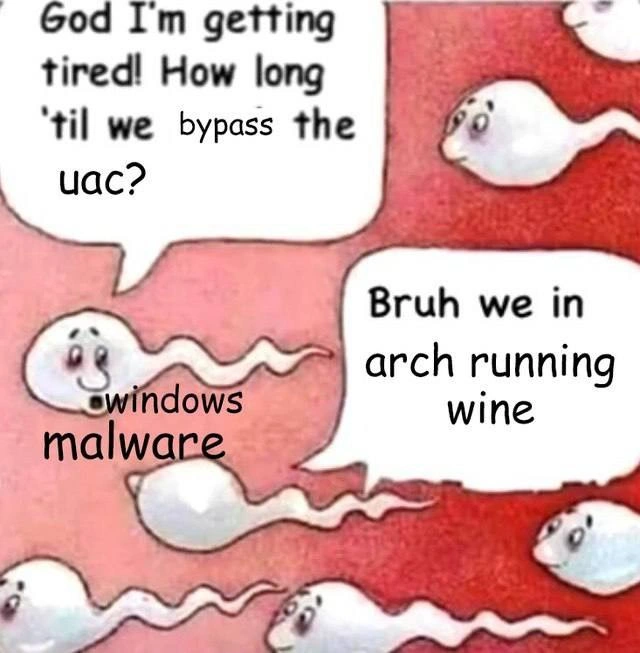
For experienced developers and security folks, this meme hits on a hilarious cross-platform mix-up. The image shows little cartoon sperm (a popular meme format for depicting a race or journey) with text overlay. The lead sperm (labeled “windows malware”) is panting: “God I’m getting tired! How long ’til we bypass the UAC?” (Looks like the meme creator even edited in the word “bypass” to emphasize that term). This little malware minion is clearly expecting a typical challenge it knows from Windows land – getting past that pesky UAC security prompt. But then another sperm on the right drops the bomb: “Bruh we in arch running wine.” In internet-speak, that’s the buddy saying, “Dude, relax – we’re on Arch Linux using WINE, not on a real Windows system at all.” 🐟💻
Why is this so chuckle-worthy for someone with a bit of tech background? It’s the absurdity of a malicious program being out of its element. Think of all the times devs have deployed something in the wrong environment or misconfigured something and nothing works as expected – it’s that, but with malware as the butt of the joke. Here you have Windows-centric malware, probably armed to the teeth with Windows tricks, unknowingly running inside Linux. It’s like a spy showing up to the wrong secret headquarters. The lead malware “sperm” is exhausted from running what it assumes is the long distance needed to bypass UAC – a common privilege escalation hurdle on Windows – asking how much further to go. The other piece of malware basically facepalms and says, “Bruh, this isn’t even Windows.” The punchline flips the situation: the malware’s elaborate plan is pointless, because the condition it’s preparing for (Windows UAC) doesn’t exist here.
This plays on a couple of insider themes:
Cross-Platform Confusion: Software (especially something sneaky like malware) often makes assumptions about its environment. Seasoned engineers know that running things in an unexpected environment can lead to ridiculous outcomes. In the security world, there’s an ongoing joke that “hey, at least most Windows viruses can’t run on Linux.” This meme pushes that to the extreme: not only is the virus on Linux, it’s trudging along under a compatibility layer, still thinking it’s in Windows. It’s the classic fish-out-of-water story. The malware is essentially lost in translation (or should we say, lost in emulation). Even though WINE is not technically an emulator, from the malware’s clueless perspective it might as well be an alternate reality where none of its usual landmarks are present.
Privilege Escalation Antics: Any senior dev who’s dealt with system security chuckles at the phrase “bypass the UAC.” It brings to mind all those hacky scripts and exploits that try to trick Windows into elevating privileges. Seeing the text in this goofy sperm-race format is funny because it’s such a serious, technical objective (bypassing UAC) being discussed by a wide-eyed cartoon sperm. It’s a deliberate incongruity. The lead malware sperm is acting like a frustrated junior dev on an all-night coding marathon: “I’m so tired, when do we get to the hard part?” The sidekick essentially says, “Buddy, you’re sweating over nothing.” For those in the know, it highlights how malware on the wrong OS is effectively neutered – a Windows virus on Linux (especially under WINE) often can’t do what it’s written to do, since it’s expecting Windows internals.
Arch Linux Cameo: Ah, Arch Linux. Mentioning Arch specifically is a wink to the tech crowd. Arch users are known for being DIY enthusiasts – the kind of folks who love to tinker with their system and often brag with "BTW, I use Arch". By specifying Arch, the meme implies an extra level of geekiness: not only is this Linux, but it’s a flavor of Linux that you typically find in the hands of power users. The image conjures an Arch user who perhaps intentionally ran a Windows malware sample under WINE, just to see what would happen (and to enjoy the irony). It wouldn’t be surprising – running random Windows malware on Linux is something you might do in a controlled way to observe its behavior without risking a real Windows install. The Arch user in question is probably smirking, knowing the malware is essentially in a hamster ball. This scenario is basically the malware meeting its arch-nemesis (pun intended) in the form of a Linux system that doesn’t play by Windows rules.
WINE’s Trickery: Experienced devs also appreciate the irony of WINE’s role here. WINE can be a lifesaver to run that one Windows-only app on your Linux box. But it’s also notorious for not perfectly supporting everything. Long-time users have stories of programs running a bit off in WINE, or not at all. Now imagine a piece of malware – which is basically a very specialized, often fragile piece of software – trying to run through this translation layer. It’s almost poetic justice: the malware is frustrated, not because an antivirus blocked it, but because the environment is weird. It’s like trying to run a diesel engine on gasoline – it just sputters. The second sperm’s line “we in arch running wine” says it all: we’re not in a native habitat. That line has a bit of a meme-ish tone itself (starting with “Bruh” sets a comedic, mock-serious tone), which seasoned meme connoisseurs recognize as the setup for a punchy reality check.
To a senior engineer or security analyst, this meme also taps into the satisfaction of seeing a bad thing fail. UAC bypass is normally a scary phrase (it means malware might successfully escalate privileges). But here, the malware is essentially defanged by its own ignorance. The little cartoon malware is worried about the wrong problem – it’s like a villain monologuing about how they will overcome the hero’s force field, not realizing the hero is standing right behind them. That dramatic irony – we know something the malware doesn’t – is what really sells the humor.
In summary (for the seasoned perspective): this meme cleverly combines knowledge of Windows security (UAC), alternate operating systems (Linux, especially Arch), and a compatibility layer (WINE) to set up a scenario where malware is completely out of its depth. It’s humor born from technical context: the kind of joke that makes infosec professionals giggle during conference coffee breaks. They’re laughing at the malware’s expense, thinking, “Heh, wrong playground, pal. You’re weaponized for Windows, and you ended up in a Linux sandbox – game over (and pretty funny, isn’t it?).”
Level 4: Permission Mirage
Under the hood of this joke lies a clash between two very different operating system security models. On a native Windows machine, User Account Control (UAC) is a cornerstone of the Windows NT security architecture. When a program wants to do something sensitive – say, install software or modify system files – Windows uses UAC to throw up a special prompt (often dimming the screen) via a process called Consent.exe. Technically, Windows runs most apps with a limited user access token by default, even if you're logged in as an admin. The UAC prompt is asking for permission to swap that limited token for a full administrator token. It’s like a locked gate that only opens if someone with the key (the user) explicitly says “yes, let this program through.” This mechanism lives partly in user-land (prompt and policy) and partly in kernel-land (token management) – a dance orchestrated by the Windows kernel and system processes (like lsass.exe managing security identities).
Windows malware authors know all about this gate, and they’ve found devious ways to slip through without ringing the doorbell. A UAC bypass is any trick that lets malware get admin-level control without showing that telltale prompt. There are many documented techniques: for instance, abusing auto-elevating binaries like fodhelper.exe or hijacking trusted system processes that are allowed through the gate. These exploits often take advantage of quirks in Windows’ design – maybe a registry key that a standard user can tweak which a high-privilege process later reads (a classic escalation), or launching a component that automatically runs with high privileges by design. In essence, sophisticated malware treats UAC like an obstacle in a heist: find a side door or convince the guard you’re harmless. Security researchers have catalogued numerous UAC bypass methods, and each Windows update often patches some known trick, while new ones pop up in advanced threat reports. It’s a cat-and-mouse game deep in the guts of Windows internals, involving things like COM interfaces, scheduled tasks, or DLL injection into privileged system processes.
Now enter WINE, which stands (recursively) for Wine Is Not an Emulator. WINE is a compatibility layer that allows Windows applications to run on Linux. It’s not a full Windows virtual machine; instead, it reimplements the Windows API calls and libraries in a way that translates them to Linux system calls and libraries. Underneath WINE, there’s the Linux kernel, which has its own security model (Unix-style file permissions, user IDs, etc.), completely different from Windows’ access token model. WINE acts as a sort of middleman: when a Windows program running under WINE thinks “let’s call a Windows function to create a file or show a window,” WINE catches that and calls the equivalent Linux functionality behind the scenes. It’s an incredibly clever illusion – the Windows program is running directly on the CPU (no emulation of the processor; it’s using the real machine’s instruction set), but all its calls to the operating system are being handled by WINE’s substitutes for Windows DLLs (like kernel32.dll, user32.dll, etc.), which in turn use Linux system services.
Crucially, WINE does not recreate everything about Windows. It focuses on application-level behavior. There’s no true Windows kernel or Ring-0 for WINE – the Linux kernel is in charge of low-level things. That means concepts like UAC – which depend on Windows’ idea of user privilege tokens and the support of the Windows kernel and system processes – have no real equivalent inside WINE. When a program under WINE tries to do something that would normally trigger UAC, one of two things can happen: either WINE has stubbed that functionality out (perhaps it just returns “okay” without really escalating anything), or it might attempt some simplified translation (often not needed, since on Linux you’d just run with the user’s permissions or get a permission denied from the Linux side). In practice, WINE usually runs as a normal Linux process under your user account. If that Windows program tries to do something requiring admin powers on Linux, it will just hit a wall if it doesn’t have permission – there’s no pop-up to elevate (you’d have to sudo the whole WINE process from the start if you wanted it to have higher privileges, which is rarely done). The UAC subsystem itself – the thing that creates that secure prompt and switches tokens – simply isn’t present. It’s a phantom gate: the malware thinks there’s a grand vault door to crack, but in reality, it’s an open field or at most a simple fence (the normal Linux permission system).
From a systems perspective, this is like a mismatch in protocol expectations. The malware is speaking “Windows security dialect,” but the OS is listening in “Linux.” The poor malware might call some Windows API like ShellExecuteEx with the "runas" flag (which on Windows means “please re-run this as admin and trigger UAC”) — on WINE, that call isn’t backed by the real machinery. The WINE developers might have implemented it to just execute the program normally (since there’s no concept of an “admin token” in the same sense). So the malware’s privilege escalation routine essentially becomes a no-op or fails silently. It’s as if it said the magic words to open Sesame, but in this universe those words have no power. Security aficionados appreciate that behind this funny scenario is a fundamental truth: many exploits and malware are highly context-specific. Take them out of the environment they were built for, and they can’t function. (In fact, advanced malware often checks for this – some strains deliberately detect if they’re running in a sandbox, VM, or WINE and will shut down or alter behavior to avoid exposing their tricks. They might look for oddities like the HKEY_CURRENT_USER\Software\Wine registry key, or differences in how certain obscure system calls behave under WINE. In this meme’s story, though, the Windows malware hasn’t caught on and keeps chugging along.)
So at this deep technical level, the humor comes from a privilege-escalation phantom. The malware is on a quest to elevate itself to system god-mode, expending energy to bypass a security barrier that, thanks to WINE on Linux, is basically a mirage. It’s a wonderfully nerdy example of how computer programs can’t “realize” when they’re out of their element. The fundamental OS and kernel assumptions baked into the malware’s code are broken. As a result, the malware’s grandiose attack sequence turns into a wild goose chase inside a Linux process. This is the permission mirage at play – a would-be intruder swinging punches at thin air, which is both technically fascinating and darkly funny to those of us who know what’s happening behind the scenes.
Description
Cartoon-style meme shows several white sperm cells swimming across a red background. The lead sperm’s speech bubble reads: “God I’m getting tired! How long ’til we bypass the uac?” with the word “bypass” inserted above the sentence in smaller font. A responding sperm on the right says, “Bruh we in arch running wine.” One sperm near the bottom is captioned “windows malware.” The humor hinges on Windows malware expecting to elevate past User Account Control (UAC) but discovering it is actually executing inside the WINE compatibility layer on an Arch Linux host, poking fun at cross-platform security assumptions and privilege-escalation tactics familiar to systems and security engineers
Comments
6Comment deleted
Windows trojan: “UAC bypass engaged, targeting NT AUTHORITY\SYSTEM!” Wine on Arch: “Relax, champ - you’re just uid 1000 with no CAP_SYS_ADMIN and journald’s already writing your post-mortem.”
The ultimate flex: spending hours configuring Wine to perfectly emulate Windows vulnerabilities, because even our malware needs to respect the AUR philosophy of 'if it exists, we can compile it from source.'
When your malware is so confused about its execution environment that it's trying to exploit Windows UAC while running in Wine on Arch Linux - a perfect metaphor for that moment when you realize your entire threat model was based on assumptions that don't apply. It's like spending hours crafting a sophisticated SQL injection attack only to discover the backend is MongoDB. The real vulnerability here isn't the UAC bypass; it's the fundamental architectural misunderstanding of where you're actually executing
Reminder for payload authors: fingerprint the OS - triggering a UAC chain under Wine just syscalls through wineserver, and the only thing that elevates is your embarrassment
Arch + Wine + Windows UAC: the layered exploit where 'elevated privileges' means emulating Microsoft's paranoia on your bleeding-edge regret
Windows malware primed for a UAC bypass, then realizes it’s running under Wine on Arch - privilege escalation doesn’t cross‑compile