Skip to content
DevMeme
2005 of 7435
GUIs See Threads And Run
Frontend Post #2234, on Nov 6, 2020 in TG

GUIs See Threads And Run

Why is this Frontend meme funny?

Level 1: Everyone Grabbing The Paintbrush

Imagine one person is carefully painting a picture while several friends keep grabbing the brush at the same time to help. They might finish faster, but they are more likely to smear everything. The joke is that graphical programs like order, and multithreading can turn "help" into chaos unless everyone takes turns properly.

Level 2: One Boss Thread

Multithreading means a program has multiple threads of execution running at the same time or overlapping in time. This can make programs faster or more responsive, especially when one part is waiting for files, network requests, or heavy calculations.

GUIs are graphical user interfaces: windows, buttons, menus, text boxes, and all the things users click. Many GUI systems use an event loop, which listens for actions like mouse clicks, key presses, timers, and repaint requests. The event loop usually runs on one main thread.

The problem is shared state. If one thread changes a button while another thread is drawing it, the program may crash, flicker, freeze, or show stale information. These are race conditions, where the result depends on which thread happens to run first. If threads wait on each other forever, that is a deadlock.

For newer developers, the practical pattern is: do slow work in the background, then send the result back to the UI thread before changing the screen. That keeps the app responsive without letting every thread grab the steering wheel.

Level 3: Main Thread Retreat

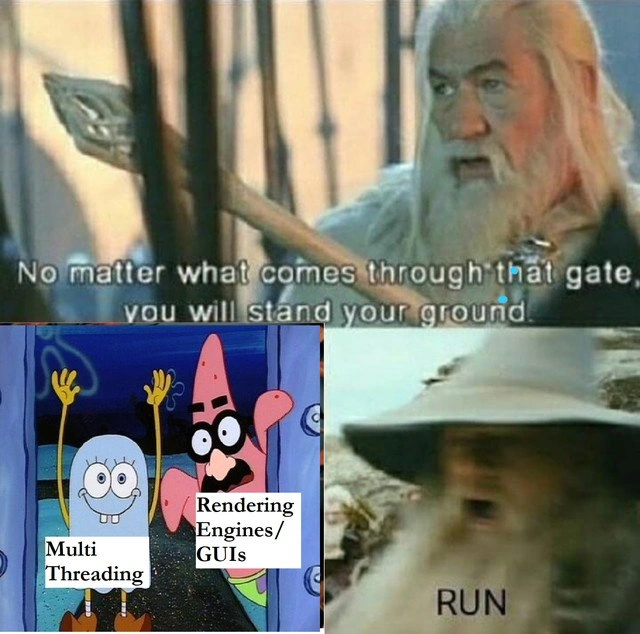
The meme sets up bravery and immediately undercuts it. Gandalf says:

No matter what comes through that gate, you will stand your ground.

Then the gate reveals:

Multi Threading

next to:

Rendering Engines/GUIs

and the final command is simply:

RUN

That is the correct architectural instinct, frankly. GUI frameworks and rendering engines often have a privileged main thread or UI thread where visual state is created, mutated, and painted. Touch that state from random worker threads and the system stops being a friendly abstraction and starts becoming a haunted timing diagram.

The senior-developer pain here is that multithreading is attractive for all the right reasons: keep the interface responsive, avoid blocking on I/O, spread CPU work across cores, and prevent a progress spinner from becoming performance theater. But rendering has strict sequencing requirements. Layout, input events, animation frames, compositing, GPU command submission, and widget state all need a coherent order. If two threads update the same UI tree at once, the bug may only appear on Tuesdays, under load, after the user drags a window across a monitor boundary. Very maintainable. Very professional. Please enjoy the deadlock.

This is why many GUI systems enforce rules such as "only update UI from the UI thread." The rule can feel restrictive until you have debugged a race where one thread destroys a button while another thread is painting it. The usual solution is not "never use concurrency." It is to isolate it: do heavy work in background threads, then marshal results back to the event loop with a queue, dispatcher, promise callback, signal, or scheduled task.

The joke also hits rendering engines specifically. Rendering is not just drawing pixels. It is a pipeline with invalidation, layout, style calculation, rasterization, buffering, and synchronization with display refresh. The more of that pipeline you allow arbitrary threads to mutate, the more locks you need. The more locks you need, the more likely you are to trade smooth frames for contention, priority inversion, or deadlock. Suddenly "make it faster with threads" has become "make the loading spinner freeze in HD."

Description

The meme combines Lord of the Rings and SpongeBob imagery. The top panel shows Gandalf saying, "No matter what comes through that gate, you will stand your ground." The bottom-left panel shows SpongeBob and Patrick with labels "Multi Threading" and "Rendering Engines/GUIs," while the bottom-right panel shows Gandalf with the text "RUN." The technical joke is that rendering engines and GUI toolkits often have strict main-thread or event-loop constraints, so naive multithreading can create race conditions, deadlocks, rendering glitches, or undefined UI behavior.

Comments

2
Anonymous ★ Top Pick The fastest way to find the UI thread is to touch it from another one and watch the framework confess.
  1. Anonymous ★ Top Pick

    The fastest way to find the UI thread is to touch it from another one and watch the framework confess.

  2. @UQuark 5y

    TUI good GUI bad

Use J and K for navigation