Skip to content
DevMeme
1579 of 7435
The Fundamental Truth of GUI Programming
CS Fundamentals Post #1763, on Jul 9, 2020 in TG

The Fundamental Truth of GUI Programming

Why is this CS Fundamentals meme funny?

Level 1: Always Listening

Imagine you have a teacher in a classroom full of students. The teacher’s job is to help whenever a student needs something. Now, how does the teacher know when to help? They keep watching and waiting. All day, the teacher stands at the front of the class, looking to see if any student raises their hand. If no one is asking a question at the moment, the teacher doesn’t leave – they just keep waiting patiently, always ready. Finally, a student raises their hand (that’s like an “event” in a program). The teacher immediately notices it and goes to help that student with their question (this is like the program handling the event). Once the student’s question is answered, the teacher goes back to the front of the room and continues watching for the next hand to go up. This repeats over and over until the school day is done and class is dismissed (which is like the program closing).

A GUI program (like a game or a photo editor or a web browser) works just like that teacher. It’s always listening for something to happen. The big loop in the program is like the teacher constantly watching the class: it runs continuously, checking “Has anyone clicked a button? Pressed a key? Moved the mouse?” If nothing has happened yet, the program just waits, the same way the teacher stands and watches a quiet classroom. The moment something does happen – say you click on a menu – the program springs into action to respond (maybe opening the menu or performing an action), just like the teacher responding to a raised hand. After doing that, the program goes back to waiting for the next thing you do.

The funny part of the meme is showing someone realizing this fact – that behind all the fancy pictures and buttons on the screen, the computer is basically just waiting in a loop like our ever-alert teacher. It’s a simple idea (just waiting and reacting), but we don’t usually think about it. So, when we discover that every GUI is powered by this never-ending waiting game, it’s kind of surprising and amusing – “Wait, it’s been doing that the whole time?” Yes, always has been! The computer is always at the front of the class, watching and ready to help, even if we never noticed it before.

Level 2: Hidden While Loop

So, what’s actually going on in “literally any GUI”? Let’s break it down in simpler terms. A GUI (Graphical User Interface) is the visual part of an application – think windows, buttons, text boxes – that you interact with using a mouse, keyboard, or touch. Unlike a simple script that runs a sequence of commands and ends, a GUI program needs to keep running and keep listening for your input as long as the window is open. It achieves this by using an event loop, which is essentially a while loop running continuously in the background.

In programming, a while loop repeats a block of code as long as a certain condition remains true. For example, you might write a loop to count from 1 to 10, but it stops when it reaches 10. An infinite loop is a loop that doesn’t naturally stop on its own – the condition always stays true, so it would run forever (unless something from outside breaks it). Usually an infinite loop is a bug (your program would hang or crash if it’s just looping nonstop without purpose), but in the case of GUIs, it’s actually a feature! GUI frameworks use a controlled infinite loop to constantly check for events. An event is anything that happens that the program might need to respond to – like the user moving the mouse, clicking a button, typing a letter, or the system telling the app to repaint a window or that a timer went off.

When you start a GUI application, somewhere deep in its code it likely calls a function to start this loop (often it's called something like run(), mainLoop(), or eventLoop()). From that point on, the program essentially says: “I’m going to keep running, and I’ll wait here until something happens. If a mouse click happens or a key is pressed, I’ll handle that, then go back to waiting again.” This is the program’s main control flow: instead of executing a sequence of steps and exiting, it loops and waits. The loop only ends when the program is told to close (for instance, you click the “X” button on the window or select File -> Quit). At that moment, the loop condition becomes false (like while(running) becomes false), and the program can break out of the loop and finally exit.

It might help to imagine what this looks like in code (in a simplified way):

running = True
while running:                            # loop runs as long as the app is "running"
    event = wait_for_event()              # this will pause until an event (user action) is available
    handle_event(event)                   # react to the event (e.g., call the button's function if clicked)
    # (the loop then repeats, going back to wait_for_event)

Every major Frontend framework or OS GUI toolkit does this. For example:

  • In a web browser, the JavaScript engine has an event loop that listens for user interactions on the page (and for things like network responses or timers) and calls your JS event handlers when those happen. You as a web developer don’t start or stop this loop; the browser does it for you.
  • In desktop application frameworks like Qt or Java Swing, you often initialize your UI and then call something like app.exec() (Qt) or just start your application’s main thread, and under the hood it enters a similar loop, dispatching events to the callbacks you defined (like your button’s onClick method).
  • In mobile development, say Android, there is a Main Looper running on the main thread. When your app launches, Android starts this looper which continuously checks a queue of events (touch events, screen draws, etc.) and sends them to the appropriate parts of your code (like an onClickListener or onTouch handler).

So “Literally any GUI” — whether it’s the calculator app on your computer, a video game, or the browser you’re reading this on — hides this giant while loop. It’s hidden because frameworks do this work for you; you rarely have to write while(true) yourself in modern high-level GUI development. Instead, you write handlers (functions) for actions, and trust that the system will call them. That trust is possible because of this event loop mechanism, which ensures your code gets called at the right times.

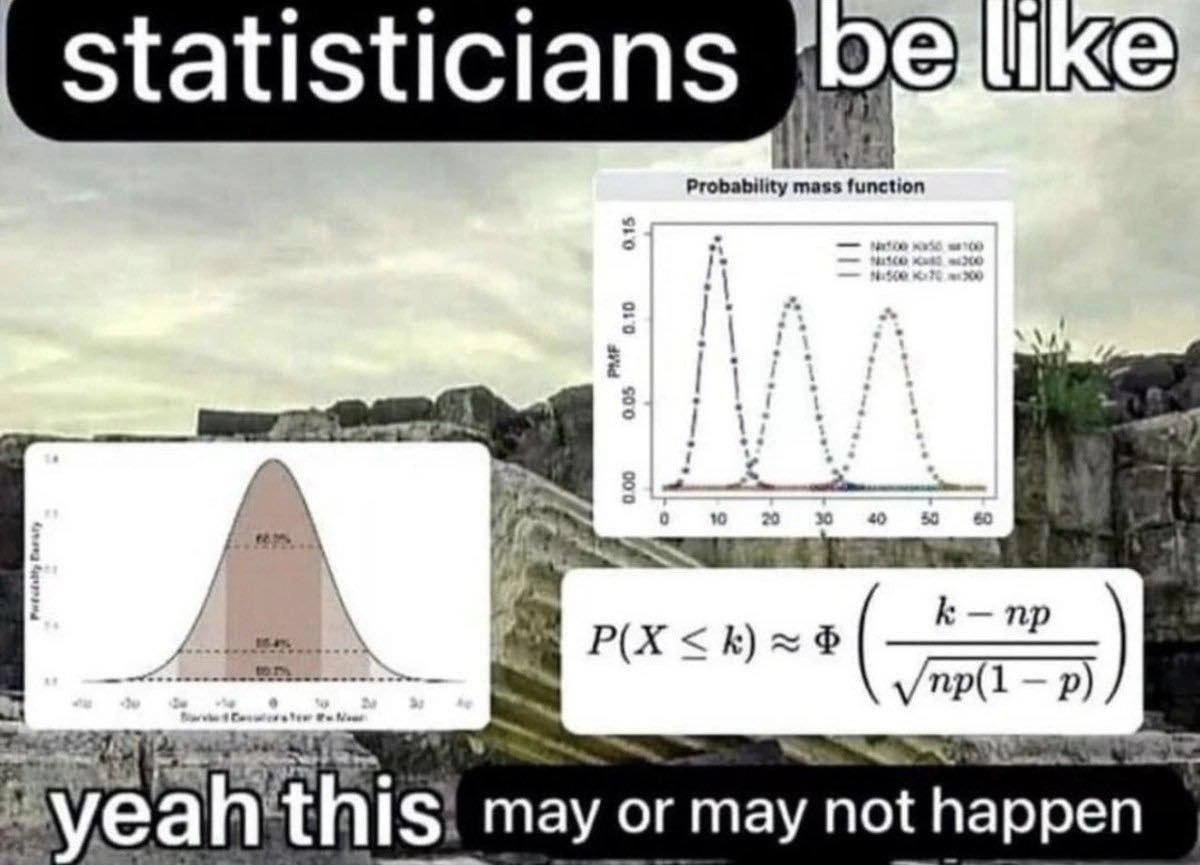
The meme text “Wait, it’s all one big while loop?” is the character expressing surprise upon learning this fact. And the answer “Always has been.” is the confirmation that yes, this has been true all along for every GUI. For a newer programmer, this might be a “mind = blown 🤯” moment – realizing that something seemingly complex operates on such a simple principle. Meanwhile, for those of us who have been around, it’s common knowledge – and pretty funny to see it depicted so bluntly. The image of an astronaut discovering the Earth is a loop is a metaphor: the world of GUIs = one big loop. And the armed astronaut saying “Always has been” is like the voice of a senior dev or CS professor reminding us that beneath all the fancy UI interactions, it’s the same basic mechanism working nonstop.

In short, every GUI program keeps running thanks to an infinite event loop that watches for user input and other events. This loop is why your apps don’t close immediately and why they can respond whenever you click or type. If that loop wasn’t there continuously checking for events, the GUI would just sit there and do nothing or quit. It’s a simple idea, but it’s the backbone of all interactive software!

Level 3: One Loop to Rule All

Front Astronaut: “Wait, it’s all one big while loop?”
Back Astronaut (gun drawn): “Always has been.”

This meme hilariously captures a junior developer’s shock at discovering the mundanely simple truth behind complex GUIs, with the senior dev ready to say “I told you so” (in classic Always Has Been astronaut-meme fashion). The humor hits home for experienced programmers because we’ve all had that realization: behind the flashy buttons, dropdowns, and responsive designs of literally every GUI, there’s an infinite loop quietly running. It’s a looping construct that continually checks for user input and system events — the GUI’s heart pumping events through the application.

Why is this funny (and true)? Because as developers climb the abstraction ladder, it’s easy to forget about basic control flow. High-level frameworks abstract away the gritty details. You create windows and buttons, write callback functions for clicks, and magically the right code runs at the right time. The magic is the event loop working behind the scenes. The first astronaut represents a developer suddenly connecting the dots: “Hold on, the program isn’t calling these handlers in sequence on its own... something else is going on… Wait, it’s all one big while loop?” The second astronaut — a seasoned dev — dryly replies “Always has been,” implying this has been a well-known fact forever (and perhaps thinking, “Did you really think events handle themselves?”).

From a seasoned front-end developer’s perspective, this scenario is so relatable. We remember learning that a GUI app doesn’t follow a straight start-to-finish path like our early console scripts. Instead, it sits idle in a loop, reacting whenever the user does something. This is known as event-driven programming. The meme’s punchline plays on that common knowledge. It’s TechHumor gold because it reveals a simple truth in a dramatic way — pointing a gun at the naïve question, as if saying “Yup, and you better accept it!”. It’s both absurd and accurate.

In real-world terms, think of any desktop application or mobile app. When it’s running, it’s typically stuck in a loop waiting for you: move the mouse, click a menu, press a key – those actions generate events that the loop catches. If nothing happens, the loop might just wait (maybe sleep briefly or block) and do essentially nothing. As soon as an event comes in, the loop wakes up and dispatches it: button clicked? Call the button’s onClick handler! Done handling? Go back to listening. Here’s a pseudo-code snippet that illustrates what you don’t see but is happening underneath every GUI framework:

// Pseudocode for a GUI application's main event loop
while (!app.shouldExit()) {                    // runs until the app is closed
    Event event = EventQueue.waitForEvent();   // block until an event (like click or key press) is available
    app.dispatch(event);                       // send event to the appropriate handler (the code you wrote)
    // (During this loop, the framework also redraws windows, etc., as needed)
}

The punch of the meme is that an InfiniteLoop – generally a scary concept that new programmers are taught to avoid – is actually a fundamental feature of GUI applications. It’s an open secret among developers. In fact, many GUI toolkits explicitly call this the “main loop” or main event loop. For example, in Python’s Tkinter library you call root.mainloop() to start that loop; in many game engines you write your own game loop; in web browsers, the JavaScript engine has an event loop constantly running to handle user interactions and async callbacks. FrontendDevelopment relies on this pattern heavily: that’s why you shouldn’t block the main thread in a web app – doing something like an expensive while loop in a button handler will freeze the UI, because you’ve hogged the very loop that needs to keep spinning to update the screen and process new events. Ever see a program window go white and say “Not Responding”? That’s often because its event loop got stuck or overwhelmed (maybe by an accidental infinite loop or a long calculation), so it can’t process new input or repaint the window. The app appears frozen, because effectively, the loop that drives it is frozen.

The meme is a nod and a wink among developers: the astronaut with the gun (the seasoned developer or computer science truth) asserts that yes, under all the abstractions, every interactive UI is fundamentally doing the same simple thing. It’s a bit like pulling back the curtain on the Wizard of Oz — you expect a grand wizard, but find an ordinary man cranking a machine. Here our “wizard” is a humble while loop churning through events. The astronaut meme template itself is the perfect vehicle for this joke: it’s always about uncovering a surprising truth that was there all along. In this case, the vast galaxy of GUI frameworks – from Windows apps to Mac, from Android to Swing, from Unity games to web browsers – are all planets orbiting the same concept: a big, spinning event loop at their core. DeveloperHumor at its finest! Once you learn this, you’ll never look at that unresponsive spinning beachball cursor the same way again – you’ll know somewhere an event loop is in trouble!

Level 4: Event Horizon of GUIs

Under the hood of every graphical interface lies a fundamental event-driven architecture that computer scientists have embraced for decades. In fact, the concept of a main event loop is a cornerstone of interactive computing. This infinite loop continuously waits for input events (like mouse movements, clicks, key presses) and dispatches them to the appropriate part of the program. It’s an elegant solution born from early OS and UI design: since the computer can’t predict when you’ll click a button, it must constantly be ready — essentially looping forever — to respond whenever an event occurs.

This design reflects an inversion of control: rather than your code running top-to-bottom and deciding when to get input, the system framework (OS or GUI library) takes control and repeatedly asks, “Any events to handle now?” The moment an event arrives, the framework invokes your callback or event handler, letting your code react. After handling the event, control returns to the loop, which goes back to waiting. This cycle repeats indefinitely until the program is closed. The theoretical foundation here is that an interactive program can be modeled as a loop processing events from an external source — a concept akin to a state machine that transitions on inputs. Formally, if we think of the program’s state $S$ and an incoming event $E$, the GUI’s main loop is continually doing something like:

S = initial_state
while (program is running):
    E = wait_for_event()        // block until next user input or system message
    S = handle_event(S, E)      // update state based on event
    render_ui(S)                // update the GUI to reflect new state

This approach dates back to early windowing systems (think of the Xerox Alto or the original Macintosh), where the OS had to manage multiple user-driven tasks concurrently. They introduced a central message queue: hardware interrupts (keyboard, mouse) would be turned into software events and placed in this queue. The GUI’s loop would pull from this queue one event at a time. This design ensured interactive responsiveness: the loop sits idle when nothing happens (often by blocking on the queue, so it doesn’t burn CPU), and wakes up as soon as an event arrives. It’s a practical implementation of the theoretical concept of event-driven programming — a paradigm shift from the older batch processing model to interactive systems.

Critically, this infinite loop isn’t like a runaway bug that pegs your CPU. It’s a controlled loop, often using system calls like select() or interrupt-driven signals to sleep until something needs attention. The loop only exits when the application is shutting down (for example, when you click “Quit” or close the window, a special event tells the loop to break out). This is why every GUI program keeps running until you close it: internally, it’s stuck (by design) in that event-processing loop. Without this loop, the program would launch, do a bit of setup, and then immediately exit, which is clearly not what we expect from something like a web browser or text editor that should stay open awaiting our input.

From a systems perspective, the always-running loop is inevitable. Whether it’s your OS’s window manager, your game engine’s frame loop, or your browser’s JavaScript event loop, the pattern is universal. We sometimes jest that it’s “loops all the way down,” an homage to the saying “turtles all the way down.” The meme’s cosmic imagery of astronauts gazing at “Literally any GUI” reveals this infinite loop as the hidden engine of our interactive universe. It humorously exposes how even the most modern, high-level user interface is grounded in a simple, almost primitive concept: a while(true) loop that has always been running in the background.

Description

This image uses the 'Always has been' meme format, which features two astronauts in space. One astronaut, looking at a large, dark blue celestial body, is having a shocking realization. The celestial body is labeled in yellow text as 'Literally any GUI'. The astronaut asks, 'Wait, it's all one big while loop?'. The second astronaut, standing behind the first and pointing a pistol at them, replies with the punchline, 'Always has been'. This meme humorously reveals a core concept of event-driven programming that underpins almost all Graphical User Interfaces (GUIs). At a fundamental level, GUI frameworks operate on an 'event loop' or 'message loop' - essentially an infinite 'while(true)' loop - that continuously listens for user input (like clicks and keystrokes) and system events, dispatching them to be handled. For developers, especially those moving from procedural to event-driven programming, this realization is a foundational 'aha' moment

Comments

7
Anonymous ★ Top Pick My therapist told me to stop writing infinite loops. Then I became a GUI developer and now I get paid to build my entire career around one
  1. Anonymous ★ Top Pick

    My therapist told me to stop writing infinite loops. Then I became a GUI developer and now I get paid to build my entire career around one

  2. Anonymous

    Funny how 25 years of UI frameworks later, we’re still shipping while(true){GetMessage();} - we just bundle 1500 npm packages around it and call it Electron

  3. Anonymous

    The real plot twist is when you realize your reactive framework's virtual DOM diffing algorithm is just a fancy way to avoid admitting you're still polling for changes 60 times a second

  4. Anonymous

    The moment every junior realizes their elegant React component tree, sophisticated state management, and carefully crafted animations all boil down to `while(true) { processEvents(); render(); }` - and that this 1960s pattern still powers every GUI framework from Electron to SwiftUI. We've added layers of abstraction, reactive paradigms, and virtual DOMs, but at 3 AM when you're debugging why your UI froze, you remember: it's event loops all the way down, and you just blocked the main thread

  5. Anonymous

    GUI architecture: an infinite message pump (while(msg = dequeue) dispatch(msg)); everything else - MVVM, Redux, observables - is just us negotiating re‑entrancy and pretending it’s not one giant loop

  6. Anonymous

    Senior devs debating microservices while knowing every GUI is just a battle-tested while(true) awaiting the next event

  7. Anonymous

    Every “declarative” UI eventually compiles to while(true){pump(); dispatch(); repaint();}; the rest is bikeshedding over who owns the main thread and how much reentrancy your state can survive

Use J and K for navigation