The Illusion of Choice in the Modern Browser and App Ecosystem
Why is this WebDev meme funny?
Level 1: All the Same Flavor
Imagine you go to the store and buy a bunch of different cereals – one looks like fruity rings, one looks like chocolate puffs, and one looks like colorful balls. But when you pour them out, you discover they all taste exactly the same because they’re made of the same stuff. You’d probably laugh and think, “Huh, they fooled me – different box, same cereal!” That’s the joke here, but with computer programs. The picture is joking that a lot of the apps on your computer (your chat app, your music app, your code editor, even some web browsers) are basically the same thing inside, just with different packaging on the outside. They all rely on the same core program (Google’s Chrome technology) to run. It’s funny in a silly way: it’s like finding out all your toys were built by the same company from the same parts, even though they look different. The feeling you get is a mix of surprise and “oh, of course they did that!” People who make software chuckle at this because it’s a truth we all notice – our computers are running a bunch of Chrome-like mini-browsers dressed up as other apps. It’s a little bit ridiculous and that’s why it makes us smile. In simple terms: no matter what’s on the label, everything in the bowl is just Chrome Crunch. Different colors, same flavor!
Level 2: Electron Everywhere
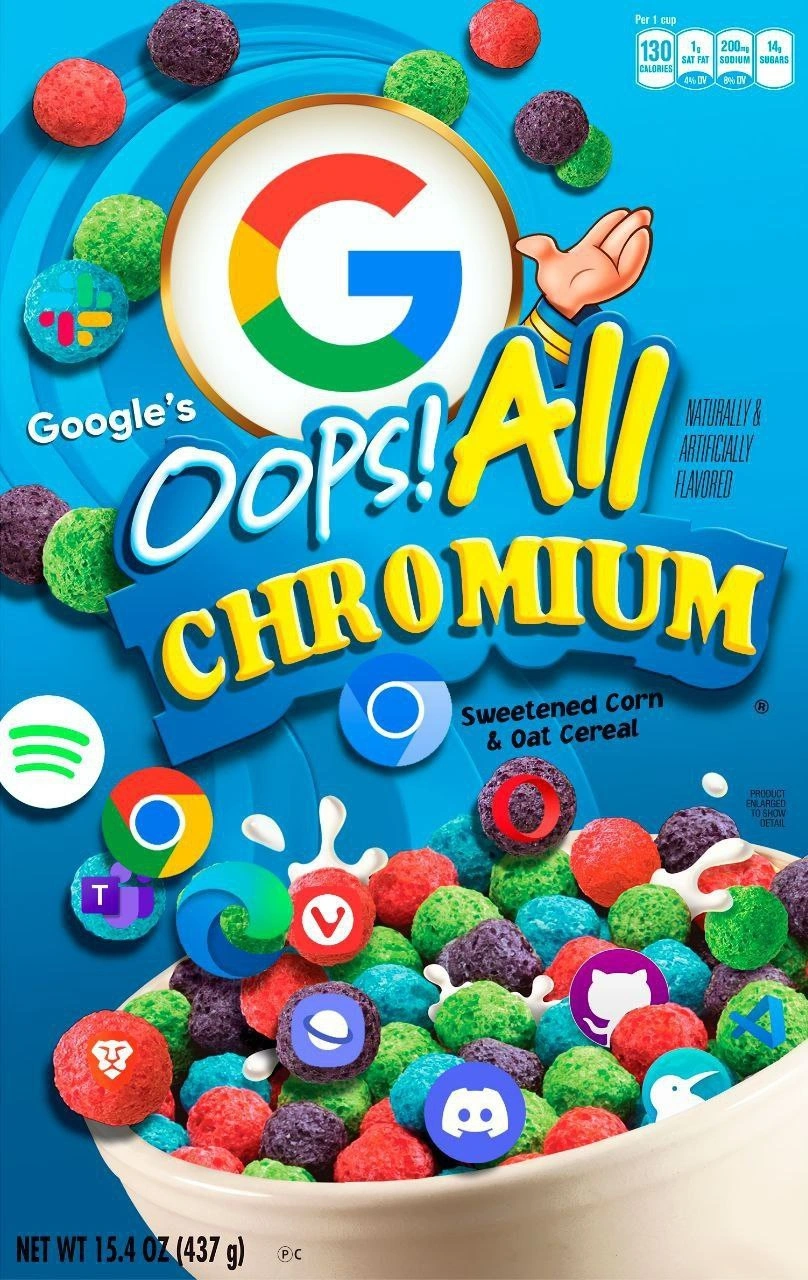
For those newer to the software world, let’s break down what’s going on. The term Chromium refers to the open-source web browser project created by Google. It’s basically the engine or “brain” inside Google Chrome – responsible for displaying web pages (rendering HTML/CSS) and running JavaScript. Now, normally you’d expect a web browser (like Chrome, Edge, or Brave) to use that engine. But the twist is that many desktop applications you use every day are also built on this browser engine. The meme jokingly shows a cereal bowl filled with logos of apps like Chrome (the browser itself), Edge (Microsoft’s browser), Brave, Vivaldi, and Opera (alternative browsers) – and mixed in are logos of Slack (a chat app), Spotify (music streaming), Microsoft Teams (team collaboration), Discord (gaming chat), GitHub (likely GitHub’s desktop client), Visual Studio Code (popular code editor), and more. All these seemingly different programs actually have something in common: they run on the same underlying technology, Chromium. In other words, they’re a lot more alike under the hood than you’d think, just as all the colorful cereal bits are actually the same sugary concoction with different food coloring.
How did all these apps end up using a browser engine? The answer is Electron. Electron is a software framework that allows developers to build cross-platform desktop applications using web technologies (HTML, CSS, JavaScript). If you know how to make a website, you can make a desktop app with Electron – it will just behave like a desktop window instead of a browser tab. Electron works by bundling Chromium (for rendering the interface) and Node.js (for back-end capabilities) into a single package. So when you install an Electron-based app, you’re actually installing a mini Chrome browser plus the app’s code. Slack, VS Code, Discord, Teams – all of these are what we call Electron apps. That’s why their interfaces feel web-like, and it’s why, for example, Slack on desktop often has the same look and features as Slack in a web browser. The meme’s phrase “All Chromium” points to this fact: Electron apps = Chromium inside. Even Spotify’s desktop client is effectively a web UI underpinned by a browser engine (Spotify uses a similar web wrapper approach). And the browsers like Edge, Opera, etc., chose to base themselves on Chromium too (they take Chromium’s code and add their own features on top). So on your PC, a huge number of programs are running the same core engine even if they have different names and purposes.
Let’s clarify some terms in simpler words. A browser engine is the part of a web browser that takes web code (HTML, CSS, JavaScript) and turns it into the interactive pages you see. Chromium’s engine (called Blink for rendering and V8 for JavaScript execution, though we don’t need to get into those names) is one of the most advanced and widely-used engines. Now, when we say software bloat, we’re talking about software that uses more memory, storage, or CPU power than seems necessary. Electron apps have a reputation for being a bit “bloated” because each one brings along that whole engine. Imagine every time you wanted to play a different song, your music player brought its own full band to your house instead of just using a radio – lots of duplicate effort! In computing terms, if you open three Electron-based apps, you’ve essentially started three separate Chrome browsers in the background. That can eat up a lot of RAM. This is what we mean by performance overhead: extra work your computer has to do, or extra resources it consumes, to accomplish the same task. Electron makes development easier but at the cost of higher overhead when the app runs.
Why do developers use Electron then? One big reason is cross-platform compatibility and speed of development. With Electron, a team can write their application once in JavaScript (like a web app) and deploy it on Windows, Mac, and Linux without rewriting the code for each operating system. It’s incredibly empowering for small teams or web developers who aren’t experts in native desktop programming. It also ensures the app looks and behaves consistently everywhere (since it’s basically a Chrome window). This is sometimes called an IndustryTrend of “JavaScript everywhere” – using web tech beyond the browser. However, the trade-off is that you’re sort of locked-in to this framework (that’s the framework_lock_in mentioned). Once your app relies on Electron and Chromium, it’s non-trivial to switch to something more lightweight or different; you’d have to rebuild a lot from scratch in another technology. So many teams just stick with it and live with the heavy resource usage. It’s a bit like how all cereals might stick with a sugary recipe because it sells, even if it’s not the healthiest – companies stick with Chromium-based tech because it gets the job done with less upfront cost, even if it’s not the most lightweight solution.
We can actually see how an Electron app works with a tiny example. When a developer creates an Electron app, they write code to open a window and load a web page (which can be online or stored locally with the app). It’s literally like launching a browser that goes to a specific page (the app’s interface). For example:
// Example of an Electron app creating a browser window
const { app, BrowserWindow } = require('electron');
app.whenReady().then(() => {
// Create a new window (which under the hood is a Chromium browser window)
const win = new BrowserWindow({ width: 800, height: 600 });
// Load the app's interface, which could be an online URL or local HTML file
win.loadURL('https://my-app.example.com/');
});
In this snippet, BrowserWindow is essentially a Chrome window without the regular toolbar. The loadURL could point to, say, index.html of an app packaged with Electron, or even an actual website. So if this were Slack, it would load Slack’s web app interface and present it as a desktop application window. To the user, it looks like a native app for Slack. But as the meme jokes, it’s really Chrome in a different outfit. The result is you get nice integration (it’s on your desktop, in your taskbar, you might not realize it’s a web page), but behind the scenes your computer is working harder – it’s running a whole browser just for that app.
The cereal-box meme format here is a form of TechHumor that mixes developer reality with a pop culture reference. “Oops! All Berries” was a funny edition of a cereal where only the rainbow-colored berry pieces were in the box, as if someone skipped the normal pieces. By saying “Oops! All Chromium,” the meme humorously suggests that somehow every application we use ended up filled with the same thing (Chromium) and asks: Was that an accident? Oops! It resonates with developers because it highlights a situation we often groan about. If you’re new to this, think about the times you might have heard your computer’s fan kick in or noticed an app was using a lot of memory. Often, Electron apps are the culprits. Developers share memes like this because it’s a lighthearted way to poke at the fact that we’ve perhaps overused one tool for everything. It’s part of meme culture in software circles to turn these complaints into jokes that only insiders fully appreciate. So when you see that bright blue cereal box with all those logos, now you know: it’s saying “all these different-looking apps are really the same thing on the inside – Chromium everywhere!”
Level 3: The Chromium Monoculture
At first glance, this parody cereal box proclaims “Oops! All Chromium”, hinting that a monoculture has taken over our desktop applications. In the image, every colorful cereal piece sports a different app or browser icon – Chrome, Edge, Brave, Vivaldi, Opera, Slack, Spotify, Microsoft Teams, Discord, GitHub, Visual Studio Code, and more – yet all share the same core ingredient: Google’s Chromium. The huge Google “G” logo as the cereal mascot is a tongue-in-cheek nod to Chrome’s engine being inside everything. This oops_all_chromium_meme is lampooning how many modern apps, even those from Google’s rivals, are essentially BrowserEngine instances under the hood. Just like an “Oops! All Berries” cereal box contains nothing but one type of sugary morsel, the joke here is that today’s desktop landscape is “Oops! All Chrome,” with a single browser core flavoring every “bite” of software. It’s a satirical take on an IndustryTrend where our supposedly diverse apps have converged into one framework lock-in – a Chrome-based tech stack for almost everything.
Why is this funny (or frightening) to experienced engineers? Because it’s so true. A slew of desktop applications nowadays are built using Electron, a framework that packages web apps as desktop apps by bundling a Chromium browser runtime. That means when you run Slack or VS Code, you’re effectively launching a dedicated Chrome instance wrapped around that app. Each Electron-based app (ElectronApps like Slack, Discord, or VSCode) isn’t a slim native program – it’s a mini web browser loading a local web page that is the app. In the meme’s cereal bowl, those app icons all being present together illustrates exactly this “different shapes, same substance” situation. Engineers recognize the logos and realize they’re all variations of Chrome in disguise. Even traditional web browsers shown (Chrome, Edge, Brave, Opera, Vivaldi) are basically the same under the hood now: they all use the Chromium engine (Google’s open-source project). Microsoft’s Edge, for example, infamously gave up its own browser engine (EdgeHTML) and switched to Chromium in 2019, essentially admitting “if you can’t beat ’em, join ’em.” So the BrowserWars have led not to a variety of engines, but to one engine to rule them all. This is the chromium_monoculture the meme highlights – one engine dominating across the board, much like one cereal flavor filling every box on the shelf.
From a senior developer perspective, the meme hits on the software bloat and performance overhead that come with this trend. Shipping an entire browser runtime with every desktop app means a lot of duplicate weight. It’s like every new appliance you buy comes with its own built-in power generator – convenient independence, but terribly inefficient. Developers joke (with a hint of pain) about how opening a chat app or a code editor now spawns multiple chrome.exe processes on their machine. If you’ve ever hit Ctrl+Shift+Esc and checked the Task Manager while running Slack, Teams, or VS Code, you’ll often see Chrome-like processes gobbling memory – because surprise! they are Chrome under the hood. Each app brings along its own Chromium renderer, its own V8 JavaScript engine, and even a hidden Chromium-based UI layer. This can lead to comically excessive resource usage: a simple to-do list app built in Electron might consume hundreds of MB of RAM, because it’s basically running a headless Chrome tab for the interface. That’s the application_bloat the meme mocks. Seasoned engineers have felt the pain of Electron apps being heavy or slow, so seeing a “nutrition label” on the box (“130 Calories” etc.) is hilarious and on-point – it’s as if every Electron app should come with a warning about how much memory and CPU it’ll eat up. Naturally & Artificially Flavored, indeed: natively it’s the same Chromium “flavor” everywhere, artificially packaged to taste like a native app.
There’s also an implied commentary on frameworks and trade-offs. Why do we end up with “All Chromium” in the first place? Because using web tech for everything is tempting. JavaScript, HTML, and CSS are familiar to many developers, and Chromium/Electron provides a quick path to a cross-platform app. Instead of writing separate native applications for Windows, macOS, and Linux, companies can build one web app and deploy it everywhere with Electron – an IndustryTrend_Hype that promises developer productivity and faster releases. It’s the ultimate reuse: your desktop app is basically your web app in a wrapper. This reduces development effort but incurs a massive runtime overhead. It’s a classic engineering trade-off: convenience vs. efficiency. The meme exaggerates it to comedic effect – suggesting we’ve taken the path of least resistance so far that everything is just a Chromium browser now, even things that aren’t web browsers by name. The phrase “Oops!” implies this might have been a bit of an accident or blunder by the industry, as if we woke up and suddenly realized every app tasted like Chrome. The humor has a TechHumor bite because it’s a shared joke among devs who are slightly horrified that even their text editor and music player are essentially Chrome tabs. It’s meme-culture savvy too: packaging this critique as a cereal box is a playful MemeCulture reference, making the truth go down easier – kind of like spoonful of sugar (or 14g of it, according to the nutrition panel) to help the medicine (or bitter truth) go down.
Finally, there’s an undercurrent of concern masked in the joke: a BrowserEngine monopoly means less diversity in the ecosystem. Older devs recall when we had multiple rendering engines competing (Gecko for Firefox, Trident for IE, Presto for Opera, etc.), each with quirks and innovations. Now, with Chromium everywhere, Google’s decisions about web standards and performance optimizations affect almost every application. It’s a subtle “brand takeover,” as the massive Google “G” on the box art suggests. Even apps that aren’t made by Google end up dependent on Google’s engine. This framework_lock_in makes it hard to escape Chrome’s orbit – once your whole app and toolkit rely on Chromium, you’re kind of stuck with it. In a sarcastic veteran tone, one might say, “Chrome won, and now we’re all living in it.” The meme manages to capture all these complex feelings – convenience, frustration, irony, a bit of nostalgia for leaner times – in one brightly colored, satire-laced image. Developers laugh at it because it’s a mirror of our reality: our desktops have become a big bowl of Chrome-flavored cereal, and every spoonful (every app launch) tastes exactly the same. It’s funny, a tad absurd, and a little frightening – a perfect recipe for an engineer in-joke.
Description
A vibrant and colorful parody of a cereal box, modeled after Cap'n Crunch's 'Oops! All Berries'. The box is bright blue with the brand 'Google's' and the product name in large yellow letters: 'Oops! All Chromium'. At the top, the Google 'G' logo replaces the usual brand mascot. The main visual is a bowl filled with colorful, spherical cereal pieces splashing in milk. Instead of berries, these cereal pieces are adorned with the logos of numerous popular web browsers and desktop applications, including Google Chrome, Microsoft Edge, Opera, Vivaldi, Brave, Discord, Spotify, Slack, Microsoft Teams, GitHub Desktop, and Visual Studio Code. The entire image serves as a commentary on the tech industry's increasing reliance on Google's open-source Chromium project. The joke is that while users perceive a wide variety of choices in browsers and apps, a vast number of them are fundamentally built on the same core technology (Chromium or frameworks like Electron that use it), creating a technological monoculture under the illusion of diversity

Comments
36Comment deleted
My therapist asked why I have trust issues. I showed her my desktop, filled with a dozen different 'browsers' and apps. She didn't get it. They're all just Chromium in a different trench coat
I used to sweat fitting code into 64 KB; now my sticky-note app ships its own Chrome and calls itself “lightweight” - pass the Oops! All Chromium, I’m already carb-loading my RAM
The real tragedy isn't that everything's Chromium - it's that we're all maintaining separate forks of the same V8 engine bugs while pretending our 'unique' browsers offer meaningful differentiation beyond which telemetry endpoints they phone home to
When Google said they were going 'all in' on AI, they meant it literally - now every Chromium-based browser comes pre-loaded with more AI features than actual features you asked for. It's like finding out your favorite cereal replaced all the marshmallows with 'AI-optimized nutritional suggestions.' At least with this version, you can still disable JavaScript
ADR: native desktop vs web - approved “Oops! All Chromium”; PMs got one codebase, SREs got a 2GB baseline RSS per seat
Modern desktop strategy: choose which copy of Blink to bundle; Electron turned the browser engine into our new libc - with a 300MB hello world and one vendor owning your rendering pipeline
Cross-browser testing reduced to 'works in Chromium?' - until the monoculture blinks
Absolutely true Comment deleted
except firefox Comment deleted
And safari Comment deleted
and any browser on iOS :P Comment deleted
*any browser on iOS based OS Comment deleted
based OS Comment deleted
Well iPadOS, tvOS, VisionOS Comment deleted
*any browser downloaded from the iStore or what it's called. You can technically have chromium on iOS if you jailbreak it I think Comment deleted
They are arrogant they call is (the) App Store because they were the first Comment deleted
they weren't the first if you count linux package managers as the same thing. Which I do. Comment deleted
But linux is not locked down Comment deleted
neither is android (depending on vendor) Comment deleted
True I never said it would be fully open Comment deleted
Also thats true but who would port it if you cant even spread it and the built in one just does the job barely good enough Comment deleted
idunno, I'm just nitpicking here Comment deleted
*iDunno Comment deleted
They still on Webkit? That would technically be: Chromium (obsolete) Comment deleted
no, chromium stole webkit's design, but not any of their code. Comment deleted
They took most of the code as it was opensource in the first place as Apple took it from KDE. KHTML -> Webkit -> Blink Comment deleted
yeah but they did rewrite is so much that none of the original code is left Comment deleted
That's slightly different statement. :-) I remember there being a period of code sharing after the Google forked it, but it's quite feasible that current Apple Webkit has been since completely rewritten. Blink is pretty much from scratch rewrite too, as you have to do when you want to fix multithreading issues. Comment deleted
chromium is a plague Comment deleted
Nope, chromium is a solution. Even the solution. Comment deleted
EXPLAIN SELECT 'oops! all Chromium' FROM 'Google' Comment deleted
encountered LazyException: no i dont wanna Comment deleted
sudo !! 😝 Comment deleted
user @SamsonovAnton is not in sudoers file. this incident will be reported Comment deleted
All of these apps are build on top of chromium. Some of them are built on top of Electron, which uses chromium to render ui. You might think you're unique by choosing opera or vivaldi instead of google chrome, but your ass is still controlled by google Comment deleted
Firefox 4 Lyfe Comment deleted