Skip to content
DevMeme
662 of 7435
The Recursive Loop of Unhelpful Error Messages
Bugs Post #750, on Oct 23, 2019 in TG

The Recursive Loop of Unhelpful Error Messages

Why is this Bugs meme funny?

Level 1: The Missing Name

Imagine you have a friendly robot that wants to greet you. It says, “Good evening, ...,” but then it doesn’t actually say your name because it never learned it. Instead, it just says a silly placeholder word. It’s like if your teacher wrote you a nice letter but forgot to fill in your name, so it starts with “Dear ______.” The result is both polite and completely wrong! That’s what happened here – the computer was trying to be friendly, but it blanked out on the name it was supposed to use. So it ended up calling the person “undefined,” which is just a nonsense way of saying it had no name to put there. It’s funny and a little absurd because obviously you’re not really “undefined” – the poor thing just didn’t know what to call you.

Level 2: Missing Name Tag

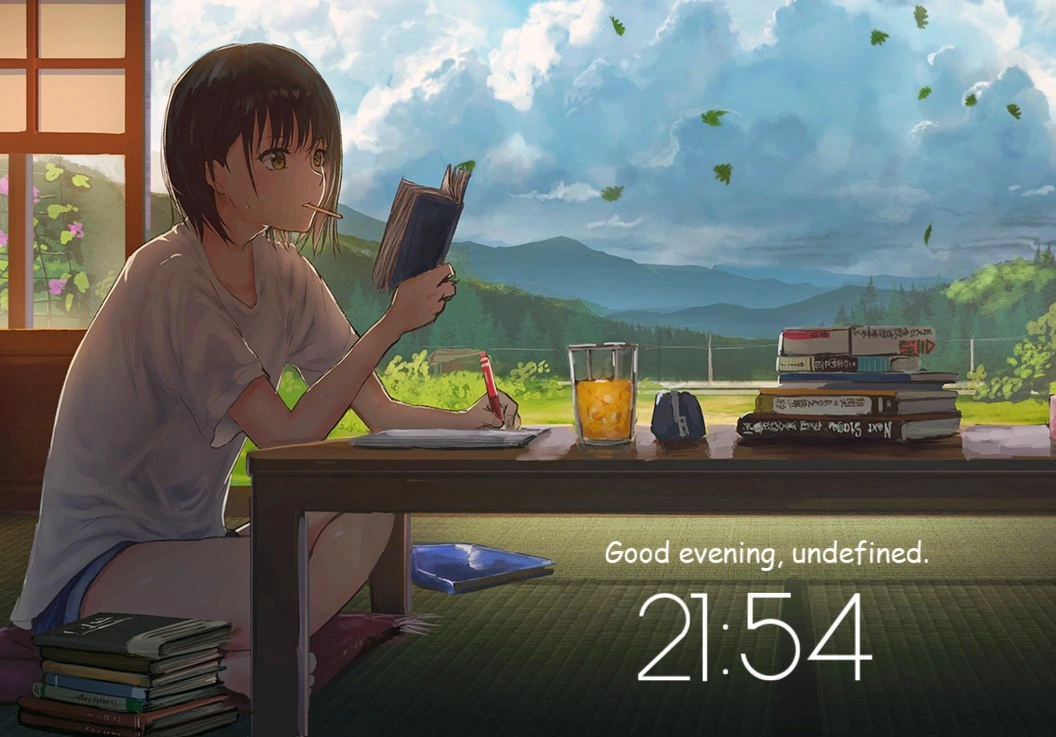
Let’s break down what’s happening in simpler terms. The picture shows a personalized dashboard – basically a custom home screen or widget that greets you by name and shows info like the time. Normally, it would say something like “Good evening, Alice.” Here, it says “Good evening, undefined.” That word undefined is not a name at all – it’s actually a programming term. In JavaScript, undefined means “no value assigned.” It’s what you get when a variable exists but hasn’t been given any data.

So why is that appearing on a pretty user interface? Because of a little bug in the front-end code. The app tried to display the user’s name, but the name wasn’t set, and the code didn’t handle that situation. Imagine the code was something like:

let userName;  // userName has no value, so it's undefined by default
let greeting = "Good evening, " + userName + ".";
console.log(greeting);  // -> "Good evening, undefined."

If userName doesn’t get defined, then "Good evening, " + userName literally produces the text "Good evening, undefined." The dashboard ended up showing exactly that to the user. In a sense, the software forgot to fill in the blank with your name, and just left a raw placeholder word. It’s like if someone wrote you a form letter and forgot to replace <Name> with your actual name – you’d see “Dear , …” on the paper. Here, the app left the technical placeholder in place of your name.

For a new developer, this is a classic front-end mistake: not initializing a variable or not checking if the data is loaded before using it in the UI. The tag undefined_variable_greeting basically means "a greeting where the name variable was undefined." It’s an oops moment where you realize the app is greeting everyone as “undefined” instead of using their real names. That’s definitely not a good user experience! It might confuse a normal user: they could be wondering, “Why is it calling me undefined? Did I do something wrong?”

This issue falls under Bugs because it’s a coding error, plain and simple. And it's specifically a front-end bug since it appears in the part of the software that runs in your browser and displays the interface. The UX/UI aspect comes in because a good user interface shouldn’t show programmer jargon or errors to the user. Calling the user "undefined" is a small glitch, but it can momentarily break the personal, friendly feeling the app was going for.

How does something like this slip through? Often, developers test their code with expected data (for example, with their own name set up) and everything works on their machine. But if a new user has no name in the system, or something goes wrong while loading the name, this edge case might be missed. That’s why teams do code review and have QA testing – to catch things like this – but nobody’s perfect. Occasionally a bug like this makes it to production (the live app that users see). It’s a bit embarrassing for the devs, but also kind of funny, because once you notice it, it’s such an obvious mistake. The team might laugh and say, “Whoops, we forgot to handle the case when the user’s name isn’t set!” and then quickly fix it.

For someone starting out in development, the lesson here is: always consider what happens if the data you expect isn’t there. A simple fix in this case is to give a default value for the name or to change the greeting if no name is available. For example, the code could check if (userName) before using it, and if not, just say “Good evening!” without a name, or use a generic term like “Good evening, guest.” That way, the greeting still works even if we don’t have a name on hand. This kind of defensive coding prevents the UI from showing weird internal values to users.

In summary, the meme is highlighting a small front-end bug where the app was supposed to greet you by name but ended up using a programmer’s placeholder word instead. It’s a relatable blunder for many developers. Even early on, most of us have seen an “undefined” or similar strange word pop up when our code didn’t quite do what we intended. It’s a gentle reminder that computers will print out whatever you tell them to – so we have to be careful to tell them the right thing!

Level 3: Undefined Behavior at Sundown

This meme nails a classic frontend fiasco in a beautifully ironic way. We have what looks like a momentum-style dashboard – one of those personalized new-tab pages with a scenic background (here an anime_study_aesthetic of a tranquil tatami room and a lush valley beyond) – displaying the greeting: “Good evening, undefined.” For seasoned developers, that one word, undefined, immediately raises a flag. It means the app tried to greet the user by name, but that name variable was never set – a classic uninitialized_username bug. The result? The dashboard politely calls you "undefined" as if that were your actual name. At least it's courteous about your identity crisis!

This is a textbook frontend_runtime_oops. In JavaScript, undefined is literally the value a variable has when it's not been given anything. If you try to display that variable on screen, the UI will faithfully show "undefined." Oops! The code probably looked something like:

// Hypothetical greeting code in the dashboard
let userName = getLoggedInUserName();  // Suppose this returns undefined (no data yet)
document.querySelector('#greeting').textContent = `Good evening, ${userName}.`;

If userName isn’t initialized (say, the user’s profile didn’t load in time or at all), that template literal turns into "Good evening, undefined." That’s a personalization_placeholder_leak in action – the placeholder for your name leaks right onto the screen because it never got replaced with real data. This kind of slip-up in rendering dynamic text is a small javascript_render_bug – the script rendered a placeholder instead of actual content.

Every experienced dev has encountered this sort of production_ui_glitch. It's the software equivalent of forgetting to fill someone’s name in a form letter. You deploy a fancy personalized feature, and then one day you see a user’s screenshot: “Good evening, undefined.” Facepalm. It’s funny in hindsight because it’s such an obvious slip-up, yet it happens all the time. Code reviews and QA usually try to catch these issues, but if everyone tests with a default user that has a proper name, they might miss the empty-name case. Perhaps the developers assumed getLoggedInUserName() would always return a real name (famous last words in software). Or maybe this bug only appears under certain conditions – like the first time a new user opens the dashboard before their data syncs. Either way, a small oversight slipped through and now the app is unintentionally waxing philosophical, basically saying “Good evening... I have no idea who you are.”

The humor here comes from the contrast. This dashboard is clearly crafted for a smooth user experience (UX): calming anime backdrop, polite time-of-day greeting, the works. It's the kind of cozy, personalized touch that should make a user feel special. Instead, it’s having an identity crisis on your behalf. The phrase “Good evening, undefined” reads like a subtle dig – as if the system momentarily forgot you exist. For developers, it's a comically relatable reminder that computers are ultra-literal. They’ll call you Undefined if that’s what the code says, even though to humans it looks absurd. We chuckle because we’ve been on both sides: the perplexed user wondering why the app doesn’t know their name, and the embarrassed developer who realizes they shipped that bug after hours of crafting what was supposed to be a welcoming feature.

From a technical standpoint, this is all about handling default values and checking for null/undefined data – mundane stuff that causes real Bugs if ignored. In many frameworks or languages, you’d provide a fallback (like “Good evening!” with no name, or “Good evening, guest”) or ensure the data is loaded before showing the greeting. But vanilla JavaScript has no problem gluing a string to an undefined value and spitting it out as-is. As a result, these slips are surprisingly easy to produce. In fact, they’ve become a trope in DeveloperHumor. See an app showing "undefined", "NaN", or "[object Object]" in the interface? You can bet a developer somewhere is facepalming and pushing a fix.

The fix in this case is straightforward. As any senior dev will tell you, always initialize your variables or handle the “no data” case. For example:

let nameToDisplay = userName || "there";  
greetingElement.textContent = `Good evening, ${nameToDisplay}.`;

With that simple change, if userName is missing, the user would see “Good evening, there.” Not the most personal, but at least it doesn’t sound like the dashboard has no idea who it’s talking to.

In the end, this meme is gently poking fun at our tendency to overlook edge cases. It wraps a simple bug – an undefined_variable_greeting – in a gorgeous, peaceful scene. That contrast delivers the punchline. Even in an almost-perfect front-end interface, one small variable glitch can create a moment of unintended comedy. And if you’ve ever spent a late night debugging why your fancy greeting feature is calling everyone undefined, this image probably makes you laugh and cringe in equal measure (while whispering “oops, been there!” to yourself).

Description

A single-panel cartoon depicting a programmer sitting at a desk, looking stressed, with hands on their head. A speech bubble from the computer screen reads, 'An error has occurred while displaying the previous error.' The humor comes from the recursive, unhelpful nature of the error message, a situation many developers have encountered. It perfectly encapsulates the frustration of a system failing so catastrophically that even its error-reporting mechanism breaks. This is a classic example of a meta-error, where the process of handling a problem itself becomes a problem, leading to a dead-end in the debugging process

Comments

7
Anonymous ★ Top Pick That's not just an error, it's a stack overflow in the exception handler. The system has achieved peak failure
  1. Anonymous ★ Top Pick

    That's not just an error, it's a stack overflow in the exception handler. The system has achieved peak failure

  2. Anonymous

    Ship the feature, they said - worst case the user gets a friendly null reference. Mission accomplished, senpai

  3. Anonymous

    After 20 years in this industry, I've finally achieved the work-life balance everyone talks about: I greet undefined at exactly 21:54 every evening, right after my TypeScript compiler finishes telling me about all the places I forgot to check for it

  4. Anonymous

    When your evening is as 'undefined' as that variable you forgot to initialize three functions deep in your callback hell. At least the view is better than staring at 'Cannot read property of undefined' for the thousandth time today. The timestamp 21:54 is suspiciously close to when you realize your 'quick fix' before dinner has turned into a full debugging session, and now you're reading documentation by moonlight wondering if you should've just used TypeScript

  5. Anonymous

    When your auth middleware race condition hits: 'Good evening, undefined' - at least the sunset compensates for missing user context

  6. Anonymous

    Good evening, undefined - when SSR beats auth to the DOM; add user?.name ?? 'there' and cancel the incident

  7. Anonymous

    When the greeting ships as 'Good evening, undefined', it's just SSR/CSR race conditions reminding us that nullish coalescing is cheaper than another blameless postmortem

Use J and K for navigation