Skip to content
DevMeme
1551 of 7435
Gatekeeping Game Development from 'New Programmers'
GameDev Post #1732, on Jun 21, 2020 in TG

Gatekeeping Game Development from 'New Programmers'

Why is this GameDev meme funny?

Level 1: Training Wheels on the Bike

Imagine a little kid who just learned to ride a bicycle with training wheels. They pedal around the block feeling super proud – “Look, I’m a great bike rider!” In their mind, they’re amazing because the bike is moving and they haven’t fallen. Now, an older kid or parent might smile and say, “Riding with training wheels is helping you. It’s not the same as riding a big kid bike all by yourself.” If the little one understood that, they might feel a bit upset or embarrassed, because they thought they were already a biking pro. It turns out the training wheels were doing a lot of the hard work (keeping the bike balanced so they didn’t crash).

This is just like our coding story. The new programmers are that kid on the bike, and the game engine they used is the set of training wheels. The engine quietly helps keep everything steady, so they could make a game without falling down (without dealing with the really hard parts of coding). The beginners feel super proud – “Wow, I made a game, I’m a coding wizard!” – just like the kid felt about riding the bike. Now along comes the experienced developer (like the parent in the analogy) saying, “Hey, just because you made one game with all that help doesn’t mean you actually know how to code well yet.” In other words: just because you rode your bike with training wheels doesn’t mean you can ride a bike with no training wheels. If the beginners really understood that comparison, they’d probably lose some of their big confidence and feel a little down – they thought they were already experts when they’re not.

The reason it’s funny is because the beginners don’t realize they had training wheels on. They’re innocently celebrating, unaware of the extra help they got. The rest of us (who’ve been through it) find it cute and humorous, because we know eventually they’ll take off those training wheels and maybe wobble or fall a bit. But that’s how you learn! Everyone starts with a bit of help before they can ride or code on their own. So the meme isn’t mean-spirited as much as it’s a playful wink: enjoy the ride, but remember those wheels won’t be there forever!

Level 2: Game Engine Training Wheels

Let’s break down the joke in simpler terms. The meme highlights the difference between making a game using an engine and being good at programming in general. A game engine (like Unity or Godot) is a big software kit that helps people build games. It provides a lot of pre-built features (graphics, physics, sound, etc.), so you don’t have to program everything from scratch. Think of a game engine as a set of training wheels for coding: it keeps you from falling over by handling the hard stuff automatically, while you (the beginner) get to focus on the easier parts like designing the game’s look or basic behaviors.

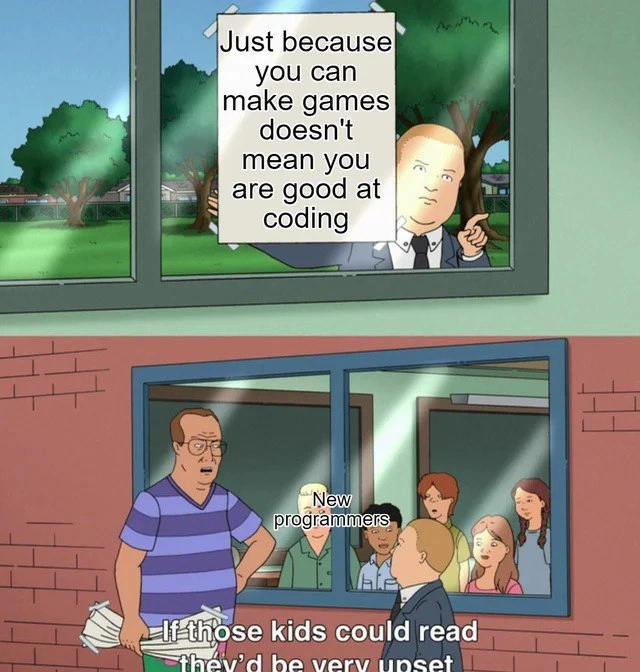
In the top panel of the meme, the adult outside holding the sign is basically saying: “Okay, you made a game, but that doesn’t automatically mean you’re a skilled programmer.” Inside the class, the kids labeled “new programmers” are the beginners who just learned to make a simple game. The bottom subtitle “If those kids could read they’d be very upset” implies the beginners don’t even realize this message is aimed at them. In other words, they’re so new that they don’t yet understand that using an easy, drag-and-drop tool to create a game is not the same as understanding real coding principles. If they did understand, they’d probably feel a bit embarrassed or let down, because the sign is essentially saying their new “achievement” isn’t as big a deal in the programming world as they think it is.

Why might they be upset? Well, many junior developers (newbies) get super excited after making their first game or project. And they should – it’s a big accomplishment in their learning journey! 😀 They might start to feel like real hotshot developers. But a senior developer (someone with a lot more experience) knows there’s more to coding than what the beginner has done so far. This meme is capturing that classic junior vs senior viewpoint. The junior might be thinking, “I built a game, I’m basically a pro now!” whereas the senior is thinking, “Congrats on your first step, but remember, the game engine did a lot of the work for you. Let’s see how you handle coding without those helpers.”

Let’s explain a few key terms and ideas from this meme:

  • Drag-and-drop game engine: This means a game development tool where you can create stuff in a game by literally clicking, dragging, and dropping elements, instead of writing out code line-by-line. For example, a beginner using Unity can drag a character model into the game world, add some built-in “components” to it (like giving it physics so it can fall or collide), and then press a Play button to test the game. They might not write much code at all for basic things. Some engines and tools (like the kid-friendly Scratch programming environment or Unity’s visual scripting tools) use a system of snapping blocks together that represent code actions. It’s very visual and intuitive. This is great for learning and quick results, but it can create an illusion that “coding is easy” because the hardest parts are hidden. In our meme, the kids have used a drag-and-drop style engine to make a game, so they feel confident because it wasn’t too hard to get something working.
  • Coding fundamentals: These are the basic building blocks of programming knowledge. It includes understanding how to use variables, loops, and functions, how to structure a program, how to debug when things go wrong, and generally how software works under the hood. It also means knowing some computer science concepts like algorithms (for example, different ways to sort data or find the best path in a game level) and data structures (like arrays, lists, or dictionaries and when to use each). In the context of the meme, the sign is suggesting the kids might not be good at coding in this fundamental sense. They managed to get a game working, but maybe they followed a step-by-step tutorial or used mostly pre-made engine features. If you asked them to write a program outside of that game engine environment, or to explain how their game code actually works, they might struggle. Being “good at coding” usually means you can tackle new problems, debug code, and build things without always relying on pre-made templates.
  • Game development vs general programming: Making a game with an engine is a specific use of programming, often with lots of help from the engine. General programming skill means you can code in many situations, not just in one particular tool. For instance, a person might do well making a 2D platformer in Unity by following a YouTube tutorial, but if you ask them to, say, write a small program to sort a list of names alphabetically in a new language, or to fix a performance issue in their game when it starts lagging, they might not know how. In professional GameDevelopment, developers actually need strong coding skills because they often have to extend the engine or optimize things beyond the default. So the meme is a bit of a gentle reality check: “Cool game, but there’s a lot more for you to learn if you want to be a programmer.”
  • Learning curve: This is the idea that learning a complex skill starts out easy and then gets harder over time (or sometimes vice versa). Learning to code has a curve where at first you might make quick progress (say, printing “Hello World” or making a basic game level) and feel awesome. But as you try more complex projects, you hit challenges that are much tougher and require deeper knowledge. In this meme, the new programmers are still on the easy part of the learning curve – they haven’t yet hit the big hills. The engine made the start of their journey pretty smooth. The senior knows that eventually these kids will encounter tougher problems (like weird bugs or limitations that require actual coding skill to solve). When they do, they’ll realize making that first game was like riding on flat ground, and now they’ve got an uphill ride ahead where those training wheels won’t help as much. The meme humorously anticipates that future “uh-oh” moment for the kids, even if the kids can’t see it yet.
  • Beginner’s confidence: Often, when you’re new at something and find early success, you get a burst of confidence. You might even think you’ve got it all figured out. This happens in coding a lot. A newbie writes a short program or, say, makes a simple game and suddenly feels “I am really good at this!” That confidence can be helpful to keep learning, but it can be out of sync with reality. There’s even a popular term for this gap between confidence and competence: the Dunning-Kruger effect (named after psychologists who studied how people with a little knowledge often overestimate themselves). In simpler terms, you don’t know what you don’t know. The meme captures this perfectly: the kids are too inexperienced to realize they still have a lot to learn, so they’re happily confident. The sign-bearer (experienced dev) is basically chuckling because he knows when reality hits, the kids’ high spirits will take a hit. It’s a form of developer humor that’s poking fun at that phase almost every coder goes through.

In plain speak, the meme’s message is: “Using a game engine to make something cool is an awesome start, but it doesn’t automatically make you a coding expert.” The reason this is funny is because the new programmers in the meme don’t realize that yet. They’re proud and satisfied, which is totally fine — everyone should enjoy that early success. But an older or more experienced programmer knows that feeling of “I’m a coding wizard!” is probably premature. The line “If those kids could read they’d be very upset” is just a witty way to say the newbies are oblivious now, but one day they’ll look back and chuckle (or cringe) at how little they actually knew. It’s a lighthearted reminder in the LearningToCodeJourney that no one starts out as a master coder, even if your first game made you feel on top of the world.

Level 3: Drag-and-Drop Sorcery

The meme pokes fun at a classic GameDev scenario: a new programmer builds a simple game using a high-level game engine and suddenly feels like a coding wizard. In the image (a riff on King of the Hill), an authority figure holds up a sign saying “Just because you can make games doesn’t mean you are good at coding.” Inside the classroom, the wide-eyed new programmers stare blankly, oblivious. The caption “If those kids could read they’d be very upset” delivers the punchline – the newbies literally lack the literacy (experience) to understand that harsh truth. This tongue-in-cheek scene highlights a coding_fundamentals_gap: beginners often conflate using drag-and-drop tools to make a game with real programming expertise, much to the bemusement of senior developers.

From a seasoned developer’s perspective, the humor comes from recognizing false wizardry. These kids think they’ve cast some grand coding spell, but really they used a drag_and_drop_game_engine (like Unity or Godot) which quietly does the real magic behind the scenes. It’s a prime example of the Junior vs Senior gap:

  • Junior (inside the classroom): “I made a game, I must be a great coder now!” 😊
  • Senior (outside holding the sign): “Nice job, but the game engine did 90% of the work…” 🙃

The engine provides fancy building blocks – rendering, physics, input handling – so the newbie only had to snap those blocks together. Sure, the game runs, but does the novice know why it works? Usually not in depth. They might have written a few lines of script (or none at all, relying on visual scripting and prefab assets), while the engine’s thousands of lines of code handle the heavy lifting. The result? A beginner_confidence boost that’s disproportionate to their actual coding ability.

To seasoned coders, it’s clear the engine is the real wizard behind the curtain, and the newbie is more like the magician’s apprentice still figuring out what the wand does. The meme’s sign is basically a reality check delivered from outside the bubble of beginner ignorance. If those kids could metaphorically read what’s on that sign (i.e. understand how much they have yet to learn about algorithms, data structures, optimization, and debugging), their self-proclaimed “wizard” status would crumble – and that moment of realization is both funny and a little painful (we’ve all been there).

Consider what an engine like Unity is handling without the beginner realizing it:

  • Graphics & Rendering: The engine calls low-level graphics APIs (DirectX/OpenGL/Vulkan) every frame to draw the game world. The new dev just drags a sprite or 3D model into the scene, unaware of shaders, draw calls, or the game loop running 60+ times a second. It feels like the picture just magically shows up.
  • Physics & Collisions: The beginner checks a box to add gravity or uses a built-in function to make characters jump. Under the hood, the engine is solving physics equations (Newton’s laws for motion, collision detection algorithms like AABB or raycasting) and handling all the math. The newbie isn’t writing a single line of that heavy physics code – it’s done for them.
  • Memory & performance: In a engine using C# like Unity, if the novice wants to remove an enemy, they call Destroy(enemyObject). That seems simple, but Unity (and the C# runtime’s garbage collector) is cleaning up the object’s memory, removing it from the scene, freeing textures, etc. In a lower-level world (say, C++), forgetting to do one of those steps would be a serious coding mistake (resource leaks or crashes). The engine quietly prevents a lot of those issues.
  • Pre-built systems: Need sound effects, user interface, or multiplayer networking? The engine provides modules or plugins. A beginner might import a library or click “Add Networked Multiplayer” and things just work. They aren’t implementing a sound mixer or a network protocol themselves – it’s all provided.

In code terms, a newbie’s "impressive" game logic might be extremely simple because the engine handles the complex parts. For example, removing a game character might look like this in Unity C#:

// Unity (high-level): the engine does the heavy lifting under the hood
if (playerCollidesWith(enemy)) {
    Destroy(enemy);  // Magic: engine cleans up the enemy object for us
}

But without a game engine, in plain C++ you’d have to manage that logic and cleanup yourself:

// Without an engine (low-level): manual handling of game object removal
if (player.collides(enemy)) {
    world.removeGameObject(enemy);  // Remove enemy from the game world data structures
    delete enemy;                   // Free memory/resources explicitly to prevent leaks
}

The difference is stark. In the first case, the beginner calls one easy function and moves on, blissfully unaware of how memory deallocation or collision handling works. In the second, a developer must understand pointers, memory management, and game state—there’s a lot more real coding involved. The meme humorously underscores that writing a few scripts within a cushy engine mastering computer science fundamentals.

This scenario gets a knowing laugh in Developer Humor circles because it’s a mild case of the Dunning-Kruger effect in action. Early in a learning journey, it’s common for new devs to overestimate their skill after a small win. You make Pong or a simple platformer and feel like a prodigy, not yet aware of all the advanced coding concepts lurking out there. The line “If those kids could read they’d be very upset” is a playful way of saying “if these beginners understood the sign (the depth of knowledge behind their game), their bubble of confidence would pop.”

For the experienced, there’s a mix of amusement and empathy. We chuckle because we’ve either mentored juniors who thought their first game made them expert coders, or we remember being that kid ourselves, proudly showing off a shaky first project. It’s a rite of passage in the LearningToCodeJourney: eventually, a tougher project or a nasty bug forces you to “read the sign” and realize oh... making a game was one thing, but coding well is a whole other hill to climb. The meme compresses that humbling lesson into a funny cartoon scene that any programmer with battle scars can appreciate.

Description

This is a two-panel meme using a template from the animated series 'King of the Hill'. In the top panel, the character Bobby Hill, dressed in a suit, is seen from inside a classroom, pointing assertively at a sign he has taped to the window. The sign reads, 'Just because you can make games doesn't mean you are good at coding'. In the bottom panel, the view shifts to outside the classroom, where the character Hank Hill is speaking to Bobby. Hank is holding a newspaper and says, 'If those kids could read they'd be very upset'. A group of children inside the classroom, labeled 'New programmers', are visible through the window, looking on cluelessly. The meme uses this format to gatekeep the field of game development, suggesting that many aspiring game developers who can assemble a game using high-level engines lack fundamental coding skills. The punchline implies that these 'new programmers' are too inexperienced to even understand the criticism being leveled at them. For senior engineers, it's a cynical take on the difference between using tools like Unity or Unreal to create something that works versus writing clean, efficient, and scalable code

Comments

7
Anonymous ★ Top Pick The difference between a game dev and a software engineer? One of them knows how to write an entity-component system, and the other just drags prefabs into the scene until the engine crashes
  1. Anonymous ★ Top Pick

    The difference between a game dev and a software engineer? One of them knows how to write an entity-component system, and the other just drags prefabs into the scene until the engine crashes

  2. Anonymous

    Let them drag-and-drop GameObjects for now; when QA asks for deterministic rollback netcode, they’ll discover the Inspector window doesn’t have a checkbox for “understand cache-coherency.”

  3. Anonymous

    The real plot twist is when senior engineers discover the game dev's Update() loop has 47 nested if-statements checking individual key presses, a singleton for every game object, and a save system that serializes the entire scene graph to JSON every frame - but hey, it runs at 60 FPS on their RTX 4090

  4. Anonymous

    This hits especially hard when you've interviewed candidates whose entire portfolio is Unity tutorials, yet they struggle to explain Big O notation or implement a basic data structure without GameObject.Find(). Game dev teaches valuable skills - spatial reasoning, performance optimization, event systems - but the architectural patterns that scale in enterprise systems often look nothing like a MonoBehaviour lifecycle. The real kicker? Many senior game engineers would agree with the sign, having learned the hard way that shipping a game and maintaining a distributed microservices architecture require fundamentally different mental models

  5. Anonymous

    Shipping a game doesn’t mean you can code - it means you can hide global mutable state behind a 60 FPS event loop and call it gameplay

  6. Anonymous

    If your entire design lives in Unity’s Update(), congrats - you’ve built a 60‑FPS monolith with zero tests and 100% deltaTime bugs

  7. Anonymous

    Hank's right: Roblox devs discovering ACID transactions - 'Wait, no god objects in prod?'

Use J and K for navigation