The existential dread of debugging a typo
Why is this Debugging Troubleshooting meme funny?
Level 1: False Alarm
Imagine you’re doing a big puzzle and you think a piece is missing. You get really upset — maybe even say “This is impossible, I’ll never finish, everything is ruined!” But a little later, you discover the missing puzzle piece was just upside down in the box the whole time. Suddenly, you’re so relieved and maybe feel a bit silly for getting so upset. In this meme’s story, the programmer felt like the whole world was broken because their code wasn’t working (that’s like thinking the puzzle can’t ever be completed). Finding out they just spelled a word wrong in the code is like finding that “missing” puzzle piece. It was a small, simple thing all along. So they go from feeling hopeless to happy because now everything fits and works again. It’s a big “phew!” moment — nothing was fundamentally wrong with the world, it was just a tiny mistake, a false alarm.
Level 2: Spelling Matters
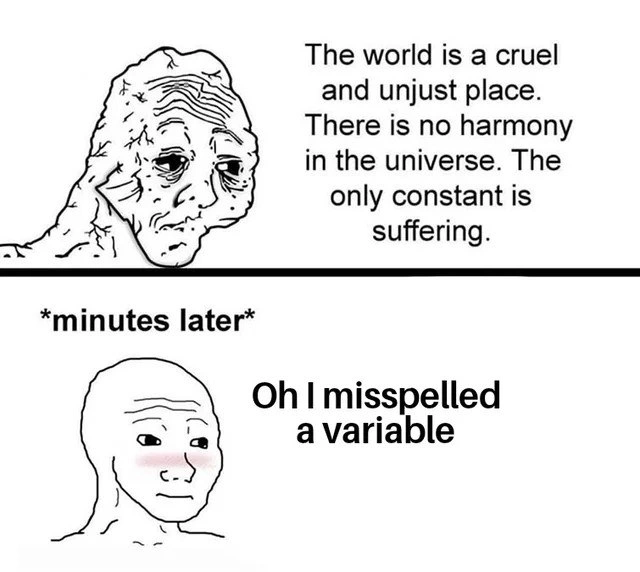
This meme is a two-panel comic that every coder can relate to. It shows a cartoon developer (using the popular Wojak character) going from total despair to happy relief in a matter of minutes. In the top part, the programmer is extremely frustrated because their program isn’t working and they can’t figure out why. The text about the world being “cruel and unjust” and “no harmony in the universe” is a very exaggerated way of saying “Everything is going wrong and I’m hopeless about this.” This is how debugging a stubborn problem can feel, especially when you’re new or when you’ve been stuck for hours. Debugging, which means finding and fixing errors or “bugs” in your code, can sometimes make you want to tear your hair out. You might think, “Nothing I do is fixing this, maybe the whole system is broken!”
The bottom part comes minutes later, after the programmer finally discovers the issue. The line “Oh I misspelled a variable” is the simple realization that fixes everything. A variable in code is just a name for a storage location that holds some data (like a box with a label). For example, you might have a variable named score that holds the player’s score in a game. If somewhere in your code you accidentally refer to it by a slightly different name (like scroe or Score with a capital S when it’s case-sensitive), the computer won’t recognize it as the same thing. That’s the typo – a small spelling mistake – that happened here. The program wasn’t working because, say, it was looking for total_items but the code actually said totla_items. A one-letter mix-up means the program is essentially looking for the wrong “box” and finds nothing useful. It’s like the code was asking, “Hey, give me the value of totla_items,” and the computer responds, “Umm, I have no idea what that is.” When the programmer corrects the spelling to total_items everywhere, suddenly the computer can find the right value and the program works perfectly. Problem solved!
Let’s illustrate a simple example in Python to make it crystal clear:
items_count = 10
# ... some other code ...
print(item_count) # Oops, missing 's' in the variable name - causes an error
In this snippet, we intended to use items_count (with an s) everywhere. But in the print statement, we wrote item_count (no s). Python will raise a NameError here, effectively saying “I don’t know any variable named item_count.” The program would crash at that line because of the undefined name. In a language like JavaScript, a similar mistake might not crash immediately but would produce undefined or a wrong value, which can be even more confusing since it fails silently. This kind of error is called a runtime error or a bug – the program runs, but it doesn’t do what it should. It’s “silent” in the sense that the program might not always scream about it (no obvious error message in some cases), but the output or behavior will be wrong. Those are the toughest bugs, because nothing outright tells you where the mistake is.
The meme hints at tools and best practices that can prevent these hair-pulling moments. For one, many programmers use linters and smart editors/IDEs. A linter is like a proofreader for code: it scans your code and warns you about potential mistakes. If you had a linter configured, it would underline or flag item_count as an unknown name, alerting you that “hey, did you perhaps mean items_count?” before you even run the code. An IDE (Integrated Development Environment) or a good code editor often has features like autocomplete and spell-check for code. That means when you start typing item_... it might suggest items_count if that was already defined, preventing you from making the typo in the first place. These tools are part of CodeQuality practices – they help keep your code clean and correct. In the meme’s scenario, the joke is partly that the developer could have been saved from this drama if such tools were in use (hence the tag linters_could_have_saved_me). It’s a lighthearted reminder that something as simple as naming consistency and automated checks can spare you a lot of pain.
For someone early in their coding journey, this experience is very common. You might be writing your first programs and suddenly nothing works, and you feel DeveloperFrustration building up – “Why is this not working? Is coding always this hard?” Then you find out it was just a missing character or a stray capital letter causing the issue. It’s equal parts relieving and humbling. Relieving because yay, it works now! Humbling because it was a simple mistake – the computer was never really at fault, nor was the task impossible; it was just a tiny oversight. The meme uses an extreme emotional swing to dramatize this: from “I hate everything, I’ll never fix this” to “Oh, nevermind, it was just a small typo, LOL.” This is definitely a form of DeveloperHumor that pokes fun at our own tendency to get very upset before checking the basics. In a way, it’s teaching a gentle lesson: next time you face a baffling bug, consider the simple things (like spelling and syntax errors) first, because often the cause is more ordinary than it seems. Even the best programmers have those facepalm moments. The key takeaway for a newcomer is that debugging is a normal part of coding – you will encounter frustrating bugs, but with patience (and maybe some tooling help), you’ll often find a straightforward fix. And when you do, you’ll probably chuckle at how worked up you got.
Level 3: Cruel and Unjust Code
At the outset, this meme captures a programmer’s debugging frustration in a hilariously dramatic way. In the top panel, our weary developer-Wojak is essentially having an existential crisis over a bug. The text “The world is a cruel and unjust place... There is no harmony in the universe. The only constant is suffering.” is an over-the-top representation of that mindset we slip into at 3 AM when nothing in our code makes sense. The codebase feels cruel and unjust because despite all logic, the program isn’t working. Every senior developer knows this despair: you’ve checked the complex logic, the database, the API responses, maybe even blamed cosmic rays flipping bits in memory, yet the bug defies explanation. It genuinely feels like there’s “no harmony in the universe” of your application. This is the kind of dark humor seasoned devs share about those nightmare debugging sessions where you start questioning reality.
Then comes the punchline in the second panel (after “minutes later”): “Oh I misspelled a variable.” In an instant, the cosmic agony collapses into sheepish relief. The only constant wasn’t suffering after all — it was a simple human error in the code! 🤦♂️ This twist is what makes the meme DeveloperHumor: the juxtaposition of grand, nihilistic despair with the silly, mundane truth that the code was broken by a one-letter mistake. It’s funny because it’s true: countless times a seemingly inexplicable software bug ends up traced to a trivial coding mistake like a typo. The developer’s blushing, calm face in the bottom panel says it all: a mix of “oops, that was dumb” and immense relief that the problem was solvable after all. Anyone who’s hunted a bug for hours can relate to that whiplash from total DeveloperFrustration to euphoric relief.
On a technical level, a misspelled variable name is one of those classic simple bugs that can be devilishly hard to spot. For example, imagine a JavaScript snippet:
let totalItems = 5;
// ... some complex logic ...
console.log("Total:", totalIems, "items processed."); // <-- typo: 'totalIems' vs 'totalItems'
In a dynamically typed language like JavaScript (without strict mode or TypeScript), this might quietly create a new global variable totalIems or result in an undefined value, instead of immediately crashing. The code would run, but behave incorrectly (maybe printing "Total: undefined items processed") – a silent runtime error. The developer might not get a clear error message, making the bug tricky to track down. In other cases (like Python or strict-mode JS), it would throw a loud error (e.g., NameError or ReferenceError), but in a large flow of output or logs, even that can be easy to overlook under stress. The meme specifically highlights that this bug was elusive enough to make the dev spiral into despair, implying there was no obvious error message. It’s the kind of bug that has you questioning all your assumptions: “Is the framework broken? Did I deploy the wrong version? Why is nothing making sense!?” Only to discover later that one variable wasn’t spelled the same across the code. It’s equal parts embarrassing and comical.
This scenario touches on a well-known truth in programming: naming things is hard. There’s a famous tongue-in-cheek quote: “There are only two hard things in Computer Science: cache invalidation, naming things, and off-by-one errors.” Here we see naming (or rather, getting a name exactly right) living up to its troublesome reputation. A variable name is essentially an identifier; if you get even one character wrong, the computer treats it as a totally different identifier. The naming consistency has to be 100% for the code to link that name to the actual data. One subtle typo – say, using userId in one place and userID elsewhere, or _count vs. _cnt – and suddenly the logic that depends on that variable collapses. It’s a tiny mistake with an outsize impact, which is exactly why this meme resonates: it’s absurd how something so minuscule can make the entire program act as if the universe has no harmony.
From a code quality perspective, this comic also softly admonishes us: linters could have saved me. A linter or an intelligent IDE would likely highlight an undefined or unused variable name immediately. For instance, ESLint in a JavaScript project or PyLint in Python would flag “unknown variable totalIems” the moment you wrote it. Modern development environments have features like spell-checking for symbol names or at least underline variables that haven’t been defined. A seasoned developer might chuckle at this meme and then quietly note, “This is why we run static analyzers and have code reviews.” In a robust development workflow, such a typo should be caught either by automated tools or even basic unit tests (a test failing because a value is always zero or nil can tip you off to the wrong variable). Yet, as all veterans know, in the real world you occasionally slip – maybe you edited code quickly without an IDE, or the project didn’t have linting set up (perhaps in a late-night debugging session on production hotfixes, who has time for CI pipelines? 😅). And inevitably Murphy’s Law strikes: that one unchecked typo sneaks through and wreaks havoc until you painstakingly uncover it.
It’s worth noting the emotional rollercoaster involved. Debugging often has a psychological dimension: initially, you might blame yourself (“I must be doing something wrong”) then escalate to blaming the universe (“Nothing makes sense, everything is broken!”). The first panel’s melodramatic monologue is a tongue-in-cheek representation of that mental spiral. It’s an absurdist exaggeration, of course – no programmer literally believes a variable typo proves the universe has no harmony – but internally it feels that tragic in the heat of the moment. This comic format (the Wojak/Feels Guy with despair vs. relief) is popular because it captures those intense mood swings in development. The instant the cause is found, all that despair evaporates. The developer’s world is harmonious again; the code works, balance in the universe (of the program) is restored, and the only “constant” is no longer suffering but perhaps learning (and a good story to tell the team).
In summary, the humor here comes from the stark contrast: a grand philosophical crisis caused by a tiny technical slip-up. It’s poking fun at how programmers (even the very experienced ones) can oscillate between feeling like the code is cursed and feeling silly for not spotting a simple syntax error. We’ve all had that cathartic “aha!” moment when you fix a bug and it was just a one-character fix. The meme winks at us and says: Don’t worry, you’re not alone — the universe isn’t against you, it was just a typo! And next time, maybe run a linter or double-check those variable names before descending into existential dread.
Description
A two-panel meme using the Wojak comic format to illustrate the emotional rollercoaster of debugging. The top panel features a deeply wrinkled, distressed Wojak character, looking downwards in despair. The accompanying text reads, 'The world is a cruel and unjust place. There is no harmony in the universe. The only constant is suffering.' This captures the feeling of utter hopelessness when facing a difficult, seemingly unsolvable bug. The bottom panel, introduced by the text '*minutes later*', shows a calm, blushing Wojak. The text next to him says, 'Oh I misspelled a variable'. This meme is highly relatable to experienced developers who have spent significant time and emotional energy troubleshooting a major issue, only to discover it was caused by a trivial typo. The humor comes from the dramatic shift from existential crisis to sheepish relief over a simple human error
Comments
10Comment deleted
The difference between a junior and a senior dev isn't avoiding the existential-crisis-inducing typo; it's just that the senior's linter and IDE setup catches it before they question all their life choices
Spent four hours blaming Kafka, Kubernetes, and the CAP theorem - turns out one service published transactionID while the other subscribed to transactionId. Existential outage downgraded to typo severity
After 20 years in this industry, I've learned that the complexity of the emotional breakdown is inversely proportional to the simplicity of the fix. The same typo that takes 3 hours to find would've been caught by a linter we disabled because 'it was too noisy.'
After three hours of architectural review, distributed tracing analysis, and questioning every life choice that led to this moment, the senior engineer discovers the production outage was caused by `usreName` instead of `userName`. The postmortem will diplomatically call it a 'configuration discrepancy.'
Incident channel went from cosmic injustice to `git commit -m "fix typo"`; proposing CAPS theorem: Case Sensitivity Always Punishes
Sev‑1 RCA: case‑sensitive identifier typo; mitigation - promote the linter to SRE and call it chaos engineering
Philosophers chase enlightenment; we grep for that one camelCase ghost in the microservices sprawl
誰もしません。(No one does) Comment deleted
Was it like "Do you like my nudes?" Comment deleted
Sort of Comment deleted