One-Liner Code Change, Massive Test Suite Failure
Why is this Testing meme funny?
Level 1: Apple’s House Rules
Imagine you have a special key that claims it can open any playground gate so you can go play anywhere. You’re super excited and try it out: it opens your local park gate just fine, and even your friend’s backyard gate. But then you walk up to Apple’s playground, and a guard at the gate shakes his head. “Sorry,” he says, “you can’t use that key here. You need an Apple key to come in.” Suddenly, your magic key isn’t enough for this one playground. You’d feel pretty upset and confused, right? You thought you could get in everywhere, but this one place has a special rule that forces you to use their key. That’s exactly what’s happening in the meme. The developer has a tool (Flutter – like a magical key) that was supposed to let him create an app for any device, but Apple has a house rule: to get into the iOS playground, he needs to use Apple’s own key (a Mac computer). It’s funny in a frustrating way, because nobody likes finding out there’s a secret rule after they’ve already started playing.
Level 2: Cross-Platform Catch
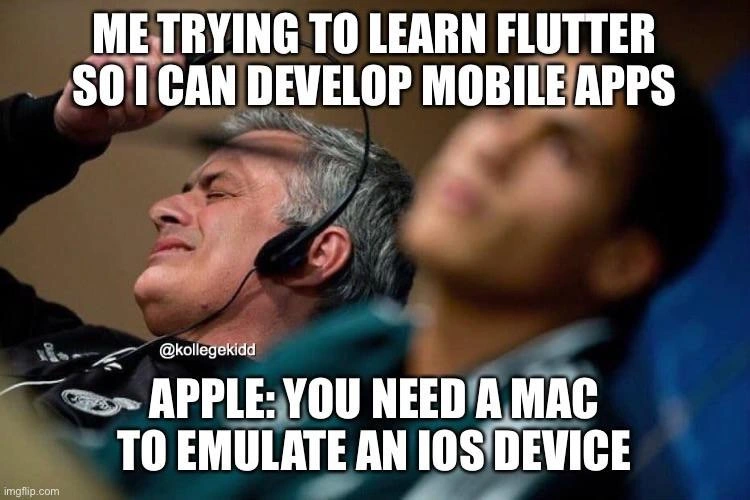
Let’s break down why this situation hits a nerve in simpler terms. Flutter is an open-source UI framework (created by Google) that lets you build mobile apps for multiple platforms from one codebase. In plain language, you can write one set of code (in the Dart programming language) and Flutter will help turn it into an Android app and an iOS app. This approach is called cross-platform development – it aims to save developers from having to write separate apps in different programming languages for Android (usually Java or Kotlin) and iOS (usually Swift or Objective-C). The top text in the meme (“Me trying to learn Flutter so I can develop [mobile apps]”) represents a developer who’s excited about using this technique to create apps for Android and iOS at the same time with one toolset.
Now, here comes the catch: the bottom text is basically Apple laying down a rule – “You need a Mac to emulate an iOS device.” What does that mean? To develop or test an iOS app (an app for iPhone or iPad), Apple requires you to use their own operating system and tools. iOS is Apple’s mobile operating system, and Apple provides an iOS simulator (a virtual iPhone running on your computer for testing) through a program named Xcode. Xcode is Apple’s official development application for making iPhone/iPad (and Mac) apps, and it only runs on Apple’s macOS operating system. So if you’re working on a Windows PC (or a Linux machine), you simply can’t run the iPhone simulator on your computer because you can’t install Xcode there. Apple doesn’t offer Xcode outside of Mac computers. This is why the meme shows Apple saying you must have a Mac – it’s the only official way to mimic an iPhone on a computer for development purposes.
For a new mobile developer, this discovery can be pretty frustrating. With Flutter on Windows, you can start building an Android app easily – Android’s developer tools (like Android Studio and the Android emulator) work on Windows, Mac, or Linux. But when it comes to the iOS side of your Flutter project, you hit a wall. Even though Flutter is cross-platform, the iOS part of the process isn’t so cross-platform because of Apple’s rules. In practice, if you write a Flutter app on a PC and want to see it run as an iPhone app, you have a few options, and none are as simple as you’d hope. You might have to get access to a Mac to run Xcode, use a cloud service that gives you a Mac over the internet, or maybe borrow a friend’s Mac just to test and compile your iOS build. It feels like a big letdown, because the whole point of learning Flutter was to avoid needing different machines or codebases for different platforms.
This is a clear example of vendor lock-in. That’s a term for when a company’s ecosystem is closed in a way that forces you to use their hardware or software for their platform. Apple is known for this kind of tight control. In this case, Apple’s system is locked such that to develop for their platform (iOS), you need to use their hardware (a Mac) and their software tools (Xcode). So even though frameworks like Flutter promise to free you from platform-specific coding, you discover you’re not entirely free from platform-specific requirements. It’s a reality check for budding developers: “cross-platform” doesn’t mean you can completely ignore the unique rules of each platform.
In the meme image, the man’s expression and body language say it all – he’s leaning back with a pained look, hand up as if to ask “Seriously?!” This perfectly represents the developer’s frustration upon finding out about the Mac requirement. The text reads like a little dialogue between the developer and Apple:
Developer: “Great, with Flutter I’ll make apps for both Android and iOS on my trusty PC!”
Apple: “Not so fast… if you want to work on the iOS part, you need to use a Mac.”
For many beginners, that moment feels like slamming into an unexpected barrier. You put a lot of effort into learning this cool new framework, expecting a smooth road to creating iPhone apps without buying extra hardware, and then you learn you might need a Mac after all. It’s a common developer pain point that leads to a lot of DeveloperFrustration. The meme is poking fun at that “uh-oh, there’s a catch” moment. Essentially, it’s saying: “Cross-platform development is awesome… until Apple reminds you that their platform has special rules.” The lesson for a new developer is that if you plan to target iPhones, you almost always have to factor in Apple’s requirements (like needing a Mac or Xcode) at some stage, even if you’re using a cross-platform tool like Flutter.
Level 3: The Mac Mandate
This meme nails a classic MobileDev frustration: you dive into Google’s Flutter framework expecting true CrossPlatformDevelopment bliss, only to smash into Apple’s Mac-only gate. It’s a very real ecosystem lock-in reality check for anyone who’s attempted to build iOS apps without a Mac. The top caption is the hopeful developer (that grey-haired man leaning back with a headset, gesturing in exasperation) saying “Me trying to learn Flutter so I can develop [mobile apps]”. In other words, “I’m ready to create for both Android and iOS from one codebase, isn’t that awesome?” But the bottom caption is Apple’s cold shower: “YOU NEED A MAC TO EMULATE AN iOS DEVICE.” That’s the kicker. No matter how cross-platform your dreams, Apple reminds you that to simulate or build anything for iPhone/iPad, you must use their hardware and tools (i.e. Xcode on macOS). The humor hits home because we’ve all seen this vendor lock-in gotcha before — the fine print that says “some platforms not included”.
For a senior dev, this scenario encapsulates the cross-platform disillusion that happens often in mobile development. Flutter (and other frameworks like React Native or Xamarin) promise “write once, run anywhere” convenience for mobile apps. Yet Apple’s walled garden has an unyielding rule: if you want to run or test the iOS side of that “anywhere,” you need Apple’s environment. There’s no official iOS simulator or build tool outside macOS because Apple tightly controls the iOS SDK and its development pipeline. Xcode – Apple’s official IDE for iOS/macOS – only runs on macOS. This means even though Flutter’s SDK itself is multi-platform (you can develop Flutter apps on Windows, Linux, or Mac), the minute you try to target an iPhone, Flutter under the hood has to invoke Xcode tooling. On a Windows or Linux machine, that’s a dead end. In practice, one does not simply emulate iOS on Windows – Apple just won’t allow it.
Experienced engineers chuckle (or groan) because we’ve lived this. It’s almost an industry rite-of-passage: a team excitedly adopts a cross-platform framework to save time and hardware costs, only to realize near release day that someone still needs to have a Mac handy to package the iOS app or run QA on an iPhone simulator. It’s the classic Flutter vs Xcode face-off. In planning meetings this often surfaces as an alarmed question: “Wait, we need a Mac build machine for the iOS version?” Yes – yes you do, because Apple’s developer ecosystem won’t budge. This exact scenario has played out with many frameworks: the promise of platform independence meets the reality of Apple’s Mac hardware requirement.
For example, try running Flutter’s environment check on a PC and you’ll get a loud reminder of Apple’s rules:
$ flutter doctor
[√] Flutter (Channel stable, 2.10)
[√] Android toolchain - develop for Android devices
[!] Xcode - develop for iOS and macOS
✗ Xcode not installed; this is necessary for iOS development.
Notice that ominous “[!] Xcode not installed; ... necessary for iOS development.” line. That’s basically Apple waving a finger and saying: “No iOS dev here unless you go through us.” This is the iOS emulation constraint in action – you simply cannot emulate an iPhone on your PC the way you can emulate an Android phone. Apple’s tools have a monopoly on iOS simulation and app packaging, enforced by design.
The result? A hidden cost in what was supposed to be a convenient cross-platform pipeline. Sure, you saved time writing one codebase for both Android and iOS, but the tooling isn’t truly platform-agnostic. Apple effectively enforces a vendor lock-in toll: even if your app’s code is universal, the build/test environment for iOS is not. Many developers new to Flutter find this out the hard way. They start on a Windows PC thinking they can do it all, and then Flutter (or the App Store submission process) basically says, “Oh, by the way, you’ll need a Mac to finish the iOS part.” It’s a bit of a trap door – you don’t discover the Mac requirement until you’re staring at an error message. So the dream of being a one-stop mobile dev shop on one machine crashes right into Apple’s closed ecosystem.
For veterans, there’s dark humor in this because it’s so predictable. The frustration seen in the meme’s image – that raised hand, pained “you’ve GOT to be kidding me” face – is exactly how we felt the first time we hit this wall. It’s the face you make after reading Apple’s docs and finding the fine print: “Requires macOS and Xcode to build for iOS.” We laugh at the meme because it’s true: cross-platform frameworks can’t fully escape Apple’s rules. It’s like building 90% of a rocket that works anywhere, then discovering the last 10% (the launch codes) only run on Apple’s control panel. This is a DeveloperPainPoints 101 moment and a source of collective DeveloperFrustration.
In short, the meme humorously captures a senior-level understanding: cross-platform promises can make development look universal, but Apple still controls the gate to its garden. We’ve learned to expect this “Apple tax” on our tooling. The shared joke is that many of us keep an old MacBook or Mac mini in the closet just for this purpose – when it’s time to compile or test the iOS build, out comes the dusty Apple hardware. We roll our eyes, fire up Xcode, and mutter something about “walled gardens.” It’s funny because it’s true: the cross-platform dream always meets reality at Apple’s doorstep.
Description
This meme shows the 'Expanding Brain' meme format. The first panel, with a small brain, reads 'Writing 100 lines of code.' The second, with a slightly larger brain, reads 'Fixing a bug with a one-line change.' The final panel, with the largest, glowing brain, reads 'Running the test suite and seeing 978 failures.' This meme hilariously captures the feeling of making a seemingly simple change that has massive, unforeseen consequences, a common experience in complex, highly-coupled codebases. For senior engineers, it’s a dark reminder of the importance of understanding the full impact of a change, the brittleness of some test suites, and the terror of touching legacy code

Comments
7Comment deleted
A single line of code can be the difference between a standing ovation and a full-blown rollback. Welcome to the wonderful world of unintended consequences
Flutter promises ‘write once, run anywhere’ - until Cupertino pops up like a runtime exception demanding you provision a $2,000 build server
"Write once, run anywhere" has evolved into "Write once, debug everywhere, but only if you've paid the Apple tax for half your user base."
Ah yes, Flutter: the 'write once, run anywhere' framework - as long as 'anywhere' includes a $1200+ MacBook for iOS builds. Nothing says 'cross-platform democratization' quite like Apple's hardware paywall. You can compile to ARM, x86, web, and mobile... but only if you first compile your bank account into Apple Silicon
“Write once, run anywhere” is great until “anywhere” is defined as a Mac with Xcode, paid dev account, valid provisioning profiles, and a Mac mini farm babysitting CocoaPods before your Hello World hits the simulator
Flutter's 'code once, deploy everywhere' pitch conveniently omits 'but iOS sim needs its own hardware tax'
Flutter promises “write once, run anywhere”; Apple quietly adds a footnote: anywhere with Xcode, a provisioning profile, and a Mac serial number in your CI inventory