Skip to content
DevMeme
5330 of 7435
A Flatpak User's File System
PackageManagement Post #5848, on Jan 27, 2024 in TG

A Flatpak User's File System

Why is this PackageManagement meme funny?

Level 1: Everyone Brings Their Own Chair

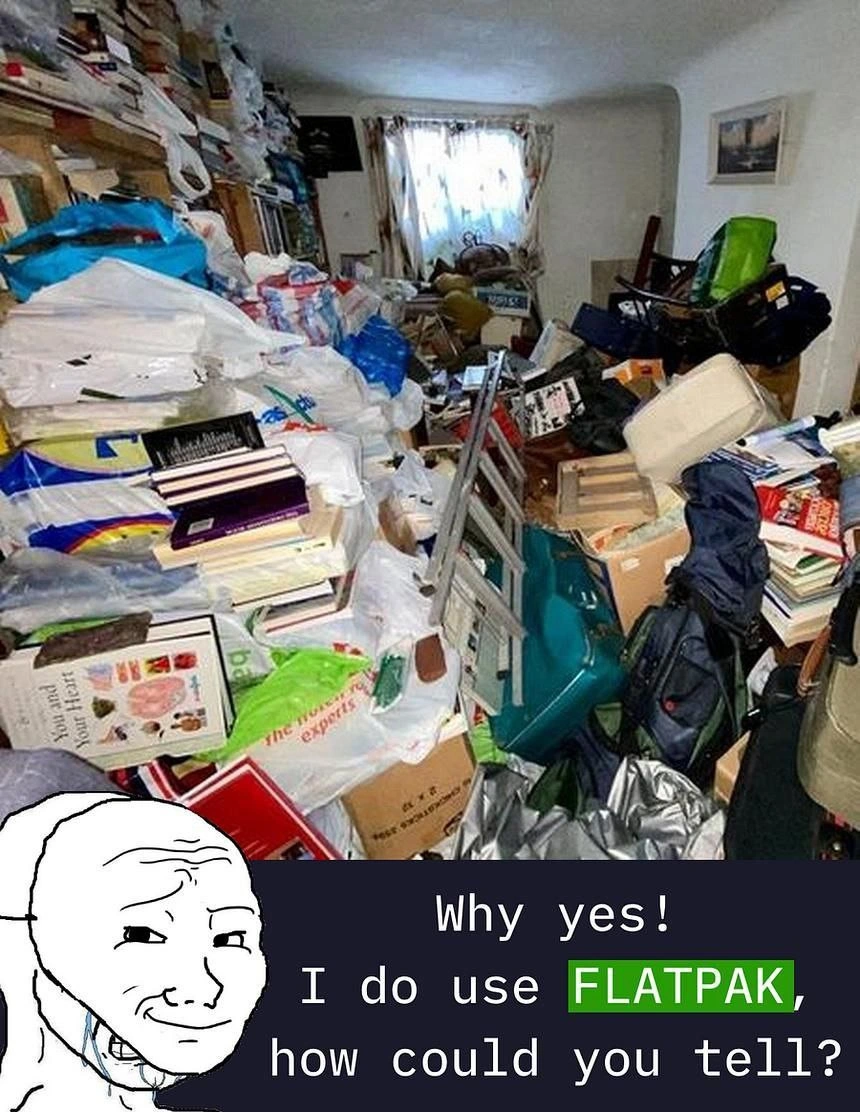
Imagine you’re throwing a big party, and you’ve got a nice dining table with plenty of chairs for all your friends. But strangely, each friend shows up at your door carrying their own chair and even their own set of plates and cutlery, just to be safe. So one friend marches in with a chair, another lugs in a chair and a folded table, and another brings a whole box of utensils. Pretty soon, your living room is overflowing with chairs and tables – far more than you need – and it’s a total mess! If someone walked in and saw that chaos, they’d immediately know, “Oh wow, everyone brought their own stuff instead of using what was already here.” That’s exactly the joke of this meme. Using Flatpak is like each app bringing all its own furniture to the party instead of sharing what’s in the house. It makes things super safe and convenient for each guest (since they know they have exactly what they need), but your poor house ends up looking like a hoarder’s paradise with duplicate items piled everywhere. The meme is funny because the character proudly says, “Yes, I use Flatpak, how could you tell?” – and we laugh since the cluttered room already gave the secret away. It’s as if a friend is bragging about being extra prepared, while behind them you see the comical result: a house (or computer) jam-packed with duplicate stuff that was “just in case.”

Level 2: No Sharing Allowed

For newer developers or those just getting into Linux, let’s break down why that room is so messy – and how that relates to Flatpak apps gobbling up disk space. In traditional Linux package management, when you install software (say via apt on Ubuntu or dnf on Fedora), the system tries to use one copy of each library for all applications. For example, if App A and App B both need the GTK graphical toolkit, the OS will install GTK once and both apps share it. This is efficient on disk space because you don’t keep duplicate files. But it assumes all apps can agree on the same version of GTK. When they don’t, you run into what’s humorously called “dependency hell.” Dependency hell is when installing or updating one program breaks another because they have incompatible needs (e.g., App A needs libX version 1.2 but App B needs version 2.0 – uh oh!). It’s like a bunch of kids all needing to use the same toy – if one kid wants the newer version of the toy, another kid might throw a tantrum because their game only works with the old one.

Flatpak was created to avoid those fights by using containerization for desktop apps. Each Flatpak application comes with its own set of toys, so to speak. The phrase “No sharing allowed” sums it up: Flatpak apps generally don’t share libraries with each other or with the host system. Instead, each app is packaged with the exact version of libraries it requires. This makes apps much more independent. You can install the latest version of your favorite video editor as a Flatpak without worrying that it will conflict with the system’s older libraries. The app won’t complain “missing libXYZ.so” because it brought its own libXYZ in its luggage! It runs in a sandbox, which also means better security and stability – the app is isolated from your core system, so it’s less likely to mess up your OS or other apps.

Now, the downside: if nothing is shared, you end up with a lot of duplicate stuff. Imagine five different Flatpak apps that all need a common ingredient like “GNOME runtime” or a Python library. Instead of using one central copy, you might have five separate copies of that ingredient (potentially different versions). This is why Flatpak can consume a ton of disk space. It’s software bloat in terms of storage: many copies of similar files scattered around. The meme’s imagery – a room piled high with duplicate items – is exactly how it feels after installing many Flatpaks. For example, a new Linux user might install a simple drawing program via Flatpak and be shocked that it’s a 700 MB download. Most of that size is not the app itself but the included runtime (like the platform and libraries it needs). If you then install a second app that uses a different runtime or a newer version, that might be another few hundred MB. Pretty soon, the disk starts looking like a hoarder’s stash of repeated files. If you open up your file manager to where Flatpak stores things (often under ~/.local/share/flatpak/ for user installs), you’ll see lots of folders for each app and runtime, much like boxes and bags filling up a room.

This situation can be confusing or frustrating for someone who’s used to the old way. With traditional packages, you might have wondered “why won’t my app run due to a missing library?” — that’s dependency hell. With Flatpak, that problem is solved, but you might instead ask “where did my free disk space go?!” Each solution comes with a trade-off. Many junior devs encounter this when they first try something like Flatpak or other similar systems (Snap, AppImage, etc., which also bundle dependencies). It’s a ToolingFrustration of modern Linux: your apps are easier to install and more reliable, but you pay by using more storage. The smug character in the meme saying “I do use Flatpak, how could you tell?” is funny because anyone who has looked at the disk usage or the flatpak list on such a system can immediately tell – it’s packed with duplicates and large runtimes. Basically, the meme is highlighting the obvious footprint that Flatpak leaves. Once you know what to look for, it’s as clear as walking into a living room so full of stuff that you can barely find the floor. You can practically point and say, “Yup, this person definitely uses Flatpak for their apps.” It’s a lighthearted way to remember the core idea: each app brings its own baggage, solving one set of problems while creating a bit of a mess in terms of storage.

Level 3: Bloat as a Feature

In the top half of this meme, we see a floor-to-ceiling cluttered room, and it brilliantly symbolizes what happens on a Linux system when you install a bunch of Flatpak applications. Flatpak is a modern Linux package management tool that uses containerization to sandbox applications along with all their dependencies. In plain terms, every Flatpak app carries its own baggage — it brings along all the libraries and frameworks it needs to run, instead of relying on a shared set from the operating system. This design is intentional: bundling everything avoids the dreaded dependency hell (where two apps need conflicting versions of the same library) and provides robust isolation. It's the "bring your own everything" philosophy of software. Need GTK or Qt or some GNOME component? A Flatpak will just pack its own copy inside. No more nightmares about one app’s upgrade breaking another app’s library version – each Flatpak app lives in its own little world (or sandbox).

However, this “bundle everything” approach comes with a huge side effect: software bloat on disk. Every sandboxed Flatpak app often drags in duplicate resources – sometimes even “half the internet,” as the meme jokingly puts it – like multiple copies of the GTK toolkit, the entire GNOME runtime, and other giant frameworks repeated across apps. Take a simple text editor delivered as a Flatpak: it might include not just the editor itself but also hundreds of megabytes of supporting libraries. Multiply that by many apps, and your drive starts looking like that hoarder's den in the photo. The chaos of plastic bags, books, and boxes stacked to the ceiling perfectly mirrors a filesystem filled with redundant Flatpak files and shared runtime copies. Each pile in that room is akin to another copy of libgtk or libQt stashed in a Flatpak directory. The meme’s punchline – “Why yes! I do use Flatpak, how could you tell?” – is spoken by the smug Wojak character who’s proudly grinning while standing in the wreckage. The joke is that the evidence of Flatpak usage is unmistakable: an absurd amount of clutter in the system, just like the absurd hoard in that living room.

From a senior developer’s perspective, this is bloat by design. We’ve essentially traded disk space for ease of deployment and stability. Back in the day, Linux old-timers carefully managed shared libraries through system package managers (apt, yum, etc.), and while that was lean on disk, it could lead to brittle systems (one wrong library version and nothing works!). Flatpak flips the script, embracing a bit of “disk space is cheap” philosophy. It’s reminiscent of static linking from decades past – bundling everything needed so the program is self-sufficient. Now your system ends up a bit like a digital hoarder’s house: lots of filesystem clutter under directories like ~/.local/share/flatpak/ or /var/lib/flatpak/ where each app has its own stash. If you crack open those directories, you'll find a maze of folders for each app and each runtime version, similar to the jumbled piles in the image.

Despite the clutter, there are some smart technical tricks trying to mitigate the madness. Flatpak uses an OSTree-based storage, which is kind of like a git repository for file system objects. This means if two apps use the exact same version of a runtime or library, Flatpak can deduplicate the files (storing one copy and linking it to both). So it’s not quite as bad as literally copying the same bytes for every app – identical files are reused behind the scenes when possible. Still, in practice, you often end up downloading many different runtimes (GNOME 41 vs 42 vs Freedesktop, etc.), and each is pretty large. It’s like having multiple versions of what feels like the entire OS, all parked on your disk at once. No wonder our smug friend in the meme looks so satisfied – he’s effectively installed a mini archive of Linux for each app he uses! The sandboxed_app_overhead (all the extra files each app carries) is the cost for avoiding conflicts and enhancing security. Seasoned developers chuckle (or sometimes groan) at this trade-off. Yes, we escaped the peril of one app breaking another (“works on my machine” is practically guaranteed now), but in exchange we've got an overstuffed lib closet. The meme hilariously exaggerates this outcome: using Flatpak has turned the system into a digital hoarder’s den, and anyone in the know can spot it instantly – just like walking into a house filled with junk and immediately guessing the owner has a hoarding habit. In summary, the humor here comes from recognizing that the solution to dependency conflicts has a very visible, messy consequence: a bloated drive full of redundant data, unquestionably due to Flatpak’s “pack rat” approach to PackageManagement.

Description

The meme displays a photograph of an extremely cluttered and disorganized room, reminiscent of a hoarder's living space, filled with stacks of books, plastic bags, and miscellaneous items. In the bottom left corner, a 'Smug Wojak' meme character, who appears to be crying behind a smiling mask, is overlaid. Below the image, against a dark background, is the text: 'Why yes! I do use FLATPAK, how could you tell?'. The word 'FLATPAK' is highlighted with a green background. The meme satirizes the Flatpak application packaging format by comparing a user's system to a hoarder's room. The joke is that Flatpak's method of bundling all dependencies with each application leads to significant disk space consumption and duplication of libraries, creating a cluttered and bloated file system, much like the room shown

Comments

7
Anonymous ★ Top Pick My filesystem is like this room: everything is containerized, but I have 17 different versions of libc and I'm afraid to delete any of them
  1. Anonymous ★ Top Pick

    My filesystem is like this room: everything is containerized, but I have 17 different versions of libc and I'm afraid to delete any of them

  2. Anonymous

    Flatpak: because every calculator clearly needs its own private build of WebKit and three GTK themes

  3. Anonymous

    "I've achieved perfect dependency isolation - each of my 12 Firefox installations has its own complete copy of GTK, and they're all slightly incompatible with my system theme."

  4. Anonymous

    Flatpak users explaining why having 47 copies of the same GTK runtime across different sandboxes is actually a feature, not a bug - meanwhile their `/var/lib/flatpak` directory has achieved sentience and is now applying for its own filesystem partition

  5. Anonymous

    Flatpak: sandboxing so pure, it demands a private glibc multiverse per app - efficiency through exponential redundancy

  6. Anonymous

    Flatpak solved dependency hell by isolating it into ~/.var - now even the calculator ships a full GNOME runtime and my home directory has more shards than our prod DB

  7. Anonymous

    Flatpak: install a 12 MB editor, receive three org.freedesktop runtimes, locale packs you’ll never use, and a private landfill at ~/.var/app - df -h becomes your observability stack

Use J and K for navigation