Skip to content
DevMeme
5331 of 7435
Flatpak Installations: A Container Ship of Dependencies
PackageManagement Post #5847, on Jan 27, 2024 in TG

Flatpak Installations: A Container Ship of Dependencies

Why is this PackageManagement meme funny?

Imagine you ask for one cookie, and the baker sends over the whole bakery to your house. You get the cookie you wanted, but along with it come dozens of other cakes, breads, and pastries that you didn’t ask for. It’s a silly and overwhelming delivery! This meme is joking about the same idea: you wanted to install one small app (the cookie), but the computer delivered a ton of extra stuff (the whole bakery of ingredients and tools) along with it. It feels over-the-top and funny because it’s such an overkill solution – kind of like using a huge cargo ship to bring a single toy. The emotional core here is a mix of surprise and amusement: “Wow, that’s way more than I needed!” It’s poking fun at how sometimes our computers will load up a bunch of additional pieces just to give us one simple program. Even if you’re not a tech expert, you can laugh at the exaggerated image: a gigantic ship or box carrying one tiny thing you wanted. It’s saying that modern app installs can be like grand deliveries for small requests – unnecessary, a bit ridiculous, but undeniably funny when you see it pictured this way.

Level 2: All For One App

Flatpak is a Linux package management system that emphasizes shipping everything an app needs in one bundle. Think of it as giving each app its own private toolbox. In traditional Linux packaging (like using apt or yum with .deb or .rpm packages), apps share common libraries installed on the system. For example, if two apps need the GTK interface library, you install GTK once and both use it. This saves space but can lead to dependency conflicts – the infamous “Dependency Hell” – where one app requires GTK v3.24 while another needs v3.20, and they can’t easily coexist. Flatpak’s solution is to avoid that conflict by bundling dependencies for each app: each Flatpak app carries its own specific version of libraries and even large frameworks it needs. No more “hell” because each app lives in its own sandboxed world with the correct versions. The downside? You might end up downloading the same large library multiple times for different apps. This is what the meme jokes about: you asked for a small program, and Flatpak also hands you all these other things it depends on.

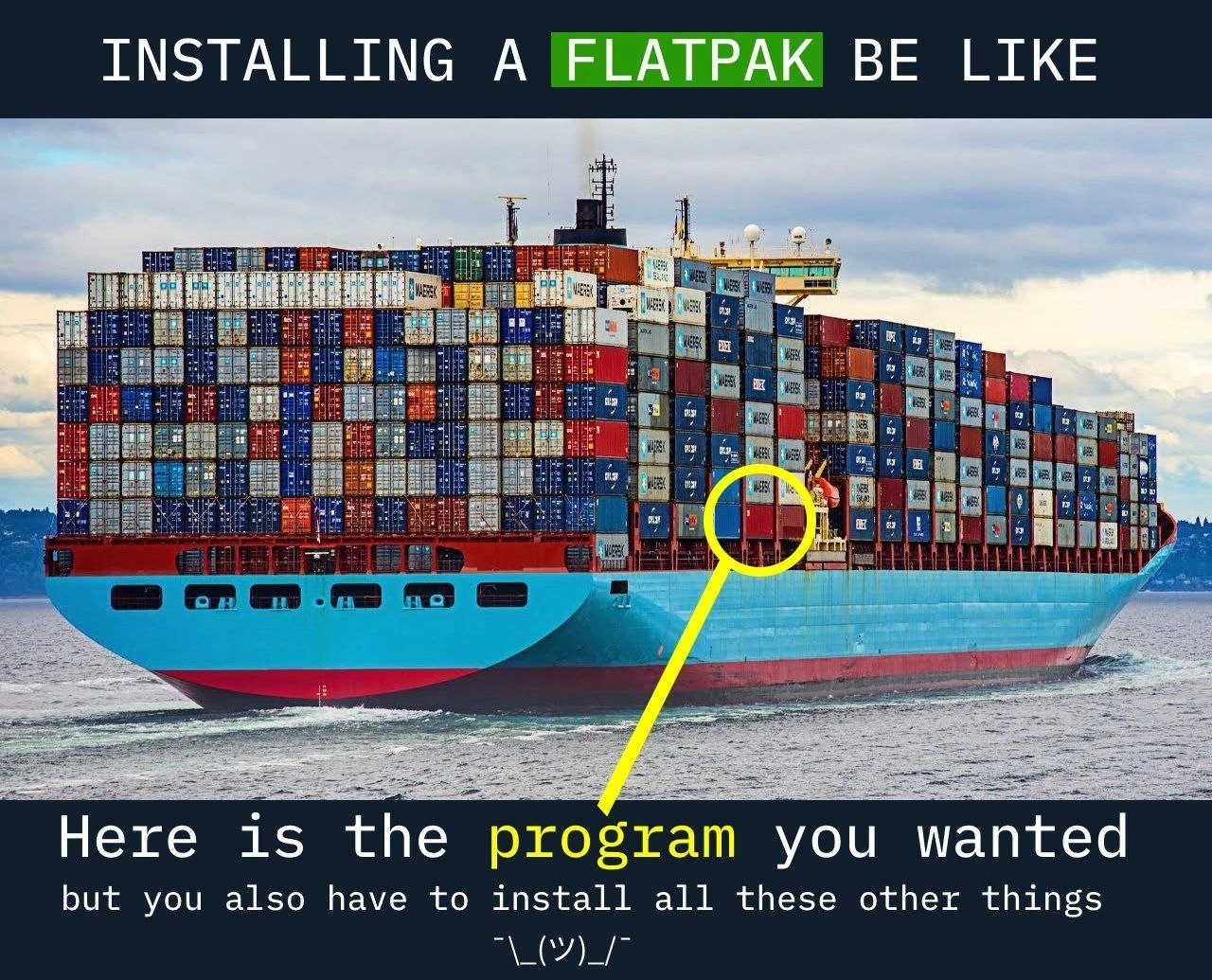
In the image, the tiny highlighted container represents the app you wanted, and all the other stacked containers are the additional stuff (libraries, runtimes) that come with it. It’s illustrating software bloat in a funny way – using an entire container ship to deliver one little item. In real life, the first time you install a Flatpak app, you often have to download a runtime (a collection of common libraries, often hundreds of megabytes). For instance, if that app uses the GNOME desktop toolkit, Flatpak will install the matching GNOME Platform runtime. That might be 700 MB of data to support a 5 MB app! The good news is that once you have that runtime, other Flatpak apps needing it will reuse it (so the big download happens once per runtime). But if each app uses a different runtime or version, your disk ends up with multiple bulky sets of libraries. Essentially, Flatpak trades disk space and download size to ensure each app “just works” without messing up others. It’s a bit like how containerization (think Docker-style containers) works for server applications: everything needed is self-contained, so you avoid version conflicts between apps – at the cost of having duplicate components across containers.

For a newer developer or someone not familiar with Flatpak, the meme is saying: installing a Flatpak app often feels like overkill. The top text “INSTALLING A FLATPAK BE LIKE” sets up the joke. The bottom text then delivers the punchline: “Here is the program you wanted… but you also have to install all these other things ¯\_(ツ)_/¯.” That shrug emoji represents Flatpak’s attitude: “Yes, it’s a lot of extras, but hey, that’s how it works!” It’s a relatable scenario in PackageManagement – you run one install command, and suddenly a long list of downloads scrolls by. If you’ve ever run npm install for a JavaScript project and watched hundreds of packages pour in (many more than you expected), you already understand the joke. Here it’s the same idea, but for desktop applications: a RelatableDeveloperExperience of software coming with way more baggage than anticipated. In short, FlatpakApps make life easy by avoiding dependency nightmares, but they often require downloading huge self_contained_bundles of files. The meme exaggerates that reality with a giant cargo ship delivering a tiny package – a humorous take on convenience vs. efficiency in modern software distribution.

Level 3: Boatload of Dependencies

The humor hits home for any developer who’s watched a simple app download drag in a boatload of dependencies. Flatpak is notorious (especially among Linux old-timers) for delivering your tiny app alongside a massive payload of frameworks, toolkits, and runtime libraries. The meme’s image – an enormous container ship carrying thousands of containers, with one little container highlighted – nails this feeling. “INSTALLING A FLATPAK BE LIKE... here is the program you wanted, but you also have to install all these other things ¯\_(ツ)_/¯.” This caption perfectly voices that shrugging inevitability: you got what you asked for (the app), but it arrived with all its baggage. To seasoned devs, this is peak PackageManagement irony. We’ve spent years preaching DRY (Don’t Repeat Yourself) and efficient shared libraries to avoid SoftwareBloat, yet Flatpak (and its cousin Snap) re-introduce redundant runtimes for the sake of reliability and sandboxing. It’s the modern answer to DependencyHell: can’t conflict with system libraries if you bundle your own copy of everything! – an approach one might cynically call “Fatpak” behind closed doors. The veteran grievance here is real: we remember painstakingly trimming install sizes and resolving package conflicts, and now the pendulum has swung to “just ship it all, who cares if it’s 3 AM and your disk is full.”

In practice, installing a Flatpak often means pulling in a huge runtime (like GNOME or KDE frameworks) that the app depends on. If your system doesn’t have that runtime yet, prepare for a big download. For example, using Flatpak to install a small GUI utility could result in output like:

# Example: Installing a small Flatpak app pulls a huge runtime
$ flatpak install com.example.SmallApp
Resolving dependencies...
Downloading runtime/org.freedesktop.Platform/x86_64/22.08... ~500 MB
Downloading com.example.SmallApp... ~10 MB
Installing... done.

Experienced developers will chuckle (or groan) at this, because it’s relatable: we’ve seen our package managers cheerfully announce that a 2 MB app requires hundreds of megabytes of “platform” downloads. The container ship analogy also pokes fun at how Containerization concepts have seeped into everyday computing. On the server side, we run microservices in Docker containers, each with their own OS layer, even if all you run is a 30 MB Go binary – essentially shipping a whole OS for one program. Flatpak does this on the desktop: it sandbox each app with its own environment to avoid conflicts and improve security. The result? Multiple apps each lug around their own copies of common libraries (or large shared runtimes isolated per platform version), inflating disk usage. Seasoned Linux users who grew up with slim .deb/.rpm packages find it absurd yet darkly funny – “we fought off one kind of dependency hell, only to be drowned in an ocean of redundant libraries.” The meme resonates because it exaggerates this truth: installing a Flatpak is like receiving a tiny present delivered in a giant container ship. Sure, everything’s neatly packed and self-contained (yay, it works everywhere!), but you’ve basically downloaded half the port just to get your gift. It’s a perfect commentary on modern linux_desktop_packaging: conveniently self_contained_bundles that make life easier today, at the cost of runtime_bloat that makes the inner cynic in us cringe.

Level 4: Sandboxes & Shipping Containers

At the core, this meme highlights a fundamental trade-off in software packaging: isolation vs. duplication. Flatpak’s design essentially puts each Linux desktop app in its own sandbox, bundling all needed libraries and frameworks. This approach is conceptually similar to deploying an OCI container for each app – a miniature filesystem with everything pre-packaged. It’s a strategy to avoid the classic dependency hell (those nightmare scenarios where one app’s required version of a library breaks another app). By shipping a complete runtime environment for an application, Flatpak guarantees the app will run the same on any system (“works on my machine” becomes “works on every machine”). But that guarantee isn’t free – it comes at the cost of significant software bloat. Fundamentally, this is a space-vs-complexity trade-off recognized in computer science: we sacrifice disk space and bandwidth to simplify dependency management. In academic terms, one could say we’re avoiding an NP-hard package resolution problem by brute-forcing it with brute storage. The joke here is that Flatpak’s solution feels comically over-engineered – akin to solving a small puzzle by encasing it in epoxy. It’s the same principle behind static linking (include everything you need internally) taken to an extreme. The meme’s shipping freighter image is a perfect metaphor: in containerization lingo, each app is like a fully loaded container with its own OS layer and dependencies. Flatpak uses technologies like OSTree (a git-like content store for binaries) to mitigate duplicate files across apps, but when you’re first installing that one tiny program, you still have to fetch the whole base runtime monolith. It’s a bit like discovering that to run a 5 MB app, you need a 500 MB runtime – the philosophical overlap between desktop sandboxes and server containers is both brilliant and absurd. This deep dive into packaging theory explains why seasoned engineers smirk at the meme: beneath the humor lies a real architectural decision about how we build and distribute software, trading elegant shared systems for brute-force self-contained bundles.

Description

A meme depicting a massive container ship on the ocean, heavily loaded with hundreds of colorful shipping containers. A single red container in the middle is circled with a bright yellow marker. The top of the image has a black banner with white text that reads, 'INSTALLING A FLATPAK BE LIKE'. The word 'FLATPAK' is highlighted in green. At the bottom, another black banner contains the text, 'Here is the program you wanted but you also have to install all these other things', followed by the shrugging emoticon '¯\_(ツ)_/¯'. The word 'program' is highlighted in yellow. The meme humorously criticizes the Flatpak software distribution model by comparing it to receiving a whole cargo ship when you only ordered one item. It illustrates the common complaint that Flatpak applications, by bundling all their dependencies, result in excessively large downloads and disk usage, as the user has to install a full set of libraries for each application, even if those libraries are already present on the system


Comments

7
Anonymous ★ Top Pick Flatpak solves dependency hell by shipping you the entire global supply chain for a single 'hello world' app
  1. Anonymous ★ Top Pick

    Flatpak solves dependency hell by shipping you the entire global supply chain for a single 'hello world' app

  2. Anonymous

    Flatpak: for when your 50-KB note-taking app absolutely must ship GTK, two WebKit builds, and the entire CERN freight logistics manifest

  3. Anonymous

    We solved dependency hell by shipping the entire hell with every application, then wondered why our SSDs started identifying as RAM

  4. Anonymous

    Flatpak: because why install a 2MB text editor when you can download 1.5GB of GNOME runtime, three versions of glibc, a complete graphics stack, and enough shared libraries to make a systems architect weep? It's not bloat - it's 'comprehensive dependency resolution' with a side of 'works on my distro' guarantees. At least when your 500GB SSD fills up, you'll know exactly which single-purpose calculator app was worth bundling an entire desktop environment for

  5. Anonymous

    We traded ld.so for ostree; now “works on my machine” means “ships its own machine.”

  6. Anonymous

    Flatpak: shipping a 40 MB app with a 1.2 GB GNOME runtime - because cross‑distro means your text editor now has a transitive dependency on the Suez Canal

  7. Anonymous

    Flatpak: Trading distro dependency hell for a self-contained armada that sinks your SSD

Use J and K for navigation