The Ultimate Hardware Patch for a Software Problem
Why is this Hardware meme funny?
Level 1: Duct Tape Fixes Everything
Imagine you have a toy or gadget that’s bothering you, but you’re not sure how to turn it off the proper way. For example, let’s say a little music toy keeps playing a song and you can’t find the off switch. What might you do? You could simply cover the speaker with tape or a cloth so you don’t hear it anymore. In a way, you’ve “turned it off” by blocking the sound, even though the toy is technically still on. That’s basically what happened in this meme! The dad didn’t know how to turn off the laptop’s built-in mouse pad (the touchpad), so he put duct tape over it. By doing that, he made sure it won’t bother him because he can’t accidentally use it when it’s covered up. It’s a funny and very dad thing to do because dads often love using duct tape to fix all sorts of problems around the house. We laugh because it’s such a simple, clunky fix for a high-tech device – but you know what? It actually solved his problem. The dad was proud that he figured it out by himself, and it reminds us of a common saying: “duct tape fixes everything!” In other words, if something is giving you trouble and you can’t figure out the fancy way to fix it, a bit of tape can be a quick helper. The meme is funny and heartwarming because it shows that even though there was probably a more “official” way to turn off the touchpad, Dad’s easy tape solution worked just fine – and that clever simplicity is something everyone can understand.
Level 2: Settings? Nah, Tape.
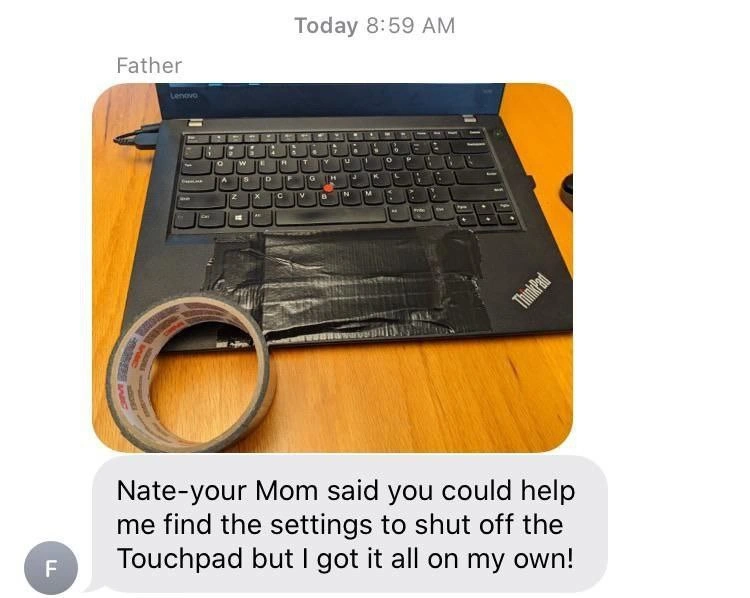
Let’s break down what’s happening in this meme in more straightforward terms. The picture shows a laptop (specifically a Lenovo ThinkPad, a brand of laptop often favored by developers and IT folks) where the touchpad — that flat rectangular “mouse” area below the keyboard — has been completely covered with duct tape. Why would someone do that? Well, in the text message, the dad says he wanted to “shut off the Touchpad.” Usually, if the touchpad is bothering you (like the cursor jumping around when you accidentally brush it while typing), there’s a setting in the computer’s software to disable it. You might go into the laptop’s settings menu, find the touchpad options, and turn it off. On many laptops, there’s even a shortcut like pressing a special Fn key (function key) combination to toggle the touchpad on or off. However, it sounds like Dad wasn’t sure where that setting was, and he didn’t want to wait for his son’s help. So he literally took matters into his own hands — by using tape to cover the touchpad so it can’t be easily used. This is a classic workaround: instead of solving the problem the “official” way, he found another method that achieves a similar result. The touchpad is effectively unusable now because you can’t move the pointer or click through layers of thick tape. Mission accomplished, in a very homespun DIY way!
The meme’s title calls this a “duct-tape feature flag.” Let’s unpack that term. In software development, a feature flag is like a switch in the code that lets developers turn a specific feature on or off without removing the code. It’s like having an on/off toggle for features so that if something is wrong or not needed, you can quickly disable that feature for users. This is super useful when deploying new features gradually or shutting down parts of an application that are causing trouble. Now, of course, Dad isn’t literally writing code here, but we’re joking that his duct tape is acting as a feature flag for the laptop’s touchpad feature. By putting tape over it, he basically turned the touchpad “off.” It’s a physical-world version of flipping a software switch. Instead of a programmer setting a flag in the software, Dad set a tape flag on the hardware.
This scenario is a funny example of a hardware humor and a low-tech solution to a tech problem. Think about it: the touchpad is hardware, and he solved a configuration issue (something we usually handle in software) using a hardware fix (tape). It’s as if someone fixed a software bug by smacking the computer — not normally how we do things, which is why it makes us chuckle. For developers and IT folks, the idea of a “duct tape solution” is a common joke. We sometimes say a fix is “held together with duct tape” to mean it’s not a pretty or permanent solution, but just a quick fix that gets the job done. Here it’s literally true! The touchpad issue is “fixed” with actual duct tape. It’s developer humor because it draws a parallel to things we experience in our work: sometimes when a program is acting up, a quick-and-dirty change (our version of duct tape) might be applied just to keep things working until a better solution is found. We call these workarounds, and while we know they aren’t ideal, they are often very relatable – especially when you’re under pressure.
Now, why is this particularly relatable to developers in terms of experience (DX)? One reason is many developers have stories of doing unofficial tech support for family members – exactly like the text conversation shown. The dad in the meme texted his son for help to disable the touchpad. This is a common dynamic: if you’re “the computer person” in your family, you become the go-to for every minor tech question (we sometimes jokingly call it parental IT support). So the son, Nate, presumably would have guided Dad to the correct setting, but Dad got impatient or inventive and solved it on his own. When Dad says, “I got it all on my own!”, you can almost hear the pride through the text. As techies, we find that adorable and funny, because often we expect a call back like, “It’s not working, can you come over?” Instead, Dad surprised us with a solution we didn’t see coming. He basically hacked the problem in a very non-technical way. That juxtaposition — parent doing a “hack” with household items — is both heartwarming and comical to those of us who usually approach things with software or proper configurations. It’s also a tiny cautionary tale: if our user interface or settings are too confusing, people might just give up and use tape (or any crude fix) out of frustration!
Let’s talk a bit about the ThinkPad aspect, since thinkpad_culture is mentioned. ThinkPads are well-known laptops originally by IBM (now by Lenovo) that have a strong following in the tech community. They have that little red TrackPoint in the middle of the keyboard, which is like a tiny joystick for moving the mouse cursor. Some people absolutely love using the TrackPoint and hardly touch the touchpad. In fact, it’s not unusual for die-hard ThinkPad fans to disable the touchpad entirely so they don’t accidentally hit it. On many models, there’s a setting or even a BIOS option (the BIOS is the firmware settings you can access before the OS loads) to turn off the touchpad for exactly this reason. So Dad’s desire to “shut off the Touchpad” isn’t coming out of nowhere. Maybe he’s more comfortable with a regular mouse or that TrackPoint. Or maybe the touchpad was causing him trouble while typing (that’s a frustration many of us have experienced: you’re typing away and your palm brushes the pad, causing the cursor to jump – suddenly you’re typing in a different part of the document!). The typical developer experience with ThinkPads might include going into settings and adjusting something called “PalmCheck” or “disable touchpad while typing” or simply toggling it off when using an external mouse. But here, instead of doing any of that technical configuration, we see a touchpad_disable_hack in its purest form: physically cover it up. It’s like covering a camera lens – straightforward and guarantees no input is registered because you simply can’t touch it anymore.
In summary, the meme humorously shows a Dad applying an engineering fix with duct tape to solve a computer issue. It ties into relatable dev experience on multiple levels: helping parents with tech, finding quick workarounds, and mixing up hardware fixes with software problems. The tags like HardwareHumor and Workarounds perfectly describe what’s going on: it’s a funny hardware-based workaround. And calling it a feature flag is the cherry on top, making it DeveloperHumor – we’re labeling his tape solution with a term from our software world. It’s a lighthearted reminder that sometimes the simplest solution (even if it’s silly) can solve the problem, and that users don’t always solve things the way software developers expect them to. After all, when faced with a tricky touchpad and no obvious settings in sight, Dad basically said, “Settings? Nah, I’ve got tape for that,” and it worked!
Level 3: Duct Tape in Prod
At first glance, this meme is a masterclass in hardware hotfixes and unintended feature flags. The image shows a Lenovo ThinkPad laptop whose entire touchpad area is plastered over with broad strips of black duct tape. There’s even a proud roll of tape resting on the keyboard, like a deployed build artifact. In the text message above the photo, the father proudly announces: “Nate - your Mom said you could help me find the settings to shut off the Touchpad but I got it all on my own!” This one line encapsulates the humor: Dad has deployed a production-ready fix in record time, bypassing the need for any software configuration. For seasoned developers, it’s an immediate head-nod: we’ve all seen duct-tape solutions both in code and in real life, where the quickest hack that delivers value wins out over the “proper” fix hidden in some obscure settings menu.
From a senior developer’s perspective, the meme brilliantly merges a dev concept (feature flags) with a classic DIY workaround. In software development, a feature flag is a technique to turn certain functionality on or off dynamically, usually with a simple config change or conditional check. It’s a way to disable a misbehaving component without deploying new code – essentially a kill-switch for features. Here, Dad implemented a physical feature flag: he toggled off the laptop’s touchpad by literally covering it, functionally removing that feature from use. It’s a literal flag in the sense that a big piece of tape now flags that part of the hardware as “off limits.” Developers chuckle because we recognize the pattern: when encountering a frustrating feature (like an overly sensitive touchpad), sometimes the most expedient solution is to just shut it down by any means necessary. Why dig through driver settings or registry keys when a few strips of trusty duct tape achieve the same end result? It’s the physical_layer_debugging equivalent of adding a quick if(false) in code to skip a troublesome block – not elegant, but hey, it stops the problem cold.
The humor also taps into the gulf between best practice and real-world hacks. Best practice says: use the OS settings, update the driver, or at least hit the proper Fn key combo to disable the touchpad. (ThinkPads often have function keys or BIOS options for this exact need, reflecting a long history of ThinkPad users who prefer the red TrackPoint nub or an external mouse over the touchpad.) But reality says: the average user (or exasperated Dad) either doesn’t know about those options or can’t find them fast enough. Maybe the setting is buried three menus deep in the Windows Control Panel or hidden behind a Lenovo driver utility that isn’t immediately obvious. This “configuration buried in UI” problem is painfully familiar in enterprise software and developer tools as well: if you hide a crucial toggle behind too many layers, don’t be surprised when users implement their own workarounds. In DevOps and engineering, we’ve all witnessed “temporary” fixes that involve editing a config file on the server at 3 AM or literally uncommenting a block of code to disable a feature – the digital cousin of slapping tape over the touchpad. The meme comedically spotlights that end-users will always choose the quickest path to value. Dad had a problem (the touchpad bothering him) and solved it in the most direct way, even if it makes engineers cringe-smile because we know how far that is from the intended solution.
There’s an element of thinkpad_culture and generational tech support woven in too. ThinkPads are beloved in many developer circles for their rugged build and the iconic TrackPoint (the little red joystick in the keyboard). In fact, veteran ThinkPad users often have strong opinions about touchpads – some old-school engineers disable the touchpad entirely, swearing by the precision of the TrackPoint or a USB mouse. Historically, IBM/Lenovo even provided BIOS settings or onboard shortcuts to turn off the touchpad for exactly these users. So when Dad reaches for duct tape, it hints that he might be one of those folks who either dislikes the touchpad or keeps brushing it by accident while typing (a common frustration leading to sudden jumps of the cursor). Maybe he asked Mom to get Nate’s (the son’s) help finding that pesky software toggle, but impatience or practicality took over. In true parental_it_support fashion, by the time the “IT support” (his developer son) is ready to assist, Dad has already solved it his way. There’s a shared laugh here for anyone who’s ever been tech support for their family: sometimes our parents come up with surprisingly creative touchpad_disable_hack solutions that you never taught them. It’s both endearing and a touch exasperating – you design an elegant feature control, and they go for the low-tech fix sitting in the garage.
To really appreciate the depth of the joke, let’s compare the intended solution versus Dad’s duct-tape solution:
| The “Proper” Way (Software) | Dad’s Way (Hardware) |
|---|---|
| Navigate a labyrinth of OS settings or driver menus to find the “disable touchpad” option. | Simply cover the entire touchpad with duct tape. |
| Use the official driver utility or a secret Fn + Fsomething key combo designed for this. | Use an everyday household fix that works in seconds (no keyboard shortcuts needed). |
| Software-based toggle: reversible with a checkbox or click. | Physical toggle: reversible by peeling off the tape (with some gooey residue as a souvenir). |
| Requires tech know-how or digging through manuals/StackOverflow to locate the right setting. | Requires only duct tape, a can-do attitude, and maybe a coffee table to set the laptop on. |
| Invisible, elegant change (nothing looks different on the laptop). | Visibly crude change (the laptop now sports a shiny black tape patch), but it’s undeniably effective. |
This side-by-side highlights why developers are laughing: Dad’s fix is basically a production hotfix. It reminds us of those times in software engineering when the theoretically correct solution is too costly or time-consuming, so you implement a quick patch directly in production. It might be hacky, it might make the purists wince, but it solves the immediate problem. In DevOps lingo, Dad didn’t bother filing a ticket or waiting for the next release; he went straight to prod with a manual override. It’s analogous to pulling the plug on a server that misbehaves rather than gracefully shutting it down via software – brute force, yet effective. There’s also a wink here at the concept of technical debt: using tape is a “debt-laden” solution (we all know it’s not a long-term fix; the proper setting is still not handled), but sometimes you accrue a little debt to quickly unlock value or relieve frustration in the moment. Seasoned engineers know that feeling all too well: “We’ll fix it properly later, but for now, just tape it (or comment it out) so we can move on.”
Another layer to this meme is the classic engineering adage: “If it moves and it shouldn’t, use duct tape. If it doesn’t move and it should, use WD-40.” This dad-level wisdom has parallel in software too (e.g., if the service is running when it shouldn’t, kill the process; if it’s not running when it should, kick-start it). Here the touchpad “moves” (responds to touch) when it shouldn’t (because Dad doesn’t want it active), so duct tape comes to the rescue. The duct_tape_feature_flag moniker is hilariously appropriate — it’s a feature flag in the sense of a kill-switch, but implemented with the most literal tool in the toolbox. This brings a sense of physical_layer_debugging comedy: rather than debugging in software, he debugged the hardware state by modifying the device itself (well, superficially). It’s like solving a software bug by physically disconnecting the component that’s acting up — which, by the way, some sysadmins have literally done in emergencies (yank out the network cable to “disable” a server’s connectivity when software firewalls fail). The Dad in the meme basically said, “I don’t know where the off switch is, so I’ll create my own off switch with tape.” That’s both a facepalm and a chef’s kiss moment for anyone in tech: it’s so wrong, yet so right.
Finally, from a DeveloperExperience_DX standpoint, this meme is a gentle jab at how we design user settings. The fact that an end-user felt the need to resort to duct tape implies some DX or UX failure in the system. Perhaps the laptop’s interface didn’t make it obvious how to disable the touchpad, or the setting was too inconvenient (maybe it re-enables every reboot, who knows). Users will gravitate to whatever solution minimizes their pain fastest. In business terms, Dad “shipped” a solution with zero documentation and an almost zero learning curve — can’t beat that for usability! It reminds developers that no matter how much effort we put into polished configuration dialogs or registry tweaks, if the user doesn’t discover it, they’ll invent their own path. And often that path might literally ignore all our code and design (like, say, covering a hardware input device with adhesive). It’s humbling and hilarious: sometimes the quick and dirty fix outperforms the elegant solution simply because it’s accessible. The meme resonates because it captures the essence of relatable dev experience: we strive to build configurable systems, yet the real world often throws us duct-tape-level solutions. As a community of builders and problem solvers, we can’t help but laugh (and maybe shed a proud tear) at Dad’s ingenuity. After all, in the grand tradition of hacker culture, he found a solution that works with the tools he had — in this case, a good ol’ roll of duct tape. Problem solved, production stable, and one Dad feeling like a tech wizard in his own right.
Description
The image is a screenshot of a text message conversation. The sender is identified as 'Father' and the message was sent at 8:59 AM. The message contains a photo of a black Lenovo ThinkPad laptop resting on a wooden desk. The laptop's touchpad has been completely covered with strips of black duct tape. A roll of the same duct tape sits on the desk next to the laptop. Below the photo, the father's message reads: 'Nate-your Mom said you could help me find the settings to shut off the Touchpad but I got it all on my own!'. The humor stems from the non-technical father's brute-force, physical solution to a common software configuration problem. Instead of navigating through system settings to disable the touchpad, he has physically obstructed it, proudly presenting his low-tech workaround as a successful, independent solution. This scenario is highly relatable for tech-savvy individuals who often provide IT support for their less technical family members, highlighting the gap in problem-solving approaches between different generations and levels of technical literacy

Comments
14Comment deleted
Some users submit a ticket to disable the touchpad; others take matters into their own hands and apply a hardware-level patch with 100% uptime and zero chance of being overridden by a driver update
When the configuration panel is six clicks deep, the Physical Layer gets promoted to SRE and ships a patch in duct-tape time
This is what happens when you tell a senior engineer to 'just disable it in prod' - they take the most direct path to resolution, even if it means literally applying a hardware patch with a 100% success rate and zero rollback capability
When your dad applies the Unix philosophy of 'everything is a file' but interprets it as 'everything is fixable with physical materials' - achieving 100% touchpad disable success rate with zero configuration overhead and infinite uptime, though admittedly with some UX trade-offs
Touchpad acting up like a flaky event handler? Duct tape: the ultimate zero-latency, reboot-proof disable
Can’t find the setting? Ship a hardware feature flag - immutable config with five‑nines uptime and a zero‑downtime rollback called “peel.”
Implementing “Disable Touchpad” as a physical feature flag - zero config, high stickiness, and rollback requires a solvent instead of a sprint
Hhahahaha that wouldn’t work as its capacitive touch Comment deleted
It looks a bit puffy, maybe there's something under the tape. Comment deleted
Heresy! Comment deleted
huh? Comment deleted
A Thinkpad is a holy relic Comment deleted
Now that's what I call thinking outside of the box Comment deleted
Thinking outside the Pad ™️ Comment deleted