Code Confessions: The 'Less Gross Name' TODO
Why is this CodeQuality meme funny?
Level 1: I'll Name It Later
Imagine you’re drawing a big colorful picture, and you’ve also drawn a clear border around it so you don’t color outside the lines. Now, you come up with a rule for yourself: “stay inside the border!” It’s an important rule so your artwork looks neat. Maybe you give this rule a silly name, like “Inside Border Goodness.” That name sounds kind of weird, right? You even scribble a little note next to it: “I’ll think of a better name later.” It’s a bit like you’re laughing at the name you chose, and you promise yourself you’ll fix it when you can think of something better. In the meantime, the rule itself (don’t color past the border) still works and keeps your drawing tidy. In this meme, a programmer did the same thing. They wrote a rule in the code to keep a dragged item inside a box (like your coloring staying inside the border). But the name they gave that rule was awkward, and they knew it! So, right in the code, they left a playful note saying essentially, “Ha, this name is kinda gross — I’ll rename it later!” It’s funny because it shows the programmer is aware of the problem and isn’t afraid to poke fun at their own work. Even though the computer doesn’t care about the name, humans reading the code do, and this one basically chuckles and says, “Yeah, I’ll fix that goofy name soon.” It’s a little moment of honesty that anyone, even not a coder, can relate to — like writing yourself a reminder on a messy part of a project, with a smile.
Level 2: Naming Things 101
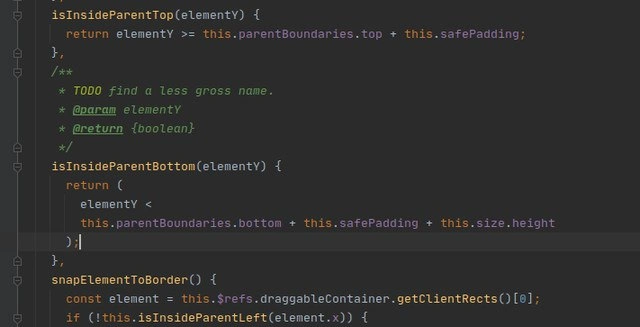
Let’s break this down in simpler terms. We’re looking at a piece of front-end development code (likely in JavaScript or TypeScript) that handles dragging an item around on the screen. Think of a scenario where you have a box or a window on a webpage that you can click and drag. The code here is making sure that box stays within a bigger container and doesn’t get dragged off the visible area. To do this, the program needs to constantly check the box’s position against the container’s edges (the boundaries).
There are two functions visible: isInsideParentTop(elementY) and isInsideParentBottom(elementY). Both functions take a value elementY – which we can assume is the vertical position (Y-coordinate) of the draggable element (probably the top edge of that element). The names hint at what they check:
isInsideParentTopis likely checking the top boundary. It returnstrueif the element’s Y position is greater than or equal to (>=) the top boundary of the parent container (plus somesafePadding). In plain words, it checks that the element hasn’t been dragged above the top edge of the container. ThesafePaddingis probably a little buffer zone; maybe the dev doesn’t want the element to touch the border exactly, or it accounts for some margin. So if the element’s Y is, say, 50px and the parent’s top boundary + padding is 40px, this returns true (50 is inside, not above the allowed top).isInsideParentBottomchecks the bottom boundary. It returnstrueif the element’s Y position is less than the parent’s bottom boundary plus padding plus the element’s own height. Why add the element’s height? Because if we’re using the element’s top position (elementY) to check the bottom, we must ensure the bottom of the element isn’t poking out. So we take the parent’s bottom edge (say 500px from the top of page), add some padding, then add the element’s height (how tall it is). If the element’s top is less than that sum, it means the entire element fits inside the container. If the element’s top were equal or greater than that sum, it would mean it’s pushed so far down that some part of it is outside the container’s bottom. In short,isInsideParentBottom= “is the element not too low beyond the parent’s bottom?”
These checks are part of a typical drag_and_drop_boundary_logic: whenever the user moves the item, the code would use these functions to decide “Are we still good? Still inside the box?”. If not, other code (like that snapElementToBorder() function we see a glimpse of) might automatically push the item back inside, so it never visually leaves the container. This is common in UI programming – for example, preventing a dialog from being dragged off-screen.
Now, about that funny comment. Above isInsideParentBottom, there’s a block comment that says:
/**
* TODO find a less gross name.
* @param elementY
* @return {boolean}
*/
This is a TODO comment. Developers write TODOs in comments to mark things that should be done later. It’s like leaving a sticky note for yourself in the code, saying “I know this isn’t ideal; I plan to improve it.” Here, the note is specifically about finding a “less gross name” for the function. “Gross” in this context means the author thinks the name isInsideParentBottom is ugly or not well-chosen. In more formal terms, they find the naming poor and want to rename it to something better. This kind of self-critique is light-hearted and a bit self-mocking. It’s not every day you see a programmer call their own function name gross right in the code – but it’s actually not unheard of either, especially in internal or personal projects. It tells anyone reading the code that the author is aware the name could be improved.
Why would isInsideParentBottom be considered a bad name? In programming, good names are descriptive and unambiguous. This name is a bit confusing because at first glance one might think “inside bottom?” That’s not a usual phrase. It requires some thinking to realize it means “inside (the bounds of) the parent’s bottom edge.” A clearer name could be something like isBelowTopBoundary and isAboveBottomBoundary (so you’d read it as “is the element below the top boundary?” and “is it above the bottom boundary?” – those sound more like proper conditions). Or perhaps withinVerticalBounds to cover both. But naming is tricky – every developer might suggest a different better name! The key is, the current name felt off enough that the developer themselves winced at it.
For a newcomer reading this code, that TODO comment is actually helpful: it signals “hey, don’t be confused by this weird name; even I (the author) think it’s weird and plan to change it.” It also injects some personality into the code. CodeComments can serve many purposes: documentation (@param elementY and @return {boolean} are there to explain what the function expects and returns), clarification, or leaving reminders (like TODOs or FIXME notes). They’re important for CodeQuality because they help others understand the code’s intent or alert them to potential issues.
Seeing “TODO find a less gross name” is almost like a teacher scribbling a note in the margin of an essay saying “reword this – sounds awkward.” It’s a sign of Code Smell (a hint that something isn’t quite right). Here the smell is simply an unclean naming choice, not a bug. It’s a small form of technical debt: the code works, but it could be cleaner. The developer intends to clean it, but not right this moment. Maybe they wrote this late at night or under a tight deadline, and obsessing over the perfect name was lower priority than getting the feature working.
Let’s also talk about the context: FrontendDevelopment often involves these manual layout adjustments. Many frameworks or libraries handle boundaries for you, but when you need custom behavior, you dive into raw DOM measurements. That this.$refs.draggableContainer.getClientRects()[0] suggests they’re grabbing the exact on-screen coordinates of an element (getClientRects() gives the rectangle dimensions of a DOM element). Once they have the container’s rectangle (with top and bottom values), they use their isInsideParentLeft/Top/Bottom checks to decide if the dragged item is out of bounds. If, say, !this.isInsideParentLeft(element.x) (meaning the element’s x-position is not inside the left boundary), then snapElementToBorder() presumably moves it back to the left edge. The code snippet in the meme cuts off, but we can infer they have similar functions for left and right boundaries (perhaps isInsideParentLeft and maybe isInsideParentRight). All these coordinate checks ensure a nice user experience: you can’t accidentally drag something completely out of view. It’s basically computing positions with a bit of math (+this.safePadding, +this.size.height) to avoid edge overflow.
For a junior developer, the takeaways here are:
- Naming matters: If a name feels gross even to you, it probably can be improved. Don’t worry – even experienced devs struggle with naming, as we see here. It’s often worth spending a little time to pick a clear name, but if you’re stuck, leave a note and revisit it when your mind’s fresher.
- TODO comments are a double-edged sword: great for not forgetting improvements, but only if you actually address them! If you see a TODO in code you inherited, it might be something worth fixing (or at least having a laugh that the last person knew it wasn’t perfect either).
- Code readability: Notice how the return condition in
isInsideParentBottomis wrapped in parentheses and split into multiple lines. This is to make it easier to read and understand. They could have written it in one long line, but that would be harder to parse at a glance. Little formatting choices like this improve clarity. - Coordinate logic: The snippet is a practical example of working with positions. Understanding that
elementYvsparentBoundaries.bottomand adding the element’s height is about ensuring the element’s bottom stays inside is a good lesson in off-by-one (or off-by-some-pixels) thinking. When coding UI interactions, always consider the size of elements, not just their position. - Humor and humility in code: It’s okay to inject a bit of personality. This comment shows the programmer doesn’t take themselves too seriously and can admit imperfection. It can make collaboration more fun, just keep it appropriate (calling your own function name gross is fairly harmless and clearly about the code, not a person or anything).
So, in summary, this meme highlights a very everyday aspect of programming: you solve a complex problem (here, keeping drags in bounds) but you might leave something a bit messy (a poorly named function), and you openly note it. It’s funny and reassuring to see, because it reminds everyone that even good developers write code they’re not 100% happy with and that naming stuff in coding is hard!.
Level 3: Gross Misnomer
This snippet showcases a bit of frontend juggling act: implementing custom drag-and-drop boundaries in JavaScript, while wrestling with the timeless challenge of naming things. The code defines helper functions like isInsideParentTop(elementY) and isInsideParentBottom(elementY) to ensure a draggable element stays within its container’s vertical limits. Under the hood, it's doing coordinate math: checking that an element’s Y position is not above the parent’s top boundary (with some safePadding buffer) and not below the parent’s bottom boundary. In plainer terms, if you grab a UI element and move it around, these functions return true only when the element hasn’t escaped the top or bottom edges of its parent box. The isInsideParentBottom function in particular returns a multi-line boolean expression:
return (
elementY < this.parentBoundaries.bottom + this.safePadding + this.size.height
);
Here the developer has spread the calculation across lines inside parentheses for clarity. It’s confirming the element’s top (elementY) is less than bottom boundary + safe padding + element’s height – effectively meaning the element’s bottom edge is still inside the container’s bottom edge (with a little extra padding wiggle room). Breaking it into multiple lines is a stylistic choice (sometimes enforced by linters or prettier config) to keep that long condition readable. This kind of coordinate-based UI check is common in complex FrontendDevelopment: when you’re not using a library, you end up crunching numbers to keep elements within bounds, avoid overflow scrollbars, etc. Seasoned devs know these calculations can get tricky (one off-by-one-pixel error and your element jiggles out of its box!), so seeing such math is relatable. The logic here is solid, if a tad manual.
Now, the real wink-wink joke in this meme is in the comment hovering above that second function. The developer wrote a JSDoc-style block comment with a frank admission:
TODO find a less gross name.
They literally labeled their own function name as “gross.” 😆 This is self-deprecating developer humor at its finest. The author realized isInsideParentBottom is an awkward, maybe even misleading name, and made a point to mark it for improvement later. Calling a name gross in code is a bit unorthodox (we usually see polite terms like "refactor" or "improve naming"), so it jumps out and tickles any experienced developer’s funny bone. It’s like the coder is half apologizing, half laughing at themselves inside the code.
Why is this so funny to folks who write code? For one, NamingThings is infamously hard – there’s an old joke that the two hardest problems in computer science are cache invalidation, naming things, and off-by-one errors (yes, the joke itself has an off-by-one error!). Here, we literally see that struggle in writing: the dev couldn’t coin a clean name on the spot. Maybe isInsideParentBottom was named in parallel to an isInsideParentTop for symmetry, but even they felt it sounds off. It’s essentially checking “is the element within the parent’s bottom boundary,” but the phrasing is clunky. A more graceful name might be something like isWithinBottomBoundary(elementY), but perhaps that felt too verbose or they just didn’t think of it in the moment. Instead of derailing their progress, they dropped a TODO comment as a promise to circle back. Any senior engineer reading this has done the same at some point – pick a meh name with every intention to change it once the urgent part (making the thing work) is done.
This situation also screams technical debt lite. A TODO in code is essentially a tiny debt: "we should clean this up later." Often, later never comes, and these comments stick around like archaeological artifacts in the codebase. The humor isn’t just the comment’s wording, it’s also the recognition – we laugh because we’ve encountered code where a CodeComment like “TODO: fix this ugly hack” has sat untouched for years. At least here the developer is aware and somewhat embarrassed. It’s a form of empathy with future readers: “Yeah, I know this name stinks, sorry! I’ll make it better soon (I hope).” The candid tone (“gross name”) would give any code reviewer a chuckle and a nod. It humanizes the code.
From a CodeQuality perspective, this snippet is a mixed bag of commendable thoroughness and admitted quick-and-dirty naming. On one hand, the developer clearly thought through the boundary conditions (using the element’s height and a padding margin to ensure the drag doesn’t overshoot – that’s attention to detail). On the other hand, naming is part of clean code, and here the naming convention slipped. The fact they called it out means they value readability – they just likely had a time crunch or brain-freeze on naming. In many real projects, especially in fast-paced frontend feature development, you’ll see this exact compromise: the code does the job, but there’s a list of polish items (like better naming or refactoring) left in comments. Everyone intends to address them post-deadline, though sometimes those intentions get forgotten.
There’s also an element of shared experience: every dev team has had a laugh at some absurd function name or comment found in the wild. We’ve opened files and seen gems like // TODO: this is a hack, but it works or bizarrely named variables like temp123 or doNotUse. Here the meme’s author is showcasing one such gem from their frontend code, inviting us to join in on the tongue-in-cheek self-critique. The combination of serious logic (ensuring correct UI behavior) with a not-so-serious comment (calling one’s own work “gross”) is what makes this meme so real. It’s the contrast between the precise mathematics of UI coordinates and the messy reality of developer creativity under pressure. As a senior dev, you find it hilarious because you see the subtext: this code probably works perfectly, but the author is cringing at the name they gave it. A battle-tested coder will tell you: it’s far better to have clear code with slightly redundant naming than clever code with confusing names. Here, we have an attempt at clarity that ended up a bit linguistically awkward, and even the author couldn’t let it slide without a comedic flag.
In summary, at the highest level of nitty-gritty:
- Frontend drag-and-drop logic? Check – been there, done that math, got the boundary conditions T-shirt.
- Cringey function name acknowledged by a TODO comment? Check – got the “naming things is hard” coffee mug to prove it.
- The meme perfectly captures a slice of developer life: the interplay of exacting technical work with a dose of humble humor about our own coding quirks. It’s a gross misnomer, indeed, and we love it.
Description
A screenshot of a code editor with a dark theme, displaying what appears to be JavaScript or TypeScript code. The focus is on a JSDoc comment block above a function definition. The comment contains a humorous and relatable developer note. The visible code includes functions like `isInsideParentTop(elementY)` and `isInsideParentBottom(elementY)`. The highlighted comment block reads: '/** * TODO find a less gross name. * @param elementY * @return {boolean} */'. This image captures a candid moment in software development, where a programmer leaves a self-deprecating note for their future self or colleagues. The humor resonates with experienced developers who understand that naming things is one of the hard problems in computer science and that sometimes you have to leave a 'gross' name as a placeholder just to keep moving, flagging it as a piece of technical debt to be addressed later
Comments
17Comment deleted
There are only two hard things in Computer Science: cache invalidation, naming things, and TODO comments that become permanent architectural features
This code finally reconciled CSS layout with Euclidean geometry; the price was a function called isInsideParentBottom() - proof that eventual consistency applies to naming conventions too
After 15 years in the industry, I've realized that 'grass name' TODOs are the technical debt equivalent of 'temporary' AWS resources from 2019 - they become permanent fixtures that future archaeologists will puzzle over while refactoring your legacy codebase into whatever quantum-blockchain-AI framework is trendy in 2030
Nothing says 'I know this is terrible but I'm shipping it anyway' quite like a TODO comment admitting your function name is gross. At least they documented their shame in JSDoc format - that's the kind of professional self-loathing that separates senior engineers from juniors. The function will probably still be called 'isInsideParentBottom' in production five years from now, with three layers of wrapper functions around it, each with their own TODO about renaming it
Define the coordinate contract once; otherwise every isInsideParentBottom() becomes bottom + padding + size.height + hope - and the drag feels flaky at 125% DPI
isInsideParentBottom(y) + safePadding + size.height + getClientRects()[0] - frontend’s eventual consistency: if it looks right within a couple pixels, we call it inside
TODO: less gross name. Reality: DOM parenting was never meant to be pretty - it's all gross margins and boundary issues
Лан Comment deleted
In java you need two monitors, the first vertical orientated, for code and the second horizontal orientated to see full name of method in one string Comment deleted
one for class names and one for stack trace Comment deleted
stack traces for C Comment deleted
> стек трейс в С Segmetation fault (core dumped) Comment deleted
that's js tho Comment deleted
alt+z Comment deleted
System.out.println Comment deleted
Damn this method names look kinda thicc Comment deleted
Easy: isInsideStepParentBottom Comment deleted