Skip to content
DevMeme
6425 of 7435
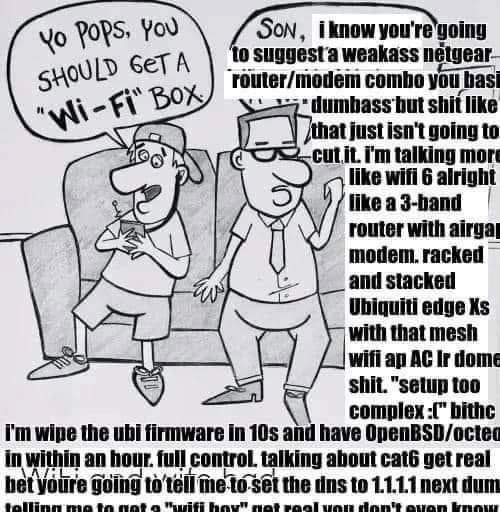
Son Roasts Dad's Wi-Fi Suggestion With Enterprise Network Architecture Rant
Networking Post #7046, on Aug 16, 2025 in TG

Son Roasts Dad's Wi-Fi Suggestion With Enterprise Network Architecture Rant

Why is this Networking meme funny?

Level 1: Sledgehammer for a Fly

Imagine you ask your dad for a simple thing – like you say, “Hey, can we get a new Wi-Fi box so the internet is better?” and instead of just saying “Sure, let’s pick one up,” he starts talking about building an entire mission control for your house’s internet. It’s like if you asked for a little treehouse in the backyard, and your dad responded with plans to build a full-blown castle complete with a moat. The joke here is basically that Dad is doing way too much for a simple request, kind of like using a giant sledgehammer to kill a tiny fly.

In everyday terms, the son just wants decent Wi-Fi to play games or watch videos without it cutting out. But Dad’s turned this into an epic project: he’s talking about special equipment and technical stuff that sounds overwhelming. It’s funny because of the overreaction. We expect a dad on a couch to maybe nod and say “Okay, let’s upgrade our router.” Instead, he unleashes a torrent of techno-babble about the latest Wi-Fi standards and professional networking gear. Even if you don’t understand the specifics, you can tell he’s describing something huge and complicated (a “WiFi 6 bunker network,” whatever that is) compared to what the son asked for.

The father’s rant is exaggerated to be ridiculous. It’s poking fun at how some people (especially tech-savvy folks) can get really carried away with a project. It’s like asking someone to fix a squeaky door hinge and they start drawing blueprints for a brand new house. The humor doesn’t require you to know what “OpenBSD” or “Ubiquiti” are – those are just the fancy tools and materials he wants to use. What’s clear is Dad isn’t going to do this the simple way. He’s basically saying, “Don’t even mention that cheap basic stuff to me. I’m going to build something extreme.”

So at the heart of it, this meme is funny because it’s a dad blowing a simple idea out of proportion in a super-nerdy way. It captures that feeling of when someone turns a small task into a huge, overly complicated undertaking. Even a kid can relate to the dynamic: you ask for one thing, and a parent (or friend) starts doing something so extra that it’s both impressive and a little absurd. It’s the classic comedy of overkill – doing so much more than necessary that you can’t help but laugh.

Level 2: Decoding Dad's Jargon

Let’s break down all the tech jargon the dad is spewing, in case you’re not a network expert but have some basic idea about home internet. The scenario is that the son suggests buying a simple router/modem combo device (like the kind you get from your internet provider or electronics store) so they can have Wi-Fi at home. A modem/router combo is a single box that typically connects to your cable or DSL line (that’s the modem part, handling communication with the Internet Service Provider) and also creates a local Wi-Fi network (that’s the router and Wi-Fi access point part). Many households have one box that does both – it’s straightforward, but not super customizable or powerful.

Now, Dad’s response is full of networking and hardware terms that show he has a much more complex plan:

  • Wi-Fi 6 (802.11ax): This is the latest generation of Wi-Fi technology (well, as of the mid-2020s). It’s faster and handles many devices better than previous Wi-Fi versions (like Wi-Fi 5 / 802.11ac). When dad insists on Wi-Fi 6, he means he doesn’t want an older or cheaper wireless standard. Wi-Fi 6 can provide higher speeds and more stable connections, especially if you have lots of devices or live in a dense area. It’s like saying “I want the newest, shiniest tech for our wireless network.” Many consumer routers by 2025 supported Wi-Fi 6 or even Wi-Fi 6E (which adds a new 6 GHz frequency band). So Dad wants the top-of-the-line wireless capability.
  • Tri-band router: Typical routers are dual-band: they have a 2.4 GHz radio and a 5 GHz radio for Wi-Fi (2.4 GHz for longer range but slower speeds, 5 GHz for faster speeds but shorter range). A tri-band router has three radios. Often that means one 2.4 GHz and two separate 5 GHz radios (or sometimes now, one 2.4, one 5, one 6 GHz in the case of Wi-Fi 6E routers). Why two 5 GHz radios? One common use is for mesh systems, where one 5 GHz band can be used as a dedicated backhaul (communication between mesh nodes), while the other is used for your devices. Or it can simply allow more devices to use high-speed 5 GHz without slowing each other down. Dad bringing up tri-band suggests he’s thinking about a mesh network or at least maximizing wireless performance so that even if many devices are connected, they won’t interfere as much. It’s more complicated to set up and more expensive, but it can improve Wi-Fi in big homes or busy networks.
  • Mesh Wi-Fi / APs / Ubiquiti AC LR: Mesh Wi-Fi means having multiple access points (APs) spread around your home that all work together to form one seamless network. Instead of one router struggling to reach the far corners of the house, you have perhaps 2, 3, or more units that relay signals. Devices can connect to the nearest unit for a strong signal. Mesh systems often self-manage (devices hand off your phone or laptop to the next AP as you move around). Dad specifically mentions Ubiquiti gear – Ubiquiti is a brand known for professional or “prosumer” network equipment. An AP AC LR is one of their products: “AP” = Access Point (a device that creates a Wi-Fi network but doesn’t necessarily route internet, usually used in combination with a separate router), “AC” = supports 802.11ac Wi-Fi 5 (since Ubiquiti started naming products before Wi-Fi 6 was out), and “LR” = Long Range (designed to cover a larger area per device). So Dad thinks a single Wi-Fi box isn’t enough; he’s imagining multiple APs like the ones an office or a large house might use. This hints he wants to place, say, one on each floor or in different wings of the house to ensure strong Wi-Fi everywhere. But those need to be wired back into the network (or mesh wireless backhaul), which adds complexity. To manage multiple APs, often you use a controller software or a more advanced router – and guess what, Dad has plans for that too.
  • EdgeRouter / Ubiquiti Edge X: The EdgeRouter line by Ubiquiti (often the EdgeRouter X, EdgeRouter Lite, etc.) are compact but powerful routers that run a Linux-based OS called EdgeOS. They are more advanced than typical home routers. For example, an EdgeRouter X doesn’t even have Wi-Fi; it’s just a router/firewall with Ethernet ports. People use these behind a modem to handle the routing, then use separate access points for Wi-Fi. Dad mentioning “Edge Xs” in plural and racking them suggests he might even be considering using multiple routers or at least has experience with them. In many home setups by enthusiasts, a Ubiquiti EdgeRouter might serve as the main router (doing DHCP, NAT, firewall, etc.), and then multiple Ubiquiti UniFi APs provide the Wi-Fi under its oversight. It’s a modular approach: separate the routing brain from the wireless radios, unlike an all-in-one router. This is common in enterprise networks and in prosumer HomeOfficeSetup scenarios, because each piece can be specialized and potentially upgraded independently. It’s more complex but often more stable and flexible.
  • Airgap modem: This one’s a bit quirky in phrasing. A modem is the device that actually connects to your ISP (like the cable line or fiber line) and translates the signal into data your router can use. Many people have a combined modem/router, but Dad clearly loathes that idea. By saying “airgap modem,” he might mean he wants a completely separate modem unit that does nothing but act as a bridge to the internet, and it’s kind of isolated (“air-gapped”) from his internal network except for the one clean connection to his own router. In simpler terms, Dad doesn’t want a cheap ISP-supplied modem+router doing things he can’t control. He’d prefer a simple modem that he can connect his fancy router to. Perhaps he even means he wants the modem on one network and then a strong firewall gap (like literally placing it on a separate network segment) – but that’s not typical terminology. It’s likely an exaggeration meaning, I want the modem separate and locked down. In practice, many techies will put the ISP modem in “bridge mode,” which turns off any routing/Wi-Fi it might have and just passes the raw Internet connection to their own router. That way, the ISP’s equipment is just a dumb pipe, and their own gear does all the important work.
  • Wipe firmware & OpenBSD on Octeon: This is probably the most hardcore part of Dad’s plan. Firmware is the low-level software that comes on hardware devices. When you buy a router, it has firmware that provides the web interface and the routing functions. Wiping the firmware means completely removing or replacing that software. Dad is essentially saying he would buy that nice Ubiquiti router hardware but not even use Ubiquiti’s software – he’d install something else (OpenBSD). OpenBSD is a free, open-source operating system, sort of like Linux but a different flavor of Unix, known for its emphasis on security and reliability. It runs on many platforms, including some router hardware. Octeon refers to the Cavium Octeon processor family, which are used in high-end routers and network appliances. So Dad is talking about installing OpenBSD on the router’s hardware, which would give him a ton of control: he could configure everything via command-line, use OpenBSD’s built-in firewall (pf), run custom services like his own DNS server or VPNs, etc. This is not something average users do – it’s complex and if done wrong could “brick” (i.e., break) the device. But hardcore network folks sometimes do this to get rid of any limitations or potential backdoors in the stock firmware. It’s akin to wiping Windows off a laptop and installing Linux – but here it’s wiping the router’s OS and installing another network-oriented OS.
  • Full control: Dad explicitly says this. The motivation behind all this fuss is control. He wants to configure things exactly to his liking, without being at the mercy of a consumer gadget’s simplified interface or an ISP’s locked-down router. With his own setup, he can set up advanced firewall rules, custom network segments (like maybe a guest Wi-Fi separate from main Wi-Fi, IoT devices on their own VLAN, etc.), better monitoring of traffic, you name it. It’s basically building a small enterprise network where he is the network administrator.
  • Cat6: Cat6 stands for Category 6 Ethernet cable. It’s a standard of network cable that supports higher data rates than the older Cat5 or Cat5e cables. Cat6 can handle 10 Gbps speeds up to a certain distance (55 meters reliably, 100 meters for 1 Gbps). It’s also better shielded against interference. When he says “talking about Cat6, get real,” he’s probably implying that suggesting Cat6 is obvious or maybe even not enough. He might prefer Cat6A or fiber optic cables! But essentially, he’s saying, “Of course I’d use high-grade cables, that’s not even a question.” If the son’s suggestion was just to plug things in with whatever cable came in the box, Dad is way ahead of that, thinking about rewiring parts of the house with professional cabling for maximum throughput and future-proofing. Pulling Cat6 cables through walls for a home network is something enthusiasts do to ensure that where possible, devices are wired (like smart TVs, PCs, game consoles) so only truly mobile things use Wi-Fi. It’s a lot of effort (you might have to go into crawlspaces or attics to run cables neatly), which again underscores how far Dad is willing to go.
  • DNS 1.1.1.1: This is referring to a public DNS server (specifically the one run by Cloudflare). DNS servers translate human-friendly domain names (like example.com) to IP addresses that computers use. Home networks by default use the ISP’s DNS, but many people change their router settings to use a faster public DNS like 1.1.1.1 (Cloudflare) or 8.8.8.8 (Google). The son might have heard from a friend or online tip, “hey, change your DNS to 1.1.1.1 for faster internet,” which is a common basic tweak. Dad’s response is to roll his eyes at this suggestion, implying “Ha, you think I’d just use an external DNS? I’m way beyond that beginner tip.” Possibly Dad would even run his own DNS resolver on the OpenBSD router for even more privacy and speed (so the router would cache and directly answer DNS queries for the home devices). At the very least, Dad considers something like using 1.1.1.1 as trivial knowledge, not worthy of mention when he’s already planning to reconstruct the network from the ground up.

All these points show Dad’s plan is essentially:
Don’t buy a simple router, but instead build a robust network:

  • Separate modem (so ISP has no control beyond providing the signal).
  • A powerful dedicated router (Ubiquiti or similar) running custom firmware (OpenBSD) for advanced routing and security.
  • Multiple wired access points for Wi-Fi coverage (using Wi-Fi 6/mesh) managed by him.
  • High-quality wired connections (Cat6 cables) wherever possible.
  • Custom configurations for services like DNS.

This is the kind of setup you’d maybe see in a tech enthusiast’s home lab or a small business, not in a typical living room. The meme exaggerates it as a comedic contrast to the son’s simple suggestion.

For a junior developer or someone early in tech, the humor might also come from recognizing just a few of these buzzwords and realizing the dad is going way too deep. You might not know OpenBSD or Octeon in detail, but you probably catch that Wi-Fi 6 is newer/faster Wi-Fi, that mesh means multiple devices, that Cat6 is a good cable, etc. Each of those alone is a sensible improvement, but all together, it sounds like Dad is prepping for some kind of mission-critical operation at home. It’s akin to someone saying, “I need a computer for email,” and the expert replying, “Sure, let me build a multinode server cluster with water cooling and dual 64-core processors so you can have the best email experience.” It’s humor via overwhelming specs.

In a workplace context, this resonates with the idea of over-engineering a solution. For example, a junior might say, “Let’s use a simple library to do X,” and a senior might respond, “No, we’ll set up a microservice architecture with load balancing and fallback systems,” which is much more complex than needed for the task. Here the father is that senior going off about the ultimate setup for something that arguably could be solved much more simply. The tags like NetworkHumor and HardwareHumor apply because you have to appreciate the nuances of networking hardware to get why it’s funny – it’s not a random list of items; it’s specifically the kind of gear and terms an obsessive network geek would bring up.

So, decoding it simply: the dad is listing out an insanely high-end home networking plan:

  • Latest Wi-Fi standard (Wi-Fi 6) with tri-band (meaning more capacity).
  • Using a mesh network with pro-grade access points (so coverage everywhere).
  • Dedicated router hardware (Ubiquiti EdgeRouter) instead of a simple router.
  • Throwing out the router’s own software and using a highly secure OS (OpenBSD) on that router for total control.
  • Using the fastest wired connections (Cat6 cables) inside the house.
  • And not relying on default settings like DNS, but customizing those too.

The result of that plan would be a home network that’s probably incredibly fast, reliable, and secure – but it’s also far more complicated to set up and maintain. The comedic angle is that most families don’t need any of this; it’s the dad’s personal passion project to go this far. If you’ve ever met an enthusiast who turned a simple DIY project into a huge undertaking, you’ll recognize the pattern and chuckle. Dad’s basically project-managing the Wi-Fi as if he’s building an enterprise infrastructure from scratch at home.

Level 3: Enterprise Overkill at Home

From a senior developer or network engineer’s perspective, this meme hilariously captures the phenomenon of overengineering a solution simply because you have the knowledge and tools to do so. The son’s casual suggestion “Yo pops, you should get a Wi-Fi box” represents the straightforward, consumer approach: go to a store and buy a simple Netgear or Linksys wireless router to plug in and get the home Wi-Fi working. But the dad—clearly an experienced tech professional or an uber-enthusiast—cannot accept something so basic. Instead, he launches into a tech rant listing enterprise-grade network components and plans, effectively saying “If we’re going to do Wi-Fi, we’re going to do it right (and by right, I mean excessively).”

This juxtaposition is the core of the humor: the son is thinking “just get internet in the house, dad,” while the father is thinking about building a home network that could handle a corporate office. It’s poking fun at that prosumer mentality—when a consumer (like a dad setting up Wi-Fi at home) starts buying professional-grade gear and implementing complex setups that go far beyond what’s needed for a typical household. People in tech often joke about this, e.g., someone using a rack-mounted server and VLANs for a home media server, or running a Kubernetes cluster to serve a personal blog. Here it’s the home Wi-Fi: instead of a one-box modem/router, Dad talks about separate modems, dedicated routers, flashing firmware, mesh access points – the whole nine yards. It’s “enterprise_grade_lan_at_home” taken to the extreme.

Experienced engineers will recognize every reference Dad drops, which makes it extra funny because each one is a hallmark of tech overkill in a home setting. For instance, Ubiquiti makes networking equipment that’s popular with professionals and serious home lab folks. A Ubiquiti EdgeRouter (like the EdgeRouter X or its bigger siblings) is a step up from typical home routers: it runs a more open OS (EdgeOS/VyOS) and offers features like advanced routing, firewall rules, and VLAN support. It’s great gear, but your average family with a few iPhones and a Smart TV wouldn’t need this kind of router; it’s chosen by those who want more control or need to handle complex setups. The meme dad says he’ll rack and stack a bunch of these – which conjures an image of him having a network rack in the basement with multiple devices wired together as if he’s an ISP or running a data center. The phrase “racked and stacked” itself is something you’d hear in professional IT environments when mounting equipment into server racks. So that one line already paints him as that guy who has a server rack at home (with maybe blinking lights and labeled cables, the full HomeOfficeSetup fantasy).

Then he mentions mesh Wi-Fi APs (Access Points) like the Ubiquiti AC LR. The UniFi AP AC LR is a specific Ubiquiti wireless access point model (“AC” indicating 802.11ac Wi-Fi 5, and “LR” meaning Long Range). It’s designed to be mounted on ceilings or walls and works with a controller for seamless roaming – basically what you’d deploy in an office or a large house for even coverage. If Dad is talking about multiple APs and a mesh, he’s envisioning placing several of these units around the house to create a single, blanket Wi-Fi network that has strong signal in every corner (and possibly even outside to the yard). Mesh networks and multiple AP setups are awesome for coverage but typically only needed in large homes or when basic routers can’t reach everywhere. Normal folks might buy a mesh kit with 2-3 units that auto-configure. But Dad? He’s going to configure it manually, possibly with different SSIDs or a single unified SSID and hand-tuned channels. The humor for an IT pro here is clear: we’ve seen colleagues or friends proudly show off their home network maps that rival a small business network. It’s cool, but also comedic in its extravagance.

Now, flashing firmware to OpenBSD: this is truly a “prosumer_router_overkill” scenario. Enthusiasts often flash custom firmware on routers (like OpenWRT, DD-WRT, or pfSense which is actually based on FreeBSD) to get more features or better stability. OpenBSD is not typically used on consumer routers (it’s more commonly run on standard PC hardware or specialized appliances), so the dad’s plan is an extra niche flex. It signals that he’s highly confident with Unix systems, and likely wants the kind of tight security and customization that OpenBSD offers. An experienced engineer reading that line might chuckle because it’s akin to saying “I won’t even tolerate the vendor’s modified Linux; I’m going completely custom with a general-purpose OS known for security.” OpenBSD’s security reputation is stellar – for example, they famously have very few remote vulnerabilities in default install over decades. So dad is implying the Netgear’s stock firmware (which might never get updated or could have backdoors) is unacceptable; he trusts only something he can open up and configure down to the kernel if needed. Running OpenBSD on a Cavium Octeon (a network-oriented CPU architecture) indicates he’s treating his router like an enterprise firewall device. In fact, many enterprise firewall appliances from companies like Cisco or Juniper run on similar hardware (MIPS or ARM processors with custom firmware). The dad basically wants to run his own version of such an appliance. It’s both impressive and absurd for home use. Networking humor often highlights this kind of excess: those of us in the field know how complex you could make a network, so seeing someone apply that at home is ironically relatable. We laugh because we know it’s possible, and part of us might even admire the dedication, but we also know it’s way beyond what’s necessary for, say, streaming Netflix or doing Zoom calls from the living room.

The rant also touches on Cat6 cabling versus Wi-Fi. Cat6 cables are high-quality Ethernet cables that support faster speeds and better reliability than older Cat5e. Only a networking nerd would insist on re-cabling a home with Cat6 (maybe to get 10 Gbps connectivity between a home server and his main PC, or just for future-proofing). The son probably doesn’t even know the difference – he just wants a wireless internet connection that works in his bedroom. But Dad is effectively saying, “Wi-Fi is fine, but let’s wire everything we possibly can with top-grade cable, and then use Wi-Fi 6 for the truly mobile devices.” That’s a very IT admin approach: wires where possible (because wired is always more stable and lower latency), and wireless only where needed, and even then use the latest standard and multiple APs. It’s funny to an experienced audience because it’s realistic – many of us do think that way – but it’s overkill because a simple $80 router could probably cover the house’s needs in most cases. The dad is optimizing for theoretical maximum performance and professional reliability in a setting that doesn’t strictly require it.

Finally, the interpersonal dynamic adds another layer: the father calling his son’s suggestion a “weakass netgear router/modem combo” and calling him a “basic dumbass” (in the comic) is an exaggerated, comical representation of a know-it-all techie who has little patience for the “noob” approach. It satirizes that gatekeeping attitude some experts have, where anything less than the best is garbage. We’ve all met that senior engineer who scoffs at simpler solutions: “Use a GUI? What kind of basic approach is that? Real pros do it in the CLI with a custom script.” Here the dad is that engineer, and his own kid is the novice suggesting the normal solution. The humor lies in overreaction: the dad doesn’t just suggest a slightly better router – he goes on a tirade outlining an entire high-end network architecture. This resonates with seasoned developers and IT folks because we’ve either been the overkill person or been around them. Maybe the first time a junior says “Why don’t we just use this library?” and a senior dev lectures them on how “No, we’ll build our own scalable service, because x, y, z…” It’s the same energy. In a networking context, it’s especially apt: network engineers often have strong opinions on gear and setups (Cisco vs Juniper vs Ubiquiti vs Mikrotik, homebrew vs ISP-provided, etc.), and they love reliability. So the idea of a dad tech rant about a home router is both absurd and strangely believable.

In summary, at this senior level of understanding, the meme is funny because it captures the insane contrast between a normal solution and an over-engineered solution. It’s networking humor gold: all the specific jargon (Wi-Fi 6, mesh APs, EdgeRouter, Cat6, OpenBSD) acts as wink-wink references to the kind of projects tech enthusiasts get way too excited about. The meme exaggerates it to the point of a dad berating his son for even thinking of a cheap router. Those of us with infrastructure backgrounds can’t help but laugh, and maybe feel a tinge of guilt, because we see a bit of ourselves in that dad who can’t resist turning a simple task into a complex, state-of-the-art project. It’s a comedic reminder that just because we can build a network worthy of a Silicon Valley startup, doesn’t mean we should – but darn if it isn’t fun (for us, at least) to imagine it.

Level 4: Ludicrous LAN Mode

At the deepest technical level, this dad is basically treating his home network like a mini data-center, pushing into territory usually reserved for serious network infrastructure labs. The mention of Wi-Fi 6 (the 802.11ax standard) means he’s eyeing the latest wireless tech: indeed Wi-Fi 6 introduced features like OFDMA (Orthogonal Frequency Division Multiple Access) and more simultaneous MU-MIMO streams for improved efficiency and capacity. In practical terms, that means Dad wants a router that can handle tons of devices at once with minimal interference – total overkill for a typical household, but perfect for a “bunker network” mentality. A tri-band router in this context likely has one 2.4 GHz and two high-band channels (maybe dual 5 GHz, or a 5 GHz + new 6 GHz if it’s Wi-Fi 6E), which could allow a dedicated wireless backhaul channel or simply more lanes for traffic. It’s the kind of high-end mesh WiFi system where one band might even be used for inter-node communication, keeping the other bands free for your devices. In short, he’s thinking of enterprise-grade wireless architecture at home, with multiple overlapping access points and solid uplinks – zero dead zones, zero congestion, and probably zero chill.

The dad’s rant dives into hardware hacks too. Mentioning wiping the Ubiquiti firmware in 10 seconds and installing OpenBSD on an Octeon CPU is a nod to hardcore customization. Ubiquiti EdgeRouter devices (like the EdgeRouter Lite or EdgeRouter X series) often use Cavium Octeon or similar network-focused SoCs. These are MIPS64 multi-core processors optimized for packet processing. OpenBSD has an unofficially legendary status for network and security folks – it’s an OS with a focus on correctness and security (fewer bugs, exploit mitigation, etc.), and it includes the powerful pf firewall. By saying he’d flash OpenBSD onto the router, Dad is effectively declaring, “I don’t trust the stock firmware; I’ll run a full-fledged UNIX-like OS on the router so I have full control over every packet.” This is beyond even typical power-user territory – it’s something you’d read about on niche forums for network hobbyists or sysadmins who love open-source routing. It implies cross-compiling the OS for the specific Octeon architecture, possibly connecting via a serial console, and manually configuring network interfaces and firewall rules. It’s a prosumer dream (or nightmare) of control. Most people would be happy if the Wi-Fi just works; this guy wants to personally compile the code running on his router’s CPU.

Let’s not skip over “airgap modem”. That term is interesting because air-gapping usually refers to physically isolating a system from networks for security. In context, Dad likely means he refuses to use a combo modem-router from the ISP; instead, he’ll use a standalone modem (probably in bridge mode connecting to the ISP) that is isolated from his internal network gear. This is classic enterprise thinking: treat the ISP connection as untrusted, and put your own trusted router/firewall behind it. By separating the modem and the router, he can rack them (“racked and stacked” hints he might even have a small server rack at home!), and ensure the modem just passes the internet through without doing any routing or Wi-Fi of its own. It’s a mini DMZ approach – the modem links to his EdgeRouter, and nothing else. An “airgap” might be hyperbole here, but it suggests he’s paranoid about security or just insists on doing things the proper way (as he sees it). The cat6 cabling reference further shows he’s wiring everything with at least Category 6 Ethernet cables, which support gigabit and even 10-gigabit speeds over shorter runs. Cat6 has better shielding and less crosstalk than Cat5e – again, not something a casual user worries about, but a networking enthusiast certainly might. Dad’s basically creating a high-throughput wired backbone in the house to complement the fancy Wi-Fi 6 mesh. He’s treating his home like an enterprise campus: wired connections where possible for reliability and low latency, wireless everywhere else with mesh APs for seamless roaming.

Even DNS 1.1.1.1 gets a dismissive shout-out in his rant. 1.1.1.1 is the public DNS resolver run by Cloudflare, known for its speed and privacy. Many tech-savvy folks set their home router DNS to 1.1.1.1 (or Google’s 8.8.8.8) for faster domain name lookups instead of using their ISP’s default. Dad mentioning it in a “you’re going to tell me to set DNS to 1.1.1.1…” tone shows that he finds such a basic tweak laughably insufficient – he’s probably running his own caching DNS server on the OpenBSD router as well (why rely on someone else’s DNS when you can run Unbound or dnsmasq locally, right?). This is peak overkill networking: every aspect from physical cables to wireless spectrum to DNS resolution is being optimized and brought under personal control. There’s an underlying logic to all this craziness: each component he references (tri-band Wi-Fi 6 throughput, separate modem for bridging, enterprise router hardware, open-source firmware, quality cabling, custom DNS) addresses a potential weakness in typical home networks (Wi-Fi congestion, ISP router insecurity, limited firmware features, cable bandwidth, slow DNS). He’s eliminating bottlenecks and unknowns one by one – essentially building a fortress or bunker network that’s robust against anything, be it neighbor’s Wi-Fi interference or ISP shenanigans.

From a theoretical standpoint, this exemplifies over-engineering driven by enthusiasm. He’s applying principles like layered security (physical separation and custom firewalls), network redundancy and performance maximization (multiple APs, tri-band, top-grade cables), and open-source transparency (flashing OpenBSD for trust). There’s a hint of “because we can” engineering philosophy here – reminiscent of how some developers replace a few lines of simple script with an elaborate framework just for fun (or bragging rights). In networking terms, it’s akin to using BGP and OSPF in your house because why not. The dad’s approach may yield a phenomenally strong home network, but it’s beyond diminishing returns for the environment it serves. Still, any seasoned network engineer reading this can’t help but grin at the absurdity and dedication – it’s a home network that could probably reliably host a small startup or at least never have Netflix buffering issues! This level of detail is what makes the meme so rich for those deep in the networking world: it name-drops enough cutting-edge or professional tech (Wi-Fi 6, Ubiquiti gear, OpenBSD firmware, CAT6, Cloudflare DNS) to show that whoever came up with this rant knows their stuff. It’s an inside joke among infrastructure geeks – we laugh because we either know someone like this, or we are someone like this deep down, fighting the temptation to turn every hobby project into a production-grade system.

Description

A cartoon in the style of the 'Yo Pops' meme showing a son and father sitting on a couch. The father says 'Yo Pops, you should get a Wi-Fi Box.' The son launches into an aggressive networking rant about not settling for a weak Netgear router/modem combo, demanding WiFi 6, a 3-band router with airgap modem, racked and stacked Ubiquiti Edge Xs with mesh WiFi AP AC LR domes, wiping Ubiquiti firmware in 10 seconds to run OpenBSD/octeon, full control with cat6 cabling, and setting DNS to 1.1.1.1. The meme captures the stereotypical IT/network enthusiast who massively overcomplicates home networking with enterprise-grade solutions

Comments

16
Anonymous ★ Top Pick Normal people: 'Just get a router from Best Buy.' Network engineers: *pulls out a 47-page Visio diagram* 'So the DMZ will go between the pfSense box and the Ubiquiti AP cluster, and we'll need to run cat6a through the crawl space for the backup NAS...'
  1. Anonymous ★ Top Pick

    Normal people: 'Just get a router from Best Buy.' Network engineers: *pulls out a 47-page Visio diagram* 'So the DMZ will go between the pfSense box and the Ubiquiti AP cluster, and we'll need to run cat6a through the crawl space for the backup NAS...'

  2. Anonymous

    That dad's home network is so aggressively optimized, his firewall doesn't just block malicious packets; it sends back a passive-aggressive lecture on proper network topology

  3. Anonymous

    Some dads buy fishing gear for the weekend - others spin up a whole BGP lab just so the fridge gets a /64

  4. Anonymous

    The son's rant perfectly captures that moment when you've spent 15 years optimizing your home network to handle enterprise-grade traffic, only to realize you're basically using it to stream Netflix and argue about DNS providers on Reddit while your actual production systems run on someone else's cloud

  5. Anonymous

    When your 'simple home network' requires a rack mount, VLAN segmentation, and a custom BSD build, you know you've crossed from 'fixing the WiFi' into 'justifying why the home office needs a /24 subnet and redundant WAN failover.' The real tell? He's already mentally architecting the monitoring stack before the kid finishes saying 'WiFi box.'

  6. Anonymous

    Flashing Ubiquiti to OpenBSD in 10s: because vendor firmware is just training wheels for real network control

  7. Anonymous

    Nothing triggers an architect like “just get a Wi‑Fi box” - five minutes later it’s Ubiquiti EdgeX with OpenBSD, mesh APs, VLANs, and DNS pinned to 1.1.1.1; the living room just became a staging environment

  8. Anonymous

    Tri‑band mesh with EdgeRouter X running OpenBSD/pf and VLANs for IoT - until mDNS across VLANs breaks the TV and the family opens a Sev‑1

  9. dev_meme 10mo

    > Buy a modern wifi7 router >Install app >Accept eula >Accept cookies >Accept privacy policy >"Would you like to enable alexa and ai smort wateva?" >Sell it on ebay >Get a wifi6 router >Router does routing instead of annoying 👍

    1. @TheFloofyFloof 10mo

      This was a problem on WiFi 6 too

  10. @H3R3T1C 10mo

    1 - Go to OpenWRT site and check the compatible routers (TPLink almost the time) 2 - Buy the router 3 - Refirmware with OpenWRT 4 - Profit

    1. @SamsonovAnton 10mo

      pfSense FTW

      1. @TheFloofyFloof 10mo

        I don't think you can install pfSense on an low spec embedded router

        1. @H3R3T1C 10mo

          from Netgate pFsense doc...

      2. @H3R3T1C 10mo

        I worked many years with pfSense, well with BSD (all variants) in general and are good... but thanks, keep with OpenWRT

  11. @slnt_opp 10mo

    mesh setup for my 13,37qm apartment

Use J and K for navigation